Where did my C and D partition go?

Mclaren

New member
Local time
3:38 PM
Messages
7
Location
Buenos Aires, Argentina
Hello everybody! I am new to this forum and I hope I can have fun here :D

But today, I registered in this forum because I think my computer is problematic lately...
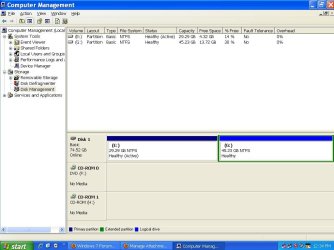
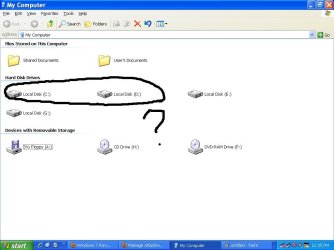
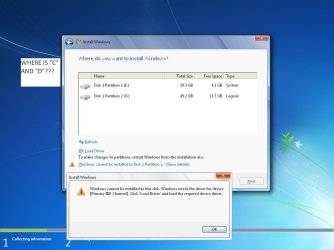
I was planning to install Windows 7 on my "C" drive but the problem is; it couldn't find my "C" nor "D" drive.
The "C" and "D" partitions are missing in Disk management, that's why I think Windows 7 could only see "E" and "G" only.
Any help will be appreciated :D
 

Attachments

  • untitled.JPG
    untitled.JPG
    72 KB · Views: 39
  • 2.JPG
    2.JPG
    51.2 KB · Views: 34
  • 3.JPG
    3.JPG
    52.8 KB · Views: 30

My Computer My Computer

At a glance

XPIntel Pentium 4 2.4 GHz768mbIntel Extreme Graphics
Computer Manufacturer/Model Number
Custom PC
OS
XP
CPU
Intel Pentium 4 2.4 GHz
Motherboard
ASRock
Memory
768mb
Graphics Card(s)
Intel Extreme Graphics
Sound Card
C-Media
Monitor(s) Displays
hp 72
Internet Speed
3mbps
Run command prompt as admin then type, diskpart
then, list disk
this will show all hdd & report their state ie on/offline & wether they are showing faults

Also more info on HDDs type/size/ide/sata etc
 

My Computer My Computer

At a glance

Win7 Ultimate X64Intel i5 3570K8GB DDR3 1600Onboard
Computer type
PC/Desktop
Computer Manufacturer/Model Number
Pauly Special
OS
Win7 Ultimate X64
CPU
Intel i5 3570K
Motherboard
Gigabyte Z77X-DS3H
Memory
8GB DDR3 1600
Graphics Card(s)
Onboard
Sound Card
Onboard
Screen Resolution
1280x1024
Hard Drives
Samsung 840 Evo SSD (OS)
1TB Spinner (Data)
PSU
800W Arctic
Case
Cooler Master
Cooling
3x120mm Fans
Keyboard
MS Wireless
Mouse
MS Wireless
Internet Speed
20M
Run command prompt as admin then type, diskpart
then, list disk
this will show all hdd & report their state ie on/offline & wether they are showing faults

Also more info on HDDs type/size/ide/sata etc

After Diskpart what do I type? Sorry, I am not used to Command Prompt. :(
 

My Computer My Computer

At a glance

XPIntel Pentium 4 2.4 GHz768mbIntel Extreme Graphics
Computer Manufacturer/Model Number
Custom PC
OS
XP
CPU
Intel Pentium 4 2.4 GHz
Motherboard
ASRock
Memory
768mb
Graphics Card(s)
Intel Extreme Graphics
Sound Card
C-Media
Monitor(s) Displays
hp 72
Internet Speed
3mbps
disk list
 

My Computer My Computer

At a glance

Win7 Ultimate X64Intel i5 3570K8GB DDR3 1600Onboard
Computer type
PC/Desktop
Computer Manufacturer/Model Number
Pauly Special
OS
Win7 Ultimate X64
CPU
Intel i5 3570K
Motherboard
Gigabyte Z77X-DS3H
Memory
8GB DDR3 1600
Graphics Card(s)
Onboard
Sound Card
Onboard
Screen Resolution
1280x1024
Hard Drives
Samsung 840 Evo SSD (OS)
1TB Spinner (Data)
PSU
800W Arctic
Case
Cooler Master
Cooling
3x120mm Fans
Keyboard
MS Wireless
Mouse
MS Wireless
Internet Speed
20M

My Computer My Computer

At a glance

XPIntel Pentium 4 2.4 GHz768mbIntel Extreme Graphics
Computer Manufacturer/Model Number
Custom PC
OS
XP
CPU
Intel Pentium 4 2.4 GHz
Motherboard
ASRock
Memory
768mb
Graphics Card(s)
Intel Extreme Graphics
Sound Card
C-Media
Monitor(s) Displays
hp 72
Internet Speed
3mbps

My Computer My Computer

At a glance

Win7 Ultimate X64Intel i5 3570K8GB DDR3 1600Onboard
Computer type
PC/Desktop
Computer Manufacturer/Model Number
Pauly Special
OS
Win7 Ultimate X64
CPU
Intel i5 3570K
Motherboard
Gigabyte Z77X-DS3H
Memory
8GB DDR3 1600
Graphics Card(s)
Onboard
Sound Card
Onboard
Screen Resolution
1280x1024
Hard Drives
Samsung 840 Evo SSD (OS)
1TB Spinner (Data)
PSU
800W Arctic
Case
Cooler Master
Cooling
3x120mm Fans
Keyboard
MS Wireless
Mouse
MS Wireless
Internet Speed
20M
Pauly
This might also help - there is a freeware tool from EASEUS for disc partitioning. They also have other recovery software on their website. I downloaded and used this to find, format, and assign ID to a drive that Windows would not see because the MOBO was not seeing it. (It was plugged into the fifth 'RAID' eSATA plug)
I'm quite certain you can resize and add partitions without overwriting data with this software. Just don't delete a partition that has data you want in it, the data will be gone, and quickly. When you open this software you'll see your 'lost' drives. I only tried the freeware, not any of their recovery software.

Here is the address

EASEUS Partition Master is Magic FREE Partition Manager Software for Windows Server 2000/2003/2008 and Windows 2000/XP/Vista/Windows 7. Free for home users.
 

My Computer My Computer

At a glance

xp, 7AMD Phenom II X3 720 BE4gbn/a
Computer Manufacturer/Model Number
Self built
OS
xp, 7
CPU
AMD Phenom II X3 720 BE
Motherboard
ASUS M4A78T-E
Memory
4gb
Graphics Card(s)
n/a
Sound Card
n/a
Monitor(s) Displays
Acer LCD 23"
Hard Drives
Internal:Western Digital 500gb xp, Seagate 500gb Win 7 64bit (installation trouble), Seagate 1.5 tb storage
External: 500gb backup drive, 250gb storage
PSU
Monster 750c
Case
Apevia Jupiter S-type
Cooling
3-120mm & 1-200mm case fans, PS fan
Internet Speed
Hughs Satelite
Other Info
4 computers total, this one is a recent (July 2009) build

My Computer My Computer

At a glance

Windows 7 Ultimate RTM (Technet)3.00 gigahertz Intel Core2 Duo E84004GBATI Radeon X1950 Pro
Computer Manufacturer/Model Number
Custom
OS
Windows 7 Ultimate RTM (Technet)
CPU
3.00 gigahertz Intel Core2 Duo E8400
Motherboard
ASUSTeK Computer INC. P5K/EPU Rev 1.xx
Memory
4GB
Graphics Card(s)
ATI Radeon X1950 Pro
Sound Card
Built in HD Audio
Monitor(s) Displays
22" Gateway LCD
Screen Resolution
1920 x 1200
Hard Drives
ST3160023A [Hard drive] (160.04 GB) -- drive 0, rev 8.01, ST3500630AS [Hard drive] (500.11 GB) -- drive 2, rev 3.AAK
ST3500630AS [Hard drive] (500.11 GB) -- drive 1, rev 3.AAK
Keyboard
Logitech G11
Mouse
Microsoft Wireless Laser Mouse 5000
Internet Speed
13.44 Mbps
Just to take a step back here these disks are gone from your XP install
If they used to work under XP then system restore might be worth a try
 

My Computer My Computer

At a glance

Win7 Ultimate X64Intel i5 3570K8GB DDR3 1600Onboard
Computer type
PC/Desktop
Computer Manufacturer/Model Number
Pauly Special
OS
Win7 Ultimate X64
CPU
Intel i5 3570K
Motherboard
Gigabyte Z77X-DS3H
Memory
8GB DDR3 1600
Graphics Card(s)
Onboard
Sound Card
Onboard
Screen Resolution
1280x1024
Hard Drives
Samsung 840 Evo SSD (OS)
1TB Spinner (Data)
PSU
800W Arctic
Case
Cooler Master
Cooling
3x120mm Fans
Keyboard
MS Wireless
Mouse
MS Wireless
Internet Speed
20M
Actually that prob wouldnt work as the comp is not even recognising the disk is there,:(
Have you been inside the machine lately any chance a plugs come out?????
 

My Computer My Computer

At a glance

Win7 Ultimate X64Intel i5 3570K8GB DDR3 1600Onboard
Computer type
PC/Desktop
Computer Manufacturer/Model Number
Pauly Special
OS
Win7 Ultimate X64
CPU
Intel i5 3570K
Motherboard
Gigabyte Z77X-DS3H
Memory
8GB DDR3 1600
Graphics Card(s)
Onboard
Sound Card
Onboard
Screen Resolution
1280x1024
Hard Drives
Samsung 840 Evo SSD (OS)
1TB Spinner (Data)
PSU
800W Arctic
Case
Cooler Master
Cooling
3x120mm Fans
Keyboard
MS Wireless
Mouse
MS Wireless
Internet Speed
20M
I tried System Restore, and yet the computer is still unable to recognise the disk in there... Will replugging the hard disk again help?
Or let me try EASEUS software first.
 

My Computer My Computer

At a glance

XPIntel Pentium 4 2.4 GHz768mbIntel Extreme Graphics
Computer Manufacturer/Model Number
Custom PC
OS
XP
CPU
Intel Pentium 4 2.4 GHz
Motherboard
ASRock
Memory
768mb
Graphics Card(s)
Intel Extreme Graphics
Sound Card
C-Media
Monitor(s) Displays
hp 72
Internet Speed
3mbps
Unbelievably the software Greg suggested recognised both hard drives on my computer but my Windows wouldn't...
Sorry for uploading lots of files in a day... :rolleyes:
 

Attachments

  • 12412.JPG
    12412.JPG
    86.1 KB · Views: 21

My Computer My Computer

At a glance

XPIntel Pentium 4 2.4 GHz768mbIntel Extreme Graphics
Computer Manufacturer/Model Number
Custom PC
OS
XP
CPU
Intel Pentium 4 2.4 GHz
Motherboard
ASRock
Memory
768mb
Graphics Card(s)
Intel Extreme Graphics
Sound Card
C-Media
Monitor(s) Displays
hp 72
Internet Speed
3mbps
OK first things first things first - check if the issue is with the hardware or windows

reboot the system and het whatever key is required to enter the BIOS - check in bios to see if you can see the missing drive here.

If drive is visible here - the issue is a windows one - If not then you will need to open your case and physically check the connections to the drive

Disconnect the drive cabe at each end in turn and reconnect.

Reboot and recheck in BIOS

If still not visible you may have a failed cable or port or drive

You can if possible try to connect the drive to another port -

Reboot and recheck in BIOS

if the drive is then visible in bios it is port failure - Look to replace motherboard as soon as is practical

If possible disconnect the working drive and use the cable to connect the missing drive

Reboot and recheck in BIOS

If the drive is now visible the original cable is at fault - replace cable

If after these checks the drive is missing it may be a missing specialist windows driver or as the system has been correct it could be the drive has failed.
 

My Computers My Computers

  • At a glance

    Windows 11 Pro x64 [Latest Release and Releas...Ryzen 9 5950X, 3.8 - 5.2 MHz64GB [2 x 32GB] DDR4 3200MHz4GB NVIDIA GEFORCE GTX 1650 Ti
    Computer type
    PC/Desktop
    Computer Manufacturer/Model Number
    ChillBlast - Custom to my design
    OS
    Windows 11 Pro x64 [Latest Release and Release Preview]
    CPU
    Ryzen 9 5950X, 3.8 - 5.2 MHz
    Motherboard
    Asus Prime X570-Pro
    Memory
    64GB [2 x 32GB] DDR4 3200MHz
    Graphics Card(s)
    4GB NVIDIA GEFORCE GTX 1650 Ti
    Sound Card
    On-board SPDIF to 5.1 System + HDMI [5.1 system]
    Monitor(s) Displays
    32" UHD 32 Bit HDR Monitor + 43" UHD 4K 32Bit HDR TV
    Screen Resolution
    2 x 3840 x 2160 @60Hz
    Hard Drives
    1TB M2 SSD OS, 500GB Fast Access SSD, 2 x 8TB Data + Various Externals from 1TB to 4TB, 10TB NAS
    PSU
    NZXT C750 80 PLUS Gold 750W Modular PSU
    Case
    Workstation Case [Matt Black]
    Cooling
    NZXT Kraken X63 280mm CPU Cooler +2x Quiet Case fans
    Keyboard
    Logitech Wireless MX Keys & K400 + others
    Mouse
    Logitech Wireless MX Master 3S
    Internet Speed
    920 MB Down 50 MB Up
    Antivirus
    BitDefender Total Security Pro
    Browser
    Chrome (always run latest Non-Beta)
    Other Info
    Also run ...
    Laptop - Quad 8GB - Windows 10 Pro x64
    Nexus 7 Android tablet x2
    Samsung 10.2" tablet
    Blackview TAB 8 4G Android Tablet c/w Keyboard
    Wacom Intuos Pro Medium Pen Pad
    Wacom Intuos Pro Small Pen Pad
    Wacom Expresskeys Remote
    Loopdeck+ Graphics Controller
    Shuttle Pro v2 Control
  • At a glance

    Windows 11 Pro x64 Latest RPIntel I7 10750H 5.0GHz32GB [2x16GB] DDR4 2933 MHznVidia GTX1650Ti 4 GB GDDR6
    Computer type
    Laptop
    System Manufacturer/Model Number
    Dell XPS 17 10750H
    OS
    Windows 11 Pro x64 Latest RP
    CPU
    Intel I7 10750H 5.0GHz
    Motherboard
    Dell XPS
    Memory
    32GB [2x16GB] DDR4 2933 MHz
    Graphics Card(s)
    nVidia GTX1650Ti 4 GB GDDR6
    Sound Card
    Stock [Realtek] 4 Speaker
    Monitor(s) Displays
    17" IPS UHD+ Infinity Edge Touchscreen
    Screen Resolution
    3840 x 2400
    Hard Drives
    2TB M2 NVMe, 4TB External + various 500GB & 1TB External NVMe (also have access to spinner HDD from
    PSU
    Stock
    Case
    Stock XPS Aluminium & Carbon Fibre
    Cooling
    Stock - Active Fan Control
    Keyboard
    Backlit + Various Logitech
    Mouse
    Stock Track Pad + Logitech MX Trackball
    Internet Speed
    72 MB Down 18MB Up
    Browser
    Chrome
    Other Info
    Also run ...
    Laptop - Quad 8GB - Windows 10 Pro x64
    Nexus 7 Android tablet x2
    10.2" tablet
    Sony Z3 Android Smartphone
    Wacom Intuos Pro Medium Pen Pad
    Wacom Intuos Pro Small Pen Pad
    Wacom Expresskeys Remote
    Loopdeck+ Graphics Controller
    Shuttle Pro v2 Control Pad
    10TB NAS
OK first things first things first - check if the issue is with the hardware or windows

reboot the system and het whatever key is required to enter the BIOS - check in bios to see if you can see the missing drive here.

If drive is visible here - the issue is a windows one - If not then you will need to open your case and physically check the connections to the drive

Disconnect the drive cabe at each end in turn and reconnect.

Reboot and recheck in BIOS

If still not visible you may have a failed cable or port or drive

You can if possible try to connect the drive to another port -

Reboot and recheck in BIOS

if the drive is then visible in bios it is port failure - Look to replace motherboard as soon as is practical

If possible disconnect the working drive and use the cable to connect the missing drive

Reboot and recheck in BIOS

If the drive is now visible the original cable is at fault - replace cable

If after these checks the drive is missing it may be a missing specialist windows driver or as the system has been correct it could be the drive has failed.

I believe it's Windows' fault. Sorry for not replying in a long time... this computer was heavily infected with Spyware. I fixed most of the malwares in here, but there are some leftovers.
What can I do to install Windows 7 in this computer? It just couldn't see my C or D drive anywhere. :confused:
 

My Computer My Computer

At a glance

XPIntel Pentium 4 2.4 GHz768mbIntel Extreme Graphics
Computer Manufacturer/Model Number
Custom PC
OS
XP
CPU
Intel Pentium 4 2.4 GHz
Motherboard
ASRock
Memory
768mb
Graphics Card(s)
Intel Extreme Graphics
Sound Card
C-Media
Monitor(s) Displays
hp 72
Internet Speed
3mbps
So can you see all the drives now, including where you want to install Win7?

Due to the infection, it is strongly suggested you completely wipe any infected drive as thoroughly as possible before installing Windows 7.

Move data which needs to be saved to another HD, then scan it with Avast home free edition (use boot scan offered during install) and in safe mode with Spybot S&D. Then unplug the data drive during install.

This will completely zero out the Win7 target HD, the cleanest it can get:

boot from your Win7 DVD.

On the second screen select "Repair My Computer" then Recovery Tools list.

Open a Command Line and type these exact commands following instructions given:

DISKPART
LIST DISK
SELECT DISK # (for targeted HD)
clean all
create partition primary (for OS drives, data drives may be logical)
select partition 1
assign letter=c: (or whichever letter you want to give subsequent cleaned drives)
active (only use this step on the drive where you will be installing Windows 7)
format
exit

If you are uncomfortable using DISKPART commands, there is a program like Easeus which makes a bootable CD to do this with a graphical interface: Free Download Partition Wizard

Now you can reboot into the Win7 DVD and install Win7 to the active formatted drive

Plug ethernet and select "connect to the internet during install" to get latest drivers/updates, then Custom install, Advanced drive tools, format one more time and install.
 
Last edited:

My Computers My Computers

  • At a glance

    7 X64i5 84002x8gb 3200mhz
    Computer type
    PC/Desktop
    OS
    7 X64
    CPU
    i5 8400
    Motherboard
    gigabyte b365m ds3h
    Memory
    2x8gb 3200mhz
    Hard Drives
    various
    PSU
    pure power 11 400w cm
    Case
    Coolermaster
    Cooling
    cryorig m9i
  • At a glance

    7x64g54008gb ddr4 2400
    Computer type
    PC/Desktop
    OS
    7x64
    CPU
    g5400
    Motherboard
    ga b365m ds3h
    Memory
    8gb ddr4 2400
    PSU
    xfx pro 450w
Back
Top