Where did this come from

huffman

New member
Pro User
Local time
3:36 PM
Messages
715
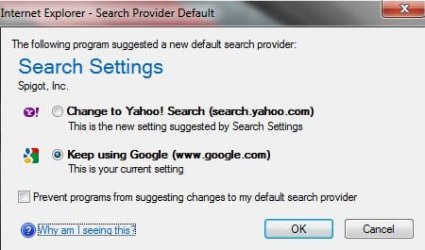
For the last two days when I startup my PC (Win 7 Pro with IE9 and Google Toolbar installed I get this popup:

search1.jpg

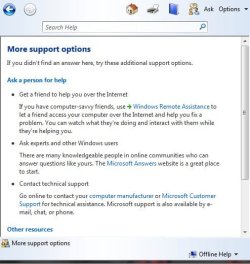
I follow the links on the popup and get these:

search2.jpg

search3.jpg

They provide NO real help and would like to stop this popup if possible.

Any help would be appreciated.
 

My Computer

OS
Windows 7 Pro
CPU
Intel(R) Pentium(R) Duel CPU E2200 2.20 Ghz
Motherboard
GA-G41M-ES2L
Memory
4 gb 2.96 Usable
Graphics Card(s)
Onboard
Sound Card
Onboard
Hard Drives
2 - 1TB WD Sata Drives
I'm going to take an educated guess and say your computer has been infected with malware. According to a quick search for Spigot, Inc (the company listed in your fist snip) they seem to make "custom" toolbars so other companies can increase their revenue. This Avast forum article may help you.

http://forum.avast.com/index.php?topic=63642.0

I'd definitely concur with the suggestion to install the free version of Malwarebytes, update it, and run a full scan. I also checked bleepingcomputer for any mention of "spigot" (use their search function) and it returned over 300 entries:

Search Form - BleepingComputer.com
 

My Computer

Computer type
Laptop
Computer Manufacturer/Model Number
Sony Vaio VPCEB47GM Laptop
OS
Win 7 Pro 64-bit
CPU
Intel i5 2.4 Ghz
Memory
8GB DDR3
Graphics Card(s)
Intel HD 3000
Sound Card
IDT High Definition
Monitor(s) Displays
15.6 WGXA Anti-Glare LED
Screen Resolution
1280x800
Hard Drives
640Gb 7200rpm
Antivirus
MSE
Browser
Opera (primary) with IE9 backup

My Computer

Computer Manufacturer/Model Number
HP Pavilion Elite 495UK
OS
Windows 7 Ultimate SP1 64-Bit
CPU
Intel Core i7 870 @ 2.93GHz
Motherboard
MSI 2A9C (CPU1)
Memory
8Gb Dual-Channel DDR3 @ 664MHz
Graphics Card(s)
nVidia GeForce GTX 460 1024MB dedicated RAM
Sound Card
Realtek HD Audio
Monitor(s) Displays
HP2310i
Screen Resolution
1920 x 1080
Hard Drives
1x1954GB Hitachi HDS22020ALA 330 (RAID), 1x1954GB Hitachi External for backup and storage
PSU
460W
Case
HP Elite
Cooling
Air cooled
Keyboard
Logitech K750 solar-powered keyboard
Mouse
Logitech Wireless M180 mouse
Internet Speed
2Mb
Other Info
Pure Avanti Flow Internet Radio with iPod Dock, 64Gb iPod, HP USB Speakers, Sony MDR-V500 Headphones, Sony Vaio F-Series Laptop
Did you install a new prog/that sneakily installed a toolbar recently?

According to Spigot Inc, the toolbar is "easily" removed: Spigot Search Settings | Easily Remove searchsettings.exe
Look for something in Control Panel/Programs and Features/Uninstall-change program/ Spigot and/or Dealio and remove it.

I would also run MBAM as previously suggested. Install it, update it's defs. Under Settings>>Scanner settings for PUP (potentially unwanted programs) & PUM (potentially unwanted modifications) set it to show results, but be careful to only remove objects related to the toolbar.

Hope this helps :)
 
Last edited:

My Computer

Computer type
Laptop
Computer Manufacturer/Model Number
MSI PE60 6QE
OS
Win 10 Pro x64, Win 7 Pro x64
CPU
Intel Core i7-6700HQ Skylake
Motherboard
MSI MS-16J5
Memory
16gb Crucial DDR4
Graphics Card(s)
NVIDIA GeForce GTX 960M 2 GB
Screen Resolution
1920 x 1080
Hard Drives
Samsung 850 EVO 250 GB M.2 SSD (MZ-N5E250BW)
HGST 1TB @7200 RPM HTS721010A9E630
Case
Plastic
Keyboard
Got one...
Mouse
Yep, one of those too.
Internet Speed
FIOS 75/75
Antivirus
Defender
Browser
Chrome/FFox/Ex-PLODE-r/(L)Edge
Other Info
Defender, Custom Hosts, uBlock, regular backups w/ Macrium (Free)
In my experience toolbars just muck things up. I would suggest you remove the Google toolbar. It can serve no useful function beyond what a shortcut added to your Favorites bar for google.com would provide.
 

My Computer

Computer type
PC/Desktop
Computer Manufacturer/Model Number
Home Built Desktop By DataTech
OS
Windows 7 Ultimate X64 SP1
CPU
Intel i5-2550K, Differing ~4.4-4.8GHz No built in GPU
Motherboard
ASUS P8Z68-V PRO/GEN3
Memory
16GB G.Skill Sniper 1866MHz @ 2133MHz 2x8GB
Graphics Card(s)
ASUS GTX650TIB-DC2OC-2GD5, (650TI Boost)
Sound Card
Onboard Realtek 5-1
Monitor(s) Displays
Samsung P2570HD
Screen Resolution
1920x1080
Hard Drives
Samsung 840 Pro 256GB SSD for OS, 500GB Seagate Constellation (Enterprise drive) for Data
PSU
Corsair HX650W
Case
Inwin Dragon Rider
Cooling
Hyper 212 EVO w/two Noctua fans, push-pull, @1300 RPM
Keyboard
E-Z Eyes, bright yellow keys with large characters
Mouse
steelseries SENSEI Laser Pro Gaming
Internet Speed
48-51Mbs Mbs down, 11 Mbs up Xfinity Cable
Antivirus
Norton Internet Security 2013
Browser
IE 10, Opera, Pale Moon if needed
Other Info
4 case fans, LG BluRay-RE, ASUS DVD-RW, Mr. Fusion power supply, 1.21 gigawatts.
What Britton30 said. :)
 

My Computer

Computer type
Laptop
Computer Manufacturer/Model Number
MSI PE60 6QE
OS
Win 10 Pro x64, Win 7 Pro x64
CPU
Intel Core i7-6700HQ Skylake
Motherboard
MSI MS-16J5
Memory
16gb Crucial DDR4
Graphics Card(s)
NVIDIA GeForce GTX 960M 2 GB
Screen Resolution
1920 x 1080
Hard Drives
Samsung 850 EVO 250 GB M.2 SSD (MZ-N5E250BW)
HGST 1TB @7200 RPM HTS721010A9E630
Case
Plastic
Keyboard
Got one...
Mouse
Yep, one of those too.
Internet Speed
FIOS 75/75
Antivirus
Defender
Browser
Chrome/FFox/Ex-PLODE-r/(L)Edge
Other Info
Defender, Custom Hosts, uBlock, regular backups w/ Macrium (Free)
I have found the problem:
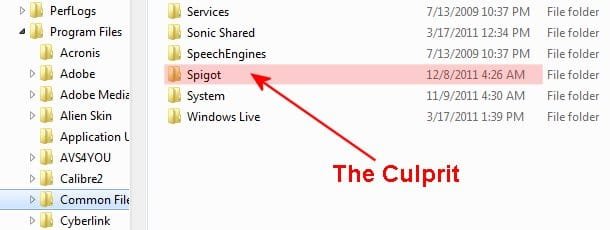
search4.jpg

Aliases of Backdoor.Spigot (AKA):
[Kaspersky] Backdoor.G_Spot.20
[McAfee] BackDoor-AAG
[F-Prot] security risk or a "backdoor" program
[Panda] Bck/Spigot.A
[Computer Associates] Win32.Spotbot.20

It is located in C:\Program Files\Common Files. There is NO uninstall file associated with it.

I ran Malwarebytes and it is not considered to malware, it was NOT found. It does not show up in either Program Removal or Revo Uninstaller.

To remove it, my understand requires changing a registry entry. God I hate making changes to the registry.

Open regedit

To delete each registry key listed in the Registry Keys section, do the following:
Locate the key in the left pane of the Registry Editor window by sequentially expanding the folders according to the path indicated in the Registry Keys section. For example, if the path of a registry key is HKEY_LOCAL_MACHINE\software\FolderA\FolderB\KeyName1, sequentially expand the HKEY_LOCAL_MACHINE, software, FolderA, and FolderB folders.
Select the key name indicated at the end of the path (KeyName1 in the example above).
Right-click the key name and select Delete on the menu.
Click Yes in the Confirm Key Delete dialog box.

delete each registry value listed in the Registry Values section, do the following:
Display the value in the right pane of the Registry Editor window by sequentially expanding the folders in the left pane according to the path indicated in the Registry Values section and selecting the specified key name. For example, if the path of a registry value is HKEY_LOCAL_MACHINE\software\FolderA\FolderB\KeyName2\,valueC=, sequentially expand the HKEY_LOCAL_MACHINE, software, FolderA, and FolderB folders and select the KeyName2 key to display the valueC value in the right pane.
In the right pane, select the value name indicated after a comma at the end of the path (valueC in the example above).
Right-click the value name and select Delete on the menu.
Click Yes in the Confirm Value Delete dialog box.

I really don't want to do this. When I get my nerve worked up I guess I will try it.

Hope this helps someone else.

 

My Computer

OS
Windows 7 Pro
CPU
Intel(R) Pentium(R) Duel CPU E2200 2.20 Ghz
Motherboard
GA-G41M-ES2L
Memory
4 gb 2.96 Usable
Graphics Card(s)
Onboard
Sound Card
Onboard
Hard Drives
2 - 1TB WD Sata Drives

My Computer

Computer type
Laptop
Computer Manufacturer/Model Number
Sony Vaio VPCEB47GM Laptop
OS
Win 7 Pro 64-bit
CPU
Intel i5 2.4 Ghz
Memory
8GB DDR3
Graphics Card(s)
Intel HD 3000
Sound Card
IDT High Definition
Monitor(s) Displays
15.6 WGXA Anti-Glare LED
Screen Resolution
1280x800
Hard Drives
640Gb 7200rpm
Antivirus
MSE
Browser
Opera (primary) with IE9 backup
Last edited:

My Computer

Computer type
PC/Desktop
Computer Manufacturer/Model Number
Home Built Desktop By DataTech
OS
Windows 7 Ultimate X64 SP1
CPU
Intel i5-2550K, Differing ~4.4-4.8GHz No built in GPU
Motherboard
ASUS P8Z68-V PRO/GEN3
Memory
16GB G.Skill Sniper 1866MHz @ 2133MHz 2x8GB
Graphics Card(s)
ASUS GTX650TIB-DC2OC-2GD5, (650TI Boost)
Sound Card
Onboard Realtek 5-1
Monitor(s) Displays
Samsung P2570HD
Screen Resolution
1920x1080
Hard Drives
Samsung 840 Pro 256GB SSD for OS, 500GB Seagate Constellation (Enterprise drive) for Data
PSU
Corsair HX650W
Case
Inwin Dragon Rider
Cooling
Hyper 212 EVO w/two Noctua fans, push-pull, @1300 RPM
Keyboard
E-Z Eyes, bright yellow keys with large characters
Mouse
steelseries SENSEI Laser Pro Gaming
Internet Speed
48-51Mbs Mbs down, 11 Mbs up Xfinity Cable
Antivirus
Norton Internet Security 2013
Browser
IE 10, Opera, Pale Moon if needed
Other Info
4 case fans, LG BluRay-RE, ASUS DVD-RW, Mr. Fusion power supply, 1.21 gigawatts.
This morning I had a new popup similar to the one originally posted. It was different but still had to do with changing how my browers would work. I did NOT allow it to make changes.

At that point I decided to do a restore using a restore point prior to when the Spigot folder was created. The restore went fine, however
C:\Program Files\Common Files\Spigot
is still there. When I restarted again, there were no popups. I guess it is wait and see now.

BTW jcgriff2 I will give that program a try. It looks like a good utility to have on hand.
 

My Computer

OS
Windows 7 Pro
CPU
Intel(R) Pentium(R) Duel CPU E2200 2.20 Ghz
Motherboard
GA-G41M-ES2L
Memory
4 gb 2.96 Usable
Graphics Card(s)
Onboard
Sound Card
Onboard
Hard Drives
2 - 1TB WD Sata Drives
I agree 100%.

I mentioned AutoRuns for the IE toolbar removal (& should have posted that fact). It definitely is not a malware removal app like MBAM.
 

My Computer

OS
Windows 7 - Vista
Back
Top