Solved Where do I find out what Windows is doing during 10 minute boot?

macnab

New member
Member
VIP
Local time
2:46 AM
Messages
158
Location
Roodepoort
From display of logo to log-in screen is taking from 2 minutes to 10 minutes. (It caries from boot to boot.) HDD light is so active it seems to burn continuously. It looks like defrag, but neither Windows nor Auslogics defrag has scheduled tasks.

CCleaner shows nothing in Startup that could be an "activity."

Where or how can I find out what Windows was doing all this time?
 

My Computer My Computer

At a glance

Windows 7 Professional SP1 64-bitIntel i3-3220 3.3GHz4GBNVIDIA GeForce GTX650 1GB
Computer type
PC/Desktop
Computer Manufacturer/Model Number
Built-up
OS
Windows 7 Professional SP1 64-bit
CPU
Intel i3-3220 3.3GHz
Motherboard
Gigabyte
Memory
4GB
Graphics Card(s)
NVIDIA GeForce GTX650 1GB
Sound Card
On-board Realtek
Monitor(s) Displays
LGL1719S
Screen Resolution
1280 x 1024
Hard Drives
Samsung HD321HJ, Samsung HD103SI, Seagate ST2000DL, Seagate ST3100524AS
PSU
450W
Case
AOpen
Cooling
Case fan, CPU fan, PSU fanf.
Keyboard
Microsoft
Mouse
AOpen
Internet Speed
1Mb/s
Antivirus
MSSE
Browser
Firefox

My Computer My Computer

At a glance

Windows 10 Pro. 64/ version 1709 Windows 7 Pr...Intel i7-6800K @ 4.3Corsair Platinum 16 gig @2400EVGA GTX 1070 OC
Computer type
PC/Desktop
Computer Manufacturer/Model Number
Home made Desktop
OS
Windows 10 Pro. 64/ version 1709 Windows 7 Pro/64
CPU
Intel i7-6800K @ 4.3
Motherboard
ASUS X-99 Deluxe II
Memory
Corsair Platinum 16 gig @2400
Graphics Card(s)
EVGA GTX 1070 OC
Monitor(s) Displays
Asus 27" LED LCD/VE278Q
Screen Resolution
1920-1080 or 1280-720 HDMI
Hard Drives
INTEL SSD 730-240 Gb Sata 3.0/
PSU
EVGA Platium 1200W
Case
Phanteks Luxe Tempered Glass 8 fans/ one radiator
Cooling
XSPC/ Water Cooled CPU
Keyboard
Das 4 Professional
Mouse
Logitech M705/MX Anywhere 2-S
Internet Speed
100 mbits
Antivirus
Microsoft Security Essentials/ Malwarebytes Premium 3.0/ SAS
Browser
I.E. 11 default/Firefox/ ISP Time Warner Cable/Spectrum
Other Info
LG BluRay Burner/
Sound system-KLipsch-THX/
Icy Dock ssd Hot Swap bays.

Attachments

  • MS.PNG
    MS.PNG
    13.6 KB · Views: 8

My Computer My Computer

At a glance

Desk1 7 Home Prem / Desk2 10 Pro / Main lap A...Desk1 i5 3750K / Laptop i7 GTX 860M / Desk2 i...Desk1 8GB (1866) / Desk2 16GB (1333) / Laptop...Desk 1& 2NVidia GTX 650 & Laptops on board Intel
Computer type
PC/Desktop
Computer Manufacturer/Model Number
Own build (new) Desk1 / Asus ROG Win 7 / Desk2 1st build
OS
Desk1 7 Home Prem / Desk2 10 Pro / Main lap Asus ROG 10 Pro 2 laptop Toshiba 7 Pro Asus P2520 7 & 10
CPU
Desk1 i5 3750K / Laptop i7 GTX 860M / Desk2 i5 2500
Motherboard
Desk1 Asus P877-V / Desk2 Gigabyte H67 UD3H / Laptop ?
Memory
Desk1 8GB (1866) / Desk2 16GB (1333) / Laptop 8Gb DDR3
Graphics Card(s)
Desk 1& 2NVidia GTX 650 & Laptops on board Intel
Sound Card
Desk 1 & 2 -XONAR DG Realtek High Def audio Laptop
Monitor(s) Displays
Desk 1 Benq HD 2450 / Desk2 Philips 24" / Laptop 17.5"
Screen Resolution
1920x1080 D1 & D2 & Laptop 1
Hard Drives
Desk1 Samsung 120GB 830 SSD
Asus ROG 256GB 850 Pro SSD
Desk2 Samsung 840 256 SSD
Toshiba 120GB EVO
PSU
Desk 1 Corsair HX 1050/ Laptop ? / Desk 2 Corsair HX 650
Case
Desk 1 Cooler HAF XM ? Toshiba laptop / Desk2 Coolermaster
Cooling
Fans on all Desk1 -2 Desk2 - all Coolermasters 5 Laptop ?
Keyboard
Desk 1 MS Sidewinder X6 Desk 2 MS Sidewinder X 4
Mouse
Desk 1&2 - Gigabyte MS 900 gamer - laptop - Logitec wireless
Internet Speed
ADSL2+
Other Info
One other Desktop (tester) and spare Toshba laptop both with SSD's
Running Kaspersky 2016 ISS on all machines config'd identically
Logitec audio stereo systems on each machine (x3)
Canon MG5250MFC
Router/modem TP-Link running WPA2SK
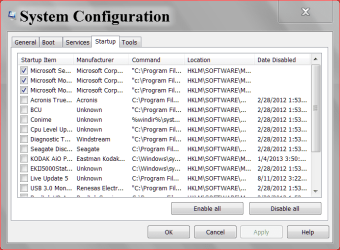
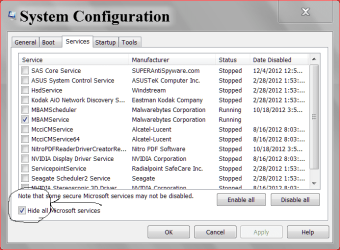
Just checked startup items with msconfig. There is nothing there that isn't shown by CCleaner. They are all things like MSSE, Adobe ARM and Speed Launcher, Winpower Agent.

Nothing that could account for 5 minutes of disk activity during bootup. The same with servises - they use memory (and a bit of bootup time) but nothing on this scale.

EDIT: What I am looking for is a log file to see what was done during the boot process. I can then refer to the timestamps to see what took so long.
 

My Computer My Computer

At a glance

Windows 7 Professional SP1 64-bitIntel i3-3220 3.3GHz4GBNVIDIA GeForce GTX650 1GB
Computer type
PC/Desktop
Computer Manufacturer/Model Number
Built-up
OS
Windows 7 Professional SP1 64-bit
CPU
Intel i3-3220 3.3GHz
Motherboard
Gigabyte
Memory
4GB
Graphics Card(s)
NVIDIA GeForce GTX650 1GB
Sound Card
On-board Realtek
Monitor(s) Displays
LGL1719S
Screen Resolution
1280 x 1024
Hard Drives
Samsung HD321HJ, Samsung HD103SI, Seagate ST2000DL, Seagate ST3100524AS
PSU
450W
Case
AOpen
Cooling
Case fan, CPU fan, PSU fanf.
Keyboard
Microsoft
Mouse
AOpen
Internet Speed
1Mb/s
Antivirus
MSSE
Browser
Firefox
What anti virus are you using?

This is mine.

msconfig Start UP.PNG

services msconfig.PNG
 

My Computer My Computer

At a glance

Windows 10 Pro. 64/ version 1709 Windows 7 Pr...Intel i7-6800K @ 4.3Corsair Platinum 16 gig @2400EVGA GTX 1070 OC
Computer type
PC/Desktop
Computer Manufacturer/Model Number
Home made Desktop
OS
Windows 10 Pro. 64/ version 1709 Windows 7 Pro/64
CPU
Intel i7-6800K @ 4.3
Motherboard
ASUS X-99 Deluxe II
Memory
Corsair Platinum 16 gig @2400
Graphics Card(s)
EVGA GTX 1070 OC
Monitor(s) Displays
Asus 27" LED LCD/VE278Q
Screen Resolution
1920-1080 or 1280-720 HDMI
Hard Drives
INTEL SSD 730-240 Gb Sata 3.0/
PSU
EVGA Platium 1200W
Case
Phanteks Luxe Tempered Glass 8 fans/ one radiator
Cooling
XSPC/ Water Cooled CPU
Keyboard
Das 4 Professional
Mouse
Logitech M705/MX Anywhere 2-S
Internet Speed
100 mbits
Antivirus
Microsoft Security Essentials/ Malwarebytes Premium 3.0/ SAS
Browser
I.E. 11 default/Firefox/ ISP Time Warner Cable/Spectrum
Other Info
LG BluRay Burner/
Sound system-KLipsch-THX/
Icy Dock ssd Hot Swap bays.
Just checked startup items with msconfig. There is nothing there that isn't shown by CCleaner. They are all things like MSSE, Adobe ARM and Speed Launcher, Winpower Agent.

Nothing that could account for 5 minutes of disk activity during bootup. The same with servises - they use memory (and a bit of bootup time) but nothing on this scale.

EDIT: What I am looking for is a log file to see what was done during the boot process. I can then refer to the timestamps to see what took so long.

If you can't find/fix the issue with the suggestions already given, you could use these tutorials to see if you can find the problem:

1) Boot in Safe Mode
http://www.sevenforums.com/tutorials/69585-safe-mode.html

2) Do a Clean Startup
http://www.sevenforums.com/tutorial...ation-conflicts-performing-clean-startup.html

3) Gather a Startup trace
http://www.sevenforums.com/tutorial...up-shutdown-sleep-hibernate-reboot-trace.html
 

My Computer My Computer

At a glance

Multi-Boot W7_Pro_x64 W8.1_Pro_x64 W10_Pro_x6...AMD Athlon II x4 6206GB GSkill DDR2 800AMD 4670 GPU + AMD 4200 IGP
Computer type
PC/Desktop
Computer Manufacturer/Model Number
home built
OS
Multi-Boot W7_Pro_x64 W8.1_Pro_x64 W10_Pro_x64 +Linux_VMs +Chromium_VM
CPU
AMD Athlon II x4 620
Motherboard
Gigabyte GA-MA785G-UD3H
Memory
6GB GSkill DDR2 800
Graphics Card(s)
AMD 4670 GPU + AMD 4200 IGP
Sound Card
on board Realtek ALC889A
Monitor(s) Displays
RCA 40" LCD TV, Insignia 32" LCD TV, HP 15" LCD monitor
Screen Resolution
1680 x 1050
Hard Drives
OCZ Vertex 3 120GB,
Samsung F3 1TB (3),
Several others - WD, Seagate, Hitachi, ...
PSU
Corsair 500 W
Case
Rosewill mid tower
Cooling
CM 90mm rifle
Keyboard
Gyration wireless, Logitech wireless, Dell USB wired
Mouse
Gyration wireless, Logitech wireless, V7 USB wired
Internet Speed
Spectrum - 100Mbps D / 10Mbps U
Antivirus
Avast, MBAM3, EMET, WinPatrol
Browser
Pale Moon, Firefox, IE
Other Info
2 multi-boot PC's
Mainly HTPC/Office/Gen purpose (no gaming).
Trendnet USB KVM.
LG DVD burner/Blue Ray Player.
Tray system for removable SATA backup drives.

Not currently OCd, under-volted.
I use Hybrid sleep, rarely re-boot or shutdown.

Hauppauge HD-PVR, Avermedia PCIe TV Tuner, Hauppauge PCI TV Tuner.
Will try Startup trace, and also procmon boot log and see where the delay is.
 

My Computer My Computer

At a glance

Windows 7 Professional SP1 64-bitIntel i3-3220 3.3GHz4GBNVIDIA GeForce GTX650 1GB
Computer type
PC/Desktop
Computer Manufacturer/Model Number
Built-up
OS
Windows 7 Professional SP1 64-bit
CPU
Intel i3-3220 3.3GHz
Motherboard
Gigabyte
Memory
4GB
Graphics Card(s)
NVIDIA GeForce GTX650 1GB
Sound Card
On-board Realtek
Monitor(s) Displays
LGL1719S
Screen Resolution
1280 x 1024
Hard Drives
Samsung HD321HJ, Samsung HD103SI, Seagate ST2000DL, Seagate ST3100524AS
PSU
450W
Case
AOpen
Cooling
Case fan, CPU fan, PSU fanf.
Keyboard
Microsoft
Mouse
AOpen
Internet Speed
1Mb/s
Antivirus
MSSE
Browser
Firefox
Event Viewer via Control Panel/Administrative Tools may be worth a gander. Shut down the computer, wait an hour, and then boot up. After the computer settles down, go to the Event Viewer and there will be a list of Critical, Errors, et al. that may have populated within the last hour. If there is, then your investigation begins.
 

My Computer My Computer

At a glance

Windows 7 Home Premium x64
OS
Windows 7 Home Premium x64
Hmm, Event Viewer shows lots and lots of disk errors and warnings from this morning.

1) I can't remember what time I rebooted this morning and had the problem, so I can't relate to event viewer times..
2) I was having a problem with an HDD that was "disappearing" while copying a file to it.
3) Booted with Partition Wizard disk - the Linux boot section reported lack of response from that HDD and when running showed the disk as non-existent.
4) Fiddled with cables to HDD - stopped disappearing and boot time is back to normal.

But if the disk was giving problems I can't see Windows spending 5 minutes with disk activity trying to get it going. Twenty to thirty seconds, yes, minutes, no.

I will just have to look at all the logs after tomorrow's boot - if it is slow! It is difficult when sometimes it boots normal and sometimes with the long delay of disk activity. And I am not exaggerating the 10 minutes - I make a cup of tea and drink it while catching up with the news on TV during boot.

We shall see.
 

My Computer My Computer

At a glance

Windows 7 Professional SP1 64-bitIntel i3-3220 3.3GHz4GBNVIDIA GeForce GTX650 1GB
Computer type
PC/Desktop
Computer Manufacturer/Model Number
Built-up
OS
Windows 7 Professional SP1 64-bit
CPU
Intel i3-3220 3.3GHz
Motherboard
Gigabyte
Memory
4GB
Graphics Card(s)
NVIDIA GeForce GTX650 1GB
Sound Card
On-board Realtek
Monitor(s) Displays
LGL1719S
Screen Resolution
1280 x 1024
Hard Drives
Samsung HD321HJ, Samsung HD103SI, Seagate ST2000DL, Seagate ST3100524AS
PSU
450W
Case
AOpen
Cooling
Case fan, CPU fan, PSU fanf.
Keyboard
Microsoft
Mouse
AOpen
Internet Speed
1Mb/s
Antivirus
MSSE
Browser
Firefox
Hello, a hardware problem CAN cause this.

For example, i had a damaged velociraptor with random I/O errors, sometimes it was working perfectly, sometimes i wasn't able to read/write on some blocks of the hard drive.

I didn't had as much problems you have actually because my system partition was not on this drive.


An other similar problem i had was on a 7 years old computer, the SATA cable got damaged (i don't know how) and the drive was sometime not deteced, same situation, it was not the system drive, so it was not causing problems during boot.

Please note(1) that you may be able to avoid some problems in the future by making sure the cable never do a 90° fold, it may cause data lose and/or make the drive not work properly. If you need for a reason to do a 90°, you should take a cable with the 90° angle part already made on it (like on this picture, with one side straight, the other turning at 90°)

SATA8LA1_1600x1600.jpg


(1) Source : Western digital hard drive documentation and Kingston's SSD documentation
 

My Computer My Computer

At a glance

7x64 ultimate / 7x64 pro / Some linux x64 distroi7-870Kingston 4x2gb 1600 9-9-9MSI GTX460 Cyclone 1GDDR5x2 + Gigabyte 285GTX...
Computer type
PC/Desktop
OS
7x64 ultimate / 7x64 pro / Some linux x64 distro
CPU
i7-870
Motherboard
MSI P55-GD85
Memory
Kingston 4x2gb 1600 9-9-9
Graphics Card(s)
MSI GTX460 Cyclone 1GDDR5x2 + Gigabyte 285GTX 1GDDR5(PhysX)
Sound Card
Realtek alc 889
Monitor(s) Displays
Samsung syncmaster 2333sw + some old acer screen
Screen Resolution
3200x1024
Hard Drives
WDC WD1500HLFS-01G6U1 - System partition
WDC WD1500HLFS-01G6U1 -
WDC WD1500HLFS-01G6U1 | RAID
WDC WD1500HLFS-01G6U1 |
WDC WD1500HLFS-01G6U1-
PSU
LC Power "Arkangel" 850W
Case
Aerocool BX-500
Cooling
Noctua NH something
Keyboard
Razer Lycosa
Mouse
Razer Imperator
Antivirus
Kaspersky Pure/Kaspersky Small Office Security
Browser
Chrome+Chrominium & Internet Explorer
Other Info
Razer Nostromo (Because there's not enough buttons for all the shortcut on a keyboard)
@Magissia: All my connections are straight, no problem there. But I have 4 HDDs and 2 optical drives, so I have a lot of cables. This gives me problems because they are all pushing against each other.
 

My Computer My Computer

At a glance

Windows 7 Professional SP1 64-bitIntel i3-3220 3.3GHz4GBNVIDIA GeForce GTX650 1GB
Computer type
PC/Desktop
Computer Manufacturer/Model Number
Built-up
OS
Windows 7 Professional SP1 64-bit
CPU
Intel i3-3220 3.3GHz
Motherboard
Gigabyte
Memory
4GB
Graphics Card(s)
NVIDIA GeForce GTX650 1GB
Sound Card
On-board Realtek
Monitor(s) Displays
LGL1719S
Screen Resolution
1280 x 1024
Hard Drives
Samsung HD321HJ, Samsung HD103SI, Seagate ST2000DL, Seagate ST3100524AS
PSU
450W
Case
AOpen
Cooling
Case fan, CPU fan, PSU fanf.
Keyboard
Microsoft
Mouse
AOpen
Internet Speed
1Mb/s
Antivirus
MSSE
Browser
Firefox

My Computer My Computer

At a glance

Desk1 7 Home Prem / Desk2 10 Pro / Main lap A...Desk1 i5 3750K / Laptop i7 GTX 860M / Desk2 i...Desk1 8GB (1866) / Desk2 16GB (1333) / Laptop...Desk 1& 2NVidia GTX 650 & Laptops on board Intel
Computer type
PC/Desktop
Computer Manufacturer/Model Number
Own build (new) Desk1 / Asus ROG Win 7 / Desk2 1st build
OS
Desk1 7 Home Prem / Desk2 10 Pro / Main lap Asus ROG 10 Pro 2 laptop Toshiba 7 Pro Asus P2520 7 & 10
CPU
Desk1 i5 3750K / Laptop i7 GTX 860M / Desk2 i5 2500
Motherboard
Desk1 Asus P877-V / Desk2 Gigabyte H67 UD3H / Laptop ?
Memory
Desk1 8GB (1866) / Desk2 16GB (1333) / Laptop 8Gb DDR3
Graphics Card(s)
Desk 1& 2NVidia GTX 650 & Laptops on board Intel
Sound Card
Desk 1 & 2 -XONAR DG Realtek High Def audio Laptop
Monitor(s) Displays
Desk 1 Benq HD 2450 / Desk2 Philips 24" / Laptop 17.5"
Screen Resolution
1920x1080 D1 & D2 & Laptop 1
Hard Drives
Desk1 Samsung 120GB 830 SSD
Asus ROG 256GB 850 Pro SSD
Desk2 Samsung 840 256 SSD
Toshiba 120GB EVO
PSU
Desk 1 Corsair HX 1050/ Laptop ? / Desk 2 Corsair HX 650
Case
Desk 1 Cooler HAF XM ? Toshiba laptop / Desk2 Coolermaster
Cooling
Fans on all Desk1 -2 Desk2 - all Coolermasters 5 Laptop ?
Keyboard
Desk 1 MS Sidewinder X6 Desk 2 MS Sidewinder X 4
Mouse
Desk 1&2 - Gigabyte MS 900 gamer - laptop - Logitec wireless
Internet Speed
ADSL2+
Other Info
One other Desktop (tester) and spare Toshba laptop both with SSD's
Running Kaspersky 2016 ISS on all machines config'd identically
Logitec audio stereo systems on each machine (x3)
Canon MG5250MFC
Router/modem TP-Link running WPA2SK
Have you looked in the Event Viewer log for:

Application Services and Logs
Microsoft
Windows
Operational

Look for 100 events.

Cut and paste here by double-clicking and then when the popup opens, COPY tile in lower left.
 

My Computer My Computer

At a glance

Windows 7AMD Phenom II X2 (dual-core)4Gintegrated ATI HD 4200
Computer type
PC/Desktop
Computer Manufacturer/Model Number
Custom
OS
Windows 7
CPU
AMD Phenom II X2 (dual-core)
Motherboard
GA-MA785GM-US2H
Memory
4G
Graphics Card(s)
integrated ATI HD 4200
Sound Card
integrated
Monitor(s) Displays
Samsung 24"
Screen Resolution
1920x1080
Hard Drives
1 SSD - Samsung 840 - 500 GB - OS and DATA partitions
1 SSD - Intel 320 - 120 GB (used for backups) - Misc/BACKUP
1 SATA HD - WD, 500 GB - BACKUP
PSU
Ultra X4 500W
Case
Ultra X-blaster
Keyboard
Microsoft Digital Media Pro
Mouse
Logitech WIRED!
Internet Speed
15 Mbps FIOS
Test the HD now using the maker's HD Diagnostic extended CD scan followed by a full Disk Check with both boxes checked.

I'd also work through the other Troubleshooting Steps for Windows 7 to go over it good.

One important thing to know is if the boot time improves with any or all of the other HD's unplugged. If so then figure out which HD is culprit.
Yep Greg I saids to test out the boot drive in post #12 cos I thought it sounded like it was a Seagate out of the 4 drives the OP has in but didn't hear anything back.
 

My Computer My Computer

At a glance

Desk1 7 Home Prem / Desk2 10 Pro / Main lap A...Desk1 i5 3750K / Laptop i7 GTX 860M / Desk2 i...Desk1 8GB (1866) / Desk2 16GB (1333) / Laptop...Desk 1& 2NVidia GTX 650 & Laptops on board Intel
Computer type
PC/Desktop
Computer Manufacturer/Model Number
Own build (new) Desk1 / Asus ROG Win 7 / Desk2 1st build
OS
Desk1 7 Home Prem / Desk2 10 Pro / Main lap Asus ROG 10 Pro 2 laptop Toshiba 7 Pro Asus P2520 7 & 10
CPU
Desk1 i5 3750K / Laptop i7 GTX 860M / Desk2 i5 2500
Motherboard
Desk1 Asus P877-V / Desk2 Gigabyte H67 UD3H / Laptop ?
Memory
Desk1 8GB (1866) / Desk2 16GB (1333) / Laptop 8Gb DDR3
Graphics Card(s)
Desk 1& 2NVidia GTX 650 & Laptops on board Intel
Sound Card
Desk 1 & 2 -XONAR DG Realtek High Def audio Laptop
Monitor(s) Displays
Desk 1 Benq HD 2450 / Desk2 Philips 24" / Laptop 17.5"
Screen Resolution
1920x1080 D1 & D2 & Laptop 1
Hard Drives
Desk1 Samsung 120GB 830 SSD
Asus ROG 256GB 850 Pro SSD
Desk2 Samsung 840 256 SSD
Toshiba 120GB EVO
PSU
Desk 1 Corsair HX 1050/ Laptop ? / Desk 2 Corsair HX 650
Case
Desk 1 Cooler HAF XM ? Toshiba laptop / Desk2 Coolermaster
Cooling
Fans on all Desk1 -2 Desk2 - all Coolermasters 5 Laptop ?
Keyboard
Desk 1 MS Sidewinder X6 Desk 2 MS Sidewinder X 4
Mouse
Desk 1&2 - Gigabyte MS 900 gamer - laptop - Logitec wireless
Internet Speed
ADSL2+
Other Info
One other Desktop (tester) and spare Toshba laptop both with SSD's
Running Kaspersky 2016 ISS on all machines config'd identically
Logitec audio stereo systems on each machine (x3)
Canon MG5250MFC
Router/modem TP-Link running WPA2SK
I cannot get the problem to occur again. The only thing I did/change was replug on of the data drives.

In light of the problem disappearing, I am closing this ticket.

Thanks to all for the suggestions.
 

My Computer My Computer

At a glance

Windows 7 Professional SP1 64-bitIntel i3-3220 3.3GHz4GBNVIDIA GeForce GTX650 1GB
Computer type
PC/Desktop
Computer Manufacturer/Model Number
Built-up
OS
Windows 7 Professional SP1 64-bit
CPU
Intel i3-3220 3.3GHz
Motherboard
Gigabyte
Memory
4GB
Graphics Card(s)
NVIDIA GeForce GTX650 1GB
Sound Card
On-board Realtek
Monitor(s) Displays
LGL1719S
Screen Resolution
1280 x 1024
Hard Drives
Samsung HD321HJ, Samsung HD103SI, Seagate ST2000DL, Seagate ST3100524AS
PSU
450W
Case
AOpen
Cooling
Case fan, CPU fan, PSU fanf.
Keyboard
Microsoft
Mouse
AOpen
Internet Speed
1Mb/s
Antivirus
MSSE
Browser
Firefox
I'm assuming you completed the suggestions in post #10 by Magissia and so far it has solved your problem.
Is that correct?
 

My Computer My Computer

At a glance

Windows 10 Pro. 64/ version 1709 Windows 7 Pr...Intel i7-6800K @ 4.3Corsair Platinum 16 gig @2400EVGA GTX 1070 OC
Computer type
PC/Desktop
Computer Manufacturer/Model Number
Home made Desktop
OS
Windows 10 Pro. 64/ version 1709 Windows 7 Pro/64
CPU
Intel i7-6800K @ 4.3
Motherboard
ASUS X-99 Deluxe II
Memory
Corsair Platinum 16 gig @2400
Graphics Card(s)
EVGA GTX 1070 OC
Monitor(s) Displays
Asus 27" LED LCD/VE278Q
Screen Resolution
1920-1080 or 1280-720 HDMI
Hard Drives
INTEL SSD 730-240 Gb Sata 3.0/
PSU
EVGA Platium 1200W
Case
Phanteks Luxe Tempered Glass 8 fans/ one radiator
Cooling
XSPC/ Water Cooled CPU
Keyboard
Das 4 Professional
Mouse
Logitech M705/MX Anywhere 2-S
Internet Speed
100 mbits
Antivirus
Microsoft Security Essentials/ Malwarebytes Premium 3.0/ SAS
Browser
I.E. 11 default/Firefox/ ISP Time Warner Cable/Spectrum
Other Info
LG BluRay Burner/
Sound system-KLipsch-THX/
Icy Dock ssd Hot Swap bays.
I have been having problems with boot time for a few days.

I can go for weeks without accessing my E: drive. Yesterday I noticed a problem writing to it (disappearing from Explorer.) I fiddled with the cables and it came right.

Because I so seldom access it, it could have been the source of my boot problems, without me being aware that the drive was giving problems.

I hope it was, because that will mean that the problem won't occur again.
 

My Computer My Computer

At a glance

Windows 7 Professional SP1 64-bitIntel i3-3220 3.3GHz4GBNVIDIA GeForce GTX650 1GB
Computer type
PC/Desktop
Computer Manufacturer/Model Number
Built-up
OS
Windows 7 Professional SP1 64-bit
CPU
Intel i3-3220 3.3GHz
Motherboard
Gigabyte
Memory
4GB
Graphics Card(s)
NVIDIA GeForce GTX650 1GB
Sound Card
On-board Realtek
Monitor(s) Displays
LGL1719S
Screen Resolution
1280 x 1024
Hard Drives
Samsung HD321HJ, Samsung HD103SI, Seagate ST2000DL, Seagate ST3100524AS
PSU
450W
Case
AOpen
Cooling
Case fan, CPU fan, PSU fanf.
Keyboard
Microsoft
Mouse
AOpen
Internet Speed
1Mb/s
Antivirus
MSSE
Browser
Firefox
I had a this exact same issue myself recently and the system would take anything from 15 - 20 minutes to fully boot and without any apparent causes. Although on my Windows XP machine I suspect this issue can still affect Windows 7 machines also. The eventual culprit turned out to be a faulting Seagate Barracuda SATA drive (D-Drive) which kept disappearing from the system at boot. Eventually the drive failed S.M.A.R.T. testing which eventually led me to the culprit.., a CORRUPT RECYCLE BIN on the D-Drive!!

Evidently the corruption occurred when the faulting drive kept disappearing, and I only later discovered this when Seagate sent me a replacement drive. As soon as I formatted the drive giving it the same partition letter the error message appeared. I followed an online tutorial on how to delete the corrupt recycle bin so that Windows could recreate it and BINGO.., the slow boot problem was gone.

Given that you have also been experiencing disappearing drive issues this may be worth investigating, a faulting hard drive or dodgy cable can easily cause corruptions to occur which then impact on the systems integrity.

Hopefully this helps? :)
 
Last edited:

My Computer My Computer

At a glance

Windows 7 Home Premium 32bitAMD Phenom II x 4 955 Processor 3.2 GHz4 GbsNVidia GeForce GT 610
Computer type
PC/Desktop
Computer Manufacturer/Model Number
ASUS
OS
Windows 7 Home Premium 32bit
CPU
AMD Phenom II x 4 955 Processor 3.2 GHz
Motherboard
M4A785TD-V EVO
Memory
4 Gbs
Graphics Card(s)
NVidia GeForce GT 610
Hard Drives
Western Digital 80 Gbs (C:Drive)
Western Digital 500 Gbs (Secondary Drive)
Seagate 1 TB SATA (Ghost Backup Drive)
Antivirus
ESET Smart Security 6.0
Browser
Firefox
Well, I have had the problem since - just jiggle the cable each time. I will look for the Recycle Bin solution for Windows 7 and give it a go. Can't do any harm.
 

My Computer My Computer

At a glance

Windows 7 Professional SP1 64-bitIntel i3-3220 3.3GHz4GBNVIDIA GeForce GTX650 1GB
Computer type
PC/Desktop
Computer Manufacturer/Model Number
Built-up
OS
Windows 7 Professional SP1 64-bit
CPU
Intel i3-3220 3.3GHz
Motherboard
Gigabyte
Memory
4GB
Graphics Card(s)
NVIDIA GeForce GTX650 1GB
Sound Card
On-board Realtek
Monitor(s) Displays
LGL1719S
Screen Resolution
1280 x 1024
Hard Drives
Samsung HD321HJ, Samsung HD103SI, Seagate ST2000DL, Seagate ST3100524AS
PSU
450W
Case
AOpen
Cooling
Case fan, CPU fan, PSU fanf.
Keyboard
Microsoft
Mouse
AOpen
Internet Speed
1Mb/s
Antivirus
MSSE
Browser
Firefox
Back
Top