Solved Where does the phantom music come from

k0065126

New member
Local time
11:07 AM
Messages
42
I keep getting snatches of music lasting about 1 second at odd intervals, never long enough to identify what the music is, or even if it is music. It only happens once or twice a day, at most, as far as I am aware, but of course it could be happening when I am not listening. Some days I do not hear it at all.

Can anyone suggest how I might go about tracking down the source of this noise?

Viv
 

My Computer My Computer

Computer type
PC/Desktop
Computer Manufacturer/Model Number
Self built custom
OS
Microsoft Windows 7 Professional 64-bit 7601 Multiprocessor Free Service Pack 1
CPU
AMD FX(tm)-8150 Eight-Core Processor
Motherboard
ASUSTeK COMPUTER INC. SABERTOOTH 990FX R2.0
Memory
16.00 GB
Graphics Card(s)
NVIDIA GeForce GT 610
Sound Card
(1) NVIDIA Virtual Audio Device (Wave Extensible) (WDM) (2
Monitor(s) Displays
iiyama Prolite XB2776QS-B1 & Dell Ultrasharp U2412M 24 inch
Screen Resolution
2560 x 1440 x 32 bits (4294967296 colors) @ 59 Hz
Hard Drives
(1) Corsair Performance Pro SATA Disk Device (2) INTEL SS DSC2MH250A2 SATA Disk Device (3) WDC WD10 01FALS-00J7B1 SATA Disk Device (4) WDC WD10 01FALS-00J7B1 SATA Disk Device
Keyboard
Logitech K740 Illuminated
Mouse
Wacom intuos 3
Internet Speed
38Mbps / 8Mbps
Antivirus
MSE
Browser
IE11, Firefox, Chrome
It`s probably a result of something you`ve downloaded. Check in Add/Remove programs for anything that looks suspicious and run your Anti-Virus and install and run Malwarebytes Anti-Malware.
 

My Computer My Computer

Computer type
PC/Desktop
Computer Manufacturer/Model Number
Skylake Special #666
OS
Windows 10 Pro x64
CPU
Intel Core i7 6700K
Motherboard
Asus Sabertooth Z170 Mark 1
Memory
GSkill TridentZ RGB 16GB 3600 16-16-16-36
Graphics Card(s)
EVGA GTX 980 Ti SC x2
Sound Card
Realtek High Definition
Monitor(s) Displays
AOC G2460PG
Screen Resolution
1920 x 1080 144Hz
Hard Drives
Samsung 860 Pro 256GB, Seagate Barracuda 4TB x2
PSU
EVGA 1000 P2, EVGA White Custom Braided Cables
Case
Corsair Vengeance C70 Gunmetal Black
Cooling
Corsair H100i v2, Corsair ML120 x2, Thermal Grizzly Kryonaut
Keyboard
Logitech G910 Orion Spectrum
Mouse
Logitech G700s
Internet Speed
Verizon Fios Quantum Gateway 75/75
Antivirus
Windows Defender, Malwarebytes Free 3.8.3
Browser
Chrome
Other Info
Corsair SP120 x4, LG Blu-ray Drive, Durabrand HT-395 100 Watt Dolby Digital Amp, Corsair H2100 Wireless 7.1 Headset
Could a sound scheme (or an event within a sound scheme) have been changed to play something like what the OP is hearing?
 

My Computer My Computer

Computer type
Laptop
Computer Manufacturer/Model Number
Employer provided Dell Latitude
OS
W7 Pro SP1 64bit
CPU
i7
Memory
8GB
Graphics Card(s)
Intel HD Graphics
Hard Drives
crappy SSD
Antivirus
Employer mandated Symantec Endpoint Protection
Browser
Pale Moon 64bit, IE11 64bit & Chrome 64bit
Thanks for the suggestions AddRAM, but nothing shows up in Malwarebytes, AdwCleaner or Microsoft Security Essentials, and I cannot see any programs I have installed which might do this.

UsernameIssues, I have opened Volume Mixer and disabled System Sounds, right clicked on the icon and the Sound Scheme is set to Windows Default, with Plays Windows Startup sound checked. On the Communications tab it is set to 'Reduce the volume of other sounds by 80%', but as it looks as if that is only to do with making phone calls via the computer it does not look as if changing that will be of any benefit.

If the sound lasted long enough for me to identify it I might be able to make more progress. Thanks to both for your help.

Viv
 

My Computer My Computer

Computer type
PC/Desktop
Computer Manufacturer/Model Number
Self built custom
OS
Microsoft Windows 7 Professional 64-bit 7601 Multiprocessor Free Service Pack 1
CPU
AMD FX(tm)-8150 Eight-Core Processor
Motherboard
ASUSTeK COMPUTER INC. SABERTOOTH 990FX R2.0
Memory
16.00 GB
Graphics Card(s)
NVIDIA GeForce GT 610
Sound Card
(1) NVIDIA Virtual Audio Device (Wave Extensible) (WDM) (2
Monitor(s) Displays
iiyama Prolite XB2776QS-B1 & Dell Ultrasharp U2412M 24 inch
Screen Resolution
2560 x 1440 x 32 bits (4294967296 colors) @ 59 Hz
Hard Drives
(1) Corsair Performance Pro SATA Disk Device (2) INTEL SS DSC2MH250A2 SATA Disk Device (3) WDC WD10 01FALS-00J7B1 SATA Disk Device (4) WDC WD10 01FALS-00J7B1 SATA Disk Device
Keyboard
Logitech K740 Illuminated
Mouse
Wacom intuos 3
Internet Speed
38Mbps / 8Mbps
Antivirus
MSE
Browser
IE11, Firefox, Chrome
Changing the sound scheme to Windows Default might not help you to find the problem. It is possible to to have a non-default sound play under the sound scheme named Windows Default. Take the time to Test each sound.
 

My Computer My Computer

Computer type
Laptop
Computer Manufacturer/Model Number
Employer provided Dell Latitude
OS
W7 Pro SP1 64bit
CPU
i7
Memory
8GB
Graphics Card(s)
Intel HD Graphics
Hard Drives
crappy SSD
Antivirus
Employer mandated Symantec Endpoint Protection
Browser
Pale Moon 64bit, IE11 64bit & Chrome 64bit
Would you by chance have a web page open when this happens?
Sometimes when a web page is left open a add will jump in for a few seconds.
 

My Computer My Computer

Computer type
PC/Desktop
Computer Manufacturer/Model Number
Home made Desktop
OS
Windows 10 Pro. 64/ version 1709 Windows 7 Pro/64
CPU
Intel i7-6800K @ 4.3
Motherboard
ASUS X-99 Deluxe II
Memory
Corsair Platinum 16 gig @2400
Graphics Card(s)
EVGA GTX 1070 OC
Monitor(s) Displays
Asus 27" LED LCD/VE278Q
Screen Resolution
1920-1080 or 1280-720 HDMI
Hard Drives
INTEL SSD 730-240 Gb Sata 3.0/
PSU
EVGA Platium 1200W
Case
Phanteks Luxe Tempered Glass 8 fans/ one radiator
Cooling
XSPC/ Water Cooled CPU
Keyboard
Das 4 Professional
Mouse
Logitech M705/MX Anywhere 2-S
Internet Speed
100 mbits
Antivirus
Microsoft Security Essentials/ Malwarebytes Premium 3.0/ SAS
Browser
I.E. 11 default/Firefox/ ISP Time Warner Cable/Spectrum
Other Info
LG BluRay Burner/
Sound system-KLipsch-THX/
Icy Dock ssd Hot Swap bays.
Changing the sound scheme to Windows Default might not help you to find the problem. It is possible to to have a non-default sound play under the sound scheme named Windows Default. Take the time to Test each sound.

Thanks for the suggestion, I will give your idea a try but I am not sure that I can remember the sound I heard well enough to identify it if I hear it again as it is so short.

Viv
 

My Computer My Computer

Computer type
PC/Desktop
Computer Manufacturer/Model Number
Self built custom
OS
Microsoft Windows 7 Professional 64-bit 7601 Multiprocessor Free Service Pack 1
CPU
AMD FX(tm)-8150 Eight-Core Processor
Motherboard
ASUSTeK COMPUTER INC. SABERTOOTH 990FX R2.0
Memory
16.00 GB
Graphics Card(s)
NVIDIA GeForce GT 610
Sound Card
(1) NVIDIA Virtual Audio Device (Wave Extensible) (WDM) (2
Monitor(s) Displays
iiyama Prolite XB2776QS-B1 & Dell Ultrasharp U2412M 24 inch
Screen Resolution
2560 x 1440 x 32 bits (4294967296 colors) @ 59 Hz
Hard Drives
(1) Corsair Performance Pro SATA Disk Device (2) INTEL SS DSC2MH250A2 SATA Disk Device (3) WDC WD10 01FALS-00J7B1 SATA Disk Device (4) WDC WD10 01FALS-00J7B1 SATA Disk Device
Keyboard
Logitech K740 Illuminated
Mouse
Wacom intuos 3
Internet Speed
38Mbps / 8Mbps
Antivirus
MSE
Browser
IE11, Firefox, Chrome
To isolate the source of the sound, set your sound scheme to No Sounds.

If you still hear the sound, then it isn't Windows, it might be as Layback suggests an open browser window.

If you crank up the volume, you won't be able to miss the sound... it might make you jump though.

If you don't here the sound, then it's just a matter of ticking each sound in the sound scheme until you hear it again. The next step is what the sound is telling you - is it a critical alert or something less?

Some applications and devices also send sound alerts (Anti-virus, Skype, printers,...) I've seen them work outside of Windows sound schemes. Can you narrow down the timeframe this started to a time when you installed a new device or application?

That's about all I can offer - good luck.

Bill
.
 
Last edited:

My Computer My Computer

Computer type
Laptop
Computer Manufacturer/Model Number
HP Pavilion dv6-6c10us
OS
x64 (6.3.9600) Win8.1 Pro & soon dual boot x64 (6.1.7601) Win7_SP1 HomePrem
CPU
AMD A6-3420M APU with Radeon(tm) HD Graphics
Motherboard
Hewlett-Packard 1805
Memory
6.00 GB
Graphics Card(s)
AMD Radeon(TM) HD 6520G
Sound Card
(1) AMD High Definition Audio Device (2) IDT High Definiti
Monitor(s) Displays
HP W2072a 20" LCD (1600 x 900) @ 60 Hz
Screen Resolution
1366 x 768 x 32 bits (4294967296 colors) @ 60 Hz
Hard Drives
ST640LM0 00 HM641JI SATA Disk Device
Keyboard
Logitech k520 wireless KB
Mouse
Logitech m320 wireless mouse (bundled with KB)
Internet Speed
15/5 | 54 MB Wireless 'n'
Antivirus
Realtime: Defender or Avast | On-demand: Malwarebytes, ESET
Browser
IE 11 on Win8, IE 10 on win 7
Other Info
Media: [Gimp, Audacity, VLC] || Comm: [WEmail 2012, Skype] || Productivity: [OpenOffice,| Textpad] || Utils: [Sysinternals, cCleaner, Speccy, Defraggler]
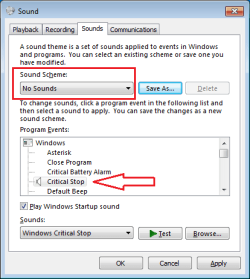
If you opt for the No Sounds test, please scroll thru and make sure that no app (or prankster) has modified that scheme:

sound.png
 

My Computer My Computer

Computer type
Laptop
Computer Manufacturer/Model Number
Employer provided Dell Latitude
OS
W7 Pro SP1 64bit
CPU
i7
Memory
8GB
Graphics Card(s)
Intel HD Graphics
Hard Drives
crappy SSD
Antivirus
Employer mandated Symantec Endpoint Protection
Browser
Pale Moon 64bit, IE11 64bit & Chrome 64bit
Would you by chance have a web page open when this happens?
Sometimes when a web page is left open a add will jump in for a few seconds.

Thanks, that seems a possibility so I will close practically all web pages and see if it happens again, then gradually increase the number of webpages I have open. It is usually the same pages open at any one time so this may solve the problem.

Viv
 

My Computer My Computer

Computer type
PC/Desktop
Computer Manufacturer/Model Number
Self built custom
OS
Microsoft Windows 7 Professional 64-bit 7601 Multiprocessor Free Service Pack 1
CPU
AMD FX(tm)-8150 Eight-Core Processor
Motherboard
ASUSTeK COMPUTER INC. SABERTOOTH 990FX R2.0
Memory
16.00 GB
Graphics Card(s)
NVIDIA GeForce GT 610
Sound Card
(1) NVIDIA Virtual Audio Device (Wave Extensible) (WDM) (2
Monitor(s) Displays
iiyama Prolite XB2776QS-B1 & Dell Ultrasharp U2412M 24 inch
Screen Resolution
2560 x 1440 x 32 bits (4294967296 colors) @ 59 Hz
Hard Drives
(1) Corsair Performance Pro SATA Disk Device (2) INTEL SS DSC2MH250A2 SATA Disk Device (3) WDC WD10 01FALS-00J7B1 SATA Disk Device (4) WDC WD10 01FALS-00J7B1 SATA Disk Device
Keyboard
Logitech K740 Illuminated
Mouse
Wacom intuos 3
Internet Speed
38Mbps / 8Mbps
Antivirus
MSE
Browser
IE11, Firefox, Chrome
To isolate the source of the sound, set your sound scheme to No Sounds.

If you still hear the sound, then it isn't Windows, it might be as Layback suggests an open browser window.

If you crank up the volume, you won't be able to miss the sound... it might make you jump though.

If you don't here the sound, then it's just a matter of ticking each sound in the sound scheme until you hear it again. The next step is what the sound is telling you - is it a critical alert or something less?

Some applications and devices also send sound alerts (Anti-virus, Skype, printers,...) I've seen them work outside of Windows sound schemes. Can you narrow down the timeframe this started to a time when you installed a new device or application?

That's about all I can offer - good luck.

Bill
.

Thanks Bill,

I have set the Sound Scheme to No Sounds, unchecked the play a sound on startup and checked that all of the system sounds show None in the box at the bottom next to the Test button.

Viv

PS, I cannot remember when the problem started as I did not take much notice at first.
 
Last edited:

My Computer My Computer

Computer type
PC/Desktop
Computer Manufacturer/Model Number
Self built custom
OS
Microsoft Windows 7 Professional 64-bit 7601 Multiprocessor Free Service Pack 1
CPU
AMD FX(tm)-8150 Eight-Core Processor
Motherboard
ASUSTeK COMPUTER INC. SABERTOOTH 990FX R2.0
Memory
16.00 GB
Graphics Card(s)
NVIDIA GeForce GT 610
Sound Card
(1) NVIDIA Virtual Audio Device (Wave Extensible) (WDM) (2
Monitor(s) Displays
iiyama Prolite XB2776QS-B1 & Dell Ultrasharp U2412M 24 inch
Screen Resolution
2560 x 1440 x 32 bits (4294967296 colors) @ 59 Hz
Hard Drives
(1) Corsair Performance Pro SATA Disk Device (2) INTEL SS DSC2MH250A2 SATA Disk Device (3) WDC WD10 01FALS-00J7B1 SATA Disk Device (4) WDC WD10 01FALS-00J7B1 SATA Disk Device
Keyboard
Logitech K740 Illuminated
Mouse
Wacom intuos 3
Internet Speed
38Mbps / 8Mbps
Antivirus
MSE
Browser
IE11, Firefox, Chrome
Do a google search for "random music virus" and you'll find lots of hits. These viruses (virii?) don't seem to be caught and removed by the many AV and malware scanners. You may want to ask for help on a forum where they specialize in infections removal.
 

My Computer My Computer

Computer type
PC/Desktop
Computer Manufacturer/Model Number
Home Built desktop, Dell G15 5511 Gaming laptop,MS Surface Pro 7 tablet
OS
W10 Pro desktop, W11 laptop, W11 Pro tablet (all 64-bit)
CPU
3.7Ghz 8700K i7, i7-11800H, i7-1065G7
Motherboard
ASUS TUF Z370-Pro Gaming in desktop
Memory
16G desktop, 16G laptop, 4G tablet
Graphics Card(s)
AMD Radeon RX580, RTX 3060, Intel Iris Plus
Sound Card
High Definition Audio (Built-in to mobo)
Monitor(s) Displays
Samsung U32J59 32" (2x), 15.6", 12"
Screen Resolution
3840x2160, 3840x2160, 1920x1080, 2160x1440
Hard Drives
500G SSD for OS; 2T, 10T & 15T HDDs for Data on Desktop, 1TB SSD laptop, 128G SSD tablet.
PSU
Corsair CX 750M
Case
Antec 100
Cooling
CM 212+
Keyboard
IBM Model M - used continuously since 1986
Mouse
Microsoft Pro IntelliMouse
Internet Speed
400M down 8M up
Antivirus
Windows Defender
Browser
FireFox
Other Info
Built my first computer (8Mhz 8088cpu, 640K RAM, 20MB HDD, 2 360K floppy drives) in 1985 and have been building them for myself, relatives and friends ever since.
If you opt for the No Sounds test, please scroll thru and make sure that no app (or prankster) has modified that scheme:

It doesn't look as if any of the scheme sounds have been modified.

Viv
 

My Computer My Computer

Computer type
PC/Desktop
Computer Manufacturer/Model Number
Self built custom
OS
Microsoft Windows 7 Professional 64-bit 7601 Multiprocessor Free Service Pack 1
CPU
AMD FX(tm)-8150 Eight-Core Processor
Motherboard
ASUSTeK COMPUTER INC. SABERTOOTH 990FX R2.0
Memory
16.00 GB
Graphics Card(s)
NVIDIA GeForce GT 610
Sound Card
(1) NVIDIA Virtual Audio Device (Wave Extensible) (WDM) (2
Monitor(s) Displays
iiyama Prolite XB2776QS-B1 & Dell Ultrasharp U2412M 24 inch
Screen Resolution
2560 x 1440 x 32 bits (4294967296 colors) @ 59 Hz
Hard Drives
(1) Corsair Performance Pro SATA Disk Device (2) INTEL SS DSC2MH250A2 SATA Disk Device (3) WDC WD10 01FALS-00J7B1 SATA Disk Device (4) WDC WD10 01FALS-00J7B1 SATA Disk Device
Keyboard
Logitech K740 Illuminated
Mouse
Wacom intuos 3
Internet Speed
38Mbps / 8Mbps
Antivirus
MSE
Browser
IE11, Firefox, Chrome
Do a google search for "random music virus" and you'll find lots of hits. These viruses (virii?) don't seem to be caught and removed by the many AV and malware scanners. You may want to ask for help on a forum where they specialize in infections removal.

Thanks for the suggestion. At the moment I am not sure that it is some type of virus, but if I have managed to eliminate all other possibilities then I will follow up on your idea.

Viv
 

My Computer My Computer

Computer type
PC/Desktop
Computer Manufacturer/Model Number
Self built custom
OS
Microsoft Windows 7 Professional 64-bit 7601 Multiprocessor Free Service Pack 1
CPU
AMD FX(tm)-8150 Eight-Core Processor
Motherboard
ASUSTeK COMPUTER INC. SABERTOOTH 990FX R2.0
Memory
16.00 GB
Graphics Card(s)
NVIDIA GeForce GT 610
Sound Card
(1) NVIDIA Virtual Audio Device (Wave Extensible) (WDM) (2
Monitor(s) Displays
iiyama Prolite XB2776QS-B1 & Dell Ultrasharp U2412M 24 inch
Screen Resolution
2560 x 1440 x 32 bits (4294967296 colors) @ 59 Hz
Hard Drives
(1) Corsair Performance Pro SATA Disk Device (2) INTEL SS DSC2MH250A2 SATA Disk Device (3) WDC WD10 01FALS-00J7B1 SATA Disk Device (4) WDC WD10 01FALS-00J7B1 SATA Disk Device
Keyboard
Logitech K740 Illuminated
Mouse
Wacom intuos 3
Internet Speed
38Mbps / 8Mbps
Antivirus
MSE
Browser
IE11, Firefox, Chrome
Thanks Viv,

Try this quick scan (scan only, no repair)

1. Click here to dowload herdProtect
a. Click on the Portable version
b. Click Save on the download action bar (your downloads folder is the default save location)
c. Click Run when the download complete action bar is presented
1. Answer Yes to the UAC diaglog window
2. Click Next on the "This will extract the portable version..."
3. Specify the location for the extracted files (USB, or Harddisk)
4. Click Next
5. Click "I agree" on the license dialog window
6. Leave the checkbox ticked [a] Launch herdProtect
7. Click Finish​
2. Click Scan
:note: herdProtect is a cloud based service. Your computer must remain connected to the Internet while the scan runs.
a. Depending on your system it will take between 5 to 30 minutes for the scan to complete. The two buttons on each object detected provide more detail, but aren't very useful to the average user.
1. Click View to open the file location on your computer
2. Click Details to open the herdProtect knowledgbase for that file​

3. Click Save (upper right area of the window) to create the log file in a readable format. The log file is then opened for review in your text editor. You can review the results in the log if you're interested or just close the log file.
:info: The log file is created in the herdProtect\Logs subfolder with a naming convention of Scan_YYYY-M-D-H-M.txt
For example: herdProtect\Logs\Scan_2014-1-1-12-47.txt

4. Attach the most current herdProtect log file to a new post on your thread.
See: http://www.sevenforums.com/tutorials/9733-screenshots-files-upload-post-seven-forums.html

Bill
.
 
Last edited:

My Computer My Computer

Computer type
Laptop
Computer Manufacturer/Model Number
HP Pavilion dv6-6c10us
OS
x64 (6.3.9600) Win8.1 Pro & soon dual boot x64 (6.1.7601) Win7_SP1 HomePrem
CPU
AMD A6-3420M APU with Radeon(tm) HD Graphics
Motherboard
Hewlett-Packard 1805
Memory
6.00 GB
Graphics Card(s)
AMD Radeon(TM) HD 6520G
Sound Card
(1) AMD High Definition Audio Device (2) IDT High Definiti
Monitor(s) Displays
HP W2072a 20" LCD (1600 x 900) @ 60 Hz
Screen Resolution
1366 x 768 x 32 bits (4294967296 colors) @ 60 Hz
Hard Drives
ST640LM0 00 HM641JI SATA Disk Device
Keyboard
Logitech k520 wireless KB
Mouse
Logitech m320 wireless mouse (bundled with KB)
Internet Speed
15/5 | 54 MB Wireless 'n'
Antivirus
Realtime: Defender or Avast | On-demand: Malwarebytes, ESET
Browser
IE 11 on Win8, IE 10 on win 7
Other Info
Media: [Gimp, Audacity, VLC] || Comm: [WEmail 2012, Skype] || Productivity: [OpenOffice,| Textpad] || Utils: [Sysinternals, cCleaner, Speccy, Defraggler]
Thanks Bill,

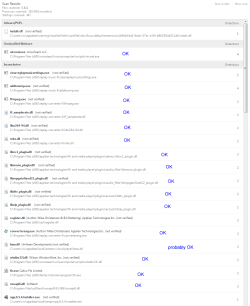
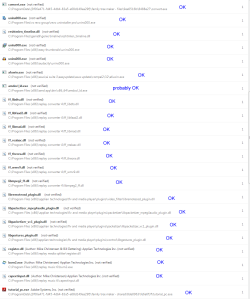
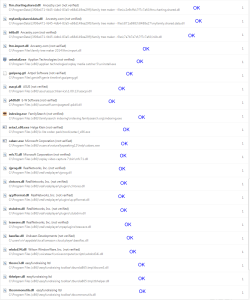
I have marked files from programs which I trust.

Viv

herdProtect1.PNG

herdProtect2.PNG

herdProtect3.PNG

herdProtect4.PNG
 

My Computer My Computer

Computer type
PC/Desktop
Computer Manufacturer/Model Number
Self built custom
OS
Microsoft Windows 7 Professional 64-bit 7601 Multiprocessor Free Service Pack 1
CPU
AMD FX(tm)-8150 Eight-Core Processor
Motherboard
ASUSTeK COMPUTER INC. SABERTOOTH 990FX R2.0
Memory
16.00 GB
Graphics Card(s)
NVIDIA GeForce GT 610
Sound Card
(1) NVIDIA Virtual Audio Device (Wave Extensible) (WDM) (2
Monitor(s) Displays
iiyama Prolite XB2776QS-B1 & Dell Ultrasharp U2412M 24 inch
Screen Resolution
2560 x 1440 x 32 bits (4294967296 colors) @ 59 Hz
Hard Drives
(1) Corsair Performance Pro SATA Disk Device (2) INTEL SS DSC2MH250A2 SATA Disk Device (3) WDC WD10 01FALS-00J7B1 SATA Disk Device (4) WDC WD10 01FALS-00J7B1 SATA Disk Device
Keyboard
Logitech K740 Illuminated
Mouse
Wacom intuos 3
Internet Speed
38Mbps / 8Mbps
Antivirus
MSE
Browser
IE11, Firefox, Chrome
hmmmmm, I only get 4 results on my scan and I verified each with VirusTotal.

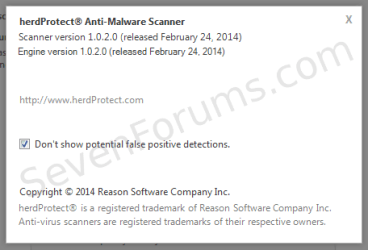
Did you by any chance untick "Don't show potential false positive detections? The question mark in the upper right corner of herdProtect isn't help - it's where you would configure this option. I unticked it and the results were similar to yours, many files were flagged.
herd6_ScanOpts.png


The two results at the top
install.rdf
herdProtect: While the manifest file itself is not malware, it is linked to an unwanted Firefox extension. (1 / 68 scanners) herdProtect (Reason Company) Heuristics: PUP.Smartbar.MozillaPlugin.K (14.3.2.13)

ThreatExpert: ThreatExpert Reports
some real threats, other inconclusive reports.

nircmd.exe
herdProtect:
Scanner detections: 4 / 68
Status: Malware

F-Secure: Suspicious:W32/Malware!Gemini (11.2014-05-03_4)
McAfee: Tool-NirCmd (5600.7201)
McAfee Web Gateway: Tool-NirCmd (7.7201)
Sophos: NirCmd (4.54)
Malware scan of NirCmd.exe (NirCmd) 436b4b7a39219a2c65f1a85de90cc5168b6b649d - herdProtect

ThreatExpert: Across all ThreatExpert reports, the file "nircmd.exe" was mostly identified as a threat
nircmd.exe | ThreatExpert statistics


The results show all other files are inconclusive determinations.
I've found that a lot of open source code (many paid for applications include some open source code) gets flagged and it normally is completely safe.

The next step is to double check the two files at the top of the list with VirusTotal (VT). The easiest way to do this is to download and install the VirusTotal Uploader: VirusTotal Windows Desktop Application. After this is installed, you can navigate to the location of the suspected file and right click the file to send to VirusTotal for further analysis. VT often gives an all clear signal on a file, but if not, then the file should definitely be removed.

Now that threats or potential threats have been identified, run another scanner that will clean any malware. You'll have the opportunity to untick anything you decide is important to keep. Look though the tabs for recognized software and untick what you want to preserve.

AdwCleaner: Scan and Clean

Click here to download AdwCleaner (author: Xplode)
>> save the application to your Desktop.

  • Right-click, Run as administrator AdwCleaner.exe
  • Click on the Scan button.
    >> AdwCleaner begins scanning your system. It might take some time to complete.
    >> You can review the objects that will be cleaned at this point of the process. Objects are grouped under the tabs. If there is something you KNOW should not be cleaned, untick the box [_] next to the object. Otherwise, go to the next step.

    :tip: If you want someone to look at the scan results before you hit the clean button, leave AdwCleaner open and attach C:\AdwCleaner\AdwCleaner[S#].txt (where # is the highest number) to a post and wait for a member to take a look. If you have to close AdwCleaner, don't worry - you'll just have to run the scan again and untick the KNOWN good files (more of an annoyance, but trouble shooting on a forum has it's drawbacks - we're in different time zones).

    .
  • After the scan has finished... click on the Clean button.
    • Answer OK to the "close all programs" prompt, then follow the onscreen prompts.
    • Answer OK to the "restart the computer" prompt to complete the removal process.
      >> The AdwCleaner[S#].txt log is opened in your default Text editor when the machine has restarted.
      :info: # gets incremented every time you run AdwCleaner - the highest number is the most recent.
    .
  • Please attach all AdwCleaner[S#].txt and AdwCleaner[R#].txt logs to a new post on your thread.
    :info: AdwCleaner logs are located in the C:\AdwCleaner folder
 

My Computer My Computer

Computer type
Laptop
Computer Manufacturer/Model Number
HP Pavilion dv6-6c10us
OS
x64 (6.3.9600) Win8.1 Pro & soon dual boot x64 (6.1.7601) Win7_SP1 HomePrem
CPU
AMD A6-3420M APU with Radeon(tm) HD Graphics
Motherboard
Hewlett-Packard 1805
Memory
6.00 GB
Graphics Card(s)
AMD Radeon(TM) HD 6520G
Sound Card
(1) AMD High Definition Audio Device (2) IDT High Definiti
Monitor(s) Displays
HP W2072a 20" LCD (1600 x 900) @ 60 Hz
Screen Resolution
1366 x 768 x 32 bits (4294967296 colors) @ 60 Hz
Hard Drives
ST640LM0 00 HM641JI SATA Disk Device
Keyboard
Logitech k520 wireless KB
Mouse
Logitech m320 wireless mouse (bundled with KB)
Internet Speed
15/5 | 54 MB Wireless 'n'
Antivirus
Realtime: Defender or Avast | On-demand: Malwarebytes, ESET
Browser
IE 11 on Win8, IE 10 on win 7
Other Info
Media: [Gimp, Audacity, VLC] || Comm: [WEmail 2012, Skype] || Productivity: [OpenOffice,| Textpad] || Utils: [Sysinternals, cCleaner, Speccy, Defraggler]
Bill,
I have uploaded the two files to VirusTotal and install.rdf was reported as clean, but nircmd.exe is shown as suspect. I will contact VoiceTeach tomorrow and ask them about it as I do not want to delete it if it is not causing me a problem, and also I do not know what it is supposed to do.
I ran AdwCleaner and there is one suspect file and numerous registry entries. I am attaching a copy of the AdwCleaner[S7].txt file to this post. I have not allowed AdwCleaner to delete any files, especially the registry entries, as I am not sure what effect it may have.
Viv
View attachment AdwCleaner[R7].txt
 

My Computer My Computer

Computer type
PC/Desktop
Computer Manufacturer/Model Number
Self built custom
OS
Microsoft Windows 7 Professional 64-bit 7601 Multiprocessor Free Service Pack 1
CPU
AMD FX(tm)-8150 Eight-Core Processor
Motherboard
ASUSTeK COMPUTER INC. SABERTOOTH 990FX R2.0
Memory
16.00 GB
Graphics Card(s)
NVIDIA GeForce GT 610
Sound Card
(1) NVIDIA Virtual Audio Device (Wave Extensible) (WDM) (2
Monitor(s) Displays
iiyama Prolite XB2776QS-B1 & Dell Ultrasharp U2412M 24 inch
Screen Resolution
2560 x 1440 x 32 bits (4294967296 colors) @ 59 Hz
Hard Drives
(1) Corsair Performance Pro SATA Disk Device (2) INTEL SS DSC2MH250A2 SATA Disk Device (3) WDC WD10 01FALS-00J7B1 SATA Disk Device (4) WDC WD10 01FALS-00J7B1 SATA Disk Device
Keyboard
Logitech K740 Illuminated
Mouse
Wacom intuos 3
Internet Speed
38Mbps / 8Mbps
Antivirus
MSE
Browser
IE11, Firefox, Chrome
Thanks Viv,

It looks as though you have a number of toolbars that are flagged as adware / malware. I looked at a few on ThreatExpert and found that some might be valid, but only you can make that determination.

There is one definite malware that I saw off the bat - conduit. There is also a Softonic downloader flagged - these download managers often come laden with junk so it's always advisable to get them off your system. Better, don't use download managers - you don't need them to download files.

Much in the same with toolbars - they're carriers. Pick one that you use all the time, maybe two. Get rid of the rest.

Normally I would advise a member to let AdwCleaner do it's job and clean up the mess. That is what I recommend now, but took a bit of time to look at the log and offer some feedback. There are too many objects in the log to do all of them and many of the seem to be related to conduit.

So here's what I recommend:
1) Go to Control Panel -> Programs and Features
Look though the installed programs and uninstall any toolbars that you don't recognize or use.

2) Check all of your browsers
The easiest way to ensure completeness is to reset the browsers
:note: this will require you to manually set options again if you had customized settings before.

Internet Explorer:
Open Internet Options
Click the Advanced tab
Click Reset button.

In the Reset Internet Explorer Settings dialog window
Tick [a] Delete personal settings
Click on Reset.
After the reset, click Close
Click OK

Close IE

Firefox
Open the Firefox menu
Mouse over Help to open the sub-menu
Click Troubleshooting Information on the sub-menu
Click the Reset Firefox button on the right
Confirm click Reset Firefox
Firefox will close and reset, an information window is displayed listing what was done.
Click Finish

Chrome
1) Remove Conduit extension(s)
Click the Chrome menu button
Select Tools
Click Extensions.
Remove Conduit Apps -> click the recycle bin to the right of the object
Remove any other unknown extensions in the same manner
:ar: Any extension you did not explicitly install is unknown

2) Set the default search engine to a trusted provider (Google or Bing)
Click the Chrome menu button
Select Settings
In the Search category, Click Manage search engines
Select Google or Bing
Click the Make Default button

On the Conduit row,
Click he X button at the end of the row.

3) Set the homepage to the Chrome default
Click the Chrome menu button
Select Settings
In the On Startup category
Click the radio button Open the New Tab page


When you have Uninstalled the toolbars and other unneeded applications from Control Panel -> Programs and Features and
you have completed the manual changes to your browsers

Run AdwCleaner scan again

Unitick nircmd for now, leave the rest ticked.

Click Clean

You can post the most recent log, but I'll probably just say - clean up your system now so you don't have to go through this exercise again. Malware doesn't wait for you, it re-establishes itself fairly quickly.

Unless you're certain about a keeper, let Adwcleaner do it's job. Anything can be recovered if you need it by downloading it and installing it.

A caveat is an application that you paid for - make sure you have the means to reinstall any purchased software (usually you just need the license key). Stuff you downloaded for free can always be downloaded again - but.... that's how a lot of systems become infected. Better to only download trusted apps than to allow malware on your system. How do you know what's trusted? Experience and caution.

You'll need to restart the machine, but wait until the malware is cleaned up or else it might put everything back.

There will probably be additional utilities or scanners for you to run to make sure there's nothing lurking​
 

My Computer My Computer

Computer type
Laptop
Computer Manufacturer/Model Number
HP Pavilion dv6-6c10us
OS
x64 (6.3.9600) Win8.1 Pro & soon dual boot x64 (6.1.7601) Win7_SP1 HomePrem
CPU
AMD A6-3420M APU with Radeon(tm) HD Graphics
Motherboard
Hewlett-Packard 1805
Memory
6.00 GB
Graphics Card(s)
AMD Radeon(TM) HD 6520G
Sound Card
(1) AMD High Definition Audio Device (2) IDT High Definiti
Monitor(s) Displays
HP W2072a 20" LCD (1600 x 900) @ 60 Hz
Screen Resolution
1366 x 768 x 32 bits (4294967296 colors) @ 60 Hz
Hard Drives
ST640LM0 00 HM641JI SATA Disk Device
Keyboard
Logitech k520 wireless KB
Mouse
Logitech m320 wireless mouse (bundled with KB)
Internet Speed
15/5 | 54 MB Wireless 'n'
Antivirus
Realtime: Defender or Avast | On-demand: Malwarebytes, ESET
Browser
IE 11 on Win8, IE 10 on win 7
Other Info
Media: [Gimp, Audacity, VLC] || Comm: [WEmail 2012, Skype] || Productivity: [OpenOffice,| Textpad] || Utils: [Sysinternals, cCleaner, Speccy, Defraggler]
Thanks Bill,

I have followed some of your advice so far. The Google toolbar for IE has now been uninstalled. I have reset IE, Firefox and Chrome, although I could not remove the Conduit extension as it is not listed.

There are a few differences in the AdwCleaner log from last time but I will wait until tomorrow before I let it clean the registry as I wish to make a registry backup and have a new system backup in case of problems.

I will let you know how I get on tomorrow, thanks for all your help.

Viv

View attachment AdwCleaner[R8].txt
 

My Computer My Computer

Computer type
PC/Desktop
Computer Manufacturer/Model Number
Self built custom
OS
Microsoft Windows 7 Professional 64-bit 7601 Multiprocessor Free Service Pack 1
CPU
AMD FX(tm)-8150 Eight-Core Processor
Motherboard
ASUSTeK COMPUTER INC. SABERTOOTH 990FX R2.0
Memory
16.00 GB
Graphics Card(s)
NVIDIA GeForce GT 610
Sound Card
(1) NVIDIA Virtual Audio Device (Wave Extensible) (WDM) (2
Monitor(s) Displays
iiyama Prolite XB2776QS-B1 & Dell Ultrasharp U2412M 24 inch
Screen Resolution
2560 x 1440 x 32 bits (4294967296 colors) @ 59 Hz
Hard Drives
(1) Corsair Performance Pro SATA Disk Device (2) INTEL SS DSC2MH250A2 SATA Disk Device (3) WDC WD10 01FALS-00J7B1 SATA Disk Device (4) WDC WD10 01FALS-00J7B1 SATA Disk Device
Keyboard
Logitech K740 Illuminated
Mouse
Wacom intuos 3
Internet Speed
38Mbps / 8Mbps
Antivirus
MSE
Browser
IE11, Firefox, Chrome
Back
Top