Where does W 7 keep your datafiles?

Anderson2

New member
Power User
Local time
8:44 PM
Messages
188
I notice that in my pre-installed W 7 there are folders called:
C:\Users\myname\My documents, My music, My Pictures, etc..
I suppose that is where W 7 puts my data files.

I like to keep my data files in a separate partition for easier backup. What is the easiest way to move these folders to my new data partition in a way that makes W 7 aware that they are now in a different location?
Thanks, Jeff
 

My Computer

OS
Windows 7
You might want to read this tutorial from our Tutorials section.

Kari
 

My Computer

Computer type
Laptop
Computer Manufacturer/Model Number
HP ENVY 17-1150eg
OS
Windows 10 Pro x64 EN-GB
CPU
1.6 GHz Intel Core i7-720QM Processor
Memory
6 GB
Graphics Card(s)
ATI Mobility Radeon HD 5850 Graphics
Sound Card
Beats sound system with integrated subwoofer
Monitor(s) Displays
17" laptop display, 22" LED and 32" Full HD TV through HDMI
Screen Resolution
1600*900 (1), 1920*1080 (2&3)
Hard Drives
Internal: 2 x 500 GB SATA Hard Disk Drive 7200 rpm
External: 2TB for backups, 3TB USB3 network drive for media
Cooling
As Envy runs a bit warm, I have it on a Cooler Master pad
Keyboard
Logitech diNovo Media Desktop Laser (bluetooth)
Mouse
Logitech Performance Mouse MX
Internet Speed
50/10 Mbps VDSL
Antivirus
Windows Defender 4.3.9431.0
Browser
Maxthon 3.5.2., IE11
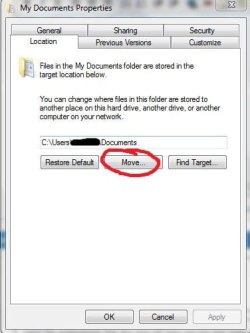
1. ok, go to that folder.
For example C:\Users\myname\My documents
2. right click it.
3. go to the tab location
Capture.JPG
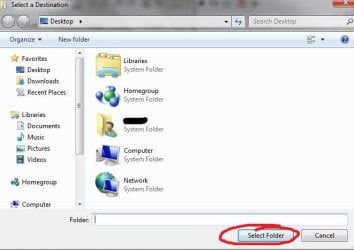
4. Click Move
2.JPG
5. Create New folder in another partition
6. Choose new Folder
 

My Computer

OS
Windows 7 Ultimate x86 SP1
Thank you both. Just what I needed to know.
 

My Computer

OS
Windows 7
Back
Top