Where does win7 keep its multiple displays configuration

chermesh

New member
Member
Local time
3:45 PM
Messages
59
Hi,
My system acts in a very unstable fashion as far as multiple displays settings. Whenever I connect my pc to my tv, the tv display becomes my primary display. This is a very unfortunate situation, since I'm required to manage my pc via remote control, with my mouse, which is located attached to my pc in one room, and a tv display, located in another room.
Since I managed to perform a comprehensive configuration using this cumbersome procedure, I would like to keep it ready for use if/when a need arises.
Does win7 keep its multiple displays configuration in its registry? If so, where? Is it anywhere else? I would like to keep a copy of the setting material and use it whenever a need arises.
 

My Computer

Computer type
PC/Desktop
OS
Triple boot: WinXP Pro + Win7 Ultimate + Win10 Ultimate
CPU
Intel Core 2 Duo 3.0GHz
Motherboard
Gigabyte GA-P43-ES3G
Memory
Transcend 2GB DDR2 800
Graphics Card(s)
NVIDIA GeForce 9500 GT
Sound Card
Realtek High Definition Audio
Monitor(s) Displays
Dell P2314H
Hard Drives
Samsung 1TB 32 MB 7200RPM
PSU
seasonic ss-500et active pfc
Case
Compucase 6A19 Black
Does NVIDIA have a program like the ATI Catalyst Control. Iv never worked with NVIDIA before
 

My Computer

OS
Windows 7 Pro x64
CPU
Intel E6300 2.8Ghz
Motherboard
ASUS P5QPL-AM Intel G41
Memory
Corsair TWIN2X 2x2GB 5-5-5-18
Graphics Card(s)
ATI HD5770 GDDR5 1GB
Sound Card
5.1 Internal
Monitor(s) Displays
Samsung Series 5 32" Full HD
Hard Drives
Seagate Barracuda 500GB 7200 16MB SATAII
WD Elements 500GB 2.5" External
PSU
CoolerMaster 550W eXtreme Power Plust Silent 12CM
Case
Lian-Li Lancool PC-K56B
Cooling
Stock Fan, Water Cooling for HDD, GPU, CPU on the Way :D
Keyboard
Logitech G15
Mouse
CoolerMaster Sentinal (set at 5600dpi)
Internet Speed
Slingshot. 5Mbps, Currently getting 2Mbps
Does NVIDIA have a program like the ATI Catalyst Control. Iv never worked with NVIDIA before

Yes it does :)

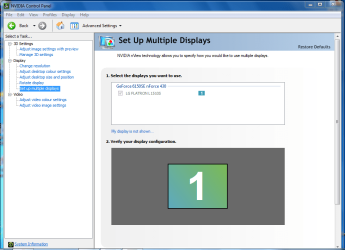
If you download the latest drivers from nVidia it will install the nVidia control panel.

Capture.PNG

Hope this helps :)


OS
 

My Computer

Computer Manufacturer/Model Number
Compaq Desktop
OS
Windows 7 Ultimate x64
CPU
AMD Sempron Dual Core
Memory
3GB
Graphics Card(s)
NVIDIA GeForce 6150SE nForce 430
Screen Resolution
1024x768
Hard Drives
150GB Sata
NVIDIA Control Panel

Yes, it does. The NVIDIA Control Panel (NCP) is a graphic interface. The NCP program is named nvcplui.exe and its dll is nvcpluir.dll. Still, none of these files seems to keep the configuration. at least not the user defined configuration.
 

My Computer

Computer type
PC/Desktop
OS
Triple boot: WinXP Pro + Win7 Ultimate + Win10 Ultimate
CPU
Intel Core 2 Duo 3.0GHz
Motherboard
Gigabyte GA-P43-ES3G
Memory
Transcend 2GB DDR2 800
Graphics Card(s)
NVIDIA GeForce 9500 GT
Sound Card
Realtek High Definition Audio
Monitor(s) Displays
Dell P2314H
Hard Drives
Samsung 1TB 32 MB 7200RPM
PSU
seasonic ss-500et active pfc
Case
Compucase 6A19 Black
Where does the system keep NVIDIA configuration?

Does NVIDIA have a program like the ATI Catalyst Control. Iv never worked with NVIDIA before

Yes it does :)

If you download the latest drivers from Welcome to NVIDIA - World Leader in Visual Computing Technologies it will install the nVidia control panel.

View attachment 99414

Hope this helps :)


OS

I do have this control panel, Orbital Shark, and this tool is the one I used for configuring my system. My question, though, refers to a hidden aspect of the application, its configuration. Where is it kept?
 

My Computer

Computer type
PC/Desktop
OS
Triple boot: WinXP Pro + Win7 Ultimate + Win10 Ultimate
CPU
Intel Core 2 Duo 3.0GHz
Motherboard
Gigabyte GA-P43-ES3G
Memory
Transcend 2GB DDR2 800
Graphics Card(s)
NVIDIA GeForce 9500 GT
Sound Card
Realtek High Definition Audio
Monitor(s) Displays
Dell P2314H
Hard Drives
Samsung 1TB 32 MB 7200RPM
PSU
seasonic ss-500et active pfc
Case
Compucase 6A19 Black
I do have this control panel, Orbital Shark, and this tool is the one I used for configuring my system. My question, though, refers to a hidden aspect of the application, its configuration. Where is it kept?

The only thing I can think of is to search the registry (type 'regedit' into the start menu) and ro a search for nVidia. Other than that I can't find anything (yet) on my HD relating to a config file for the nVidia control panel :(
 

My Computer

Computer Manufacturer/Model Number
Compaq Desktop
OS
Windows 7 Ultimate x64
CPU
AMD Sempron Dual Core
Memory
3GB
Graphics Card(s)
NVIDIA GeForce 6150SE nForce 430
Screen Resolution
1024x768
Hard Drives
150GB Sata

My Computer

Computer type
PC/Desktop
OS
Triple boot: WinXP Pro + Win7 Ultimate + Win10 Ultimate
CPU
Intel Core 2 Duo 3.0GHz
Motherboard
Gigabyte GA-P43-ES3G
Memory
Transcend 2GB DDR2 800
Graphics Card(s)
NVIDIA GeForce 9500 GT
Sound Card
Realtek High Definition Audio
Monitor(s) Displays
Dell P2314H
Hard Drives
Samsung 1TB 32 MB 7200RPM
PSU
seasonic ss-500et active pfc
Case
Compucase 6A19 Black

My Computer

Computer type
PC/Desktop
OS
Triple boot: WinXP Pro + Win7 Ultimate + Win10 Ultimate
CPU
Intel Core 2 Duo 3.0GHz
Motherboard
Gigabyte GA-P43-ES3G
Memory
Transcend 2GB DDR2 800
Graphics Card(s)
NVIDIA GeForce 9500 GT
Sound Card
Realtek High Definition Audio
Monitor(s) Displays
Dell P2314H
Hard Drives
Samsung 1TB 32 MB 7200RPM
PSU
seasonic ss-500et active pfc
Case
Compucase 6A19 Black
Looks like it could be but i'd be very wary of changing it as it could have major consequences...The problem is that a lot of apps no longer use .cfg files to store information, instead they're stored in the actual binary files of the app.
 

My Computer

Computer Manufacturer/Model Number
Compaq Desktop
OS
Windows 7 Ultimate x64
CPU
AMD Sempron Dual Core
Memory
3GB
Graphics Card(s)
NVIDIA GeForce 6150SE nForce 430
Screen Resolution
1024x768
Hard Drives
150GB Sata
I'm less concerned since...

Since all reg information in the shown section is specifically NVIDIA related, I'm less concerned. All I plan to do with the saved reg file is to run it if and when I connect my system back to my tv and discover that it has retreated to its original setting, meaning TV as the primary display.
Does it seem like a real adventure?
 

My Computer

Computer type
PC/Desktop
OS
Triple boot: WinXP Pro + Win7 Ultimate + Win10 Ultimate
CPU
Intel Core 2 Duo 3.0GHz
Motherboard
Gigabyte GA-P43-ES3G
Memory
Transcend 2GB DDR2 800
Graphics Card(s)
NVIDIA GeForce 9500 GT
Sound Card
Realtek High Definition Audio
Monitor(s) Displays
Dell P2314H
Hard Drives
Samsung 1TB 32 MB 7200RPM
PSU
seasonic ss-500et active pfc
Case
Compucase 6A19 Black
Probably an easier solution would be to install UltraMon and map a hotkey to your desired monitor layout.

google ultramon to download it.
 

My Computer

OS
Windows 7 Premium 64-bit, Windows 7 Ultimate 64-bit
Did you try experimenting with Windows Key + P (If your TV is on another room experiment with the different options blidly by pressing the P key twice)? Or right clicking the desktop->Screen Resolution->Display?
 

My Computer

Computer Manufacturer/Model Number
Asus G73SW-XN2
OS
Windows 2000 5.0 Build 2195
CPU
Intel Core i7-2630QM@2GHz(2.9GHz Turbo Boost) [Sandy Bridge]
Motherboard
Asus G73SW (Intel HM65 Chipset)
Memory
Kingston DDR3 1333 16GB (4GBx4)
Graphics Card(s)
nVidia GTX 460m 1.5GB
Sound Card
EAX Advanced HD 5.0, THX TruStudio
Monitor(s) Displays
17.3 in. primary & 23 in. secondary
Screen Resolution
1920x1080
Hard Drives
Seagate Momentus XT (SATA II) 500 GB @ 7200 RPM
Hitachi (SATA II) 500GB @ 7200 RPM

Non Raid because ASUS was crappy to choose an HM65 Chipset
Keyboard
Built-in 102-Key Backlit Keyboard
Other Info
It's a Laptop.
Did you try experimenting with Windows Key + P (If your TV is on another room experiment with the different options blidly by pressing the P key twice)? Or right clicking the desktop->Screen Resolution->Display?

I managed to solve my problem by the delicate procedure of moving my mouse carefully, while being instructed by someone else, who watches these moves on my tv screen. Thus' had no chance to check your solution.
Still,looks like your suggestion is a very easy and useful suggestion. I'll keep it in ming if the problem ever reoccurs.
Thank.
 

My Computer

Computer type
PC/Desktop
OS
Triple boot: WinXP Pro + Win7 Ultimate + Win10 Ultimate
CPU
Intel Core 2 Duo 3.0GHz
Motherboard
Gigabyte GA-P43-ES3G
Memory
Transcend 2GB DDR2 800
Graphics Card(s)
NVIDIA GeForce 9500 GT
Sound Card
Realtek High Definition Audio
Monitor(s) Displays
Dell P2314H
Hard Drives
Samsung 1TB 32 MB 7200RPM
PSU
seasonic ss-500et active pfc
Case
Compucase 6A19 Black
Back
Top