Solved Where have my documents gone

donnie1

New member
Local time
7:21 PM
Messages
20
I've just upgraded from Windows Vista to Windows 7. I'm using Synch Back to back up folders. Synch back does not seem to recognise "my Pictures" , "My Documents" , and "my Music" to have anything in them , even though they have Gigabytes - are they stored under some other name , but displayed as the old names ? never had this problem with Vista or XP - I assume this is something to do with the so called library , but really don't understand the help file supplied with the library.
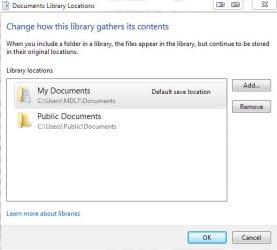
Also , while trying to figure out what was going on , under the "my Documents" folder I noticed it said "2 locations" - so I deleted 1 and all my documents have vanished ( gone in less than a second - about 20 Gigabytes) - they're not in the recycle bin , and can't be found doing a search - where are they.
 

My Computer My Computer

Computer Manufacturer/Model Number
Apevia
OS
Windows 7 Home Premium 32 bit
CPU
Intel P43 Chipset
Motherboard
ASUS P5QL PRO
Memory
2x 2G DDR2
Graphics Card(s)
Gigabyte Geforce 9800 GT 1GB Silent
Sound Card
Realtek ALC 1200 Audio CODEC
Hard Drives
WD Caviar Green – 800 GB
Libraries is just a view, it doesn't hold any files. It takes multiple locations and merges them into a single view.
The Document/Pictures/etc folders are still where they have been: C:\Users\[username]
 

My Computer My Computer

Computer type
PC/Desktop
Computer Manufacturer/Model Number
Alienware Aurora ALX R4
OS
Windows 10 Pro (x64)
CPU
Intel Core i7-3930K (3.2GHz - 4.5GHz)
Motherboard
Alienware Aurora-R4 x79
Memory
4x Samsung 4GB PC3-12800 DDR3 (16GB 1600MHz)
Graphics Card(s)
Nvidia Geforce GTX 690
Sound Card
SteelSeries Siberia Elite
Monitor(s) Displays
Dell UltraSharp U3011
Screen Resolution
2560x1600
Hard Drives
Samsung 850 Pro 256 GB, Seagate 1TB Desktop Hybrid HDD, 2x Western Digital 4TB Green HDD
PSU
875W Some Dell PSU <.<
Case
Alienware Aurora ALX
Cooling
Custom Liquid Cooling (EK CPU & GPU blocks) dual EK 480RAD
Keyboard
Logitech G710+ Mechanical
Mouse
Logitech G700s
Internet Speed
Verizon Fios (50 mbps average)
Other Info
Server: Intel NUC D54250WYK: i5-4250U, 16GB, 256 GB mSATA, Windows Server 2012 R2
Also , while trying to figure out what was going on , under the "my Documents" folder I noticed it said "2 locations" - so I deleted 1 and all my documents have vanished ( gone in less than a second - about 20 Gigabytes) - they're not in the recycle bin , and can't be found doing a search - where are they.
Sorry for making your text bold, donnie, I just wanted to emphasize the portion of your text I'm addressing; Did you delete or remove it? Which one?

ScreenShot00186.jpg
 

My Computer My Computer

Computer Manufacturer/Model Number
Toshiba L355D
OS
Windows 7 Ultimate x64 SP1
CPU
Core2 Duo
Motherboard
Intel
Memory
4 GB
Graphics Card(s)
GM965 on-board
Sound Card
RealTek on-board
Monitor(s) Displays
19"+17"(laptop)
Screen Resolution
1440x900 (x 2)
Hard Drives
500GB Ext. 200GB Internal
PSU
N/A
Case
N/A
Cooling
N/A
Thanks for your help

I've found them , I had removed them to "public documents" - what I don't understand though , is why can't the search function find any of them ie I type in the name of one of the many folders when they have been removed from "my documents" , and it cannot find them
 

My Computer My Computer

Computer Manufacturer/Model Number
Apevia
OS
Windows 7 Home Premium 32 bit
CPU
Intel P43 Chipset
Motherboard
ASUS P5QL PRO
Memory
2x 2G DDR2
Graphics Card(s)
Gigabyte Geforce 9800 GT 1GB Silent
Sound Card
Realtek ALC 1200 Audio CODEC
Hard Drives
WD Caviar Green – 800 GB
donnie, when you perform a search for a file name (or a folder name), preface the name of the file with the search filter "Name:" (without the quotes) as in "Name:[folder-file name]" (again, without the quotes) with [folder-file name] being the name of the file or folder you are searching to find. See more here.
To search by only filename, prefix your search with name:, followed by the word or words you wish to find. It’s so simple, yet so user-unfriendly. I think I’ll get back to scratching my head about this one.
 

My Computer My Computer

Computer Manufacturer/Model Number
Toshiba L355D
OS
Windows 7 Ultimate x64 SP1
CPU
Core2 Duo
Motherboard
Intel
Memory
4 GB
Graphics Card(s)
GM965 on-board
Sound Card
RealTek on-board
Monitor(s) Displays
19"+17"(laptop)
Screen Resolution
1440x900 (x 2)
Hard Drives
500GB Ext. 200GB Internal
PSU
N/A
Case
N/A
Cooling
N/A
Thanks

Thanks , now that works , I can find missing folders now
 

My Computer My Computer

Computer Manufacturer/Model Number
Apevia
OS
Windows 7 Home Premium 32 bit
CPU
Intel P43 Chipset
Motherboard
ASUS P5QL PRO
Memory
2x 2G DDR2
Graphics Card(s)
Gigabyte Geforce 9800 GT 1GB Silent
Sound Card
Realtek ALC 1200 Audio CODEC
Hard Drives
WD Caviar Green – 800 GB
Thanks , now that works , I can find missing folders now
Wonderful! You'll be a pro before you know it and helping others in short order. :D
 

My Computer My Computer

Computer Manufacturer/Model Number
Toshiba L355D
OS
Windows 7 Ultimate x64 SP1
CPU
Core2 Duo
Motherboard
Intel
Memory
4 GB
Graphics Card(s)
GM965 on-board
Sound Card
RealTek on-board
Monitor(s) Displays
19"+17"(laptop)
Screen Resolution
1440x900 (x 2)
Hard Drives
500GB Ext. 200GB Internal
PSU
N/A
Case
N/A
Cooling
N/A
Back
Top