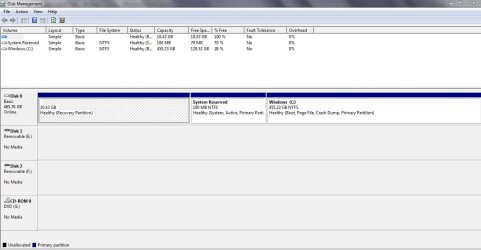
where have my partitions gone? help!

oldbai

New member
Local time
1:57 PM
Messages
5
Hi there!

I bought a new notebook installed Windows 7 OS. I created two partitions on Disk C through disk management yesterday. Everything seemed to be fine at that time and I did see the disk D & disk H (new partition volumes) displaying in "my computer"; however, both of them are gone when I turned on my notebook today. Neither disk management nor "my computer" could find those two disks. Further more, the space assigned for the partitions is gone too. I can still see the exact full size of my disk C, but the free size does not include the lost partitions at all.

Could anyone help me to fix the problem? Thank you very much.
 

My Computer My Computer

OS
windows7
Can you post a screen shot of disk management as it is now?
 

My Computer My Computer

Computer type
PC/Desktop
Computer Manufacturer/Model Number
Ignatz Special; 4 speed manual gearbox; factory air conditioning; one of one
OS
Windows 7 Home Premium SP1, 64-bit
CPU
Intel Skylake i5-6600K, not overclocked
Motherboard
AsRock Z170M Extreme 4, micro ATX
Memory
8 GB HyperX DDR4-2666 (2 x 4 GB)
Graphics Card(s)
none; graphics are integrated on CPU
Sound Card
onboard: Realtek ALC1150; external: USB Behringer UF0-202
Monitor(s) Displays
Dell S2340M 23 inch IPS
Screen Resolution
1600 x 900
Hard Drives
System: Crucial MX100 series SSD, 128 GB;
Data: Samsung Spinpoint 103SJ, 1 TB;
Backup: WD Caviar Green WD30EZRX-00D8PB0, 3 TB
PSU
Rosewill SilentNight 500 watt fanless, semi-modular
Case
Antec Solo II
Cooling
Noctua NH-U12S; Noctua F12 intake, Noctua S12A exhaust
Keyboard
Microsoft 200 6JH-00001 USB
Mouse
Dell or Microsoft optical wired; USB
Antivirus
Microsoft Security Essentials and Malwarebytes Premium
Browser
Pale Moon
Other Info
All fans PWM; speeds at idle: CPU circa 500 rpm; intake circa 600 rpm; exhaust circa 600 rpm; CPU temps 27 idle and 47 C load in a warm room (27 C/81 F) when running Intel Extreme Tuning Utility stress test.
Thank you for your reply, but how can I post a picture?:cry:
 

Attachments

  • Capture.JPG
    Capture.JPG
    77.5 KB · Views: 104

My Computer My Computer

OS
windows7
The 10 gig partition appears to be for a recovery partition for a prior OS.

The 100 MB partition was put there by Windows 7 to assist with system repair.

It's curious that your C partition is not marked active.

What is the advertised capacity of your entire hard drive? 500 gigs?
 

My Computer My Computer

Computer type
PC/Desktop
Computer Manufacturer/Model Number
Ignatz Special; 4 speed manual gearbox; factory air conditioning; one of one
OS
Windows 7 Home Premium SP1, 64-bit
CPU
Intel Skylake i5-6600K, not overclocked
Motherboard
AsRock Z170M Extreme 4, micro ATX
Memory
8 GB HyperX DDR4-2666 (2 x 4 GB)
Graphics Card(s)
none; graphics are integrated on CPU
Sound Card
onboard: Realtek ALC1150; external: USB Behringer UF0-202
Monitor(s) Displays
Dell S2340M 23 inch IPS
Screen Resolution
1600 x 900
Hard Drives
System: Crucial MX100 series SSD, 128 GB;
Data: Samsung Spinpoint 103SJ, 1 TB;
Backup: WD Caviar Green WD30EZRX-00D8PB0, 3 TB
PSU
Rosewill SilentNight 500 watt fanless, semi-modular
Case
Antec Solo II
Cooling
Noctua NH-U12S; Noctua F12 intake, Noctua S12A exhaust
Keyboard
Microsoft 200 6JH-00001 USB
Mouse
Dell or Microsoft optical wired; USB
Antivirus
Microsoft Security Essentials and Malwarebytes Premium
Browser
Pale Moon
Other Info
All fans PWM; speeds at idle: CPU circa 500 rpm; intake circa 600 rpm; exhaust circa 600 rpm; CPU temps 27 idle and 47 C load in a warm room (27 C/81 F) when running Intel Extreme Tuning Utility stress test.
Sorry i thought you said you bought a Win7 computer.

If you just installed Win7 then it left a huge recovery partition which probably is not functional, so you might want to remove it, then move the 100mb Win7 boot/repair partition, followed by the Win7 partition, over there using a third party partition manager like Partition Wizard.

This gives you the OS in the faster lower addresses and makes room for more data partitions.
 
Last edited:
The 10 gig partition appears to be for a recovery partition for a prior OS.

The 100 MB partition was put there by Windows 7 to assist with system repair.

It's curious that your C partition is not marked active.

What is the advertised capacity of your entire hard drive? 500 gigs?

Yeah, it's 500G. Should I mark "active" to C? If so, how to do it?
 

My Computer My Computer

OS
windows7
No the active partition needs to be the 100mb boot/repair partition put there by Win7 installer. It makes repair console available at boot using F8.

Unless you want to delete the 100mb, mark Win7 partition active and run startup repair to reclaim the boot into Win7 part.

I personally would delete the large recovery partition, then boot into a partition manager like Paragon or Partition Wizard to move both the 100mb and Win7 partitions over into the lower addresses.

Then if necessary run Startup repair 3 times to fix any boot issues remaining.
 
How much bloatware did they include in your new Win7 computer?

Do you have previous experience with the Win7 RTM so you know how fast it should be by comparision, because normally bloatware slows down a system even after it is removed piecemeal.

If, like Vista, the bloatware impinges on performance and its removal corrupts system files, I personally would obtain a clean copy of Win7 RTM and install it without the bloatware to maximize performance. It will activate with the OEM license on that machine.

I notice the recovery partition is huge. You will probably want to make the recovery disks since there are situations where you might want to restore to factory condition, like if they don't support clean reinstalls and you need their support for hardware warranty issues. Most of their profit margin nowadays comes from sponsor's bloatware.

Then I personally would remove that recov partition and reclaim that space, using a partition manager like Partition Wizard to move the 100mb boot/repair System partition along with Win7 into that space, then creating my data partitions as desired.

Save one primary formatted partition to place your Win7 Backup Image which will allow you to reimage the HDD in 15 minutes. Store a copy externally in case of HDD failure, as you can boot from the Installer repair console and restore from an image to a new HDD, too. Reinstalls are a thing of the past now that Win7 has brought imaging to the masses.

Well, I have to admit I'm a complete lalyman with those computer things although I have 3 computers at home now. For most of your suggestions, they are just too hard for me to practice. Never tried win7 before. This is my first action on win7, and you saw the consequence:D. I remember my last laptop came with some softwares on the discs together, but this one only had everything preinstalled. I'm wandering what should I do if the OS collapses some day.
 

My Computer My Computer

OS
windows7
Please clarify something:

Did you buy the computer and THEN upgrade to Windows 7 or did you buy it with Windows 7 already on it? If you upgraded did it originally have Vista?

What type of discs do you have and where did you get them? Were they supplied by the PC manufacturer or are they the same Windows 7 discs I would get if I went down to Best Buy?
 

My Computer My Computer

Computer type
PC/Desktop
Computer Manufacturer/Model Number
Ignatz Special; 4 speed manual gearbox; factory air conditioning; one of one
OS
Windows 7 Home Premium SP1, 64-bit
CPU
Intel Skylake i5-6600K, not overclocked
Motherboard
AsRock Z170M Extreme 4, micro ATX
Memory
8 GB HyperX DDR4-2666 (2 x 4 GB)
Graphics Card(s)
none; graphics are integrated on CPU
Sound Card
onboard: Realtek ALC1150; external: USB Behringer UF0-202
Monitor(s) Displays
Dell S2340M 23 inch IPS
Screen Resolution
1600 x 900
Hard Drives
System: Crucial MX100 series SSD, 128 GB;
Data: Samsung Spinpoint 103SJ, 1 TB;
Backup: WD Caviar Green WD30EZRX-00D8PB0, 3 TB
PSU
Rosewill SilentNight 500 watt fanless, semi-modular
Case
Antec Solo II
Cooling
Noctua NH-U12S; Noctua F12 intake, Noctua S12A exhaust
Keyboard
Microsoft 200 6JH-00001 USB
Mouse
Dell or Microsoft optical wired; USB
Antivirus
Microsoft Security Essentials and Malwarebytes Premium
Browser
Pale Moon
Other Info
All fans PWM; speeds at idle: CPU circa 500 rpm; intake circa 600 rpm; exhaust circa 600 rpm; CPU temps 27 idle and 47 C load in a warm room (27 C/81 F) when running Intel Extreme Tuning Utility stress test.
oldbai,

Can you execute disk management?

Then right click on disk1 and disk2, and tell us which options appear?

Best regards,

zx81
 

My Computer My Computer

Computer Manufacturer/Model Number
Dell Inpspiron 1720
OS
Windows 7 Home Premium x64
CPU
Intel 1720 Core 2 Duo 2.00GHz,800,2M
Memory
4GB 667MHz DDR2 SDRAM (2x2048)
Graphics Card(s)
NVIDIA Geforce Go 8600M GT 256MB DDR2
Sound Card
SigmaTel
Monitor(s) Displays
17.0" Widescreen WXGA+ (1440x900) TFT with TrueLife
Screen Resolution
1440x900
Hard Drives
2x160GB 5400RPM Serial ATA
Mouse
Logitech
Just a suggestion-

If you boot up with a partition manager which is Linux based, like GPartEd, it will see the partitions that Windows cannot see. If you have empty or faulty partitions, or if you have Linux partitions, you will be able to see them and work with them.

Good Luck!
 

My Computer My Computer

Computer Manufacturer/Model Number
HP dv5-1004nr
OS
Windows 7
Sorry, my earlier bloatware rant was when I thought you said you had bought a Win7 computer, but it now appears you installed Win7 yourself.

You can protect the install you have now if it is running to your satisfaction by using the Win7 Backup Imaging utility to save an image of your HDD externally, or even stored in a primary Partition for easy access. Then if anything should happen to your install, you just boot into the Win7 installer Repair console and Recover Using An Image, browse to where the image is stored, and it will reimage your HDD flawlessly in 15 minutes.

Be sure to back up the image externally in case of HDD failure.
 
Back
Top