Where is Connect To?

kenrob2000

New member
Hi All,
Quite pleased with 7 so far. One thing I can't find is the Connect To function that Vista had. How do I now connect to a hot spot or wireless connection?

Cheers

Rob
 

My Computer

OS
Windows 7
Hi Rob, and Welcome to the Forums!

It's in the Start Menu properties, right click either the taskbar or start button and select properties, then the Start Menu tab - customize button, and the Connect To option is in there...check it to have the option added to the Start menu.
 

My Computer

Computer Manufacturer/Model Number
Personal Build
OS
Vista Ult 64bit - Windows 7 Ult 7264 64bit
CPU
Intel Core 2 Duo E6750
Motherboard
Asus Commando
Memory
4 G's Crucial Ballistix Tracer
Graphics Card(s)
BFG Nvidia 8800 GTS 340
Sound Card
Creative Sound Blaster X-FI Platinum FATAL1TY
Monitor(s) Displays
2-22" HP W2207 LCD
Screen Resolution
1920 x 1080
Hard Drives
3 x 500G WD Caviar SATA II
PSU
Enermax Noise Taker II 600W
Case
NZXT Lexa Classic (dual doored & windowed)
Cooling
Zalman 9700 CPU cooler - 4 x 120mm, 1 x 90mm fans
Keyboard
Logitech MX 5500
Mouse
Logitech MX Revolution
Internet Speed
Blazing...
Display as menu?
In the Customize Start Menu, The Connect To is a check box. How do I Display as a menu?
 

My Computer

Computer Manufacturer/Model Number
HP nc8430
OS
Windows 7 Ult 32-bit
CPU
Intel Dual T5600 1.83GHz
Memory
2 GB
Display as menu?
In the Customize Start Menu, The Connect To is a check box. How do I Display as a menu?

Uncheck and Check again. Then hit OK.

Connect To will show up under My Computer in Start Menu.
 

My Computer

Computer Manufacturer/Model Number
HP dv5 1000EA
OS
Windows 7 Professional 64-bit / Vista 32-bit Home Premium Dual Boot
CPU
Intel Core2 Duo 2.00GHz
Memory
3GB
Graphics Card(s)
nVidia GeForce 9200M GS
Internet Speed
768kb/sec
Connect To is a check box. When it is checked, Connect To shows up as a link. In the Customize Start Menu you will notice that some items like Control Panel you can Display as a link or menu. Connect To is displayed as a link when it is checked. I would like to display it as menu. (Thanks for your help!)
 

My Computer

Computer Manufacturer/Model Number
HP nc8430
OS
Windows 7 Ult 32-bit
CPU
Intel Dual T5600 1.83GHz
Memory
2 GB
Sorry for not understanding your initial problem.

However, I'm unsure why you want the menu facility. Clicking the link opens a menu in the right hand corner anyway?
 

My Computer

Computer Manufacturer/Model Number
HP dv5 1000EA
OS
Windows 7 Professional 64-bit / Vista 32-bit Home Premium Dual Boot
CPU
Intel Core2 Duo 2.00GHz
Memory
3GB
Graphics Card(s)
nVidia GeForce 9200M GS
Internet Speed
768kb/sec
Hello Sjester, and welcome to Seven Forums.

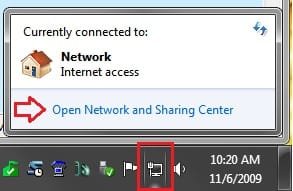
Sorry, but "Display as menu" is not an option for "Connect To". You can also open this link be left clicking on the Network icon in the taskbar Notification area. To expand it, you can click on the "Open Network and Sharing Center" link below instead.

Connect_To.jpg

Hope this helps,
Shawn
 

My Computer

Computer type
PC/Desktop
Computer Manufacturer/Model Number
Self built custom
OS
64-bit Windows 11 Pro for Workstations
CPU
Intel i7-8700K OC'd to 5 GHz
Motherboard
ASUS ROG Maximus XI Formula Z390
Memory
64 GB (4x16GB) G.SKILL TridentZ RGB DDR4 3600 MHz
Graphics Card(s)
ASUS ROG-STRIX-GTX1080TI-O11G-GAMING
Sound Card
Integrated
Monitor(s) Displays
2 x Samsung Odyssey G7 27"
Screen Resolution
2560x1440
Hard Drives
1TB Samsung 990 PRO M.2,
4TB Samsung 990 PRO PRO M.2,
TerraMaster F8 SSD Plus NAS
PSU
Seasonic Prime Titanium 850W
Case
Thermaltake Core P3
Cooling
Corsair Hydro H115i
Keyboard
Logitech wireless K800
Mouse
Logitech MX Master 4
Internet Speed
2 Gb/s Download and 100 Mb/s Upload
Antivirus
Malwarebyte Anti-Malware Premium
Browser
Google Chrome
Other Info
Logitech Z625 speaker system,
Logitech BRIO 4K Pro webcam,
HP Color LaserJet Pro MFP M477fdn,
APC SMART-UPS RT 1000 XL - SURT1000XLI,
Galaxy S23 Plus phone
@ above pic

When my pc boots , it takes literally 2 mins to left on this icon.Is it because of various services while booting?
 

My Computer

OS
Windows 7 RTM x86
CPU
AMD Athlon L1640
Motherboard
Gigabyte
Memory
2 Gb DDR2
Monitor(s) Displays
17"
Hard Drives
80 GB Samsung, 250 GB Hitachi Sata HDD
Keyboard
Microsoft
Internet Speed
Dail up :(
MS Security Essentials starts rather slowly on my machine and the wifi will not connect until MSE "allows" it to.
 
Back
Top