Where is it ?

titou56

New member
Local time
11:28 AM
Messages
2
Hi friends
icon_wink.gif


I have just upgraded Vista to Seven Premium.

I encouters two problems which I do not succeed in solving and I count on your help.

1 Some softs throw IE or Firefox instead of showing their own window:

* For instance Antivir, if I click "By the way " in the menu "Help" then IE or Firefox starts and shows a page with the elements which were before displayed in the window ANTIVIR.
* For instance Incredimail, to read or write a message, the navigator is launched instead of showing contents in the window INCREDIMAIL And there it is bluntly prejudicial!

2 very often the desk of windows is "reorganized", icons are lined up, casi by military means, to the left of the screen. For instance after a modif of option in Internet Explorer or to define a program by default.

Where can I proceed ?

Thank you for your precious help

Thank you for your help.

Titou.
 

My Computer My Computer

At a glance

seven premium
Computer Manufacturer/Model Number
DELL XPS M1710
OS
seven premium
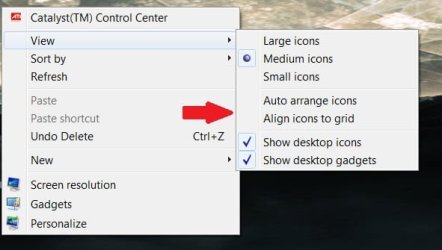
For the icons, right-click on the desktop and under view>Align icons to grid / Auto arrange icons - untick them:

icons.jpg

As for the other issues, some windows will now open in your default browser (firefox), or ignore your default browser and use IE anyway to display the information.

I'm sorry, I had trouble deciphering what you needed exactly, so I'm not sure if that answer is sufficient.
 

My Computer My Computer

At a glance

8 Pro x64i7 3770K 4.6GHz16GB G.Skill Trident X 2666mhzx2 EVGA 780 Ti Superclocked SLI
Computer type
PC/Desktop
Computer Manufacturer/Model Number
Systems by SmartEyeball
OS
8 Pro x64
CPU
i7 3770K 4.6GHz
Motherboard
ASUS P8Z77 WS
Memory
16GB G.Skill Trident X 2666mhz
Graphics Card(s)
x2 EVGA 780 Ti Superclocked SLI
Sound Card
SB X-FI Surround 5.1 PRO USB / ATH-AD900 Headphones
Monitor(s) Displays
x3 Dell U2410 / 58" Samsung
Screen Resolution
5760*1200/ 1920*1200
Hard Drives
2x Intel 520 240GB (RAID 0) * 2x WD Caviar Blacks 2TB (RAID 0) * 2TB WD Caviar Black * Sony Optirac DVD
PSU
Silverstone Strider Evolution 1200W
Case
Thermaltake Level 10 GT Snow Edition
Cooling
Noctua NH-D14
Keyboard
Topre Realforce // Ducky Shine MX Black // Filco Ninja TKL
Mouse
Thermaltake Theron (Highly Recommended) + Razer Imperator
Antivirus
MSE
Browser
IE, FF, WaterFox
Other Info
GT Extreme V2 Sim Racing Cockpit + 40" LCD and K/B Mouse stand ▼
Fanatec CSR Elite Wheel + Clubsport V1 Pedals + CSR shifter/7G-H ▼Saitek X52 Pro ▼ TrackIR 5 Pro
Buttkicker v2 Seat Rumbler with Dedicated 5.1 and Sub Woofer attached to frame ▼
=
Bloody Big Grin
Come on

Hi smarteyeball :wink:

Thank you for your fast answer. Well, I believe there is a command, somewhere, I've lost, wich can resolve my pb...

Concerning Icons the way you describe is known since XP.;) But Seven is often arranging my desktop as it wants ! Hapyly I've got "iconoid" wich resolve quickly that point.

About the launch of IE or Firefox, IMO, there is a case, somewhere, which indicate to the system to send priority to the browser uppon the soft (Antivir or Incredimail)..

best regard,

Titou
 

My Computer My Computer

At a glance

seven premium
Computer Manufacturer/Model Number
DELL XPS M1710
OS
seven premium
If you uncheck Auto-arrange Icons, it may take a few more restarts before Icons remember their placement. This is normal.

Check your Event Viewer's Admin View to see if it is generating repeat errors, which can be resolved by googling the number and some of the text.
 
But Seven is often arranging my desktop as it wants !

Do you have any applications that when opened, use a different resolution to your native 1920x1200?

ie a game that runs at 1024x768, 12800x720,1600x1200 etc?

Or do you sometimes switch to an external monitor with a lower/higher resolution than 1920x1200?

Some apps, or switching back and forth from an external monitor that adjusts the resolution will change the icon layout upon exiting or reverting.


As for the other issue, I'm sorry but I can't currently think of a work around.
 
Last edited:

My Computer My Computer

At a glance

8 Pro x64i7 3770K 4.6GHz16GB G.Skill Trident X 2666mhzx2 EVGA 780 Ti Superclocked SLI
Computer type
PC/Desktop
Computer Manufacturer/Model Number
Systems by SmartEyeball
OS
8 Pro x64
CPU
i7 3770K 4.6GHz
Motherboard
ASUS P8Z77 WS
Memory
16GB G.Skill Trident X 2666mhz
Graphics Card(s)
x2 EVGA 780 Ti Superclocked SLI
Sound Card
SB X-FI Surround 5.1 PRO USB / ATH-AD900 Headphones
Monitor(s) Displays
x3 Dell U2410 / 58" Samsung
Screen Resolution
5760*1200/ 1920*1200
Hard Drives
2x Intel 520 240GB (RAID 0) * 2x WD Caviar Blacks 2TB (RAID 0) * 2TB WD Caviar Black * Sony Optirac DVD
PSU
Silverstone Strider Evolution 1200W
Case
Thermaltake Level 10 GT Snow Edition
Cooling
Noctua NH-D14
Keyboard
Topre Realforce // Ducky Shine MX Black // Filco Ninja TKL
Mouse
Thermaltake Theron (Highly Recommended) + Razer Imperator
Antivirus
MSE
Browser
IE, FF, WaterFox
Other Info
GT Extreme V2 Sim Racing Cockpit + 40" LCD and K/B Mouse stand ▼
Fanatec CSR Elite Wheel + Clubsport V1 Pedals + CSR shifter/7G-H ▼Saitek X52 Pro ▼ TrackIR 5 Pro
Buttkicker v2 Seat Rumbler with Dedicated 5.1 and Sub Woofer attached to frame ▼
=
Bloody Big Grin
Back
Top