
Where IS Media Centre

xrjxman

New member
Local time
9:50 PM
Messages
5
I recently upgraded from XP to W7 using an official paid for disc. Initially there was a reference to Windows Media Centre on the left of the Start Button box. Somehow I have managed to lose it and have no access to media Centre.
Anyone know where I can find it on my system..OR will I have to re-install W7./..Hope not??? ordinary searches come up with nothing

Will Woodf:sarc:ord
Blackburn
UK
 

My Computer

Computer Manufacturer/Model Number
Compaq Presario `1909
OS
MS Windows 7 Home Premium 32-bit SP1
CPU
AMD Athlon 64 3500+ 51 °C Orleans 90nm Technology
Motherboard
Manufacturer ASUSTek Computer INC. Model NODUSM Version 0nF0
Memory
3gb
Graphics Card(s)
GeForce 6150 LE GPU C51PVG Device ID 10DE-0241
Sound Card
Realtek High Definition Audio Unimodem Half-Duplex Audio Dev
Monitor(s) Displays
Name Generic PnP Monitor on NVIDIA GeForce 6150 LE
Hard Drives
WDC WD25 00JS-75NCB1 SCSI Disk Device
Manufacturer Western Digital
Hopefully your searches come up empty because you search for the wrong string

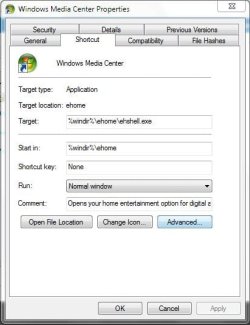
In a default installation the Media center should be here:
Code:
 %windir%\ehome\ehshell.exe
copy/paste that into a new shortcut and you'll see ;)

Capture.JPG

-DG
 

My Computer

Computer Manufacturer/Model Number
HP m8000n
OS
Windows 7 Ultimate x86
CPU
DualCore AMD Athlon 64 X2, 2600 MHz 5200+
Motherboard
Asus M2N68-LA (Narra)
Memory
Samsung 2GB DDR2
Graphics Card(s)
Onboard NVIDIA GeForce 6150SE nForce 430
Sound Card
Onboard nVIDIA nForce 6100-430 (MCP61P)
Monitor(s) Displays
Westinghouse 19" LED
Screen Resolution
1280x1024
Hard Drives
SATA II Seagate Barracuda 500GB
USB II WD Elements 500GB
USB II WD My Book 1TB
USB II WD My Book 2TB
PSU
Stock (HP)
Case
Stock (HP)
Cooling
Stock
Keyboard
Logitech Classic KB 200
Mouse
Standard HP opticle USB mouse
The search I have done is only by entering Windows Media Centre into the search box just above the start button. It finds nothing. I have checked in the ("c**P") Windows 7 version of explorer but again NO TRACE.

I cannot get the Windows Media Centre box shown on your reply to paste anything. Just creating a new shortcut on the desktop and pasting gets an error message sayin string NOT FOUND??????!?!?!?
 

My Computer

Computer Manufacturer/Model Number
Compaq Presario `1909
OS
MS Windows 7 Home Premium 32-bit SP1
CPU
AMD Athlon 64 3500+ 51 °C Orleans 90nm Technology
Motherboard
Manufacturer ASUSTek Computer INC. Model NODUSM Version 0nF0
Memory
3gb
Graphics Card(s)
GeForce 6150 LE GPU C51PVG Device ID 10DE-0241
Sound Card
Realtek High Definition Audio Unimodem Half-Duplex Audio Dev
Monitor(s) Displays
Name Generic PnP Monitor on NVIDIA GeForce 6150 LE
Hard Drives
WDC WD25 00JS-75NCB1 SCSI Disk Device
Manufacturer Western Digital
Have you turned off the media center in "Turn window features on/off"? In Control panel (small icons view), click on Programs and Features, then in the left pane, click "Turn windows features....". Make sure, media center is not disabled.
 

My Computer

Computer Manufacturer/Model Number
Too many to describe...
OS
Windows 7 x64 pro/ Windows 7 x86 Pro/ XP SP3 x86
First of all, assuming this is a very recent upgrade to Windows 7 and you probably havent touched anything with regards to Windows Media Center, my question is: what version of Windows 7 are you using???

If you are using Windows 7 Starter or Home Basic Edition, those versions of Windows 7 have NO Windows Media Center included.


You got to have Windows 7 Home Premium or the higher versions of Windows 7 to have Media Center included.
 

My Computer

Computer Manufacturer/Model Number
Custom Built
OS
Windows 7 Ultimate 32 Bit, Windows Developer Preview, Linux Mint 9 Gnome 32 Bit
CPU
Intel Pentium Dual CPU E2180@2GHz
Motherboard
Elitegroup 671T-M3
Graphics Card(s)
NVIDIA GeForce 7200 GS
Monitor(s) Displays
AOC TFT1560 15" LCD Monitor
Screen Resolution
1024x768
Keyboard
Logitech USB Keyboard
MS Windows 7 Home Premium 32-bit SP1
Installation Date: 04 May 2011, 15:23
Serial Number: [removed]
Windows Security Center
User Account Control (UAC) Enabled
Notify level 1 - Rare Notify
Firewall Enabled
Windows Update
AutoUpdate Download Automatically and Install at Set Scheduled time
Schedule Frequency Every day
Schedule Time 3 am
Windows Defender
Windows Defender Disabled
Antivirus
Antivirus Enabled
Company Name Avira GmbH
Display Name AntiVir Desktop
Product Version 10.0.1.58
TimeZone
TimeZone GMT
TimeZone GMT 0 Hours
Language English
Country United Kingdom
Currency £
Date Format dd/MM/yyyy
Time Format HH:mm:ss
Power Profile
Active power scheme Home/Office Desk
Hibernation Enabled
Scheduler
Disabled ASC4_PerformanceMonitor
Disabled Windows Codec Update Service
Hotfixes
Services
Device Tree
 
Last edited by a moderator:

My Computer

Computer Manufacturer/Model Number
Compaq Presario `1909
OS
MS Windows 7 Home Premium 32-bit SP1
CPU
AMD Athlon 64 3500+ 51 °C Orleans 90nm Technology
Motherboard
Manufacturer ASUSTek Computer INC. Model NODUSM Version 0nF0
Memory
3gb
Graphics Card(s)
GeForce 6150 LE GPU C51PVG Device ID 10DE-0241
Sound Card
Realtek High Definition Audio Unimodem Half-Duplex Audio Dev
Monitor(s) Displays
Name Generic PnP Monitor on NVIDIA GeForce 6150 LE
Hard Drives
WDC WD25 00JS-75NCB1 SCSI Disk Device
Manufacturer Western Digital
Are you nuts? Dont post the product key.
 

My Computer

Computer Manufacturer/Model Number
Too many to describe...
OS
Windows 7 x64 pro/ Windows 7 x86 Pro/ XP SP3 x86
Nuts..I am.!!!!

Just meant to copy and paste the top line and got distracted doing the pasting so didnt check before sending.
Thanks for zapping it so quickly!!
WW
 

My Computer

Computer Manufacturer/Model Number
Compaq Presario `1909
OS
MS Windows 7 Home Premium 32-bit SP1
CPU
AMD Athlon 64 3500+ 51 °C Orleans 90nm Technology
Motherboard
Manufacturer ASUSTek Computer INC. Model NODUSM Version 0nF0
Memory
3gb
Graphics Card(s)
GeForce 6150 LE GPU C51PVG Device ID 10DE-0241
Sound Card
Realtek High Definition Audio Unimodem Half-Duplex Audio Dev
Monitor(s) Displays
Name Generic PnP Monitor on NVIDIA GeForce 6150 LE
Hard Drives
WDC WD25 00JS-75NCB1 SCSI Disk Device
Manufacturer Western Digital
Nuts..I am.!!!!

Just meant to copy and paste the top line and got distracted doing the pasting so didnt check before sending.
Thanks for zapping it so quickly!!
WW
Have you tried the solution provided by Bill2 on the above post yet? That would be to turn Windows features on for Windows Media Center?
 

My Computer

Computer Manufacturer/Model Number
Custom Built
OS
Windows 7 Ultimate 32 Bit, Windows Developer Preview, Linux Mint 9 Gnome 32 Bit
CPU
Intel Pentium Dual CPU E2180@2GHz
Motherboard
Elitegroup 671T-M3
Graphics Card(s)
NVIDIA GeForce 7200 GS
Monitor(s) Displays
AOC TFT1560 15" LCD Monitor
Screen Resolution
1024x768
Keyboard
Logitech USB Keyboard
Tea time over here in the Uk. Wife's had a new hip so I am chief cook and bottle washer. Been away from PC.

Just done the above and found that Media Centre was NOT ticked. It is NOW and the system is still working.

Watch this space and thanks to ALL in anticipation of a result.

WW
 

My Computer

Computer Manufacturer/Model Number
Compaq Presario `1909
OS
MS Windows 7 Home Premium 32-bit SP1
CPU
AMD Athlon 64 3500+ 51 °C Orleans 90nm Technology
Motherboard
Manufacturer ASUSTek Computer INC. Model NODUSM Version 0nF0
Memory
3gb
Graphics Card(s)
GeForce 6150 LE GPU C51PVG Device ID 10DE-0241
Sound Card
Realtek High Definition Audio Unimodem Half-Duplex Audio Dev
Monitor(s) Displays
Name Generic PnP Monitor on NVIDIA GeForce 6150 LE
Hard Drives
WDC WD25 00JS-75NCB1 SCSI Disk Device
Manufacturer Western Digital
Thanks guys (& girls?), particularly SledgeDG, worked but second time. First time said that it could not make shortcut but renamed it (i.e. Media Center) anyway. Second time said file with that name already existed on desktop - do I want to replace it?... or whatever... hell yes! It appears with the right icon and all. Perseverance pays off... that or subborn bloody-mindedness and a refusal to accept reality. :)

This appeared third in Google to the query "media center where is it" so still relevant after all this time. Groovy. Thanks again SevenForums.
 

My Computer

OS
XP, Win 7 x64 & x32
Thank you Thank you!!!!!!

Hopefully your searches come up empty because you search for the wrong string

In a default installation the Media center should be here:
Code:
 %windir%\ehome\ehshell.exe
copy/paste that into a new shortcut and you'll see ;)

View attachment 153930

-DG

Worked perfectly......:party:
 

My Computer

OS
windows home premium7 32 bit
Motherboard
Asus M2N-E
Memory
3g
Graphics Card(s)
Nvidia
Monitor(s) Displays
HP L2045w
Back
Top