Where is the location for the windows logon script?

tomcolgan

New member
Local time
10:19 AM
Messages
6
I am looking for the location for the windows logon script file. I need to compare two script files
The issue that I am having is that one laptop is not automatically mapping network drives even though the user is in the correct active directory group.
Another user is in the same group and has the network drive mapped, so I need to compare both logon scripts from both laptops.
Maybe these scripts can be read or edited in notepad but I need the location if anybody can help? :D
 

My Computer

Computer type
Laptop
Computer Manufacturer/Model Number
HP
OS
Windows 7 Enterprise 64bit
CPU
i5
Memory
6GB RAM
Graphics Card(s)
AMD Radeon HD 7570M
Hard Drives
300GB
Antivirus
Symantec
Browser
IE11
Hello Tomcolgan,

To find the location of a user's logon script, while logged in as the user, run the command:
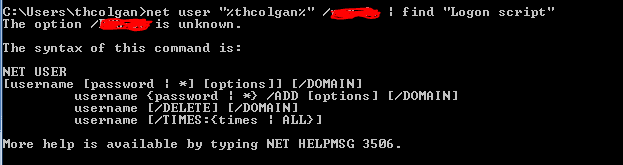
net user "%USERNAME%" | find "Logon script"
or for a domain user,
net user "%USERNAME%" /domain | find "Logon script"
 

My Computer

Computer type
PC/Desktop
OS
Windows 10, Windows 8.1 Pro, Windows 7 Professional, OS X El Capitan
Thanks for your reply but can you check my screenshot it doesn't seem to work

in the username part am I to use only LDAP or full email address for domain user

also in the domain part do I put in my domain or leave it as domain
 

Attachments

  • Capture.PNG
    Capture.PNG
    8.3 KB · Views: 37

My Computer

Computer type
Laptop
Computer Manufacturer/Model Number
HP
OS
Windows 7 Enterprise 64bit
CPU
i5
Memory
6GB RAM
Graphics Card(s)
AMD Radeon HD 7570M
Hard Drives
300GB
Antivirus
Symantec
Browser
IE11
You should use the exact command as Pyprohly suggested in bold. Copy and paste it :)
 

My Computer

Computer type
Laptop
Computer Manufacturer/Model Number
HP Elitebook 8540p
OS
Windows 7 Pro 32
CPU
Intel(R) Core(TM) i5 CPU M 540 @ 2.53GHz
Motherboard
Hewlett-Packard 1521
Memory
4,00 GB (Usable 2,98)
Graphics Card(s)
NVIDIA NVS 5100M
Sound Card
NVIDIA High Definition Audio
Screen Resolution
1600x900
Hard Drives
INTEL SSDSA2CW120G3
Antivirus
F-Secure Internet Security
Browser
IE, Firefox, Opera
Other Info
Sandboxie,
SRP (Software Restriction Policy),
EMET (Enhanced Mitigation Experience Toolkit),
WFC (Windows Firewall Control by BiniSoft),
Malwarebytes Premium
Okay thanks I'll give this a try in work tomorrow! And I will revert back :)
 

My Computer

Computer type
Laptop
Computer Manufacturer/Model Number
HP
OS
Windows 7 Enterprise 64bit
CPU
i5
Memory
6GB RAM
Graphics Card(s)
AMD Radeon HD 7570M
Hard Drives
300GB
Antivirus
Symantec
Browser
IE11
Okay so I copied and pasted it in and nothing came back only the words Logon Script
 

Attachments

  • Capture7.PNG
    Capture7.PNG
    1.6 KB · Views: 24

My Computer

Computer type
Laptop
Computer Manufacturer/Model Number
HP
OS
Windows 7 Enterprise 64bit
CPU
i5
Memory
6GB RAM
Graphics Card(s)
AMD Radeon HD 7570M
Hard Drives
300GB
Antivirus
Symantec
Browser
IE11

My Computer

Computer type
PC/Desktop
Computer Manufacturer/Model Number
Dell optiplex 740
OS
Win 7 Home Premium SP1 32 bit
CPU
AMD Athlon 64 X2 5000B
Motherboard
Dell Inc. 0YP696 (Socket M2 )
Memory
4.00 GB Dual-Channel DDR2 @ 370MHz (6-6-6-18)
Graphics Card(s)
Acer E181H (1366x768@60Hz) 64MB GeForce 6150 LE (Dell)
Sound Card
SigmaTel High Definition Audio CODEC
Monitor(s) Displays
Acer E181H (1366x768@60Hz) 64MB GeForce 6150 LE (Dell)
Hard Drives
699GB Seagate ST375064 0NS SCSI Disk Device (ATA)
Case
Mini tower
Internet Speed
Ping 36 ms, Download 57.71 mbps , Upload 11.79mbps
Antivirus
Free Avast. Pro paid Mbam , Free Sas
Browser
Palemoon .
Okay so I copied and pasted it in and nothing came back only the words Logon Script

Then there is no logon script assigned to the user. However, this logon script feature isn't the only method one can go about for executing a script during logon.

Every user has a Startup folder. Each item in this Startup folder is invoked during a user's logon phase. It's rather informal for a domain administrator to setup user accounts this way, but it does get the job done.

The location of a user's Startup folder is
C:\Users\%USERNAME%\AppData\Roaming\Microsoft\Windows\Start Menu\Programs\Startup
or the Startup folder for all users on the machine,
C:\ProgramData\Microsoft\Windows\Start Menu\Programs\Startup

Try checking those locations for the logon script.
 

My Computer

Computer type
PC/Desktop
OS
Windows 10, Windows 8.1 Pro, Windows 7 Professional, OS X El Capitan
Okay so I copied and pasted it in and nothing came back only the words Logon Script

Then there is no logon script assigned to the user. However, this logon script feature isn't the only method one can go about for executing a script during logon.

Every user has a Startup folder. Each item in this Startup folder is invoked during a user's logon phase. It's rather informal for a domain administrator to setup user accounts this way, but it does get the job done.

The location of a user's Startup folder is
C:\Users\%USERNAME%\AppData\Roaming\Microsoft\Windows\Start Menu\Programs\Startup
or the Startup folder for all users on the machine,
C:\ProgramData\Microsoft\Windows\Start Menu\Programs\Startup

Try checking those locations for the logon script.


Found nothing, would you know what the script file is? e.g .bat .exe .ini
 

My Computer

Computer type
Laptop
Computer Manufacturer/Model Number
HP
OS
Windows 7 Enterprise 64bit
CPU
i5
Memory
6GB RAM
Graphics Card(s)
AMD Radeon HD 7570M
Hard Drives
300GB
Antivirus
Symantec
Browser
IE11
Can you run the commands Pyprohly gave you for the PC/user that does work correctly ?
If you find the working script, can you copy it to the PC/user (same location) that doesn't work?
Maybe that will help ???
 

My Computer

Computer type
PC/Desktop
Computer Manufacturer/Model Number
home built
OS
Multi-Boot W7_Pro_x64 W8.1_Pro_x64 W10_Pro_x64 +Linux_VMs +Chromium_VM
CPU
AMD Athlon II x4 620
Motherboard
Gigabyte GA-MA785G-UD3H
Memory
6GB GSkill DDR2 800
Graphics Card(s)
AMD 4670 GPU + AMD 4200 IGP
Sound Card
on board Realtek ALC889A
Monitor(s) Displays
RCA 40" LCD TV, Insignia 32" LCD TV, HP 15" LCD monitor
Screen Resolution
1680 x 1050
Hard Drives
OCZ Vertex 3 120GB,
Samsung F3 1TB (3),
Several others - WD, Seagate, Hitachi, ...
PSU
Corsair 500 W
Case
Rosewill mid tower
Cooling
CM 90mm rifle
Keyboard
Gyration wireless, Logitech wireless, Dell USB wired
Mouse
Gyration wireless, Logitech wireless, V7 USB wired
Internet Speed
Spectrum - 100Mbps D / 10Mbps U
Antivirus
Avast, MBAM3, EMET, WinPatrol
Browser
Pale Moon, Firefox, IE
Other Info
2 multi-boot PC's
Mainly HTPC/Office/Gen purpose (no gaming).
Trendnet USB KVM.
LG DVD burner/Blue Ray Player.
Tray system for removable SATA backup drives.

Not currently OCd, under-volted.
I use Hybrid sleep, rarely re-boot or shutdown.

Hauppauge HD-PVR, Avermedia PCIe TV Tuner, Hauppauge PCI TV Tuner.
The logon script might be a task triggered through Task Scheduler. That's my final guess.


Found nothing, would you know what the script file is?

It's likely either a .bat or .vbs file (more likely .vbs). You can try searching the entire user's home folder for these file extensions with the following command. (Added in .js and .ps1 script types just incase)

Code:
dir "C:\Users\%USERNAME%\*.bat" "*.vbs" "*.js" "*.ps1" /a /b /s

I doubt you'll find any script though. Might have to give the person who set up the user accounts a ring.
 

My Computer

Computer type
PC/Desktop
OS
Windows 10, Windows 8.1 Pro, Windows 7 Professional, OS X El Capitan
Back
Top