where is the Search box?

yali

New member
Local time
3:36 AM
Messages
6
Hi, I have win 7 ultimate
and IT doesnt have the sear box, in the start menu and in the windows either.

I have tried many options, like in windows explorer, the windows search is checked, eveything about the searching checkbox are checked, and still
dont have the search box!
the other option I tried, is in the folder options, well many forums says that you need to check the search option, but in my little folder option window, it doesnt even have the search button to click it!!, windows-organize-folder option, just have folder general and view!


HOW CAN I ADD THE SEARCH BOX?

please somebody answer me with a right answer.
 

My Computer My Computer

Computer Manufacturer/Model Number
VGN-NR498E
OS
WIN7
Memory
3 GB
Graphics Card(s)
INtel
Hello Yali, and welcome to Seven Forums.

Did you have Windows Search checked in Windows Features to have it turned on?

Hope this helps,
Shawn
 

My Computer My Computer

Computer type
PC/Desktop
Computer Manufacturer/Model Number
Self built custom
OS
64-bit Windows 11 Pro for Workstations
CPU
Intel i7-8700K OC'd to 5 GHz
Motherboard
ASUS ROG Maximus XI Formula Z390
Memory
64 GB (4x16GB) G.SKILL TridentZ RGB DDR4 3600 MHz
Graphics Card(s)
ASUS ROG-STRIX-GTX1080TI-O11G-GAMING
Sound Card
Integrated
Monitor(s) Displays
2 x Samsung Odyssey G7 27"
Screen Resolution
2560x1440
Hard Drives
1TB Samsung 990 PRO M.2,
4TB Samsung 990 PRO PRO M.2,
TerraMaster F8 SSD Plus NAS
PSU
Seasonic Prime Titanium 850W
Case
Thermaltake Core P3
Cooling
Corsair Hydro H115i
Keyboard
Logitech wireless K800
Mouse
Logitech MX Master 4
Internet Speed
2 Gb/s Download and 100 Mb/s Upload
Antivirus
Malwarebyte Anti-Malware Premium
Browser
Google Chrome
Other Info
Logitech Z625 speaker system,
Logitech BRIO 4K Pro webcam,
HP Color LaserJet Pro MFP M477fdn,
APC SMART-UPS RT 1000 XL - SURT1000XLI,
Galaxy S23 Plus phone
Yes it is cheked !
 

My Computer My Computer

Computer Manufacturer/Model Number
VGN-NR498E
OS
WIN7
Memory
3 GB
Graphics Card(s)
INtel
Have you already tried doing a system restore using a restore point dated before the search box went missing?

If you did, then you may need to do a Factory System Recovery to reinstall Windows 7 with to fix this. Be sure to backup anything that you do not want to lose first.
 

My Computer My Computer

Computer type
PC/Desktop
Computer Manufacturer/Model Number
Self built custom
OS
64-bit Windows 11 Pro for Workstations
CPU
Intel i7-8700K OC'd to 5 GHz
Motherboard
ASUS ROG Maximus XI Formula Z390
Memory
64 GB (4x16GB) G.SKILL TridentZ RGB DDR4 3600 MHz
Graphics Card(s)
ASUS ROG-STRIX-GTX1080TI-O11G-GAMING
Sound Card
Integrated
Monitor(s) Displays
2 x Samsung Odyssey G7 27"
Screen Resolution
2560x1440
Hard Drives
1TB Samsung 990 PRO M.2,
4TB Samsung 990 PRO PRO M.2,
TerraMaster F8 SSD Plus NAS
PSU
Seasonic Prime Titanium 850W
Case
Thermaltake Core P3
Cooling
Corsair Hydro H115i
Keyboard
Logitech wireless K800
Mouse
Logitech MX Master 4
Internet Speed
2 Gb/s Download and 100 Mb/s Upload
Antivirus
Malwarebyte Anti-Malware Premium
Browser
Google Chrome
Other Info
Logitech Z625 speaker system,
Logitech BRIO 4K Pro webcam,
HP Color LaserJet Pro MFP M477fdn,
APC SMART-UPS RT 1000 XL - SURT1000XLI,
Galaxy S23 Plus phone
WELL, I cant do a system restore because I just got it, and I nevede had the search box, isnt an easy way to just add the search box?, Do I have to do the factory restore??
 

My Computer My Computer

Computer Manufacturer/Model Number
VGN-NR498E
OS
WIN7
Memory
3 GB
Graphics Card(s)
INtel
Seems bizarre for a clean fresh install -- out of the box :confused:
 

My Computer My Computer

OS
Windows XP - Now Windows 7 Home Premium (64-bit).
As a test, uncheck Windows Search in Windows Features and click on OK, then check it and click on OK. Restart if prompted to do so.
 

My Computer My Computer

Computer type
PC/Desktop
Computer Manufacturer/Model Number
Self built custom
OS
64-bit Windows 11 Pro for Workstations
CPU
Intel i7-8700K OC'd to 5 GHz
Motherboard
ASUS ROG Maximus XI Formula Z390
Memory
64 GB (4x16GB) G.SKILL TridentZ RGB DDR4 3600 MHz
Graphics Card(s)
ASUS ROG-STRIX-GTX1080TI-O11G-GAMING
Sound Card
Integrated
Monitor(s) Displays
2 x Samsung Odyssey G7 27"
Screen Resolution
2560x1440
Hard Drives
1TB Samsung 990 PRO M.2,
4TB Samsung 990 PRO PRO M.2,
TerraMaster F8 SSD Plus NAS
PSU
Seasonic Prime Titanium 850W
Case
Thermaltake Core P3
Cooling
Corsair Hydro H115i
Keyboard
Logitech wireless K800
Mouse
Logitech MX Master 4
Internet Speed
2 Gb/s Download and 100 Mb/s Upload
Antivirus
Malwarebyte Anti-Malware Premium
Browser
Google Chrome
Other Info
Logitech Z625 speaker system,
Logitech BRIO 4K Pro webcam,
HP Color LaserJet Pro MFP M477fdn,
APC SMART-UPS RT 1000 XL - SURT1000XLI,
Galaxy S23 Plus phone

My Computer My Computer

Computer type
PC/Desktop
Computer Manufacturer/Model Number
Self Built
OS
Windows 7 Ultimate 64bit
CPU
AMD Phenom Quad core 9950 black edition
Motherboard
Gigabyte
Memory
16Gb
Graphics Card(s)
2x XFX Radeon 5850
Sound Card
PCI Express X-Fi Titanium / Logitech G35
Monitor(s) Displays
2x HP 2410i
Screen Resolution
1920x1080
Hard Drives
2x 500Gb Seagate
1x 300Gb Seagate
1x 1Tb Seagate
2x 1Tb Hitatchi
PSU
Jean Tech Storm 700W
Case
Cooler Master COSMOS S
Cooling
Akasa Evo Blue Pro
Keyboard
Logitech G15
Mouse
Mad Catz M.M.O. 7
Internet Speed
12mb
Excellent idea PMUK (would rather abbreviate your handle lol).
 

My Computer My Computer

OS
Windows XP - Now Windows 7 Home Premium (64-bit).
pooman Uk- if I dont have the search box, the windows+f, obviously DONT WORK

Brink.- I uncheked the windows search, pressed ok, but a warning advice says, that the changes are not made, so the windows search option is still checked! even if I uncheck it.

so I did it twice, and a restart prompt, so I did it, and is still checked.

is there somebody from Microsoft who can Help me and tell me what to do? do I have to install the whole Win7 again?? What do I do, I cant find my homework!
 
Last edited:

My Computer My Computer

Computer Manufacturer/Model Number
VGN-NR498E
OS
WIN7
Memory
3 GB
Graphics Card(s)
INtel
To go back to the original post the "Search Box" is here:
 
Last edited:

My Computer My Computer

Computer type
PC/Desktop
OS
Microsoft Windows 7 Home Premium 64-bit 7601 Multiprocessor Free Service Pack 1
CPU
Intel(R) Core(TM) i7-3770 CPU @ 3.40GHz
Motherboard
ASUSTeK COMPUTER INC. P8H77-M
Memory
8.00 GB
Graphics Card(s)
Intel(R) HD Graphics 4000
Sound Card
On Board
Monitor(s) Displays
Dell 24"
Screen Resolution
1920 x 1080
Hard Drives
(1) INTEL SSDSC2CT180A3 ATA Device (2) ST500DM002-1BD142 ATA Device (3) WDC WD3200AAKS-75L9A0 ATA Device (4) Generic- Compact Flash USB Device (5) Generic- MS/MS-Pro USB Device (6) Generic- SD/MMC USB Device (7) Generic- SM/xD-Picture USB
PSU
500w Corsair
Case
Cooler Master
Cooling
3 Fans
Keyboard
Logitech MK300
Mouse
Logitech WOM
Internet Speed
75Mb
Antivirus
Norton 360
Browser
Firefox, Opera, IE

My Computer My Computer

OS
window's 7
CPU
core 2 quad
Motherboard
gigabyte
Memory
2gb corsair
Graphics Card(s)
ati hd4850
Monitor(s) Displays
lg
Screen Resolution
1600 X 900
Case
power logic
Other Info
none of the spec above is accurate
Event Viewer?

Have you checked event viewer?
 

My Computer My Computer

Computer Manufacturer/Model Number
iBuyPower
OS
windows seven
CPU
Phenom II x2 3.1
Motherboard
asus
Memory
4 gigs
Graphics Card(s)
Nvidia GTS 250
Monitor(s) Displays
23in Acre
event viewer

No I havent tried, what is it?
 

My Computer My Computer

Computer Manufacturer/Model Number
VGN-NR498E
OS
WIN7
Memory
3 GB
Graphics Card(s)
INtel
Go to search, type the words event viewer. You can see what errors ocurred at any time that you choose.
 

My Computer My Computer

Computer type
PC/Desktop
Computer Manufacturer/Model Number
Dell XPS 420
OS
Windows 10, Home Clean Install
CPU
Intel Core2 processsor Q8200(2.33Ghz 1333FSB) Quad Core Tech
Motherboard
Dell
Memory
6 gb
Graphics Card(s)
ATI Radeon 256MB HD3650
Sound Card
Intergrated 7.1 Channel Audio
Monitor(s) Displays
Dell SP2009W 20"
Hard Drives
640 GB Serial ATA Hard drive
Cooling
Fan
Keyboard
Dell USB Keyboard
Mouse
Dell Premium Optical USB
Internet Speed
DSL 2.85

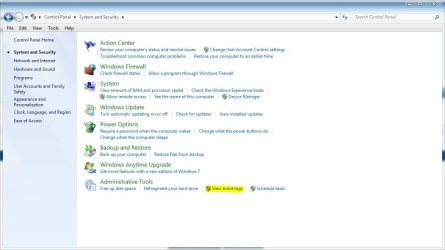
Type event viewer in search


Sorry, It's right here in control panel. :D
 

Attachments

  • event.JPG
    event.JPG
    73 KB · Views: 12

My Computer My Computer

Computer type
PC/Desktop
Computer Manufacturer/Model Number
Self Built
OS
Win 10 Pro x64
CPU
Intel I5-2500K @3.3GHz
Motherboard
Asrock P67 Extreme4
Memory
16GB G.Skill Ripjaws X (4x4GB)
Graphics Card(s)
EVGA GeForce 750 Ti SC 2GB
Sound Card
ASUS Xonar DG 5.1 Channels 24-bit 96KHz PCI Interface Sound
Monitor(s) Displays
auria eq2367
Screen Resolution
1920 x 1080
Hard Drives
250GB Samsung 850 EVO SSD
1TB WD Blue
1TB Hitachi
PSU
SeaSonic X 650W 80 Plus Gold
Case
Corsair Obsidian 750D
Cooling
Corsair H60, Three 140mm case fans
Keyboard
Logitech Wireless Keyboard K520
Mouse
Logitech Wireless Mouse M310
Internet Speed
Wave Broadband ~ 100 dn 5 up
Antivirus
Windows Defender, Malwarebytes Premium
Browser
Edge, IE11, Chrome
Other Info
Laptop specs: HP g7-1365dx /
CPU: AMD A6-3420M APU with Radeon(tm) HD Graphics /
RAM: Crucial 8Gb (2x4Gb) /
SSD: Crucial M4-CT128M4SSD2 ATA Device/ FW 000F /
GFX: AMD Radeon HD 6520G /
OS: Windows 10 Pro x64
Do you get a Search Computer box here ?
 

Attachments

  • Search_Computer_Box.JPG
    Search_Computer_Box.JPG
    41 KB · Views: 5

My Computer My Computer

Computer Manufacturer/Model Number
Home Built
OS
Win XP - Win7 Pro on Compaq Laptop
CPU
Intel Pent 4 2.8ghz
Motherboard
D865PERL
Memory
512mb currently up to 4gb Max!
Graphics Card(s)
nVidia FX 5200
Sound Card
on board
Monitor(s) Displays
17" CRT Currently
Hard Drives
WD 80gb currently, Two SATA HD connections available on MB
Memorex DVD R/W Double Layer 16x drive
6 USB ports
PSU
stock
Case
Generic
Cooling
2 fans
Keyboard
Standard Keyboard
Mouse
Optical mouse
Internet Speed
Cable Internet

My Computer My Computer

OS
window's 7
CPU
core 2 quad
Motherboard
gigabyte
Memory
2gb corsair
Graphics Card(s)
ati hd4850
Monitor(s) Displays
lg
Screen Resolution
1600 X 900
Case
power logic
Other Info
none of the spec above is accurate
Go to search, type the words event viewer. You can see what errors ocurred at any time that you choose.

No search box Rich.:)
 

My Computer My Computer

Computer type
PC/Desktop
Computer Manufacturer/Model Number
Self Built
OS
Win 10 Pro x64
CPU
Intel I5-2500K @3.3GHz
Motherboard
Asrock P67 Extreme4
Memory
16GB G.Skill Ripjaws X (4x4GB)
Graphics Card(s)
EVGA GeForce 750 Ti SC 2GB
Sound Card
ASUS Xonar DG 5.1 Channels 24-bit 96KHz PCI Interface Sound
Monitor(s) Displays
auria eq2367
Screen Resolution
1920 x 1080
Hard Drives
250GB Samsung 850 EVO SSD
1TB WD Blue
1TB Hitachi
PSU
SeaSonic X 650W 80 Plus Gold
Case
Corsair Obsidian 750D
Cooling
Corsair H60, Three 140mm case fans
Keyboard
Logitech Wireless Keyboard K520
Mouse
Logitech Wireless Mouse M310
Internet Speed
Wave Broadband ~ 100 dn 5 up
Antivirus
Windows Defender, Malwarebytes Premium
Browser
Edge, IE11, Chrome
Other Info
Laptop specs: HP g7-1365dx /
CPU: AMD A6-3420M APU with Radeon(tm) HD Graphics /
RAM: Crucial 8Gb (2x4Gb) /
SSD: Crucial M4-CT128M4SSD2 ATA Device/ FW 000F /
GFX: AMD Radeon HD 6520G /
OS: Windows 10 Pro x64
no search box at all

I cant type anything in the search box, because I do not have it , in the start menu and in the windows either.


the event viewer are to look for your events, does not help at all seeking for the search box!
 

My Computer My Computer

Computer Manufacturer/Model Number
VGN-NR498E
OS
WIN7
Memory
3 GB
Graphics Card(s)
INtel
Back
Top