Where to Obtain Drivers when Mfr Website has none?

byzantine

New member
Member
Local time
8:16 PM
Messages
53
Hi, It looks like I need some drivers for my internal 56K dialup modem, since my Windows 7 doesn't have them. It's an old modem and needs the old drivers, I guess. Since it is an Askey Computer Corporation modem, I searched for a download from the Askey website. They don't even mention downloads. So I will have to deviate from the prime directive of only downloading drivers from the mfr website! I see there are a bunch of websites that say they have what I need, including model number, fcc number, Askey brand name and everything. Websites like modemdriver.com, driverguide.com, nodevice.com, modem-drivers.com, driverzone.com, download.cnet.com and more. Is one of these sites better than the others? Will I be taking a chance of getting bloatware or worse in the download? I would think CNET would be the safest site. Opinions, advice? Thanks
 

My Computer My Computer

At a glance

windows 7 32 bit
Computer type
PC/Desktop
Computer Manufacturer/Model Number
custom
OS
windows 7 32 bit
Motherboard
asus ??
Hard Drives
maxtor 75 g
Browser
firefox
Cnet requires installing their software and still can have bloatware.
Might be better off buying a new model that comes with Win 7 drivers.

Most of the driver sites will list what they tell you is out of date and that they have the drivers but that is not always the case and in all of those sites I've seen you have to pay for their drivers.
 

My Computer My Computer

At a glance

Windows 10 64 bitIntel i7 6700K16GB Corsair DominatorIntel CPU Graphics
Computer type
PC/Desktop
Computer Manufacturer/Model Number
My Own Build
OS
Windows 10 64 bit
CPU
Intel i7 6700K
Motherboard
ASUS ROG Maximus VIII Hero
Memory
16GB Corsair Dominator
Graphics Card(s)
Intel CPU Graphics
Sound Card
RealTek
Monitor(s) Displays
27" Dell S2719dgf
Screen Resolution
2560X1440
Hard Drives
1 TB Samsung 850 EVO SSD for Win 10 Pro
500GB Samsung 850 EVO SSD for Win 10 Insider
2 TB drive for backup
PSU
EVGA Supernova 750G2
Case
BeQuiet Silent Base 600
Cooling
Deepcool Captain 120EX
Keyboard
Microsoft Wireless 2000
Mouse
Microsoft wireless
Internet Speed
100 MB/sec (Cable)
Antivirus
Microsoft Defender and Malwarebytes
Browser
Edge/Firefox
Other Info
Cakewalk (Sonar) by BandLab and Studio One 4.1 Pro recording studio software. MOTU 896Mk3 Hybrid recording interface, Frontier Tranzport wireless control unit, Behringer X-Touch Control Surface.
Five USB connected optical drives for CD Audio production using Nero BurningROM
Hi Byzantine,
INCORRECT
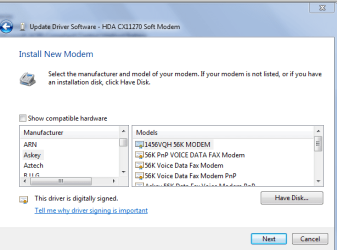
MS does have W7 drivers for Askey modems see screenshot,
it only shows some of them
device manager > modem > update driver >> browse >> let me pick choose >> uncheck show compatible hardware.

take your pick

Roy
 

Attachments

  • modem1.PNG
    modem1.PNG
    18.2 KB · Views: 42

My Computer My Computer

At a glance

W7 home premium 32bit/W7HP 64bit/w10 tp insid...E5300 dual core3gbNvidia Geforce 7100 Nforce 630i
Computer type
PC/Desktop
Computer Manufacturer/Model Number
medionl/Aspire 6930G/acer x55a
OS
W7 home premium 32bit/W7HP 64bit/w10 tp insider ring
CPU
E5300 dual core
Motherboard
medion MS7366
Memory
3gb
Graphics Card(s)
Nvidia Geforce 7100 Nforce 630i
Monitor(s) Displays
avixc
Internet Speed
n (isp resticted to 72)
Antivirus
mse/pands
Browser
palemoon
Other Info
Belkin Fd7050 n USB using Railink RT2870 drivers, more upto date
Nice to see someone using 56k modem. Ever since I was 9 years old I wanted to experience how fast can such internet connection keep up with today's standards.
 

My Computer My Computer

At a glance

Windows 7 Home Premium 64-BITAMD A8 7200P8GB 1600mhzRadeon R5 (APU) + Radeon R5 M230 2GB Dual Gra...
Computer type
PC/Desktop
Computer Manufacturer/Model Number
ASUS X550ZE
OS
Windows 7 Home Premium 64-BIT
CPU
AMD A8 7200P
Motherboard
N/A
Memory
8GB 1600mhz
Graphics Card(s)
Radeon R5 (APU) + Radeon R5 M230 2GB Dual Graphics
Sound Card
Realtek ALC269 with SonicMaster
Monitor(s) Displays
Laptop Display
Screen Resolution
1920 x 1080 @60hz
Hard Drives
WDC WD50 00LPVX-80V0TT0 (500GB)
PSU
Laptop Charger
Mouse
ARMAGGEDON TEXTRON SCORPION 7
Internet Speed
100 mbps DOWN / 50 mbps UP
Antivirus
Windows Defender
Browser
Mozzila FireFox, Valve Steam in-game internet browser
Nice to see someone using 56k modem. Ever since I was 9 years old I wanted to experience how fast can such internet connection keep up with today's standards.

My 1st modem was a 'Practical Peripherals' 14.4, a real rocket, , ,

-c-
 

My Computer My Computer

At a glance

Windows 7 Home Premium bitamd?4 gig
Computer type
Laptop
Computer Manufacturer/Model Number
toshiba 505
OS
Windows 7 Home Premium bit
CPU
amd?
Motherboard
?
Memory
4 gig
Monitor(s) Displays
Samsung S27D360 &S24D300 - Acer K222HQL - Eizo 21" (4x3)
Screen Resolution
1280 x 720 -1600x900 - (eizo 1024x768
Hard Drives
240 ssd
PSU
amd (?)
Mouse
logitech tackball
Antivirus
360 total security
Browser
firefox portable 29.0.1
Torchwood. You rule! Yes, I found a matching model number of my Askey modem in the device manager list. DM had a 7 digit model number which matched the first 7 digits of my 9 digit model number, so I assumed my last 2 digits would be OK. DM only had the first 7, not the whole 9. So I went ahead and clicked on that model number and "install new modem", but then DM gave me a warning that updating the driver might render my pc unusable (didn't say permanently bricked or just unusable until next reboot) since Windows cannot verify that the the driver is compatible with the hardware!! So at that point I canceled out. There were also some generic options like "56K voice data fax modem" but didn't try them yet.
 

My Computer My Computer

At a glance

windows 7 32 bit
Computer type
PC/Desktop
Computer Manufacturer/Model Number
custom
OS
windows 7 32 bit
Motherboard
asus ??
Hard Drives
maxtor 75 g
Browser
firefox
Another thing. When I installed the actual physical modem, it set up in Device Manager as PCI Simple Communications Controller with exclamation point next to it. I then let Wizard install the modem as legacy hardware, and now have a modem entry in DM (even though not working). Can I ignore the PCI Simple Communications Controller entry or do I need to uninstall it, or maybe even try to install drivers for it? Thanks
 

My Computer My Computer

At a glance

windows 7 32 bit
Computer type
PC/Desktop
Computer Manufacturer/Model Number
custom
OS
windows 7 32 bit
Motherboard
asus ??
Hard Drives
maxtor 75 g
Browser
firefox
Hi Byzantine,
Now that you have installed the Modem, even thou its Legacy, is it actually showing as having drivers, or code 28, (no drivers installed).
If the drivers are showing as installed,
run the network troubleshooter
Otherwise were going to need to get the pci drivers from your motherboard CD.

Roy
 

My Computer My Computer

At a glance

W7 home premium 32bit/W7HP 64bit/w10 tp insid...E5300 dual core3gbNvidia Geforce 7100 Nforce 630i
Computer type
PC/Desktop
Computer Manufacturer/Model Number
medionl/Aspire 6930G/acer x55a
OS
W7 home premium 32bit/W7HP 64bit/w10 tp insider ring
CPU
E5300 dual core
Motherboard
medion MS7366
Memory
3gb
Graphics Card(s)
Nvidia Geforce 7100 Nforce 630i
Monitor(s) Displays
avixc
Internet Speed
n (isp resticted to 72)
Antivirus
mse/pands
Browser
palemoon
Other Info
Belkin Fd7050 n USB using Railink RT2870 drivers, more upto date
Torchwood, Greetings, Yes, as soon as I installed the modem, I got a code 28 for drivers not found, and got the entry added to Device Manager for PCI Simple Comm Controller in "Other Devices", not "modem". So the code 28 is under PCI Simple Com Controller. The Wizard let me add the legacy modem, supposedly, so I then had a "modem" entry appear in DM. Clicking around under "modem" says all is well, device is functioning properly, and yes, it has 2 driver files listed: system32\ drivers\modem.sys and system32\drivers\RootMdm.sys. But when clicking on query modem in diagnostic panel, I get aerror msg "modem failed to respond, etc". No code 28 under modems, but yes, a code 28 under PCI Simple Comm Controller. Going into Network Troubleshooting I get something about a network adapter lacking drivers. There used to be a network adapter listed by DM but it disappeared somehow. I don't think the modem needs a network adapter, though, right?
 

My Computer My Computer

At a glance

windows 7 32 bit
Computer type
PC/Desktop
Computer Manufacturer/Model Number
custom
OS
windows 7 32 bit
Motherboard
asus ??
Hard Drives
maxtor 75 g
Browser
firefox
Just noticed something else. Troubleshooting in Hardware and Devices wants me to click to add a driver for PCI Simple Communications device. I haven't done it yet since somewhere else DM says it does not need a driver.
 

My Computer My Computer

At a glance

windows 7 32 bit
Computer type
PC/Desktop
Computer Manufacturer/Model Number
custom
OS
windows 7 32 bit
Motherboard
asus ??
Hard Drives
maxtor 75 g
Browser
firefox
please ADD the PCI drivers.
Never used a modem,
Maybe the other boys can comfirm the correct set-up, modem>>cable>>PC ??

Roy
 

My Computer My Computer

At a glance

W7 home premium 32bit/W7HP 64bit/w10 tp insid...E5300 dual core3gbNvidia Geforce 7100 Nforce 630i
Computer type
PC/Desktop
Computer Manufacturer/Model Number
medionl/Aspire 6930G/acer x55a
OS
W7 home premium 32bit/W7HP 64bit/w10 tp insider ring
CPU
E5300 dual core
Motherboard
medion MS7366
Memory
3gb
Graphics Card(s)
Nvidia Geforce 7100 Nforce 630i
Monitor(s) Displays
avixc
Internet Speed
n (isp resticted to 72)
Antivirus
mse/pands
Browser
palemoon
Other Info
Belkin Fd7050 n USB using Railink RT2870 drivers, more upto date
I just tried to add drivers for the PCI Simple Communications Controller. I actually had to click on Modems again, and it pointed me to the same driver options, and gave me the same warning that the system may become unusable if I install them. Where is the nearest tall cliff?. I want to jump off.
 

My Computer My Computer

At a glance

windows 7 32 bit
Computer type
PC/Desktop
Computer Manufacturer/Model Number
custom
OS
windows 7 32 bit
Motherboard
asus ??
Hard Drives
maxtor 75 g
Browser
firefox
Create a sytem restore point
Then jump off the cliff after you install the drivers, IGNORE the warning;)

Roy

PS if the water is nice and warm tell me where it is and i'll join you
 

My Computer My Computer

At a glance

W7 home premium 32bit/W7HP 64bit/w10 tp insid...E5300 dual core3gbNvidia Geforce 7100 Nforce 630i
Computer type
PC/Desktop
Computer Manufacturer/Model Number
medionl/Aspire 6930G/acer x55a
OS
W7 home premium 32bit/W7HP 64bit/w10 tp insider ring
CPU
E5300 dual core
Motherboard
medion MS7366
Memory
3gb
Graphics Card(s)
Nvidia Geforce 7100 Nforce 630i
Monitor(s) Displays
avixc
Internet Speed
n (isp resticted to 72)
Antivirus
mse/pands
Browser
palemoon
Other Info
Belkin Fd7050 n USB using Railink RT2870 drivers, more upto date
OK! I thought maybe someone would tell me to throw the old modem off the cliff. Will create restore point and hope that doesn't cause it's own problems somehow. Ha Ha!
 

My Computer My Computer

At a glance

windows 7 32 bit
Computer type
PC/Desktop
Computer Manufacturer/Model Number
custom
OS
windows 7 32 bit
Motherboard
asus ??
Hard Drives
maxtor 75 g
Browser
firefox
I ignored the warning and clicked on *yes* to install the the askey driver for the PCI Simple Communications Device. Then immediately got an error msg saying "Windows found driver software for your device but encountered an error while attempting to install it. The device cannot start (Code 10)". The PCI Simple Comm entry has disappeared from DM, and I have a new entry in Modems. But no Diagnostics tab and no Advanced tab to click on. The location of the device is stated as PCI bus 0 device 15, function 0. What now? :)
 

My Computer My Computer

At a glance

windows 7 32 bit
Computer type
PC/Desktop
Computer Manufacturer/Model Number
custom
OS
windows 7 32 bit
Motherboard
asus ??
Hard Drives
maxtor 75 g
Browser
firefox
A scary thing happened. The next day after I installed the modem driver, I tried to start the computer and nothing happened. Dead, as in bricked. There had been a lightning storm overnight. I have a surge protector, but who knows, right? I then unplugged the PC and held the power button in for about 10 seconds. Then plugged it back in, pushed power button, and thank God, the red light came on on the tower, but nothing on the screen! I then pushed in a vertical button under the regular power button and the green light came on. Still no screen! I think I then held the power button down until it shut off, unplugged the pc again, then plugged it back in, finally got a screen to show up. It said something about having been shut down improperly starting in safe mode vs starting windows normally, and I chose to start windows normally. I hopped over to device manager and uninstalled the modem, which uninstalled just fine. Shut down, booted up again, and the thing is working OK!! I thought I had possibly bricked my computer with the modem drivers. I didn't have to go back to a Restore point. Just uninstalling the drivers seems to have fixed it. But now I'm paranoid! Maybe buying a newer PCI modem that comes with windows 7 drivers is the way to go? I heard that USB modems had more problems than PCI internal modems. Thanks
 

My Computer My Computer

At a glance

windows 7 32 bit
Computer type
PC/Desktop
Computer Manufacturer/Model Number
custom
OS
windows 7 32 bit
Motherboard
asus ??
Hard Drives
maxtor 75 g
Browser
firefox
Back
Top