Solved Where to put drivers (cab file) so programme installer will find them

landronick

New member
Local time
10:55 PM
Messages
4
I'm trying to upgrade an old Android phone (HTC Desire S), using an official HTC download. It has to be done on a Windows machine using HTC Sync, which is no longer supported (replaced by more modern Sync Manager). I've got hold of an earlier version of HTC Sync, but the installation fails because the installer can't find/install the correct HTC drivers. I've managed to find and download the requisite drivers, which are in a .cab file, but I've no idea how to integrate them into the installation process when I run the .exe file for HTC Sync. It's a long time since I used Windows, and I'm trying the installation on an old Sony Vaio laptop running Win 7 Home Premium. Would be very grateful for advice.
 

My Computer My Computer

Computer type
Laptop
Computer Manufacturer/Model Number
Sony Vaio
OS
Windows 7 Home Premium 32bit.
Browser
Firefox
Welcome to the forum. It all depends what the exe is looking for a cab file or other files a cab file is like a zip file full of files. Best bet would be to put the install exe the cab file all in the same folder then use something like WinZip to extract the cab files into the same folder so it has both formats for the files it needs
 

My Computer My Computer

Computer type
PC/Desktop
OS
win 8 32 bit
Thanks samuria. I've actually made a bit of progress since posting, using a separate installer I found for the HTC drivers, so now I have HTC Sync properly and fully installed. I thought I'd then be able to run the official HTC update programme, but to my intense frustration HTC Sync doesn't find the phone! It's a Win 7 drivers issue I'm pretty sure, since the HTC drivers, which were causing the initial HTC Sync install failure, are now in place. I have a folder of Win 7 usb drivers which were with the HTC drivers on the XDA site, but I can't get Win 7 to use them. When I point the "Update drivers" dialogue at that folder it doesn't find anything it can use. (Grrr! That's why I left Windows!) Any suggestions?
 

My Computer My Computer

Computer type
Laptop
Computer Manufacturer/Model Number
Sony Vaio
OS
Windows 7 Home Premium 32bit.
Browser
Firefox
In the drivers folder are there any .Inf file if so right click choose install
 

My Computer My Computer

Computer type
PC/Desktop
OS
win 8 32 bit
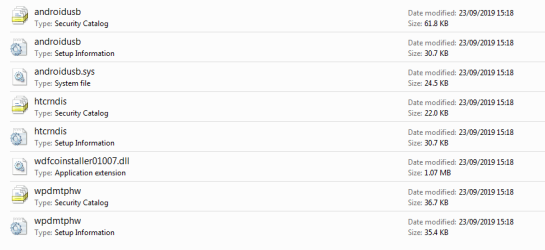
Thanks samuria. At first sight there didn't appear to be a .inf file, but not all the files have a file extension, which puzzled me, so I checked the properties of one which had a little cog symbol on its icon and sure enough it is identified in properties as an inf file. But trying to run it as you suggest produces: "The INF file you selected does not support this method of installation". Would it be safe to give it a file extension .inf by renaming, then try pointing the "update drivers" dialogue at it again?


PS I've attached a screenshot of the contents of the folder in question.
 

Attachments

  • Win 7 Android USB drivers.PNG
    Win 7 Android USB drivers.PNG
    16.2 KB · Views: 0
Last edited:

My Computer My Computer

Computer type
Laptop
Computer Manufacturer/Model Number
Sony Vaio
OS
Windows 7 Home Premium 32bit.
Browser
Firefox
A inf file basicaly just gives details of the driver etc so windows knows more details you could copy the inf file to the inf folder in windows then rescan device manager it may then pick it up
 

My Computer My Computer

Computer type
PC/Desktop
OS
win 8 32 bit
Success at last! I found another version of HTC Sync, which installed without a problem. And I tried a different usb cable, whereupon Windows installed the correct drivers and suddenly i was in business. The upgrade then ran without a hitch. Thanks again for the assistance.
 

My Computer My Computer

Computer type
Laptop
Computer Manufacturer/Model Number
Sony Vaio
OS
Windows 7 Home Premium 32bit.
Browser
Firefox
Back
Top