My Computer
- Computer Manufacturer/Model Number
- bilt it myself
- OS
- win7 home premium 64bit
- CPU
- AMD phenom2 X6
- Motherboard
- gigabyte
- Memory
- OZC 8gig (2fours)
- Graphics Card(s)
- onbourd
- Sound Card
- onbourd
- Monitor(s) Displays
- samsung syncmaster 1100p plus
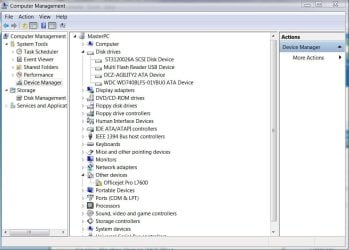
For some unknown reason Windows device manager likes to label some SATA connected devices as SCSI. May be the same problem with some IDEs.
I have a Hitachi, Seagate 1TB HDDs, DVD all SATA. Device manager lists them as SCSI. After I found it wasn't a unique problem and had no effect on the operation of the devices, I ignored it.
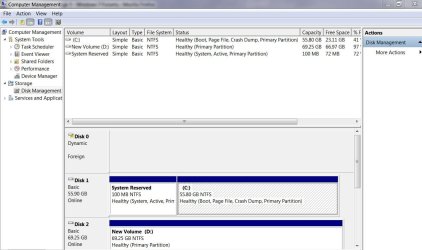
Your Device manager shows 2 HDDs as does disk management. But you indicate disk management doesn't show a HDD???
try this
- Start -> Right Click Computer -> Properties
- Device Manager (on left side)
- Click the Disk Drives arrow to show the list
- Find Your Drive You Installed Here
- Right Click on the Drive -> Uninstall
- After the HDD disappears, click the Action menu -> Scan For Hardware Changes
- This will rescan your system and reinstall your HDD drivers.
Yes+1 to you & othersIsn't the missing disk in question "Disk 0" in disk management? If so it's not actually missing it's just not recognized by windows because its dynamic and not basic. I'm guessing it was made dynamic on another PC/OS so it needs to be formated/converted back to basic on this PC.
Isn't the missing disk in question "Disk 0" in disk management? If so it's not actually missing it's just not recognized by windows because its dynamic and not basic. I'm guessing it was made dynamic on another PC/OS so it needs to be formated/converted back to basic on this PC.
Yes it was I reformatted it and made it basic it is now recognized by the system