Solved Where's the Recycle Bin gone?

cheddarcaveman

New member
Member
Local time
8:44 PM
Messages
28
Having just bought a new computer, with Windows 7 pre installed, I must admit that so far, a couple of weeks, I don't really like it!

Any way, apart from that, can somebody tell me where the Recycle Bin has gone, or is a deleted file lost forever?
 

My Computer

OS
Windows 7
Having just bought a new computer, with Windows 7 pre installed, I must admit that so far, a couple of weeks, I don't really like it!

Any way, apart from that, can somebody tell me where the Recycle Bin has gone, or is a deleted file lost forever?

Welcome to the forums cheddarcaveman!

Right click on your desktop and choose personalize, then choose Change Desktop icons in the upper left and add a check in front of Recycle Bin!

http://www.sevenforums.com/tutorials/919-desktop-icons-add-remove.html
 
Last edited by a moderator:

My Computer

Computer Manufacturer/Model Number
Homebrew PC - "Alpha_Dawg"
OS
Windows 7 Ultimate 64 bit Steve Ballmer Signature Edition
CPU
Intel Core 2 Quad - Q9550 - 2.83GHz stock - OC'd to 3.6GHz
Motherboard
Gigabyte EP45-UD3P
Memory
4GB DDR2 800MHz (PC6400) OCZ Reaper
Graphics Card(s)
Nvidia GE Force 8800 GTS
Sound Card
Asus Xonar DX
Monitor(s) Displays
Samsung SyncMaster 2333HD
Screen Resolution
1920 x 1080
Hard Drives
WD Caviar Black 750GB - 7200RPM - 32MB cache
WD Caviar Green 1.5TB - 5400RPM - 64MB cache
WD Caviar Green 2.0TB - 5400RPM - 64MB cache
PSU
PC Power & Cooling Silencer 750
Case
Gigabyte 3D Aurora
Cooling
Case is Air - 5ea. 120mm fans (mix of Arctic and Xigmatec)
Keyboard
MS Natural Wireless KB
Mouse
MS Wireless Mouse
Internet Speed
50 mbps down/5 mbps up
Other Info
AVerMedia - AVerTVHD G2 Dual Tuner Card
Having just bought a new computer, with Windows 7 pre installed, I must admit that so far, a couple of weeks, I don't really like it!
Stick with it, come here if you have a problem, it really is worth it in the end. Sure it's a bit different but once you begin to find your way around you will probably agree with the majority of members of this Forum that it is pretty good. We have one member who has actually fallen in love with Windows 7. Beware this Forum is full to overflowing with some really weird people but they are all of the friendly sort so do come back whenever! :p
 

My Computer

Computer type
PC/Desktop
OS
Microsoft Windows 7 Home Premium 64-bit 7601 Multiprocessor Free Service Pack 1
CPU
Intel(R) Core(TM) i7-3770 CPU @ 3.40GHz
Motherboard
ASUSTeK COMPUTER INC. P8H77-M
Memory
8.00 GB
Graphics Card(s)
Intel(R) HD Graphics 4000
Sound Card
On Board
Monitor(s) Displays
Dell 24"
Screen Resolution
1920 x 1080
Hard Drives
(1) INTEL SSDSC2CT180A3 ATA Device (2) ST500DM002-1BD142 ATA Device (3) WDC WD3200AAKS-75L9A0 ATA Device (4) Generic- Compact Flash USB Device (5) Generic- MS/MS-Pro USB Device (6) Generic- SD/MMC USB Device (7) Generic- SM/xD-Picture USB
PSU
500w Corsair
Case
Cooler Master
Cooling
3 Fans
Keyboard
Logitech MK300
Mouse
Logitech WOM
Internet Speed
75Mb
Antivirus
Norton 360
Browser
Firefox, Opera, IE

My Computer

Computer type
PC/Desktop
Computer Manufacturer/Model Number
Self built custom
OS
64-bit Windows 11 Pro for Workstations
CPU
Intel i7-8700K OC'd to 5 GHz
Motherboard
ASUS ROG Maximus XI Formula Z390
Memory
64 GB (4x16GB) G.SKILL TridentZ RGB DDR4 3600 MHz
Graphics Card(s)
ASUS ROG-STRIX-GTX1080TI-O11G-GAMING
Sound Card
Integrated
Monitor(s) Displays
2 x Samsung Odyssey G7 27"
Screen Resolution
2560x1440
Hard Drives
1TB Samsung 990 PRO M.2,
4TB Samsung 990 PRO PRO M.2,
TerraMaster F8 SSD Plus NAS
PSU
Seasonic Prime Titanium 850W
Case
Thermaltake Core P3
Cooling
Corsair Hydro H115i
Keyboard
Logitech wireless K800
Mouse
Logitech MX Master 4
Internet Speed
2 Gb/s Download and 100 Mb/s Upload
Antivirus
Malwarebyte Anti-Malware Premium
Browser
Google Chrome
Other Info
Logitech Z625 speaker system,
Logitech BRIO 4K Pro webcam,
HP Color LaserJet Pro MFP M477fdn,
APC SMART-UPS RT 1000 XL - SURT1000XLI,
Galaxy S23 Plus phone
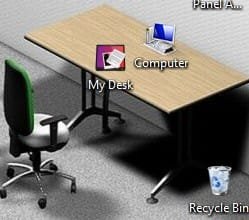
You can blame your OEM for doing that. By default, the Recycle Bin is on your desktop. This is a very small example, but it is one of many reasons why I don't like buying an OEM system, unless I wipe it out and install the OS properly myself, and then configure it to my liking without their pre-installed crap to slow it down.
 

My Computer

OS
Windows 7 Ultimate x64 SP1
CPU
Intel Core i7-2600
Motherboard
Gigabyte GA-P67A-UD3P-B3
Memory
12 GB Patriot Extreme DDR3-1333
Graphics Card(s)
Nvidia GTX 470
Monitor(s) Displays
Dell UltraSharp 2209WA
Hard Drives
OCZ Agility3 240 GB, WD5001AALS, WD7501AALS
PSU
OCZ ModStream 700W
Case
CoolerMaster HAF 912 Advanced
Cooling
CoolerMaster Hyper 212 Plus
Mines on the floor next to my desk :p
 

Attachments

  • recyclebin.jpg
    recyclebin.jpg
    10.6 KB · Views: 3,644

My Computer

Computer type
PC/Desktop
Computer Manufacturer/Model Number
Bruce ... somewhere in his 40's
OS
Windows 7 Ultimate 32bit SP1
CPU
Intel(R) Core(TM)2 Quad CPU @ 2.40GHz, 2400 MHz
Motherboard
INTEL/D975XBX2
Memory
4 GB
Graphics Card(s)
ATI Radeon HD 2600 Pro
Monitor(s) Displays
Samsung SyncMaster 914v
Screen Resolution
1280 x 1024
Hard Drives
2/500GB each ... ST3500630AS ATA Device.
One is not connected
PSU
Rocketfish 700 W
Case
G.Skill Gigabyte Chassis
Keyboard
Standard PS/2 Keyboard
Mouse
Microsoft PS/2 Mouse
Internet Speed
DSL
Antivirus
Avira Internet Security
Browser
IE 11
Other Info
ATI HDMI Audio
windows 7 is awsome ive only had a few problems but nothing major!
 

My Computer

OS
Windows 7 Home Premium 64-bit (6.1, Build 7600)
CPU
AMD Phenom(tm) 9750 Quad-Core Processor (4 CPUs), ~2.4GHz
Motherboard
HP-Pavilion p6130y
Memory
8192MB RAM
Graphics Card(s)
NVIDIA GeForce 9100
Sound Card
Realtek Semiconductor Corp
Monitor(s) Displays
W2361 LG
Screen Resolution
1920 x 1080 (32 bit) (59Hz)
Keyboard
HP
Mouse
HP
Internet Speed
AT&T Elite 6.0 MPBS
Other Info
DirectX 11

My Computer

Computer type
PC/Desktop
Computer Manufacturer/Model Number
Self built custom
OS
64-bit Windows 11 Pro for Workstations
CPU
Intel i7-8700K OC'd to 5 GHz
Motherboard
ASUS ROG Maximus XI Formula Z390
Memory
64 GB (4x16GB) G.SKILL TridentZ RGB DDR4 3600 MHz
Graphics Card(s)
ASUS ROG-STRIX-GTX1080TI-O11G-GAMING
Sound Card
Integrated
Monitor(s) Displays
2 x Samsung Odyssey G7 27"
Screen Resolution
2560x1440
Hard Drives
1TB Samsung 990 PRO M.2,
4TB Samsung 990 PRO PRO M.2,
TerraMaster F8 SSD Plus NAS
PSU
Seasonic Prime Titanium 850W
Case
Thermaltake Core P3
Cooling
Corsair Hydro H115i
Keyboard
Logitech wireless K800
Mouse
Logitech MX Master 4
Internet Speed
2 Gb/s Download and 100 Mb/s Upload
Antivirus
Malwarebyte Anti-Malware Premium
Browser
Google Chrome
Other Info
Logitech Z625 speaker system,
Logitech BRIO 4K Pro webcam,
HP Color LaserJet Pro MFP M477fdn,
APC SMART-UPS RT 1000 XL - SURT1000XLI,
Galaxy S23 Plus phone
Hey guys! Thanks for the "funny" and useful replies. My fault that the recycle bin wasn't visible as originally it was on the "task bar" thing which I found very annoying when photo editing and therefore dissabled it:o

I now have the bin where I want it, top left of the desktop screen.:thumbsup:
 

My Computer

OS
Windows 7
I've still got a mystery here.... Fresh install of Win7 Pro 64. Recycle bin was on the desktop. A day or two later it disappeared. Not only that, but it's disappeared off two laptops and my HTPC. Work laptop with the same OS is fine and no appreciable difference in software loads between machines.

I googled, and followed instructions to access the personalization menu for the desktop and hold on, here's where we take a turn...

Queue the scary "Dun, Dun, Dunnnnnn....". The checkbox next to the recycle bin was still checked.

I've tried unchecking it, applying, closing, and coming back to re-check it.
I've tried the above steps with a restart thrown in between various steps.
I did successfully pin the recycle bin to the taskbar so I can open and empty it, but so far no joy on having it show back up on the desktop like normal.

I'm a minimalist. The recycle bin is the only icon on the desktop normally. The fact that it's gone isn't so bad, its that I can't get it back up there that is troubling.

Any insight you guys can provide would be appreciated.

Thanks!
 

My Computer

OS
Windows 7 Professional 64
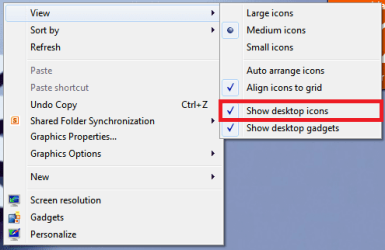
Problem solved. Don't know how it happened but somehow the "show desktop icons" under "View" in the context menu of the desktop was unchecked. I'm still puzzled on how this happened since it affected three of four computers all with the same OS and similar software loads. FWIW, check there if you're icons are missing and you cannot see a new folder or shortcut created to the desktop.
 

My Computer

OS
Windows 7 Professional 64
Problem solved. Don't know how it happened but somehow the "show desktop icons" under "View" in the context menu of the desktop was unchecked. I'm still puzzled on how this happened since it affected three of four computers all with the same OS and similar software loads. FWIW, check there if you're icons are missing and you cannot see a new folder or shortcut created to the desktop.

Did you by any chance install "Daemon Tools", "Alcohol 52%" or "Infra Recorder" on the computers that had the problem.
http://www.sevenforums.com/550832-post4.html
 

My Computer

Computer type
Laptop
Computer Manufacturer/Model Number
HP EliteBook 8530w Mobile Workstation
OS
Windows 7 Ultimate x64 (XP, 98SE, 95, 3.11, DOS 7.10 on VM) + Ubuntu 10.04 LTS Lucid Lynx
CPU
Intel Core 2 Duo Processor P8600 (2.40 GHz, 3 MB L2 cache)
Motherboard
Mobile Intel PM45 Express Chipset ICH9M-Enhanced
Memory
4GB 800 MHz DDR2 SDRAM
Graphics Card(s)
ATI Mobility FireGL V5700 with 256 MB
Sound Card
SoundMAX Integrated Digital HD Audio
Monitor(s) Displays
15.4-inch WXGA anti-glare (1280 x 800 resolution)
Screen Resolution
1280 x 800
Hard Drives
500GB + 1TB
Mouse
Synaptics PS/2 Port Touchpad, USB Mouse
Internet Speed
4 Mbps
Antivirus
MSE
Browser
Firefox, Chrome, IE
Other Info
Authentec AES2810 Fingerprint Reader
Problem solved.
Damn - I was enjoying the saga of the recursive recycle bin - I was about to blame .NET's garbage collection algorithm.
sarcastic.gif


pjd
 

My Computer

Computer type
PC/Desktop
Computer Manufacturer/Model Number
generic - made to spec
OS
Win 7 Professional 64bit
CPU
I5 650 @ 3.2GHz
Motherboard
Gigabyte H55M-UD2H
Memory
6G
Graphics Card(s)
AMD Radeon R7 200 Series
Sound Card
whatever is on mobo
Monitor(s) Displays
1 x 24" Samsung
Screen Resolution
1920x1200
Hard Drives
Internal 1x256GB Toshiba SSD
Internal 1x2TB
External 2 slot USB 3.0 dock (various drives)
External 1 500GB USB 2.0 drive
PSU
850W Antech Modular
Case
Shiny Black Aluminium
Cooling
extra fans - sucker in front, blower at back - noisy & cool
Keyboard
Microsoft USB Dual Receiver Wireless Keyboard
Mouse
Microsoft USB Dual Receiver Wireless Mouse
Internet Speed
20/1Mbps down/up
Antivirus
MSE
Browser
Firefox and Chrome
Other Info
Hitachi USB 3.0 adapter
@Gladson1976 InfraRecorder, yes. I saw mention of it earlier in the thread, does it have a reputation for hiding your desktop icons? Now that I've re-checked "show desktop icons", is there any reason to remove the program as some have suggested? As part of my troubleshooting, I uninstalled InfraRecorder from one of the machines to no avail so I didn't remove it from the others and now that the proper checkbox is checked, all appears to be well.

Thanks to you and pjd for the replies!
 

My Computer

OS
Windows 7 Professional 64
@Gladson1976 InfraRecorder, yes. I saw mention of it earlier in the thread, does it have a reputation for hiding your desktop icons? Now that I've re-checked "show desktop icons", is there any reason to remove the program as some have suggested? As part of my troubleshooting, I uninstalled InfraRecorder from one of the machines to no avail so I didn't remove it from the others and now that the proper checkbox is checked, all appears to be well.

Thanks to you and pjd for the replies!

InfraRecorder does it (Hiding the desktop icons) only once after install. Once the "Show desktop icons" is selected, all will be well :)
 

My Computer

Computer type
Laptop
Computer Manufacturer/Model Number
HP EliteBook 8530w Mobile Workstation
OS
Windows 7 Ultimate x64 (XP, 98SE, 95, 3.11, DOS 7.10 on VM) + Ubuntu 10.04 LTS Lucid Lynx
CPU
Intel Core 2 Duo Processor P8600 (2.40 GHz, 3 MB L2 cache)
Motherboard
Mobile Intel PM45 Express Chipset ICH9M-Enhanced
Memory
4GB 800 MHz DDR2 SDRAM
Graphics Card(s)
ATI Mobility FireGL V5700 with 256 MB
Sound Card
SoundMAX Integrated Digital HD Audio
Monitor(s) Displays
15.4-inch WXGA anti-glare (1280 x 800 resolution)
Screen Resolution
1280 x 800
Hard Drives
500GB + 1TB
Mouse
Synaptics PS/2 Port Touchpad, USB Mouse
Internet Speed
4 Mbps
Antivirus
MSE
Browser
Firefox, Chrome, IE
Other Info
Authentec AES2810 Fingerprint Reader
Maybe I'm not seeing something important, but I can't find the "Show Desktop Icons" box anywhere. I have found the "Desktop Icon Settings" window, but it's no help.

Using Windows 7 Home Premium x64. Halp!
 

My Computer

Computer Manufacturer/Model Number
Samsung QX-411
OS
Windows 7 Home Premium x64
CPU
Intel Core i5 Dual
Memory
6GB
Graphics Card(s)
Intel Graphics 3000
Hard Drives
1 Terabyte Western Digital
Cooling
Cooler Master 130mm external fan
Last edited by a moderator:

My Computer

Computer type
Laptop
Computer Manufacturer/Model Number
HP EliteBook 8530w Mobile Workstation
OS
Windows 7 Ultimate x64 (XP, 98SE, 95, 3.11, DOS 7.10 on VM) + Ubuntu 10.04 LTS Lucid Lynx
CPU
Intel Core 2 Duo Processor P8600 (2.40 GHz, 3 MB L2 cache)
Motherboard
Mobile Intel PM45 Express Chipset ICH9M-Enhanced
Memory
4GB 800 MHz DDR2 SDRAM
Graphics Card(s)
ATI Mobility FireGL V5700 with 256 MB
Sound Card
SoundMAX Integrated Digital HD Audio
Monitor(s) Displays
15.4-inch WXGA anti-glare (1280 x 800 resolution)
Screen Resolution
1280 x 800
Hard Drives
500GB + 1TB
Mouse
Synaptics PS/2 Port Touchpad, USB Mouse
Internet Speed
4 Mbps
Antivirus
MSE
Browser
Firefox, Chrome, IE
Other Info
Authentec AES2810 Fingerprint Reader
Back
Top