Which CD writing software for a Blu-ray player firmware update?

BruceUK

New member
Local time
8:41 AM
Messages
48
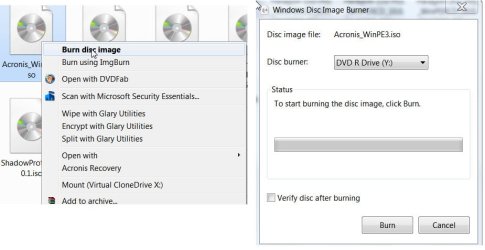
Hi everyone, I need to do a firmware update for my Panasonic Blu-ray player, and this is the first one I've done since I started using Windows 7. The update file has to be written to a CD-R using the ISO9660 format.

I'm not quite sure which CD-R writing software I should be using for this purpose. Is the provided ImgBurn utility suitable for this, and is there a particular option I need to use within it?

If ImgBurn is not suitable, can you suggest a good alternative product?

Many thanks in anticipation for any advice! :)
 
Last edited:

My Computer My Computer

At a glance

Windows 74GB
Computer Manufacturer/Model Number
HP Pavilion DV7-2215SA
OS
Windows 7
Memory
4GB
Hard Drives
Internal 500GB
External LaCie 160GB

My Computer My Computer

At a glance

Windows 7 Ultimate 32bitAMD Phenom II X3 720 ProcessorTranscend DDR2 (PC2 6400) 4 X 1GBIntegrated + ATI Radeon 4550
Computer Manufacturer/Model Number
self-assembled
OS
Windows 7 Ultimate 32bit
CPU
AMD Phenom II X3 720 Processor
Motherboard
Gigabyte GA-MA78GM-S2H Revision 1.0
Memory
Transcend DDR2 (PC2 6400) 4 X 1GB
Graphics Card(s)
Integrated + ATI Radeon 4550
Sound Card
Integrated Realtek ALC 889A
Monitor(s) Displays
DELL 1704 FPT
Screen Resolution
1280 x 1024
Hard Drives
Western Digital Caviar SE16 250 GB x2 in RAID 0
PSU
Coolermaster 400 W
Case
Zebronics Cube
Cooling
stock
Keyboard
Microsoft - wired
Mouse
Microsoft - wired
Internet Speed
ADSL 256-512Kbps
Thanks for the response, but it didn't work out in that way. My Blu-ray player has rejected the created CD-R with an error message.

First, I should mention that the firmware upgrade file has the extension .FRM, so I assume it wouldn't be recognised by ImgBurn anyway.

When I loaded a blank CD-R, I first had to choose between two formatting options:

Like a USB flash drive (Live File System)
To use with a CD/DVD player (Mastered)

I chose "Mastered" but I'm not sure if this is correct. It then prompted me to select the file(s) to be burned to the CD-R, and this appeared to be done entirely via Windows Explorer. ImgBurn was not launched.

I know that Windows Vista has no native support for the ISO9660 format, but I'm not sure whether this is also the case in Windows 7. If it is, then I imagine I would have to use a proprietory disc burner.

Obviously I need some further guidance on all this. Anyone? :confused:

Edit: I've now successfully used ImgBurn to create the CD-R. (I've now hit a problem with the upgrade in the Blu-ray player, but that's for a different forum!) Anyway, thanks for the help.
 
Last edited:

My Computer My Computer

At a glance

Windows 74GB
Computer Manufacturer/Model Number
HP Pavilion DV7-2215SA
OS
Windows 7
Memory
4GB
Hard Drives
Internal 500GB
External LaCie 160GB
Just an update to the problem I was having. After doing a bit of research on the Blu-ray forum, I installed Nero BurnLite and used that rather than ImgBurn to create another CD-R, and that one worked fine for the firmware upgrade. I'm not sure what the issue was with the first CD-R I created with ImgBurn, but anyway, Nero seems to be a nice freeware utility, and I'll use it in the future if I do any more firmware upgrades.

Thanks again for the assistance. :)
 

My Computer My Computer

At a glance

Windows 74GB
Computer Manufacturer/Model Number
HP Pavilion DV7-2215SA
OS
Windows 7
Memory
4GB
Hard Drives
Internal 500GB
External LaCie 160GB
OK. I had assumed that was an ISO image. .FRM, I am hearing for the first time. (Now I know that I don't know so many things.:) )

I presume that it has to be written as just a data file on the CD.

Anything that you may use only once, you should always burn it on a CD-RW. That way even if there are failures, you save the media for reuse.
 

My Computer My Computer

At a glance

Windows 7 Ultimate 32bitAMD Phenom II X3 720 ProcessorTranscend DDR2 (PC2 6400) 4 X 1GBIntegrated + ATI Radeon 4550
Computer Manufacturer/Model Number
self-assembled
OS
Windows 7 Ultimate 32bit
CPU
AMD Phenom II X3 720 Processor
Motherboard
Gigabyte GA-MA78GM-S2H Revision 1.0
Memory
Transcend DDR2 (PC2 6400) 4 X 1GB
Graphics Card(s)
Integrated + ATI Radeon 4550
Sound Card
Integrated Realtek ALC 889A
Monitor(s) Displays
DELL 1704 FPT
Screen Resolution
1280 x 1024
Hard Drives
Western Digital Caviar SE16 250 GB x2 in RAID 0
PSU
Coolermaster 400 W
Case
Zebronics Cube
Cooling
stock
Keyboard
Microsoft - wired
Mouse
Microsoft - wired
Internet Speed
ADSL 256-512Kbps
OK. I had assumed that was an ISO image. .FRM, I am hearing for the first time. (Now I know that I don't know so many things.:) )

I presume that it has to be written as just a data file on the CD.

Anything that you may use only once, you should always burn it on a CD-RW. That way even if there are failures, you save the media for reuse.

Well that's another pitfall with firmware upgrades. The procedure requires that a new CD-R is used, and it doesn't work if a CD-RW is used. Also I don't think it works if there are any other files present on the CD-R.

BTW, yes you're correct, the file has to be written as a data file.
 

My Computer My Computer

At a glance

Windows 74GB
Computer Manufacturer/Model Number
HP Pavilion DV7-2215SA
OS
Windows 7
Memory
4GB
Hard Drives
Internal 500GB
External LaCie 160GB
Back
Top