Which Drive Primary

JackNaylorPE

New member
Member
VIP
Local time
1:54 AM
Messages
159
Just finished build for Son No. 3 last night (Specs below). He had his friends over today and when I got home he asked how come the SSD is so slow..... Of course my answer was that it's very fast but .... ya know kids ... "my friend said his HD gets 5.9. I bet him a dollar that it would get a 7 ..... I lost :)

I'm not much concerned about WEI but I ran the test myself and got:

Processor 7.8
Memory 7.8
Graphics Desktop 7.9
Graphics Gaming 7.9
Primary Hard Disk 5.9

I gotta wonder how he wound up with a score I could get from any HD. So I ran the disk portion again via the winsat disk -v and, it would seem from what's "in the little black box" that it runs the test on Disk 1 rather than Disk 0. Any way to shift that ? I wanna get my dollar back !

Antec DF-85 w/ CP-850
Asus WS Revolution w/ i7-2600k @ 4.8 Ghz OC
Twin Asus GTX 560 Yi Cu II TOP (not OC'd yet)
OCZ Vertex 3 120 GB (Disk 0) / Seagate Barracuda XT 2TB (Disk 1)
Thermalright Silver Arrow w/ Shin Etsu TIM
Mushkin DDR3-1600 CAS 7
Plextor 320SA
 

My Computer

Computer Manufacturer/Model Number
Home Built
OS
Windows 7 - 64 bit
CPU
i7 920
Motherboard
Asus Rampage II Extreme
Memory
Mushkin 998692
Graphics Card(s)
GTX 295 FTW Edition 1792MB
Sound Card
Sounblaster Xi Fi Extreme
Monitor(s) Displays
Dekk U2410
Hard Drives
Seagate 7200.12
PSU
Antec SG-850
Case
Antec 1200
Cooling
Prolimatech Megashadow
Just finished build for Son No. 3 last night (Specs below). He had his friends over today and when I got home he asked how come the SSD is so slow..... Of course my answer was that it's very fast but .... ya know kids ... "my friend said his HD gets 5.9. I bet him a dollar that it would get a 7 ..... I lost :)

I'm not much concerned about WEI but I ran the test myself and got:

Processor 7.8
Memory 7.8
Graphics Desktop 7.9
Graphics Gaming 7.9
Primary Hard Disk 5.9

I gotta wonder how he wound up with a score I could get from any HD. So I ran the disk portion again via the winsat disk -v and, it would seem from what's "in the little black box" that it runs the test on Disk 1 rather than Disk 0. Any way to shift that ? I wanna get my dollar back !

Antec DF-85 w/ CP-850
Asus WS Revolution w/ i7-2600k @ 4.8 Ghz OC
Twin Asus GTX 560 Yi Cu II TOP (not OC'd yet)
OCZ Vertex 3 120 GB (Disk 0) / Seagate Barracuda XT 2TB (Disk 1)
Thermalright Silver Arrow w/ Shin Etsu TIM
Mushkin DDR3-1600 CAS 7
Plextor 320SA

Have you installed windows on the right drive? (The SSD)
 

My Computer

Computer Manufacturer/Model Number
Something I threw together
OS
Windows 7 Ultimate x64
CPU
Intel Core i7-2600K
Motherboard
Asus P8P67
Memory
16 GB G Skill F3-10666 CL9D-4GBRL
Graphics Card(s)
ATI Radeon HD 6870
Sound Card
ATI Radeon HDMI / Realtek ALC892
Monitor(s) Displays
2 x 22" standard monitors / LG32LC56v TV to watch films
Screen Resolution
1920 x1080
Hard Drives
2 x OCZ Vertex2 111.79GB
3 x Samsung103SJ
1 x Samsung103UJ
1 x WD3200BEVT
1 x Hitachi5K320-160
PSU
Thermaltake Toughpower Cable Management 750W
Case
Antec 300
Cooling
Noctua NH-U12P SE2 and 5 120mm Case fans
Keyboard
Microsoft Comfort Curve Keyboard 2000
Mouse
Hama M3110 / Logitech M305
Internet Speed
16000
Other Info
I have also used Fedora, Suse, Ubuntu Linux
And all other Windows from 95 to date except ME
I have personally noticed on most of the Hard drives(having diff space and diff manufacturers) having windows 7 get a score of 5.9.It does not depend upon the space available but the response time of the hdd.

Cheers
 

My Computer

OS
Windows 7
Make sure the SSD is your primary drive. Is this the drive you boot from? (the one your OS is on?) cody471 is right it scores on how fast the hdd reads and writes.
 

My Computer

Computer Manufacturer/Model Number
Black and Blue Beast
OS
Microsoft Windows 7 Home Premium 64bit SP1
CPU
AMD Athlon II X3 440 3.0Ghz OC to 3.51(22hr stable prime95)
Motherboard
MSI 785GM-E51
Memory
PNY XLR8 4GB DDR3 PC3-12800 1600MHz 2x2GB Crucial 2048MB DDR
Graphics Card(s)
MSI R5770 Hawk 1GB GDDR5 OCed to 935MHz 1335MHz Mem
Sound Card
Realtek® High-End Audio
Monitor(s) Displays
46" Sharp 1080p LED, Vizio 42" 1080p LED
Screen Resolution
1080p via HDMI cable
Hard Drives
Seagate 1.5TB 32mb cache SATA
WD Caviar Green 1TB 64MB/SATA-3G
WD Caviar Green 2TB 64MB/SATA-3G
PSU
Thermaltake TR2 RX 650-Watt Modular PSU
Case
Apevia X-Master Black Desktop/HTPC Case
Cooling
Corsair H50 liquid cooled
Keyboard
Cideko Wireless 3D keyboard
Mouse
Cideko Wireless 3D Mouse
Internet Speed
6 MB/s Download 2 MB/s Upload
Other Info
Sabrent USB 2.0 Internal Multi Card Reader
LG 10X Blu Ray Burner
3x 80mm fans
2x 120mm fans

22 deg C Idle; 36 deg C full load; mobo 26 deg C under load 18 deg C idle
Just finished build for Son No. 3 last night (Specs below). He had his friends over today and when I got home he asked how come the SSD is so slow..... Of course my answer was that it's very fast but .... ya know kids ... "my friend said his HD gets 5.9. I bet him a dollar that it would get a 7 ..... I lost :)

I'm not much concerned about WEI but I ran the test myself and got:

Processor 7.8
Memory 7.8
Graphics Desktop 7.9
Graphics Gaming 7.9
Primary Hard Disk 5.9

I gotta wonder how he wound up with a score I could get from any HD. So I ran the disk portion again via the winsat disk -v and, it would seem from what's "in the little black box" that it runs the test on Disk 1 rather than Disk 0. Any way to shift that ? I wanna get my dollar back !

Antec DF-85 w/ CP-850
Asus WS Revolution w/ i7-2600k @ 4.8 Ghz OC
Twin Asus GTX 560 Yi Cu II TOP (not OC'd yet)
OCZ Vertex 3 120 GB (Disk 0) / Seagate Barracuda XT 2TB (Disk 1)
Thermalright Silver Arrow w/ Shin Etsu TIM
Mushkin DDR3-1600 CAS 7
Plextor 320SA


Hello JackNaylorPE and welcome:

First type "disk management" into the search bar above start menu and click on Create and format disk partitions then when in disk management check which drive is in slot 0 and which one is in slot 1 located to left of drive map and also which one is active as the C drive should be the one marked active.

If the drive slots are reversed than power down your computer and reverse the order of the SATA cables at the back of the drives. Also while the computer is off check the SATA connections on the motherboard and ensure the SSD is in an 6Gb/slot (Consult the Motherboard manual for this)

If I checked the specs right they should be the Grey slots(intel), Navy Blue (marvell) for - P8P67 WS Revolution REV 3.0 - New P67 B3 Revision Motherboard.

In my case the Intel ones were faster but I also have an Intel Drive so consult OCZ Manual.
 

My Computer

Computer type
PC/Desktop
Computer Manufacturer/Model Number
My own abomination, I call it the Money Pit
OS
Windows 10 Pro x 2/Windows 11 Home
CPU
Intel i7 2600K @ 3.40 GHz
Motherboard
ASUS Sabertooth P67
Memory
Corsair Vengeance 16GB DDR3 1600MHz CL8 Dual Channel Kit
Graphics Card(s)
EVGA GeForce RTX 3080 XC3 ULTRA GAMING 10GB GDDR6X
Sound Card
Onboard Realtek or Nvidia High Definition Audio (HDMI)
Monitor(s) Displays
Samsung JS7000 50" SUHD TV or Samsung 27" FHD 60Hz 8ms GTG V
Screen Resolution
1920 x 1080
Hard Drives
1 x Samsung 870 EVO 250 GB SSD (Windows 10 Pro), 1 x Samsung 850 EVO 250 GB SSD (Windows 10 Pro)
PSU
Corsair AX860 - 860W Modular Power Supply
Case
Phanteks Enthoo Luxe Full Tower Case - Black
Cooling
CORSAIR Hydro Series H150i PRO RGB 360mm Liquid CPU Cooler
Keyboard
Logitech K830 Illuminated Living-Room Keyboard
Mouse
Logitech MX Anywhere 2S Wireless Mouse
Internet Speed
100 Mbps
Antivirus
ESET Internet Security
Browser
Latest Version Of Firefox & Microsoft Edge Chromium Stable
Other Info
LG Super Multi Blue Internal Blu-ray Disk Rewriter - BH10LS30
6x2 HDMI Switcher (6 inputs, 2 outputs) so I can send the output of my Cable Box, Roku, or any my 4 computers to either my TV or Monitor separately or simultaneously.
Have you installed windows on the right drive? (The SSD)

Windows is on both drives .... I can boot to either via BIOS. The test was performed when Booted to the SSD.
 

My Computer

Computer Manufacturer/Model Number
Home Built
OS
Windows 7 - 64 bit
CPU
i7 920
Motherboard
Asus Rampage II Extreme
Memory
Mushkin 998692
Graphics Card(s)
GTX 295 FTW Edition 1792MB
Sound Card
Sounblaster Xi Fi Extreme
Monitor(s) Displays
Dekk U2410
Hard Drives
Seagate 7200.12
PSU
Antec SG-850
Case
Antec 1200
Cooling
Prolimatech Megashadow
First type "disk management" into the search bar above start menu and click on Create and format disk partitions then when in disk management check which drive is in slot 0 and which one is in slot 1 located to left of drive map and also which one is active as the C drive should be the one marked active.

OK, guess I should have stated the obvious (to me anyway ;) ). Windows is on both the SSD and the HD. I can boot from either via the BIOS. SSD is on 0 (118.8 GB) with OS on Volume Label C-SSDBoot (C:\).

Under this boot OS on HD appears in Disk Mangler as XC-HDBOOT (X: \) as Disk 1 w/1,863 GB.

So yes, all is well on the hardware / configuration front. I'm wondering since I changed default location of program installs to E:\ on the Programs Partition of the HD, it's using that as a pointer to where it should test. And it looks like that is the ticket .... just ran winsat again and it says its tested Disk 0.

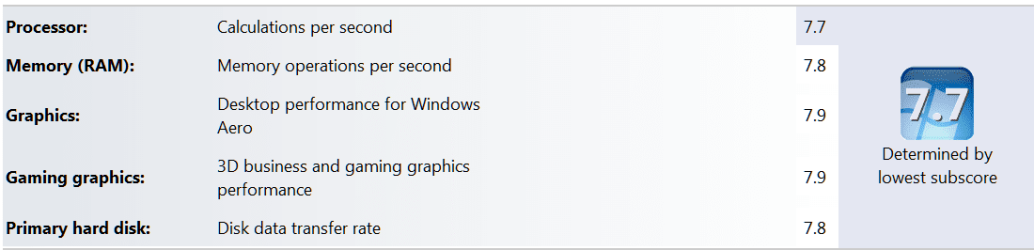
And the proof "is in da puddin' " :)

Processor 7.8
Memory 7.8
Graphics Desktop 7.9
Graphics Gaming 7.9
Primary Hard Disk 7.9
 

My Computer

Computer Manufacturer/Model Number
Home Built
OS
Windows 7 - 64 bit
CPU
i7 920
Motherboard
Asus Rampage II Extreme
Memory
Mushkin 998692
Graphics Card(s)
GTX 295 FTW Edition 1792MB
Sound Card
Sounblaster Xi Fi Extreme
Monitor(s) Displays
Dekk U2410
Hard Drives
Seagate 7200.12
PSU
Antec SG-850
Case
Antec 1200
Cooling
Prolimatech Megashadow
Have you installed windows on the right drive? (The SSD)

Windows is on both drives .... I can boot to either via BIOS. The test was performed when Booted to the SSD.
Then as far as I am concerned that was the disk that was tested :confused: Windows WEI strikes again lol

If you want a true benchmark of the hard drive performance download programs like ATTO, HDTune or CrystalDiskMark.

PS it wasn't obvious to me as I cannot understand why you would install on a mechanical when you have a SSD :p
 

My Computer

Computer Manufacturer/Model Number
Something I threw together
OS
Windows 7 Ultimate x64
CPU
Intel Core i7-2600K
Motherboard
Asus P8P67
Memory
16 GB G Skill F3-10666 CL9D-4GBRL
Graphics Card(s)
ATI Radeon HD 6870
Sound Card
ATI Radeon HDMI / Realtek ALC892
Monitor(s) Displays
2 x 22" standard monitors / LG32LC56v TV to watch films
Screen Resolution
1920 x1080
Hard Drives
2 x OCZ Vertex2 111.79GB
3 x Samsung103SJ
1 x Samsung103UJ
1 x WD3200BEVT
1 x Hitachi5K320-160
PSU
Thermaltake Toughpower Cable Management 750W
Case
Antec 300
Cooling
Noctua NH-U12P SE2 and 5 120mm Case fans
Keyboard
Microsoft Comfort Curve Keyboard 2000
Mouse
Hama M3110 / Logitech M305
Internet Speed
16000
Other Info
I have also used Fedora, Suse, Ubuntu Linux
And all other Windows from 95 to date except ME
First type "disk management" into the search bar above start menu and click on Create and format disk partitions then when in disk management check which drive is in slot 0 and which one is in slot 1 located to left of drive map and also which one is active as the C drive should be the one marked active.

OK, guess I should have stated the obvious (to me anyway ;) ). Windows is on both the SSD and the HD. I can boot from either via the BIOS. SSD is on 0 (118.8 GB) with OS on Volume Label C-SSDBoot (C:\).

Under this boot OS on HD appears in Disk Mangler as XC-HDBOOT (X: \) as Disk 1 w/1,863 GB.

So yes, all is well on the hardware / configuration front. I'm wondering since I changed default location of program installs to E:\ on the Programs Partition of the HD, it's using that as a pointer to where it should test. And it looks like that is the ticket .... just ran winsat again and it says its tested Disk 0.

And the proof "is in da puddin' " :)

Processor 7.8
Memory 7.8
Graphics Desktop 7.9
Graphics Gaming 7.9
Primary Hard Disk 7.9

So did you win your dollar back and teach you son's friend a lesson to respect their elders (from post #1)

I know your score even tanned my Hide

2011-04-13_081452.png
 

My Computer

Computer type
PC/Desktop
Computer Manufacturer/Model Number
My own abomination, I call it the Money Pit
OS
Windows 10 Pro x 2/Windows 11 Home
CPU
Intel i7 2600K @ 3.40 GHz
Motherboard
ASUS Sabertooth P67
Memory
Corsair Vengeance 16GB DDR3 1600MHz CL8 Dual Channel Kit
Graphics Card(s)
EVGA GeForce RTX 3080 XC3 ULTRA GAMING 10GB GDDR6X
Sound Card
Onboard Realtek or Nvidia High Definition Audio (HDMI)
Monitor(s) Displays
Samsung JS7000 50" SUHD TV or Samsung 27" FHD 60Hz 8ms GTG V
Screen Resolution
1920 x 1080
Hard Drives
1 x Samsung 870 EVO 250 GB SSD (Windows 10 Pro), 1 x Samsung 850 EVO 250 GB SSD (Windows 10 Pro)
PSU
Corsair AX860 - 860W Modular Power Supply
Case
Phanteks Enthoo Luxe Full Tower Case - Black
Cooling
CORSAIR Hydro Series H150i PRO RGB 360mm Liquid CPU Cooler
Keyboard
Logitech K830 Illuminated Living-Room Keyboard
Mouse
Logitech MX Anywhere 2S Wireless Mouse
Internet Speed
100 Mbps
Antivirus
ESET Internet Security
Browser
Latest Version Of Firefox & Microsoft Edge Chromium Stable
Other Info
LG Super Multi Blue Internal Blu-ray Disk Rewriter - BH10LS30
6x2 HDMI Switcher (6 inputs, 2 outputs) so I can send the output of my Cable Box, Roku, or any my 4 computers to either my TV or Monitor separately or simultaneously.
Then as far as I am concerned that was the disk that was tested :confused: Windows WEI strikes again lol

Again, it's obvious that it wasn't. As in the original post, running it from winsat disk -v, showed in the "DOS box" that it was testing Disk 1 ..... move the Program Files default directory back to C:\ and running it from winsat disk -v showed that it was testing from Disk 0.
 

My Computer

Computer Manufacturer/Model Number
Home Built
OS
Windows 7 - 64 bit
CPU
i7 920
Motherboard
Asus Rampage II Extreme
Memory
Mushkin 998692
Graphics Card(s)
GTX 295 FTW Edition 1792MB
Sound Card
Sounblaster Xi Fi Extreme
Monitor(s) Displays
Dekk U2410
Hard Drives
Seagate 7200.12
PSU
Antec SG-850
Case
Antec 1200
Cooling
Prolimatech Megashadow
So did you win your dollar back and teach you son's friend a lesson to respect their elders (from post #1)

He won't pay up ! .... fixed his tail .... logged on as Administrator and changed his password to "PayYourDebts"
 

My Computer

Computer Manufacturer/Model Number
Home Built
OS
Windows 7 - 64 bit
CPU
i7 920
Motherboard
Asus Rampage II Extreme
Memory
Mushkin 998692
Graphics Card(s)
GTX 295 FTW Edition 1792MB
Sound Card
Sounblaster Xi Fi Extreme
Monitor(s) Displays
Dekk U2410
Hard Drives
Seagate 7200.12
PSU
Antec SG-850
Case
Antec 1200
Cooling
Prolimatech Megashadow

My Computer

Computer Manufacturer/Model Number
Something I threw together
OS
Windows 7 Ultimate x64
CPU
Intel Core i7-2600K
Motherboard
Asus P8P67
Memory
16 GB G Skill F3-10666 CL9D-4GBRL
Graphics Card(s)
ATI Radeon HD 6870
Sound Card
ATI Radeon HDMI / Realtek ALC892
Monitor(s) Displays
2 x 22" standard monitors / LG32LC56v TV to watch films
Screen Resolution
1920 x1080
Hard Drives
2 x OCZ Vertex2 111.79GB
3 x Samsung103SJ
1 x Samsung103UJ
1 x WD3200BEVT
1 x Hitachi5K320-160
PSU
Thermaltake Toughpower Cable Management 750W
Case
Antec 300
Cooling
Noctua NH-U12P SE2 and 5 120mm Case fans
Keyboard
Microsoft Comfort Curve Keyboard 2000
Mouse
Hama M3110 / Logitech M305
Internet Speed
16000
Other Info
I have also used Fedora, Suse, Ubuntu Linux
And all other Windows from 95 to date except ME
Then as far as I am concerned that was the disk that was tested :confused: Windows WEI strikes again lol

Again, it's obvious that it wasn't. As in the original post, running it from winsat disk -v, showed in the "DOS box" that it was testing Disk 1 ..... move the Program Files default directory back to C:\ and running it from winsat disk -v showed that it was testing from Disk 0.
I think we have a slight misunderstanding here I was talking about the WEI when ran over the Control Panel :)
 

My Computer

Computer Manufacturer/Model Number
Something I threw together
OS
Windows 7 Ultimate x64
CPU
Intel Core i7-2600K
Motherboard
Asus P8P67
Memory
16 GB G Skill F3-10666 CL9D-4GBRL
Graphics Card(s)
ATI Radeon HD 6870
Sound Card
ATI Radeon HDMI / Realtek ALC892
Monitor(s) Displays
2 x 22" standard monitors / LG32LC56v TV to watch films
Screen Resolution
1920 x1080
Hard Drives
2 x OCZ Vertex2 111.79GB
3 x Samsung103SJ
1 x Samsung103UJ
1 x WD3200BEVT
1 x Hitachi5K320-160
PSU
Thermaltake Toughpower Cable Management 750W
Case
Antec 300
Cooling
Noctua NH-U12P SE2 and 5 120mm Case fans
Keyboard
Microsoft Comfort Curve Keyboard 2000
Mouse
Hama M3110 / Logitech M305
Internet Speed
16000
Other Info
I have also used Fedora, Suse, Ubuntu Linux
And all other Windows from 95 to date except ME
Back
Top