The situation I'm in is starting to annoy me extremely!
I have Biostar TA790GXB A2+ motherboard. Two months ago I installed Win7 Ultimate 32bit and everything was working just fine exept one thing - I could not set Weather widget to run on my desktop and display weather in my city (the error said it's something with location sensors, something).
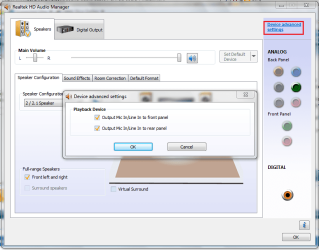
OK, so I reinstalled Win but now I can not set my headphones to work when I plug them into rear panel jacks. I have speakers connected in rear green jack and they work just fine but headphones work only if I connect them to front jack. That solution does not fit me so I'm trying to correct but no success.
I installed drivers for motherboard from Biostar site, also drivers for sound and they are labeled as Realtek HD Audio manager R263 (I think that's the number, maybe 253). The latest one, in any case.
Second thing which gives me trouble is that from time to time I get notification that I just "unpluged audio device from jack" although I didn't touch any cable or something like that!!
Does someone knows which drivers sould I install or maybe have/had same problem?
Any help will be appreciated.
I have Biostar TA790GXB A2+ motherboard. Two months ago I installed Win7 Ultimate 32bit and everything was working just fine exept one thing - I could not set Weather widget to run on my desktop and display weather in my city (the error said it's something with location sensors, something).
OK, so I reinstalled Win but now I can not set my headphones to work when I plug them into rear panel jacks. I have speakers connected in rear green jack and they work just fine but headphones work only if I connect them to front jack. That solution does not fit me so I'm trying to correct but no success.
I installed drivers for motherboard from Biostar site, also drivers for sound and they are labeled as Realtek HD Audio manager R263 (I think that's the number, maybe 253). The latest one, in any case.
Second thing which gives me trouble is that from time to time I get notification that I just "unpluged audio device from jack" although I didn't touch any cable or something like that!!
Does someone knows which drivers sould I install or maybe have/had same problem?
Any help will be appreciated.
My Computer
- OS
- Windows 7 Ultimate 32-bit
- CPU
- AMD 7750 Black Edition
- Motherboard
- Biostar TA790GXB A2+
- Memory
- 2 x 2GB Kingston KVR800D2N6 CL6
- Graphics Card(s)
- XFX 9600GSO Cuda enabled
- Monitor(s) Displays
- Viewsonic VA2216w
- Hard Drives
- WD 500GB
- Case
- Chieftec