Which is the best?

codyw

New member
Power User
Local time
8:46 PM
Messages
369
Location
Pennsylvania
A friend of mine the other day asked me which was the best: NIS 2010 or MSE.
Since they both are good, I could't really decide.

I tried comparing pros and cons but that didn't work either. :(
 

My Computer

Computer Manufacturer/Model Number
ASUSTeK Computer Inc./Q550LF/Laptop
OS
Windows 7 Ultimate x64 with SP1
CPU
Intel(R) Core(TM) i7-4500U CPU @ 1.80GHz
Motherboard
ASUSTeK Computer Inc.
Memory
8 GB
Graphics Card(s)
Intel(R) HD Graphics Family, NVIDIA GeForce
Hard Drives
Hitachi HTS547575A9E384
Internet Speed
XFINITY
Antivirus
Trend Micro
A friend of mine the other day asked me which was the best: NIS 2010 or MSE.
Since they both are good, I could't really decide.

I tried comparing pros and cons but that didn't work either. :(

Its easy whichever you will use ALL the time. There is a thread like this about once a week and we always seem to have everyone with a different opinion. You could search the previous threads for every ones preferences if you are inclined.

I analyze BSOD's and have seen MANY caused by NIS so I wouldn't recommend that. MSE is lightweight but works and doesn't seem to cause crashes.

I personally use something else.

Ken
 

My Computer

Computer Manufacturer/Model Number
HP Pavillion dv-7 1005 Tx
OS
Win 8 Release candidate 8400
CPU
[email protected]
Memory
4 gigs
Graphics Card(s)
Nvidia 9600M
Sound Card
HD built-in
Monitor(s) Displays
17" Wxga
Screen Resolution
1440x900
Cooling
none
Internet Speed
45Mb down 5Mb up
Same here as a rule. On the main case I'll be found running the VIPRE Premium which includes a firewall for that retail software. Quite effective at that. But that's just another "opinion" from observing it in use here.

On an old build 6-7yrs. I'm going through I just added the beta 2 version of the MS SEesentials now available for download over at connect. That you have to sign up for in order to participate in the beta program however.
 

My Computers

System One System Two

  • Computer type
    PC/Desktop
    Computer Manufacturer/Model Number
    Custom builds = 2
    OS
    W7 Ultimate x64/W10 Pro x64/W11 Pro Triple Boot - Main PC W7 Remote PC Micro ATX W7 Pro x64/W11 Pro
    CPU
    AMD Phenom II X4 975 Deneb 3.6ghz - 965 2nd remote pc
    Motherboard
    Gigabyte GA-790XTA-UD4-Gigabyte GA-880GM-D2H remote pc
    Memory
    Kingston Hyper X DDR3 1600 1.5v 16gb - Hyper X Fury 8gb 2nd
    Graphics Card(s)
    MSI HD Radeon 5750 1gb - MSI HD Radeon 6450 on mini tower
    Sound Card
    Creative Labs X-Fi Xtreme Audio P - Realtek onooard 2nd case
    Monitor(s) Displays
    ASUS VW199T-P 19" HP 2082a Main-HP 2082a 20" remote pc
    Screen Resolution
    Asus 1440x900 - HP 1600x900
    Hard Drives
    WD Black 1TB HD per OS W7, W10, and pending W11 presently on 500gb OS Drive - Pending Triple 1TB HDs for Spanned Storage/backup volume
    Single 2TB external USB enclosure, single 1TB System 7 Host/Boot drive, Pending 8TB external HD for system image b
    PSU
    Corsair 750TX - primary / Corsair CX600 - second
    Case
    Antec 900-2 - SSD compatible / NZXT Vulcan mini tower
    Cooling
    Zalman CNPS9900A
    Keyboard
    AZIO L70 Backlit Letters Gaming - ONN Cordless/USB
    Mouse
    MSI DS200 Programmable, Logitech Cordless
    Internet Speed
    30mbps upgrade - primary hard wired - mini tower usb WiFi
    Antivirus
    GFI VIPRE Internet Security 2014 on W7 2016 beta on W10,
    Browser
    Cyberfox, WaterFox 64bit FF variants, FireFox x64, Pale Moon
    Other Info
    Accomdata fan cooled usb 2.0 PIDE/Sata II, III external enclosure.
    Sambient usb/eSata PATA/Sata II, III external enclosure.
  • Computer type
    PC/Desktop
    System Manufacturer/Model Number
    CUSTOM ASSEMBLY
    OS
    W7 Pro x64/W11 Pro
    CPU
    AMD Deneb 3.6ghz - 965
    Motherboard
    Gigabyte GA-880GM-D2H remote pc
    Memory
    Kingston Hyper X Fury 8gb
    Graphics Card(s)
    MSI HD Radeon 6450 DVI Output
    Sound Card
    Realtek onooard Creative or Other separate PENDING
    Monitor(s) Displays
    VIZIO 32" LCD TV Separate LCD Pending
    Screen Resolution
    1600x1080
    Hard Drives
    WD 500GB OS Host/Boot WD Green 1TB Storage/Backup
    PSU
    Corsair 600W - THERMALTAKE 600W spare case
    Case
    NZXT Vulcan mini tower
    Cooling
    Twin 120mm Top Fans - 240mm Side Cover
    Keyboard
    ONN Cordless/USB Logitech Cordless
    Mouse
    ONN USB/Cordless - Logitech Cordless
    Internet Speed
    DSL 5G
    Browser
    MS Edge, FireFox, WaterFox x64, FireFox Nightly
    Other Info
    OS Testing-Remote Access to Main TeamViewer
I think MSE uses less resources, integrates well with windows, isn't intrusive, and, oh year, it's free :D

A Guy
 

My Computer

Computer type
PC/Desktop
OS
Windows 10 Home x64
CPU
INTEL Core i5-750 Quad-Core 3.37GHz
Motherboard
ASUS P7P55D
Memory
HyperX Fury Black Series 8GB (2 x 4GB) 1866Mhz
Graphics Card(s)
EVGA GeForce GTX 750 Superclocked 1GB 128-Bit GDDR5
Monitor(s) Displays
LG 32MA68HY 32" IPS
Screen Resolution
1920 x 1080
Hard Drives
Samsung 840 Evo 120GB, SEAGATE 500GB Barracuda® 7200.12, SATA 3 Gb/s, 7200 RPM, 16MB cache
PSU
ANTEC TruePower New TP-550, 80 PLUS, 550W
Case
ANTEC Three Hundred Illusion
Cooling
COOLER MASTER Hyper 212 Plus, 4 x 120mm 1 x 140mm Noctua's
Internet Speed
85 + Mbps
Antivirus
Avast
Browser
Vivaldi
The one I have on now is also quite light on resources but you pay for the 2yr. license while still reasonable. My only complaint with the MS SE was no detection when a trojan was being placed on the driive. When scanning later it came up.

With the retail program the entire site it came from would have been blocked from view entirely. But that has the additional protection layer in it being a retail product. The old av here even when being disabled in the mscnfig sprang to life when something was put on some time ago but would never offer the same for that other option while the MS SE did find this one.

Differences are common between each as well as what they actually cover. The best advice anyone can pass along is getting familiar with multiple layers and not putting all confidences into any one program by itself as unfortunately many do.
 

My Computers

System One System Two

  • Computer type
    PC/Desktop
    Computer Manufacturer/Model Number
    Custom builds = 2
    OS
    W7 Ultimate x64/W10 Pro x64/W11 Pro Triple Boot - Main PC W7 Remote PC Micro ATX W7 Pro x64/W11 Pro
    CPU
    AMD Phenom II X4 975 Deneb 3.6ghz - 965 2nd remote pc
    Motherboard
    Gigabyte GA-790XTA-UD4-Gigabyte GA-880GM-D2H remote pc
    Memory
    Kingston Hyper X DDR3 1600 1.5v 16gb - Hyper X Fury 8gb 2nd
    Graphics Card(s)
    MSI HD Radeon 5750 1gb - MSI HD Radeon 6450 on mini tower
    Sound Card
    Creative Labs X-Fi Xtreme Audio P - Realtek onooard 2nd case
    Monitor(s) Displays
    ASUS VW199T-P 19" HP 2082a Main-HP 2082a 20" remote pc
    Screen Resolution
    Asus 1440x900 - HP 1600x900
    Hard Drives
    WD Black 1TB HD per OS W7, W10, and pending W11 presently on 500gb OS Drive - Pending Triple 1TB HDs for Spanned Storage/backup volume
    Single 2TB external USB enclosure, single 1TB System 7 Host/Boot drive, Pending 8TB external HD for system image b
    PSU
    Corsair 750TX - primary / Corsair CX600 - second
    Case
    Antec 900-2 - SSD compatible / NZXT Vulcan mini tower
    Cooling
    Zalman CNPS9900A
    Keyboard
    AZIO L70 Backlit Letters Gaming - ONN Cordless/USB
    Mouse
    MSI DS200 Programmable, Logitech Cordless
    Internet Speed
    30mbps upgrade - primary hard wired - mini tower usb WiFi
    Antivirus
    GFI VIPRE Internet Security 2014 on W7 2016 beta on W10,
    Browser
    Cyberfox, WaterFox 64bit FF variants, FireFox x64, Pale Moon
    Other Info
    Accomdata fan cooled usb 2.0 PIDE/Sata II, III external enclosure.
    Sambient usb/eSata PATA/Sata II, III external enclosure.
  • Computer type
    PC/Desktop
    System Manufacturer/Model Number
    CUSTOM ASSEMBLY
    OS
    W7 Pro x64/W11 Pro
    CPU
    AMD Deneb 3.6ghz - 965
    Motherboard
    Gigabyte GA-880GM-D2H remote pc
    Memory
    Kingston Hyper X Fury 8gb
    Graphics Card(s)
    MSI HD Radeon 6450 DVI Output
    Sound Card
    Realtek onooard Creative or Other separate PENDING
    Monitor(s) Displays
    VIZIO 32" LCD TV Separate LCD Pending
    Screen Resolution
    1600x1080
    Hard Drives
    WD 500GB OS Host/Boot WD Green 1TB Storage/Backup
    PSU
    Corsair 600W - THERMALTAKE 600W spare case
    Case
    NZXT Vulcan mini tower
    Cooling
    Twin 120mm Top Fans - 240mm Side Cover
    Keyboard
    ONN Cordless/USB Logitech Cordless
    Mouse
    ONN USB/Cordless - Logitech Cordless
    Internet Speed
    DSL 5G
    Browser
    MS Edge, FireFox, WaterFox x64, FireFox Nightly
    Other Info
    OS Testing-Remote Access to Main TeamViewer
NIS is better than MSE, it contains many additional features not included in MSE
 

My Computer

Computer type
PC/Desktop
Computer Manufacturer/Model Number
Custom Build
OS
Windows 10 Pro x64, Arch Linux
CPU
Intel Core 2 Quad Q8200 OC'd 3.08GHz
Motherboard
Asus Rampage formula LGA775
Memory
8GB DDR2 900Mhz
Graphics Card(s)
MSI GT730 2GB GDDR5 (Kepler)
Sound Card
Supreme FX2
Monitor(s) Displays
Samsung LS22F350 LED
Screen Resolution
1080P
Hard Drives
Kingston SSDNow UV400 120GB, 500GB Hitachi, 2TB Samsung, 500GB Seagate FreeAgent, 640GB Samsung, 160GB Toshiba (Arch)
PSU
AeroCool 500W Bronze
Cooling
Cooler Master V6 + 3X fans
Keyboard
Prolink keyboard
Mouse
Logitech M705
Internet Speed
1MiB/s
Browser
Chrome Beta
I think MSE uses less resources, integrates well with windows, isn't intrusive, and, oh year, it's free :D

A Guy

I agree with all points. Microsoft has really made paid security software rather moot these days.
 

My Computer

OS
Windows 7 Home Premium x64
CPU
Intel Core 2 Quad Q9450 @ 3.2GHz
Motherboard
Asus P5Q PRO Turbo
Memory
4GB DDR2-800
Graphics Card(s)
MSI Radeon HD 5850
Sound Card
Creative Labs Audigy2 ZS
Monitor(s) Displays
Samsung 225BW
Hard Drives
(2) 1TB Samsung F1, (2) 1.5TB Samsung F2, 1TB Samsung F2, 2TB Samsung F3
PSU
Corsair HX650
Case
Antec Nine Hundred
A friend of mine the other day asked me which was the best: NIS 2010 or MSE.

simply put... the one that works for you.... or your friend in this case :p

sermon:
but if you want third party firewall/password manager/the norton insights/quorums/secret sauce/sonars and are willing to shell $$$ year after year then -NIS
however...if you are willing to have a no nonsense..no frills... yet pretty effective av that's free then- MSE
 

My Computer

OS
windows 7 ultimate 64 bit,Windows 7 ultimate 32 bit,Windows XP sp3 home
I'm laughing because I didn't immediately know what NIS and MSE were referring to;
Looks like I'm avoiding both.... :party:

Guessing Norton and M$ products for protection, yeah easy skip based on reputations that to me are unforgivable in these areas.

M$=bloat
Norton=bloat
bloat=lagged PC
lagged PC=unhappy user
unhappy user=:sick::mad:
thus M$ & Norton fare=:p

I've been avoiding those brands for this for years....

Passwords wise, snag KeePass Password Safe (free) and awesome!
 

My Computer

Computer type
PC/Desktop
Computer Manufacturer/Model Number
Self Built Custom
OS
Windows 7 Ultimate Retail Box (64-bit installed) + Service Pack 1
CPU
AMD FX-8350 CPU v1.15 (or 1.0F) BIOS was required!
Motherboard
MSI 890FXA-GD70
Memory
8G CAS-7 G-Skill DDR3 @1333 (2 fours) [mobo nonOC max rec'd]
Graphics Card(s)
Radeon HD 7950 [3 gigs of GDDR5] MSI Twin Frozr model
Sound Card
Realtek High Definition Audio (onboard mobo, ALC-889 chip)
Monitor(s) Displays
2 WS LED Monitors: One LG One Viewsonic
Screen Resolution
1920 by 1080
Hard Drives
SSD for OS: Samsung 840 Pro
SSD for VM and utilities: Adata SX900
7200 RPM SATA HDs for the rest: Hitachi and Seagate
PSU
Corsair TX850 - 850W max, in service since August 2010.
Case
Thermaltake Armor A90
Cooling
Thermaltake Spin Q CPU Cooler, in service since August 2010
Keyboard
Logitech G11
Mouse
Logitech M310 Wireless
Internet Speed
100 Megabit broadband supposedly upgraded from 50 (Cable)
Antivirus
Bitdefender Internet Security 2014 suite
Browser
Pale Moon 64-bit main, also IceDragon, Opera, and Maxthon.
Other Info
CompTIA A+ certified (220-800 series) in July 2013.
I think MSE uses less resources, integrates well with windows, isn't intrusive, and, oh year, it's free :D

A Guy

I agree with all points. Microsoft has really made paid security software rather moot these days.
The working set of MSE is rather large. NIS 2010 is much smaller. It may not matter, but it is a point to retain.
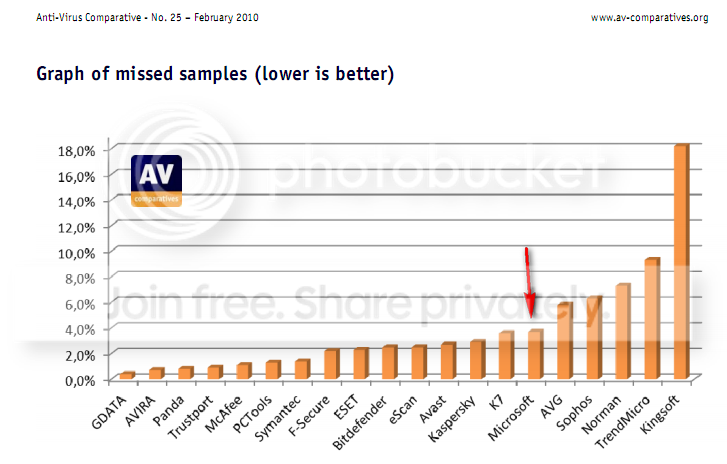
In the professional AV comparisons, NIS2010 gets much higher marks than MSE. At least in the ones I have seen. See example below - NIS2010 is under Symantec.
I use both (on different systems). I never had trouble with NIS, but some with MSE.

2010-03-22_193327.png
 

My Computer

Computer Manufacturer/Model Number
HP, Dell, Gateway, Toshiba - 4 laptops and 2 desktops
OS
Vista, Windows7, Mint Mate, Zorin, Windows 8
CPU
from 1.6GHz Duo to i7
Monitor(s) Displays
2x HP w2207
Hard Drives
5x HDD, 7x SSD, 12x Externals
Keyboard
with trackball - no mices
Mouse
Trackball mice
Internet Speed
DSL 6000
My opinion for the best AV is:
http://www.sevenforums.com/tutorials/73828-imaging-free-macrium.html
(doesn't have to be macrium)

After you'll do that, use something that is recommended from the majority of power users around, usually a combo. Example: MSE+Comodo firewall+Malwarebytes+SAS+asquared (real time+on demand) plus you can use something like hosts file, winpatrol etc. If you use FF nice ad-dons are noscript and flashblock plus, and of course, use common sense to stay protected while surfing. That would be the general advice that works just fine for most of the users.
cheers
 

My Computer

Computer Manufacturer/Model Number
Micro-Star International/MS-7529
OS
Windows 7 Ultimate x32
CPU
DualCore Intel Pentium E2200, 2218 MHz (11 x 202)
Motherboard
MSI G31M3 V2 (MS-7529) (2 PCI, 1 PCI-E x16,2 DDR2 DIMM)
Memory
2 GB DDR2-800 DDR2 SDRAM
Graphics Card(s)
nVIDIA GeForce 9500GT 1GB
Sound Card
Realtek ALC888/1200 @ Intel 82801GB ICH7
Monitor(s) Displays
Samsung SyncMaster 2253BW (Digital) 22'' LCD
Screen Resolution
1680x1050
Hard Drives
SAMSUNG HD322IJ ATA Device (298 GB , IDE)
I could readily agree with "common sense" as far as browsing habits. Yet with the MS SE on the Bing search results in one instance saw the first site at the top place a trojan on the system when not having the former av program's(free version) IE security toolbar enabled.

What does that say for the SE? It did detect once on but "did not" prevent it from getting on showing the need again for multiple layers. You can name all the programs you want but don't be fooled assuming any one program is the best for that type since something will get past that while not another.

The best advice is having the strongest defense in order to provide the best offense against the various types of malwares that haven't even been written yet.
 

My Computers

System One System Two

  • Computer type
    PC/Desktop
    Computer Manufacturer/Model Number
    Custom builds = 2
    OS
    W7 Ultimate x64/W10 Pro x64/W11 Pro Triple Boot - Main PC W7 Remote PC Micro ATX W7 Pro x64/W11 Pro
    CPU
    AMD Phenom II X4 975 Deneb 3.6ghz - 965 2nd remote pc
    Motherboard
    Gigabyte GA-790XTA-UD4-Gigabyte GA-880GM-D2H remote pc
    Memory
    Kingston Hyper X DDR3 1600 1.5v 16gb - Hyper X Fury 8gb 2nd
    Graphics Card(s)
    MSI HD Radeon 5750 1gb - MSI HD Radeon 6450 on mini tower
    Sound Card
    Creative Labs X-Fi Xtreme Audio P - Realtek onooard 2nd case
    Monitor(s) Displays
    ASUS VW199T-P 19" HP 2082a Main-HP 2082a 20" remote pc
    Screen Resolution
    Asus 1440x900 - HP 1600x900
    Hard Drives
    WD Black 1TB HD per OS W7, W10, and pending W11 presently on 500gb OS Drive - Pending Triple 1TB HDs for Spanned Storage/backup volume
    Single 2TB external USB enclosure, single 1TB System 7 Host/Boot drive, Pending 8TB external HD for system image b
    PSU
    Corsair 750TX - primary / Corsair CX600 - second
    Case
    Antec 900-2 - SSD compatible / NZXT Vulcan mini tower
    Cooling
    Zalman CNPS9900A
    Keyboard
    AZIO L70 Backlit Letters Gaming - ONN Cordless/USB
    Mouse
    MSI DS200 Programmable, Logitech Cordless
    Internet Speed
    30mbps upgrade - primary hard wired - mini tower usb WiFi
    Antivirus
    GFI VIPRE Internet Security 2014 on W7 2016 beta on W10,
    Browser
    Cyberfox, WaterFox 64bit FF variants, FireFox x64, Pale Moon
    Other Info
    Accomdata fan cooled usb 2.0 PIDE/Sata II, III external enclosure.
    Sambient usb/eSata PATA/Sata II, III external enclosure.
  • Computer type
    PC/Desktop
    System Manufacturer/Model Number
    CUSTOM ASSEMBLY
    OS
    W7 Pro x64/W11 Pro
    CPU
    AMD Deneb 3.6ghz - 965
    Motherboard
    Gigabyte GA-880GM-D2H remote pc
    Memory
    Kingston Hyper X Fury 8gb
    Graphics Card(s)
    MSI HD Radeon 6450 DVI Output
    Sound Card
    Realtek onooard Creative or Other separate PENDING
    Monitor(s) Displays
    VIZIO 32" LCD TV Separate LCD Pending
    Screen Resolution
    1600x1080
    Hard Drives
    WD 500GB OS Host/Boot WD Green 1TB Storage/Backup
    PSU
    Corsair 600W - THERMALTAKE 600W spare case
    Case
    NZXT Vulcan mini tower
    Cooling
    Twin 120mm Top Fans - 240mm Side Cover
    Keyboard
    ONN Cordless/USB Logitech Cordless
    Mouse
    ONN USB/Cordless - Logitech Cordless
    Internet Speed
    DSL 5G
    Browser
    MS Edge, FireFox, WaterFox x64, FireFox Nightly
    Other Info
    OS Testing-Remote Access to Main TeamViewer
I use Avast and Avira as an on demand scanner. I have layers of protection. Tried to download the trojan simulator, and even disabling each program as it detected it, I never was allowed to download it, lol. If it gets past the front line, it gets tackled by the back line :)

Trojan Simulator

A Guy
 

My Computer

Computer type
PC/Desktop
OS
Windows 10 Home x64
CPU
INTEL Core i5-750 Quad-Core 3.37GHz
Motherboard
ASUS P7P55D
Memory
HyperX Fury Black Series 8GB (2 x 4GB) 1866Mhz
Graphics Card(s)
EVGA GeForce GTX 750 Superclocked 1GB 128-Bit GDDR5
Monitor(s) Displays
LG 32MA68HY 32" IPS
Screen Resolution
1920 x 1080
Hard Drives
Samsung 840 Evo 120GB, SEAGATE 500GB Barracuda® 7200.12, SATA 3 Gb/s, 7200 RPM, 16MB cache
PSU
ANTEC TruePower New TP-550, 80 PLUS, 550W
Case
ANTEC Three Hundred Illusion
Cooling
COOLER MASTER Hyper 212 Plus, 4 x 120mm 1 x 140mm Noctua's
Internet Speed
85 + Mbps
Antivirus
Avast
Browser
Vivaldi
I tried the trojan simulator. I've used IZArc for most compressed folders for well over a year. IZArc wouldn't let me run the installer and MSE (2.0 beta) responded at the same time. I'm happy to know IZArc is trying to protect me from being stupid on top of everything else I have to keep me safe.
 

My Computer

Computer type
Laptop
Computer Manufacturer/Model Number
Toshiba P775-S7100
OS
Windows 7 Professional SP1 64-bit
CPU
Intel Core i5-2450M @2.5 GHz
Memory
6 GB DDR3 1333MHz
Graphics Card(s)
Intel HD 3000
Monitor(s) Displays
Built-in 17.3" LED; 22" Insignia NS-L22Q-10A
Screen Resolution
1600x900; 1360x768
Hard Drives
750 GB Hitachi
1TB Seagate FreeAgent External
Internet Speed
Verizon DSL Speed(Down/Up): 3360 Kbps / 800 Kbps
Antivirus
MSE and MBAM Pro
Browser
IE10
Used both, had better results from Norton.

My experience:
Norton IS (had about 2 years/2 versions) = no viruses, no malware trouble
MSE (temporary usage) = got several viruses that trashed 7

Niether are memory hogs - or bloated. Norton that was out 3+ years ago was bloated & inefficient, but the software has been rewritten.
 

My Computer

Computer Manufacturer/Model Number
ATX Custom Build 2012
OS
Windows 7 Enterprise x64 SP1
CPU
Intel Core i3-2100 @ 3.10GHz
Motherboard
Intel DH67CL desktop ATX
Memory
10 GB DDR3
Graphics Card(s)
Asus EAH5450 series (Radeon)
Monitor(s) Displays
Samsung SyncMaster 226BW, Samsung Syncmaster P2450H
Screen Resolution
226BW: 1680 x 1050 & P2450H: 1920 x 1080
Hard Drives
Western Digital 320 GB sata (boot), Samsung 640 GB sata, Seagate 2 TB sata (data)
PSU
Cooler Master Extreme Power Plus 500W
Case
Thermaltake V3 Black Edition
Cooling
stock cooling with added intake fan
Keyboard
HP Wireless Elite Keyboard Wireless Keyboard
Mouse
Microsoft Touch
Internet Speed
Comcast Cable business class <=18Mb {averages 12Mb}
Other Info
Optical drives: LG SuperMulti Blue, HP DVD 1260T
Other: Kensington Bluetooth Receiver
Network: Buffalo Wireless N USB, DLink N router/DLink Ethernet Switch/DLink Xtreme N wireless bridge
Printer: HP Photosmart Plus, HP Officejet Pro 8600 Plus
PCs: HP dv6-3040us (7 x64 SP1), HP DM4-2165dx (7 x64 SP1), HP Pavilion zv6130us (7 x86), Apple Macbook Air (Lion)
************
NIS uses less resources than MSE, 10-20MB compared to 45-60MB MSE
 

My Computer

Computer type
PC/Desktop
Computer Manufacturer/Model Number
Custom Build
OS
Windows 10 Pro x64, Arch Linux
CPU
Intel Core 2 Quad Q8200 OC'd 3.08GHz
Motherboard
Asus Rampage formula LGA775
Memory
8GB DDR2 900Mhz
Graphics Card(s)
MSI GT730 2GB GDDR5 (Kepler)
Sound Card
Supreme FX2
Monitor(s) Displays
Samsung LS22F350 LED
Screen Resolution
1080P
Hard Drives
Kingston SSDNow UV400 120GB, 500GB Hitachi, 2TB Samsung, 500GB Seagate FreeAgent, 640GB Samsung, 160GB Toshiba (Arch)
PSU
AeroCool 500W Bronze
Cooling
Cooler Master V6 + 3X fans
Keyboard
Prolink keyboard
Mouse
Logitech M705
Internet Speed
1MiB/s
Browser
Chrome Beta
Used both, had better results from Norton.

My experience:
Norton IS (had about 2 years/2 versions) = no viruses, no malware trouble
MSE (temporary usage) = got several viruses that trashed 7

Niether are memory hogs - or bloated. Norton that was out 3+ years ago was bloated & inefficient, but the software has been rewritten.
I had a similar experience. MSE is not watertight.
 

My Computer

Computer Manufacturer/Model Number
HP, Dell, Gateway, Toshiba - 4 laptops and 2 desktops
OS
Vista, Windows7, Mint Mate, Zorin, Windows 8
CPU
from 1.6GHz Duo to i7
Monitor(s) Displays
2x HP w2207
Hard Drives
5x HDD, 7x SSD, 12x Externals
Keyboard
with trackball - no mices
Mouse
Trackball mice
Internet Speed
DSL 6000
Used both, had better results from Norton.

My experience:
Norton IS (had about 2 years/2 versions) = no viruses, no malware trouble
MSE (temporary usage) = got several viruses that trashed 7

Niether are memory hogs - or bloated. Norton that was out 3+ years ago was bloated & inefficient, but the software has been rewritten.
I had a similar experience. MSE is not watertight.

Which is the prime reason to approach security in a layered approach .... no one app will catch it all ... ;)
 

My Computer

Computer type
PC/Desktop
Computer Manufacturer/Model Number
LENOVO K450 @3.0GHZ
OS
64-bit Windows 8.1 Pro
CPU
Core(TM) i5 CPU 4330 Haswell @ 3.20GHz
Motherboard
LENOVO
Memory
12.00 GB
Graphics Card(s)
Intel(R) HD Graphics
Sound Card
Intel HD integtrated
Monitor(s) Displays
HP 25' ISP Monitor
Screen Resolution
1900/1020
Hard Drives
(1) ST1000DM003-1CH162 (2) Generic STORAGE DEVICE USB Device (3) Generic STORAGE DEVICE USB Device
Internet Speed
100mb down/10mb up

that graph made me rethink my security software choice, was a firm believer in Eset products but will switch soon to Avira, thanks for posting that graph
 
Last edited:

My Computer

OS
Windows 7 SP1

that graph made me rethink my security software choice, was a firm believer in Eset products but will switch soon to Avira, thanks for posting that graph
Eset is still a good choice though. And as Tews says, no AV program is perfect. My security strategy is built around imaging with free Macrium. Then I am sure I can bail myself out at any point in time.
 

My Computer

Computer Manufacturer/Model Number
HP, Dell, Gateway, Toshiba - 4 laptops and 2 desktops
OS
Vista, Windows7, Mint Mate, Zorin, Windows 8
CPU
from 1.6GHz Duo to i7
Monitor(s) Displays
2x HP w2207
Hard Drives
5x HDD, 7x SSD, 12x Externals
Keyboard
with trackball - no mices
Mouse
Trackball mice
Internet Speed
DSL 6000
Back
Top