Which OS to choose

copiman

New member
Power User
VIP
Local time
4:58 PM
Messages
261
I am somewhat confused about the different versions of Windows 7 OS. In the clean install tutorial there is a link to https://www.heidoc.net/joomla/technology-science/microsoft/67-microsoft-windows-iso-download-tool. On this page it lists:

Windows 7 Editions and Languages

S: Starter Edition
HB: Home Basic Edition
HP: Home Premium Edition
P: Professional Edition
U: Ultimate Edition
N: without Media Player
K: optional 3rd party media and messaging software
OEM: Original Equipment Manufacturer
GG: Get Genuine Kit
32: 32 bit Edition
64: 64 bit Edition

When you download the tool in order to download the appropriate OS you must choose from the above list. This is where it gets fuzzy for me. Most computers I come into contact with are ones that are purchased with the OS already installed. An example would be a Dell computer that was purchased with Windows 7 Home premium installed. Like one someone purchased from a store. I would assume I would need to download the "OEM: Original Equipment Manufacturer". I try to download from the Microsoft site but there is always an issue with the Product Key which by the way is a valid key. Microsoft told me I have to contact the manufacture of the computer since they installed it. The manufacture tells me I must order the recovery CDs but only the registered owner can do that.

All I want to do is reload the OS and validate it so it is legal. I know this may be simple but its not for me. Can some one elaborate on this process?
 

My Computer

Computer type
PC/Desktop
Computer Manufacturer/Model Number
All
OS
Windows 7 Home Premium
Other Info
I work on many PCs/Laptops for people to get hands on experience. I am a student at a technical college learning about computers and networks.
As windows 7 is now out of support, , it is on extended support until approx 2020, (this provides only security patches), you will find it difficult to obtain the disk(s) you require to re-install and activate with an OEM key.

Your best bet would be to try to borrow a disk from someone you know, as the "retail" disk of the original level, (Home Premium?), (which is the one you require to activate with the key found on the case of an OEM system) if you cannot find a disk from the exact model you have.

There are a few copies for sale on the web with keys that are not illegal but these tend to be around $150, (you will see them at around $25, but these are mostly pre used keys or those from MSDN which are also invalid)
 

My Computers

System One System Two

  • Computer type
    PC/Desktop
    Computer Manufacturer/Model Number
    ChillBlast - Custom to my design
    OS
    Windows 11 Pro x64 [Latest Release and Release Preview]
    CPU
    Ryzen 9 5950X, 3.8 - 5.2 MHz
    Motherboard
    Asus Prime X570-Pro
    Memory
    64GB [2 x 32GB] DDR4 3200MHz
    Graphics Card(s)
    4GB NVIDIA GEFORCE GTX 1650 Ti
    Sound Card
    On-board SPDIF to 5.1 System + HDMI [5.1 system]
    Monitor(s) Displays
    32" UHD 32 Bit HDR Monitor + 43" UHD 4K 32Bit HDR TV
    Screen Resolution
    2 x 3840 x 2160 @60Hz
    Hard Drives
    1TB M2 SSD OS, 500GB Fast Access SSD, 2 x 8TB Data + Various Externals from 1TB to 4TB, 10TB NAS
    PSU
    NZXT C750 80 PLUS Gold 750W Modular PSU
    Case
    Workstation Case [Matt Black]
    Cooling
    NZXT Kraken X63 280mm CPU Cooler +2x Quiet Case fans
    Keyboard
    Logitech Wireless MX Keys & K400 + others
    Mouse
    Logitech Wireless MX Master 3S
    Internet Speed
    920 MB Down 50 MB Up
    Antivirus
    BitDefender Total Security Pro
    Browser
    Chrome (always run latest Non-Beta)
    Other Info
    Also run ...
    Laptop - Quad 8GB - Windows 10 Pro x64
    Nexus 7 Android tablet x2
    Samsung 10.2" tablet
    Blackview TAB 8 4G Android Tablet c/w Keyboard
    Wacom Intuos Pro Medium Pen Pad
    Wacom Intuos Pro Small Pen Pad
    Wacom Expresskeys Remote
    Loopdeck+ Graphics Controller
    Shuttle Pro v2 Control
  • Computer type
    Laptop
    System Manufacturer/Model Number
    Dell XPS 17 10750H
    OS
    Windows 11 Pro x64 Latest RP
    CPU
    Intel I7 10750H 5.0GHz
    Motherboard
    Dell XPS
    Memory
    32GB [2x16GB] DDR4 2933 MHz
    Graphics Card(s)
    nVidia GTX1650Ti 4 GB GDDR6
    Sound Card
    Stock [Realtek] 4 Speaker
    Monitor(s) Displays
    17" IPS UHD+ Infinity Edge Touchscreen
    Screen Resolution
    3840 x 2400
    Hard Drives
    2TB M2 NVMe, 4TB External + various 500GB & 1TB External NVMe (also have access to spinner HDD from
    PSU
    Stock
    Case
    Stock XPS Aluminium & Carbon Fibre
    Cooling
    Stock - Active Fan Control
    Keyboard
    Backlit + Various Logitech
    Mouse
    Stock Track Pad + Logitech MX Trackball
    Internet Speed
    72 MB Down 18MB Up
    Browser
    Chrome
    Other Info
    Also run ...
    Laptop - Quad 8GB - Windows 10 Pro x64
    Nexus 7 Android tablet x2
    10.2" tablet
    Sony Z3 Android Smartphone
    Wacom Intuos Pro Medium Pen Pad
    Wacom Intuos Pro Small Pen Pad
    Wacom Expresskeys Remote
    Loopdeck+ Graphics Controller
    Shuttle Pro v2 Control Pad
    10TB NAS
Hi,
As long as you have a activation code sticker on the machine and you download the same version it shows it should work.
202840d1331785878-clean-reinstall-factory-oem-windows-7-a-coa-stickers.gif

You show 7 home premium under your avatar not sure if it's 32 or 64 bit though ?
http://www.sevenforums.com/tutorials/515-system-type-32-bit-x86-64-bit-x64.html
I doubt that site has any downloads on it anymore anyway.
Here's another process using Chrome and TechBench website
Download Windows 7 and 8.1 ISO Images from Microsoft - gHacks Tech News

If you state which one you have we can post a iso for you but you will need a Product key ;)
 

My Computer

Computer type
PC/Desktop
Computer Manufacturer/Model Number
Custom assembled by me :}
OS
Win-7-Pro64bit 7-H-Prem-64bit
CPU
i7-5930K 2nd i9-9940x both water blocked VRM's too
Motherboard
ASUS SABERTOOTH X99 2nd ASUS x299 Apex
Memory
Trident-z 3200C14 2nd Trident-z 3600C16
Graphics Card(s)
EVGA 1080ti ftw3 2nd Titan Xp both water blocked
Sound Card
Built-in Realtek
Monitor(s) Displays
1-AOC G2460PG 24"G-Sync 144Hz/ 2nd 1-ASUS VG248QE 24" 144Hz
Screen Resolution
1920 x 1080 144Hz
Hard Drives
2-Samsung M.2 Evo & Evo Plus
2-Samsung 850 EVO 500GB SSD's/ 3-2.5 W.D. Black 1tb-&3-1tb/3-3.5 WD Black 1tb hdd's
PSU
EVGA SuperNOVA 1000-P2 2nd 1200-P2
Case
2-Corsair Obsidian Series 450D Black ATX Mid Tower
Cooling
Custom water loops
Keyboard
Logitech G710+/ 2nd Logitech G910
Mouse
2-RedDragon M901 Perdition 16400 dpi Gaming mouse = wired
Internet Speed
Comcast Ping 19ms 89.31mbps download speed 6.12mbps upload
Antivirus
Malwarebytes Pro/ Superantispyware Pro
Browser
FireFox & Pale moon
Other Info
2nd ASUS X299 Apex/Intel i9-9940x with Custom water loop/7H-Prem-x64/Corsair 450D case/Ram Trident-z 3600C16 4x8gb / Samsung970Evo plus 500gb SSD/Dual ssd EZ swap evo/PSU EVGA SuperNova 1200w-P2 80+Platinum/GPU Titan Xp /8-ML-140 on push-pull on 2-280GTX rads
An example would be a Dell computer that was purchased with Windows 7 Home Premium installed. Like one someone purchased from a store. I would assume I would need to download the "OEM: Original Equipment Manufacturer".

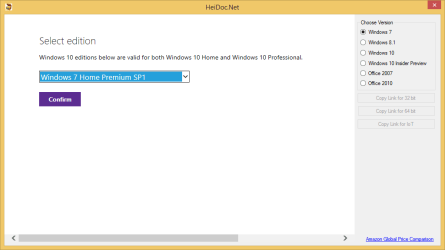
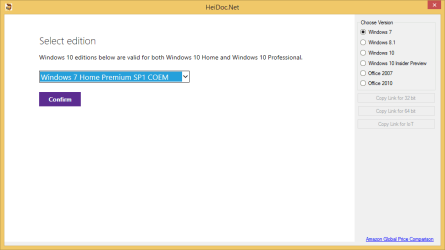
Windows 7 Home Premium SP1 or Windows 7 Home Premium SP1 COEM. Only the EULA is different.

It does not matter which one you choose (see screenshots below) if you have a retail or OEM key.

https://www.heidoc.net/joomla/technology-science/microsoft/67-microsoft-windows-iso-download-tool

HeiDoc.net 1.png

HeiDoc.net 2.png
 

My Computer

Computer type
PC/Desktop
OS
Windows 7/10
Back
Top