Which product ID key to Use on Reinstall?

Quadzilla

New member
Local time
2:18 AM
Messages
27
Hi All,
It's been suggested that I do a reinstall of Win 7 Pro on my Dell XPS 8100 after frequent sys lockups. I follwed the steps at Windows 7 Help Forums - Clean Reinstall - Factory OEM Windows 7 to get the latest ver. of Win 7 & I've made a bootable DVD w/that image. Question is can I use the product key liasted at Start/Compter/Properties? I ask becaese I'm disabled & getting the key from the back of The PC would be very difficult. THANKS!
 

My Computer My Computer

At a glance

Windows 7 Proffessional 64-biti 712 GB tape
Computer type
PC/Desktop
Computer Manufacturer/Model Number
Dell XPS
OS
Windows 7 Proffessional 64-bit
CPU
i 7
Memory
12 GB tape
Did the Dell come with Windows 7 Pro installed or did you install it?

Jerry
 

My Computer My Computer

At a glance

Win 7 Pro x64 / Win 10 ProIntel(R) Core(TM) i7-3630QM CPU @ 2.40GHz12 GB(1) Intel(R) HD Graphics 4000 (2) NVIDIA GeFo...
Computer type
Laptop
Computer Manufacturer/Model Number
Sager NP9170
OS
Win 7 Pro x64 / Win 10 Pro
CPU
Intel(R) Core(TM) i7-3630QM CPU @ 2.40GHz
Motherboard
CLEVO P170EM
Memory
12 GB
Graphics Card(s)
(1) Intel(R) HD Graphics 4000 (2) NVIDIA GeForce GTX 675M
Sound Card
(1) Realtek High Definition Audio (2) Intel(R) Display Aud
Monitor(s) Displays
17.3
Screen Resolution
1920x1080
Hard Drives
(1) Samsung 860 EVO 500GB(OS) (1) Samsung 860 EVO 500GB(Data)
Keyboard
Backlite
Antivirus
MSE, Malwarebytes Pro
Browser
Firefox
Other Info
DESKTOP: Custom-built.
OS: Win 10 Pro x64.
CASE: Rosewill R5.
CPU: Intel I5 4670K CPU @ 3.40GHz.
CPU COOLER: Cool Master Hyper 212 EVO.
MOTHERBOARD: Asus Z87-A.
MEMORY: Kingston HyperX 2x4 GB.
GPU: Nvidia Geforce 650 TI.
PSU: Corsair TX750.
DRIVES: (1) Samsung 840 120 GB SSD (2) Western Digital blue 500 GB 7200 RPM.
Hello Quadzilla,

Unfortunately, it would need to be the product key number on the COA sticker on the back of the PC. :(

The current one is just an OEM SLP key that can't be used with a clean install.

If you like, you could still do a factory recovery if you didn't want to do a clean install in the link you posted. Just be sure to back up anything that you do not want to lose first.

How to perform a system restore for Windows 7 | Dell US

Hope this helps, :)
Shawn
 

My Computer My Computer

At a glance

64-bit Windows 11 Pro for WorkstationsIntel i7-8700K OC'd to 5 GHz64 GB (4x16GB) G.SKILL TridentZ RGB DDR4 3600...ASUS ROG-STRIX-GTX1080TI-O11G-GAMING
Computer type
PC/Desktop
Computer Manufacturer/Model Number
Self built custom
OS
64-bit Windows 11 Pro for Workstations
CPU
Intel i7-8700K OC'd to 5 GHz
Motherboard
ASUS ROG Maximus XI Formula Z390
Memory
64 GB (4x16GB) G.SKILL TridentZ RGB DDR4 3600 MHz
Graphics Card(s)
ASUS ROG-STRIX-GTX1080TI-O11G-GAMING
Sound Card
Integrated
Monitor(s) Displays
2 x Samsung Odyssey G7 27"
Screen Resolution
2560x1440
Hard Drives
1TB Samsung 990 PRO M.2,
4TB Samsung 990 PRO PRO M.2,
TerraMaster F8 SSD Plus NAS
PSU
Seasonic Prime Titanium 850W
Case
Thermaltake Core P3
Cooling
Corsair Hydro H115i
Keyboard
Logitech wireless K800
Mouse
Logitech MX Master 4
Internet Speed
2 Gb/s Download and 100 Mb/s Upload
Antivirus
Malwarebyte Anti-Malware Premium
Browser
Google Chrome
Other Info
Logitech Z625 speaker system,
Logitech BRIO 4K Pro webcam,
HP Color LaserJet Pro MFP M477fdn,
APC SMART-UPS RT 1000 XL - SURT1000XLI,
Galaxy S23 Plus phone

My Computer My Computer

At a glance

64-bit Windows 11 Pro for WorkstationsIntel i7-8700K OC'd to 5 GHz64 GB (4x16GB) G.SKILL TridentZ RGB DDR4 3600...ASUS ROG-STRIX-GTX1080TI-O11G-GAMING
Computer type
PC/Desktop
Computer Manufacturer/Model Number
Self built custom
OS
64-bit Windows 11 Pro for Workstations
CPU
Intel i7-8700K OC'd to 5 GHz
Motherboard
ASUS ROG Maximus XI Formula Z390
Memory
64 GB (4x16GB) G.SKILL TridentZ RGB DDR4 3600 MHz
Graphics Card(s)
ASUS ROG-STRIX-GTX1080TI-O11G-GAMING
Sound Card
Integrated
Monitor(s) Displays
2 x Samsung Odyssey G7 27"
Screen Resolution
2560x1440
Hard Drives
1TB Samsung 990 PRO M.2,
4TB Samsung 990 PRO PRO M.2,
TerraMaster F8 SSD Plus NAS
PSU
Seasonic Prime Titanium 850W
Case
Thermaltake Core P3
Cooling
Corsair Hydro H115i
Keyboard
Logitech wireless K800
Mouse
Logitech MX Master 4
Internet Speed
2 Gb/s Download and 100 Mb/s Upload
Antivirus
Malwarebyte Anti-Malware Premium
Browser
Google Chrome
Other Info
Logitech Z625 speaker system,
Logitech BRIO 4K Pro webcam,
HP Color LaserJet Pro MFP M477fdn,
APC SMART-UPS RT 1000 XL - SURT1000XLI,
Galaxy S23 Plus phone
Did the Dell come with Windows 7 Pro installed or did you install it?

Jerry

According to this below, 64-bit Windows 7 Pro.

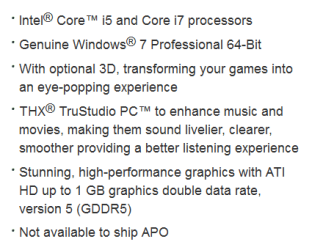
Dell Studio XPS 8100 Desktop Details | Dell

Hello Quadzilla,

Unfortunately, it would need to be the product key number on the COA sticker on the back of the PC. :(

The current one is just an OEM SLP key that can't be used with a clean install.

If you like, you could still do a factory recovery if you didn't want to do a clean install in the link you posted. Just be sure to back up anything that you do not want to lose first.

How to perform a system restore for Windows 7 | Dell US

Hope this helps, :)
Shawn
Thanks Shawn thats way I asked, but you answer it :D
 

My Computer My Computer

At a glance

Win 7 Pro x64 / Win 10 ProIntel(R) Core(TM) i7-3630QM CPU @ 2.40GHz12 GB(1) Intel(R) HD Graphics 4000 (2) NVIDIA GeFo...
Computer type
Laptop
Computer Manufacturer/Model Number
Sager NP9170
OS
Win 7 Pro x64 / Win 10 Pro
CPU
Intel(R) Core(TM) i7-3630QM CPU @ 2.40GHz
Motherboard
CLEVO P170EM
Memory
12 GB
Graphics Card(s)
(1) Intel(R) HD Graphics 4000 (2) NVIDIA GeForce GTX 675M
Sound Card
(1) Realtek High Definition Audio (2) Intel(R) Display Aud
Monitor(s) Displays
17.3
Screen Resolution
1920x1080
Hard Drives
(1) Samsung 860 EVO 500GB(OS) (1) Samsung 860 EVO 500GB(Data)
Keyboard
Backlite
Antivirus
MSE, Malwarebytes Pro
Browser
Firefox
Other Info
DESKTOP: Custom-built.
OS: Win 10 Pro x64.
CASE: Rosewill R5.
CPU: Intel I5 4670K CPU @ 3.40GHz.
CPU COOLER: Cool Master Hyper 212 EVO.
MOTHERBOARD: Asus Z87-A.
MEMORY: Kingston HyperX 2x4 GB.
GPU: Nvidia Geforce 650 TI.
PSU: Corsair TX750.
DRIVES: (1) Samsung 840 120 GB SSD (2) Western Digital blue 500 GB 7200 RPM.
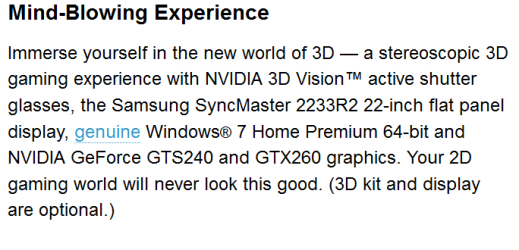
It lists both on that page :confused:
pro.PNG

home.PNG
 

My Computer My Computer

At a glance

Win 7 Pro x64 / Win 10 ProIntel(R) Core(TM) i7-3630QM CPU @ 2.40GHz12 GB(1) Intel(R) HD Graphics 4000 (2) NVIDIA GeFo...
Computer type
Laptop
Computer Manufacturer/Model Number
Sager NP9170
OS
Win 7 Pro x64 / Win 10 Pro
CPU
Intel(R) Core(TM) i7-3630QM CPU @ 2.40GHz
Motherboard
CLEVO P170EM
Memory
12 GB
Graphics Card(s)
(1) Intel(R) HD Graphics 4000 (2) NVIDIA GeForce GTX 675M
Sound Card
(1) Realtek High Definition Audio (2) Intel(R) Display Aud
Monitor(s) Displays
17.3
Screen Resolution
1920x1080
Hard Drives
(1) Samsung 860 EVO 500GB(OS) (1) Samsung 860 EVO 500GB(Data)
Keyboard
Backlite
Antivirus
MSE, Malwarebytes Pro
Browser
Firefox
Other Info
DESKTOP: Custom-built.
OS: Win 10 Pro x64.
CASE: Rosewill R5.
CPU: Intel I5 4670K CPU @ 3.40GHz.
CPU COOLER: Cool Master Hyper 212 EVO.
MOTHERBOARD: Asus Z87-A.
MEMORY: Kingston HyperX 2x4 GB.
GPU: Nvidia Geforce 650 TI.
PSU: Corsair TX750.
DRIVES: (1) Samsung 840 120 GB SSD (2) Western Digital blue 500 GB 7200 RPM.
Thx all for the quick replies, it did come new w/Win 7 Pro installed.
 

My Computer My Computer

At a glance

Windows 7 Proffessional 64-biti 712 GB tape
Computer type
PC/Desktop
Computer Manufacturer/Model Number
Dell XPS
OS
Windows 7 Proffessional 64-bit
CPU
i 7
Memory
12 GB tape
Thx all for the quick replies, it did come new w/Win 7 Pro installed.

Hello Quadzilla,

Unfortunately, it would need to be the product key number on the COA sticker on the back of the PC. :(

The current one is just an OEM SLP key that can't be used with a clean install.

If you like, you could still do a factory recovery if you didn't want to do a clean install in the link you posted. Just be sure to back up anything that you do not want to lose first.

How to perform a system restore for Windows 7 | Dell US

Hope this helps, :)
Shawn
You will need to do what Brink posted then.

Jerry
 

My Computer My Computer

At a glance

Win 7 Pro x64 / Win 10 ProIntel(R) Core(TM) i7-3630QM CPU @ 2.40GHz12 GB(1) Intel(R) HD Graphics 4000 (2) NVIDIA GeFo...
Computer type
Laptop
Computer Manufacturer/Model Number
Sager NP9170
OS
Win 7 Pro x64 / Win 10 Pro
CPU
Intel(R) Core(TM) i7-3630QM CPU @ 2.40GHz
Motherboard
CLEVO P170EM
Memory
12 GB
Graphics Card(s)
(1) Intel(R) HD Graphics 4000 (2) NVIDIA GeForce GTX 675M
Sound Card
(1) Realtek High Definition Audio (2) Intel(R) Display Aud
Monitor(s) Displays
17.3
Screen Resolution
1920x1080
Hard Drives
(1) Samsung 860 EVO 500GB(OS) (1) Samsung 860 EVO 500GB(Data)
Keyboard
Backlite
Antivirus
MSE, Malwarebytes Pro
Browser
Firefox
Other Info
DESKTOP: Custom-built.
OS: Win 10 Pro x64.
CASE: Rosewill R5.
CPU: Intel I5 4670K CPU @ 3.40GHz.
CPU COOLER: Cool Master Hyper 212 EVO.
MOTHERBOARD: Asus Z87-A.
MEMORY: Kingston HyperX 2x4 GB.
GPU: Nvidia Geforce 650 TI.
PSU: Corsair TX750.
DRIVES: (1) Samsung 840 120 GB SSD (2) Western Digital blue 500 GB 7200 RPM.
Hi All,
I was wrong after all, my PC had Win 7 Home Pro when I bought it. I upgraded a few weeks later to Win 7 Professional via Microsoft online store. Sorry for the mix up.
Having said that, I tried to reinstall Win 7 Professinal using a bootable DVD that was made w/an iso file from Windows 7 Direct Download Links.
I booted to that DVD and at the point where I was to select the partition, I got an error that the install could not continue and to check the setup log file for the reason. (3 partitions were available, I chose the largest, 900GB)

I searched my C drive and found no such file. Any idea what the problem is? I did find the Dell Win 7 Home Pro reinstall, do I have to use that then upgrade? I was hoping to do avoid that.

Thanks again for your help and patience!
 

My Computer My Computer

At a glance

Windows 7 Proffessional 64-biti 712 GB tape
Computer type
PC/Desktop
Computer Manufacturer/Model Number
Dell XPS
OS
Windows 7 Proffessional 64-bit
CPU
i 7
Memory
12 GB tape
from the booted dvd, after you get the error message:

Shift+F10 to open cmd prompt, type "notepad X:\Windows\panther\setupact.log"
 

My Computers My Computers

  • At a glance

    7 X64i5 84002x8gb 3200mhz
    Computer type
    PC/Desktop
    OS
    7 X64
    CPU
    i5 8400
    Motherboard
    gigabyte b365m ds3h
    Memory
    2x8gb 3200mhz
    Hard Drives
    various
    PSU
    pure power 11 400w cm
    Case
    Coolermaster
    Cooling
    cryorig m9i
  • At a glance

    7x64g54008gb ddr4 2400
    Computer type
    PC/Desktop
    OS
    7x64
    CPU
    g5400
    Motherboard
    ga b365m ds3h
    Memory
    8gb ddr4 2400
    PSU
    xfx pro 450w
You can't directly reinstall Pro version if you Anytime Upgraded to it from Home Premium. You'll have to first Clean Reinstall - Factory OEM Windows 7 Home Premium, activate it using the Product Key on COA sticker, then run the Anytime Upgrade by inserting its key: Windows Anytime Upgrade - How to - Windows 7 Forums

The solution to make this easier in the future is to save a backup image of the native Home Premium on that PC, then another after you Anytime Upgrade. This way you can recover to either OS without the need to activate again.

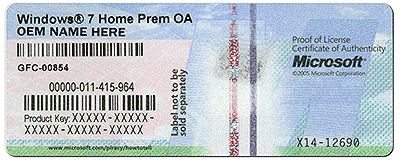
Here is the screenshot from the tutorial showing Product Key used for reinstall:
coa-stickers.gif
 
K, I tried that & got a message that setup could not create a sys. partition or locate a sys partition & to check setup log. I'm assuming I need to format 1st? Thing is theres a partition labeled "RECOVERY", OK to format that too or just the 3rd(of 3) partition? Sorry to keep coming back, just don't want to mess this up. I did read the pages you recommended but didn't see mention of the Recovery partition. Thanks!

Ed. this post.
I went aheead & formatted that partition but still got the message that setup could not create a sys. partition or locate a sys partition. I also tried to delete but no luck, I was prompted for new partition size but still got same error after. Could this be caused by bad controller? Im doing this reinstall because of frequent sys crashes. There was mention of possible controller issues, see http://www.sevenforums.com/bsod-help-support/314023-dell-xps-freezing-frequently-no-bsod-s.html.

FYI, I also tried this reinstall using the Dell Win 7 Home Pro DVD but got same error as before.
 
Last edited:

My Computer My Computer

At a glance

Windows 7 Proffessional 64-biti 712 GB tape
Computer type
PC/Desktop
Computer Manufacturer/Model Number
Dell XPS
OS
Windows 7 Proffessional 64-bit
CPU
i 7
Memory
12 GB tape
Try running Dell Hardware Diagnostics from F12 Menu
to test the hardware and see if the bootable diagnostics will run.

If so delete all partitions except the small Dell OEM partition at the beginning of the driver, since that contains the bootable Diagnostics which are worth keeping if they will run.

Delete all other partitions using the Drive Options pictured in Steps 7 and 8 of Clean Install Windows 7. Then create a new partition in the space, format and install Win7 there.

Other tips here to assure you get and keep a perfect Clean Reinstall - Factory OEM Windows 7. You would already know about the above if you'd read them.
 
I have a similar issue and seem to find contradicting info.

I have an Acer Aspire desktop that I purchased two years ago. Windows 7 Home 64 came pre-installed and with no discs. Last week, it sort of died. While the HDD had a capacity of 500GB, I only had 72GB used, but it suddenly ballooned to 500GB. In the process of pulling programs off manually, the computer became corrupted and windows no longer functioned. While I did run Kaspersky and a Malware program, only one virus was found, which I think was the root of the problem.

So, I need to get a new copy of Windows, but I've seen where if Windows came loaded, a new version won't work. How is that? I don't have a copy of Windows to reload. I have been able to access Disk Part and ran a clean all. I also partitioned the Disk 0. Interesting for me that it showed only 449GB instead of 500GB. Any reason?

Does anyone have a clear answer on my OS concern? I'm about to go out and purchase Win7 from a store, but not until I hear from someone more learned on this matter.

Thanks in advance.
 

My Computer My Computer

At a glance

Windows 7 Home Premim 64BitAMD Athalon II X2 2206GB
Computer type
PC/Desktop
Computer Manufacturer/Model Number
Acer
OS
Windows 7 Home Premim 64Bit
CPU
AMD Athalon II X2 220
Memory
6GB
Hard Drives
500GB
Antivirus
Kaspersky Pure
Browser
Firefox
Run the maker's HD Diagnostic extended CD scan to determine with certainty the HD condition.

Then Clean Reinstall - Factory OEM Windows 7 - everything is provided in the blue link which was posted earlier. You do not need to buy a new copy of Win7 which you already paid for when you bought the PC and which can be reinstalled any way you please for as long as the hardware lasts.
 
Hi gregrocker, thanks for responding so quickly. You provided a lot of information for me to read, but if I am understanding the first part, this can be done outside windows? I have an old laptop on which I`ve installed a clean version of XP and can download and burn on that. Again, if I am understanding you correctly? I´m working today and will be home tonight and can read more of what you are writing.

Again, thanks for the information and we´ll see what happens.
 

My Computer My Computer

At a glance

Windows 7 Home Premim 64BitAMD Athalon II X2 2206GB
Computer type
PC/Desktop
Computer Manufacturer/Model Number
Acer
OS
Windows 7 Home Premim 64Bit
CPU
AMD Athalon II X2 220
Memory
6GB
Hard Drives
500GB
Antivirus
Kaspersky Pure
Browser
Firefox
All is now well. Gregrocker offers great starting points and advice and after this rather painful experience, I suggest reading his guides on how to repair your system. It is expansive, albeit general in terms of what to do. No one person could provide what to do for each type of machine and situation, but gregrocker has taken time to give starting points on what to do and how to do it. Without that help, I cannot think of how much money he saved me. This is, however, time consuming.

So, I''ve Tried to keep notes of all the steps should someone else have a near same experience.

Keep in mind that I am using an Acer Travelmate Laptop with Windows XP as a means to repair my desktop with Windows 7 Home Premium 64Bit. The laptop has only.. 512MB Ram and a 1.3Ghz CPU. Fast is something is doesn't know.

1. The HD Diagnostic tool: Went quite well. I have a 500GB Seagate on the Desktop and the short test took about 2 minutes and passed. I then ran a long test, took about 2.5 hours, but passed as well. I plan to keep a Windows version and test on occasion.

2. ISO Recorder: Downloaded and setup quite easily with no problems. Nice when a programme does that!

3. The Windows 7 USB/DVD Tool: Dowloaded the Win7 Tool, but installing it was another matter. Seems I needed Image Master API v2 (IMAPI) programme. Downloaded a version, but it was riddled with bundled adware crap! Be careful from where this is downloaded. It took me time to get rid of the garbage. But the IMAPI was fine and helped with the Win7 Tool.

4. The ISO Windows File: Got the ISO file I needed. Did some reading to best understand what I have and which program I need. My previous Win7 was in German, but I understand English in the computer world much better, so I decided to switch fom German 64Bit to English 64Bit.

5. DVD or USB: Know your system's capabilities beforehand. Seems I forgot my old laptop does not have a burnable DVD device. Burns a CD well enough, but a DVD, not at all. So I need to get a USB stick. Seems all mine are old and too small (64mb, 256mb & 2GB). Tried using an external USB HDD to make it "appear" as a USB stick. No chance for that.

6. USB it is: Bought a Verbatim 16GB stick. Only, it is recognized in this laptop as FAT or I can change it to exFat. Ran CMD, then from C: convert e:/fs:ntfs (simply formatting will not work, just convert and it will be formatted). Also, it will be formatted when you do the installer program.

7. Using the Win7 Tool: This part is important. I ran the Win7 USB/DVD tool. All went well up to the very end. I have a spyware/adware program and it halted the very end with a confusing statement that the ISO program was attempting to execute. Not what I wanted at all! I didn't want this to run on my laptop. So, I blocked it. Well, that was NOT what it was doing. The Win7 tool only needed to complete and make the stick bootable. It took roughly 40 minutes to format and download to the stick. So I had to start over several times. To make a very long story short, if you have adware or spyware programs running, shut them off! They just make this more complicated than it needs to be.

More to that story: BOOTSECT: Additionally, you will need a bootsect file if you are doing what I am, which is loading from a 32bit machine into a 64bit. This did not work for my machine. Seems Bootsect on my computer just doesn't work. This is not working for me. Could be I did something wrong, but it did load properly. I found the bootsect zip file on this forum, but it just would not work for me. So I opted to try the Universal USB Installer programme I found a link for on this site.

8. Universal USB Installer: This worked! It took the same amount of time that the Win7 tool did. Now, I cannot say whether or not having the Bootsect file installed was needed or not, as I had it installed previously. But this worked.

All-in-all, this worked well. Frustrating at times, but in the end, it worked. Again, thanks for giving me great advice and starting points, gregrocker!

Now, I need to find someone who can help me with my WLAN connection... is now broken for some odd reason.

A Happy and Healthy New Year to all!

 

My Computer My Computer

At a glance

Windows 7 Home Premim 64BitAMD Athalon II X2 2206GB
Computer type
PC/Desktop
Computer Manufacturer/Model Number
Acer
OS
Windows 7 Home Premim 64Bit
CPU
AMD Athalon II X2 220
Memory
6GB
Hard Drives
500GB
Antivirus
Kaspersky Pure
Browser
Firefox
Why would you allow Spyware on your PC at all? Uninstall everything you don't actively use in Add/remove Programs, disable all Browser Add-ons except Flash, run SUPERAntiSpyware and Malwarebytes free scanners declining Trial versions.

Use UltraISO Software To Create Bootable USB Flash Drive which always works when the Download tool falters.

Rightclick on the Network Connection icon in bottom-right task bar System Tray, run Troubleshooter. Is the driver installed? Does it show your network? What is the exact error or condition state?

Did you follow the steps in Clean Reinstall - Factory OEM Windows 7 to put your network driver in backup so you can install it to get online quickly to enable Automatically deliver drivers via Windows Update (Step 3) and run all Important and Optional Windows Update until no more are offered.

Are you following the rest of the steps in Clean Reinstall - Factory OEM Windows 7 after Step 2 as you dont mention anything about them? These will assure you get and keep a perfect install, for as long as you stick with the tools and methods given.
 
Back
Top