Solved Which program to create AVCHD DVD?

jumanji

New member
Guru
Gold Member
VIP
Local time
5:34 AM
Messages
5,915
Using MakeMKV I can backup my Blu-ray movies. This takes huge space on the HDD.

Is there a simple program to create an AVCHD DVD disc? Then I can burn the AVCHD to low-cost DVD and play it on my PS3, preserving my original Blu-ray disc.

I have very little knowledge of the video terminology and conversion. So the program should be simple to execute with just a few clicks.
 

My Computer

OS
Windows 7 Home Premium 32 bit
The Sony Picture Motion Browser is supposed to do that - but in bad quality. Another option is Corel. It costs money but they have a free trial. You can also try DVD Flick which is free.
 

My Computer

Computer Manufacturer/Model Number
HP, Dell, Gateway, Toshiba - 4 laptops and 2 desktops
OS
Vista, Windows7, Mint Mate, Zorin, Windows 8
CPU
from 1.6GHz Duo to i7
Monitor(s) Displays
2x HP w2207
Hard Drives
5x HDD, 7x SSD, 12x Externals
Keyboard
with trackball - no mices
Mouse
Trackball mice
Internet Speed
DSL 6000
Thanks for the suggestions.

May be I was not clear in what I stated. I do not want to convert AVCHD into DVD format. Rather I want to write my blu-ray movie backup (about 40GB) into AVCHD format compressing it to near 4.7 GB so that it can be written onto a DVD. The AVCHD on DVD can then played with most Blu-ray players and definitely on the Sony PS3.

Sony PMB seems to be specifically intended for Sony HD Camcorders for organising/managing camcorder video clips/pictures and I doubt whether DVDFlick can author/encode to AVCHD, unless someone has used it to create an AVCHD format DVD.
 

My Computer

OS
Windows 7 Home Premium 32 bit
Unfortunately I have no AVCHD file to try it out. But maybe you try DCDFlick and see what happens. Else you can try a file conversion with Format Factory. Here is a little tutorial I made that shows you how to handle it: Format factory tutorial on Vimeo If you want to compress 40GBs into 4.7GB, you will have to choose a high loss format - e.g. .flv. - and even then I am not sure whether it would reduce it that much. Matter of trying.
 

My Computer

Computer Manufacturer/Model Number
HP, Dell, Gateway, Toshiba - 4 laptops and 2 desktops
OS
Vista, Windows7, Mint Mate, Zorin, Windows 8
CPU
from 1.6GHz Duo to i7
Monitor(s) Displays
2x HP w2207
Hard Drives
5x HDD, 7x SSD, 12x Externals
Keyboard
with trackball - no mices
Mouse
Trackball mice
Internet Speed
DSL 6000
I have great experiences with DVDFab Blu-ray Copy. It is not free but, imo, has the best read and conversion to BD9 or BD5, allowing instant burning on a DL-DVD (BD9) or even a normal DVD (BD5).


My Computer

Computer Manufacturer/Model Number
custom build
OS
Windows 7 64b Ultimate
CPU
I7-2600 3.40GHz - testing various OC levels..
Motherboard
ASUS Sabretooth
Memory
2x 4Gb DDR3/1333
Graphics Card(s)
GTX570 - testing OC levels
Sound Card
motherboard 7.1 DIG.
Monitor(s) Displays
2x Ilyama 24" E2409HDS-B1 2ms/DVI
Screen Resolution
1920 x 1080
Hard Drives
120 GB Intel Elmcrest SSD
1 TB SATAII 7200RPM/32MB
External 2TB USB3
PSU
Corsair Pro HX850W
Cooling
Coolermaster Hyper V8
Keyboard
Logitech G110
Mouse
Logitech G700
Internet Speed
25Mb
Other Info
CPU: 7,7 RAM: 7,7 GTX: 7,9 GTX 3D : 7,9 SSD 7,6
Overall 7,6 ...... now to speed up the SSD... ;)

Also use a Dell XPS M1710 on Vista 32b
Asus LT on Vista 32
3 older machines still doing fine on Linux/ubuntu but not used much anymore...
I have great experiences with DVDFab Blu-ray Copy. It is not free but, imo, has the best read and conversion to BD9 or BD5, allowing instant burning on a DL-DVD (BD9) or even a normal DVD (BD5).
He wants to write a 40GB file to one DVD (4.7GB). Do you think that would work with this program?
 

My Computer

Computer Manufacturer/Model Number
HP, Dell, Gateway, Toshiba - 4 laptops and 2 desktops
OS
Vista, Windows7, Mint Mate, Zorin, Windows 8
CPU
from 1.6GHz Duo to i7
Monitor(s) Displays
2x HP w2207
Hard Drives
5x HDD, 7x SSD, 12x Externals
Keyboard
with trackball - no mices
Mouse
Trackball mice
Internet Speed
DSL 6000
I have great experiences with DVDFab Blu-ray Copy. It is not free but, imo, has the best read and conversion to BD9 or BD5, allowing instant burning on a DL-DVD (BD9) or even a normal DVD (BD5).

Thanks for the suggestion. But DVDFab Bluray copy costs anywhere between $60-106 depending upon the subscription period.

I am looking for a simple freeware solution and I think I have got my hand on one after searching the internet.

It is this: BDtoAVCHD - Create an AVCHD disc (BD5/BD9/BD25) from a Blu-Ray or MKV from BDtoAVCHD - Create an AVCHD disc (BD5/BD9/BD25) from a Blu-Ray or MKV | Blu-Ray to MKV | Blu-Ray to AVCHD | MKV to AVCHD | Blu-Ray 3D to MKV 3D SBS | Connecta 2000 and it seems to fit my bill.

I have installed v1.6.0 and right now my system is chugging along creating the AVCHD for Night at Museum2 from the blu-ray backup folder done with MakeMKV. Shall report when the trial succeeds.
 

My Computer

OS
Windows 7 Home Premium 32 bit
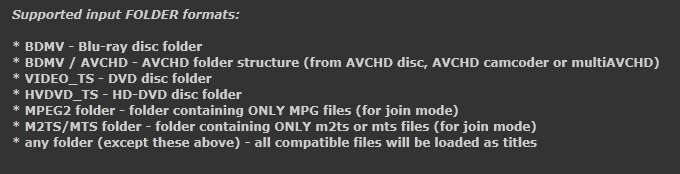
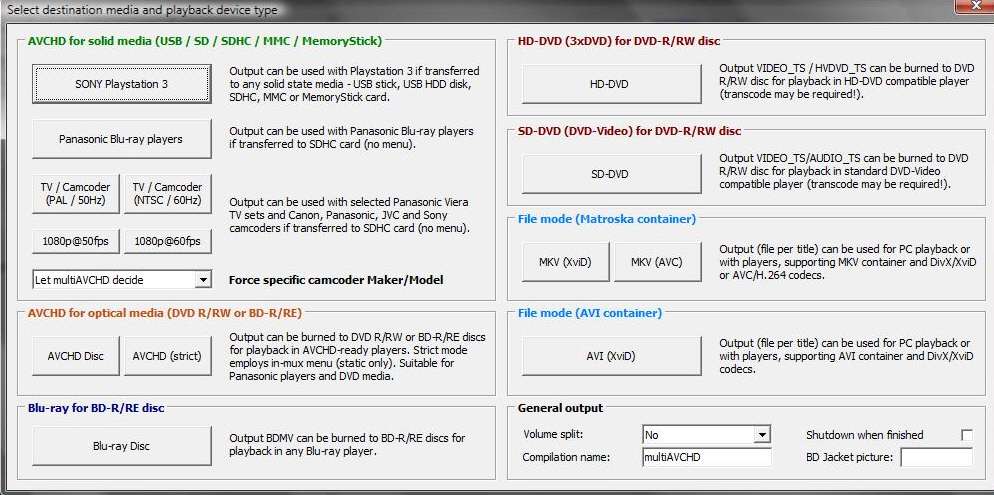
MultiavcHD. Also can create BDMV on ordinary DVD (SL/DL) media, if you want to create BluRay for small videos and don't want to waste an expensive BD blank.

multiavchdinput1.jpg

multiavchdinput2.jpg


multiavchdoutput.jpg


There used to be a dedicated Forum, but the author has taken it down about three months ago. Now it is supported strictly through the multiAVCHD thread on the Doom9 forum.
 

My Computer

Computer type
PC/Desktop
Computer Manufacturer/Model Number
Home-built, two systems (1) and (2)
OS
Windows 7 Pro x64 (1), Win7 Pro X64 (2)
CPU
i5-3350p 3.1Ghz/6MB-cache (1); E8400 3.0Ghz/6MB-cache (2)
Motherboard
ASUS P8Z77-V Pro (1); ASUS P5Q3 (2)
Memory
8GB PC3-12800 DDR3 (1); 4GB PC3-10600 DDR3 (2)
Graphics Card(s)
ATI HD7750 (1), (see TV cards); ATI R7 250 (2)
Sound Card
Realtek ALC892 HD Audio (1); Realtek ALC1200 HD Audio (2)
Monitor(s) Displays
Eizo HD2441W LCD, Eizo S2433W (1); Eizo 24" S2433W (2)
Screen Resolution
1920x1200, 1920x1200 (1); 1920x1200 (2)
Hard Drives
(1) 1TB SATA-II (7200RPM), 2x2TB SATA-III (7200RPM), 250GB SATA-III (10000RPM) for OS; 2x2TB external USB 3.0

(2) 320GB SATA-II (7200RPM), 750GB SATA-II (7200RPM), 150GB SATA-II (10000RPM) for OS; 2TB external USB 3.0
PSU
Nesteq ECS-6001 600W (1); Nesteq ECS-5001 500W (2)
Case
Acousti-Case 360 (1) and (2)
Cooling
Noctua NH-U12P SE2 for CPU, 2x120mm case fans (1) and (2)
Keyboard
IBM PS/2 (1) and (2)
Mouse
Logitech MX Revolution wireless (1); Microsoft wired (2)
Internet Speed
100mbps down / 10mbps up
Antivirus
Microsoft Security Essentials; Malwarebyte Anti-Malware Pro
Browser
Firefox
Other Info
Ceton InfiniTV 4-tuner cablecard-enabled TV card as well as Hauppauge HVR-2250 OTA/ATSC 2-tuner TV card in (1), running under Win7 WMC
You have 2 options.

1) Buy a Bluray burner, and copy the BluRay 1:1 to a blank BD disc.

2) Burn to DVD or Dual Layer DVD as a AVCHD disc using multiAVCHD.

The problem with option 2 is that you need to compress a 25-45GB BD disc down to at least 8GB for DL DVD, or just over 4GB for a DVD.

To do this, you'll specific setting in the encoder to make it BluRay compatable.
Also, downsizing the video to 720P will be a very good idea, depending on the legnth of the movie, and what type of disc you intend to use.

High Bitrate 720P will look better than low bitrate 1080P.


What I do .. and would recommend, is using MeGUI to recode the movie at 720P.
Then, use multiAVCHD to create a Bluray structure to burn to DVD.

This makes for an excellent looking backup, and at 720P allows for higher bitrates that will fit on a standard DVD.

The downside is that MeGUI can be slow (depending on settings & how much CPU power you have) especially using higher bitrates and settings.
But if done properly, the results will be hard to distinguish from the original.
 

My Computer

Computer Manufacturer/Model Number
Custom (Self Build)
OS
Windows 7 Home Premium 64bit
CPU
Intel Core i7 2700k
Motherboard
eVGA P67 SLI
Memory
8GB Mushkin Redline Ridgebacks @1866
Graphics Card(s)
EVGA GTX570 SC
Sound Card
XiFi Titanium HD
Monitor(s) Displays
LG W2453V
Screen Resolution
1920x1080
Hard Drives
Intel 320 80GB -- Intel X25-V 40GB --WD Black 1TB x2 -- WD Blue 640GB
PSU
Seasonic x750
Case
Corsair 600T SE White
Cooling
eVGA Superclocked CPU Cooler
Keyboard
Saitek Cyborg
Antivirus
Kaspersky
Browser
IE
Other Info
LG BD/DVD
I have great experiences with DVDFab Blu-ray Copy. It is not free but, imo, has the best read and conversion to BD9 or BD5, allowing instant burning on a DL-DVD (BD9) or even a normal DVD (BD5).
He wants to write a 40GB file to one DVD (4.7GB). Do you think that would work with this program?

yes, it will...
 

My Computer

Computer Manufacturer/Model Number
custom build
OS
Windows 7 64b Ultimate
CPU
I7-2600 3.40GHz - testing various OC levels..
Motherboard
ASUS Sabretooth
Memory
2x 4Gb DDR3/1333
Graphics Card(s)
GTX570 - testing OC levels
Sound Card
motherboard 7.1 DIG.
Monitor(s) Displays
2x Ilyama 24" E2409HDS-B1 2ms/DVI
Screen Resolution
1920 x 1080
Hard Drives
120 GB Intel Elmcrest SSD
1 TB SATAII 7200RPM/32MB
External 2TB USB3
PSU
Corsair Pro HX850W
Cooling
Coolermaster Hyper V8
Keyboard
Logitech G110
Mouse
Logitech G700
Internet Speed
25Mb
Other Info
CPU: 7,7 RAM: 7,7 GTX: 7,9 GTX 3D : 7,9 SSD 7,6
Overall 7,6 ...... now to speed up the SSD... ;)

Also use a Dell XPS M1710 on Vista 32b
Asus LT on Vista 32
3 older machines still doing fine on Linux/ubuntu but not used much anymore...
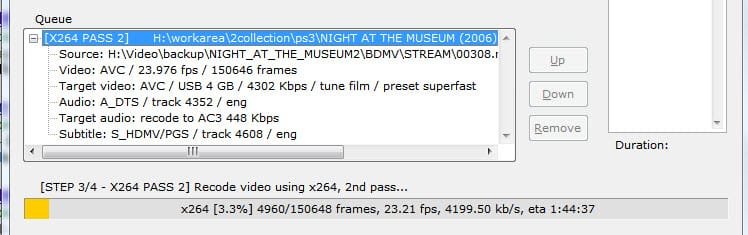
After about four hours, BDTOAVCHD successfully created the AVCHD format of the bluray movie ready to be burnt on a DVD. It turned out to be as easy as ABC.

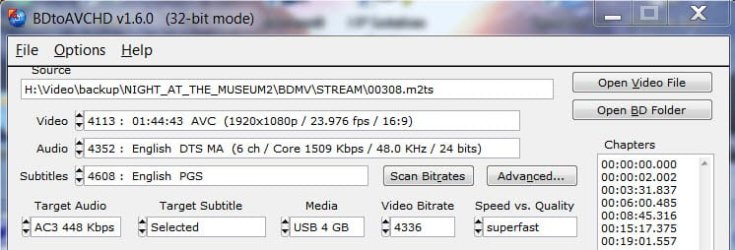
The backed-up movie title (made by MakeMKV) loaded to BDTOAVCHD. It analyses the BD back-up and automatically selects the main movie. For Target Audio I selected AC3 448Kbps instead of 640. For the media I selected USB so that I can play it on my PS3 with a USB stick.
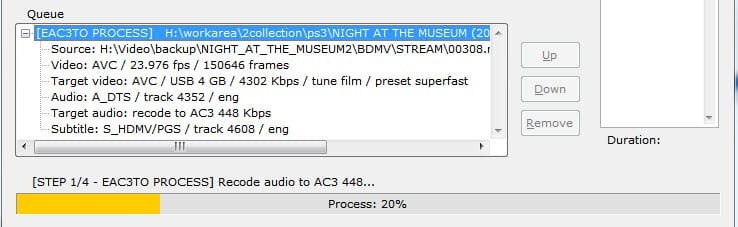
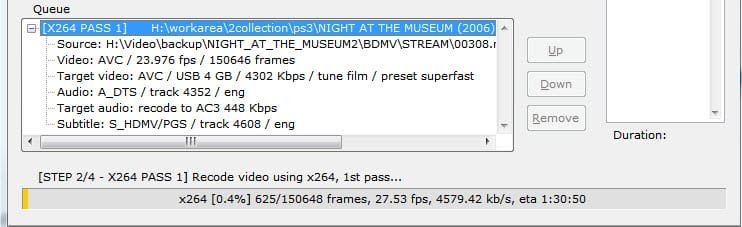
A few screenshots.

BD2AVCHD5.jpg

step1.jpg

step2.jpg

step3.jpg

Step 4 must have been remuxing, but I had gone to sleep leaving the system to work.:) I guess it must have taken something like four hours to complete the task.
Using ImgBurn I first created an ISO, mounted it on Virtual Clone drive and played it on MPC-Home Cinema. After confirming that everything was fine and working, I burnt the ISO on to a DVDRW and my PS3 played it fine. The video quality is quite good and totally satisfactory. All in all the program did a good job.

You have 2 options.

1) Buy a Bluray burner, and copy the BluRay 1:1 to a blank BD disc.

2) Burn to DVD or Dual Layer DVD as a AVCHD disc using multiAVCHD.

The problem with option 2 is that you need to compress a 25-45GB BD disc down to at least 8GB for DL DVD, or just over 4GB for a DVD.

To do this, you'll specific setting in the encoder to make it BluRay compatable.
Also, downsizing the video to 720P will be a very good idea, depending on the legnth of the movie, and what type of disc you intend to use.

High Bitrate 720P will look better than low bitrate 1080P.


What I do .. and would recommend, is using MeGUI to recode the movie at 720P.
Then, use multiAVCHD to create a Bluray structure to burn to DVD.

This makes for an excellent looking backup, and at 720P allows for higher bitrates that will fit on a standard DVD.

The downside is that MeGUI can be slow (depending on settings & how much CPU power you have) especially using higher bitrates and settings.
But if done properly, the results will be hard to distinguish from the original.

1. I do have a BD burner. Making a 1:1 bluray copy is absolutely no problem but for the cost of the Blank BD.

2. I had tried multi-AVCHD about a year back. It only crashed and I then uninstalled it.

Even today I tried with the latest version. I did not succeed. It crashed saying AVinfo stopped working. It appears to be a complex and buggy program and not suitable for ordinary users.

If you had successfully created an AVCHD disk, I would like to know a step by step process so that I can try. May be I am doing something wrong.

Whatever, it is not as easy, straightforward and intuitive as BDTOAVCHD where it is a child's play. My personal opinion.
 
Last edited:

My Computer

OS
Windows 7 Home Premium 32 bit
I actually didnt know about that program. Ill have to look into it. :)
4 hours seems reasonable to me to compress a BD down to DVD size.

The method I was suggestiong would take 4-6 hours per movie as well, depending on length and settings.

But if this app makes good looking copies, it certainly seems as if its a bit easier.

The only advantage to my suggestion is that (or so it seems) you have a bit more control with what you can do.
For example, I like to downsize to 720P and use 5000-6000bit rates. To me this looks better than 1080P under 8K.
But thats just personal opinion. Not everyone would agree.

But, true its not as easy. it certainly is a bit more complicted than what you are describing.


Im going to check this app out though. It looks interesting.
 

My Computer

Computer Manufacturer/Model Number
Custom (Self Build)
OS
Windows 7 Home Premium 64bit
CPU
Intel Core i7 2700k
Motherboard
eVGA P67 SLI
Memory
8GB Mushkin Redline Ridgebacks @1866
Graphics Card(s)
EVGA GTX570 SC
Sound Card
XiFi Titanium HD
Monitor(s) Displays
LG W2453V
Screen Resolution
1920x1080
Hard Drives
Intel 320 80GB -- Intel X25-V 40GB --WD Black 1TB x2 -- WD Blue 640GB
PSU
Seasonic x750
Case
Corsair 600T SE White
Cooling
eVGA Superclocked CPU Cooler
Keyboard
Saitek Cyborg
Antivirus
Kaspersky
Browser
IE
Other Info
LG BD/DVD
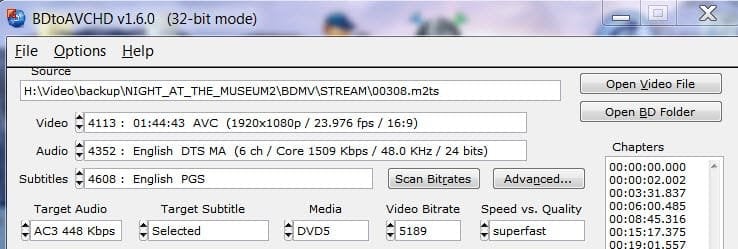
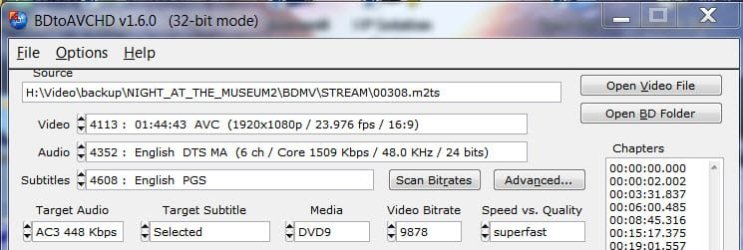
I think there is enough ammunition in the program to deal with personally acceptable video quality of the end AVCHD. The following screenshots indicate the video bitrate decided by the program for different Media DVD5, DVD9 and USB 4GB all else remaining the same.( I have left out Custom Size, BD25 and BD50 as not relevant.) So take your pick.

ADVD5VB.jpg

BDVD9VB.jpg

CUSB4GBVB.jpg

Then again one can select any of the following x264 presets in Speed Vs Quality : Superfast, very fast, faster, fast, medium, slow, slower, very slow, Placebo (High Quality)

But one has to keep in mind the system capability and the time it will take to finish for a better quality. ( Just for the heck of it I chose Placebo (High Quality) and when the first pass indicated something like 41 hours, beat a hasty retreat and accepted the default Superfast :))
 

My Computer

OS
Windows 7 Home Premium 32 bit
If its settings are anything like Meguis (which should be close being based on x264)

The Palcebo settings makes settings that are really not even worth the trade off. Although the results are better, it becomes nearly impossible to see them VS say, Slow or Slower settings.

I always like a A slow or Slower preset, and then tweak a bit from there.


Not sure if this is an option for you or not but remember you can cut more out if needed.
Additional Audio tracks you have no need for, Subtitles etc.


I agree, for 5.1,448 is a good setting. Good quality, much smaller size.

But if you have no 5.1 playback device, you can also consider downgrading the Audio to Stereo @ 256 or even 384.
I mean, if theres no 5.1 sound system for the playback, amay as well usde those extra bits towards Video :)


Thanks for the screenies BTW. Good looking app. Simple and straight forward.
 

My Computer

Computer Manufacturer/Model Number
Custom (Self Build)
OS
Windows 7 Home Premium 64bit
CPU
Intel Core i7 2700k
Motherboard
eVGA P67 SLI
Memory
8GB Mushkin Redline Ridgebacks @1866
Graphics Card(s)
EVGA GTX570 SC
Sound Card
XiFi Titanium HD
Monitor(s) Displays
LG W2453V
Screen Resolution
1920x1080
Hard Drives
Intel 320 80GB -- Intel X25-V 40GB --WD Black 1TB x2 -- WD Blue 640GB
PSU
Seasonic x750
Case
Corsair 600T SE White
Cooling
eVGA Superclocked CPU Cooler
Keyboard
Saitek Cyborg
Antivirus
Kaspersky
Browser
IE
Other Info
LG BD/DVD
Hi, Wishmaster. Thank you for all the valuable info and suggestions. ( Incidentally, I had gone through your tutorial on how to create an AVCHD in this very forum before embarking on my search and trial of a simple program suitable for dummies like me :) )

Here is some more data on which you may deliberate.

Since DVDFab was suggested by MvdB, I downloaded the 30 day evaluation copy and tried it with the same movie..

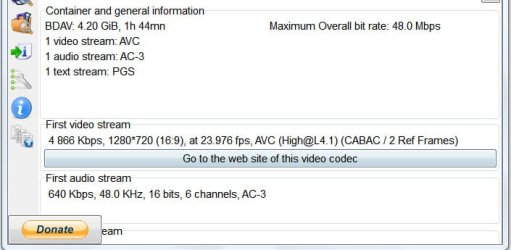
DVDFab Bluray copy gives one a choice of creating a 1080P (original resolution) as well as a 720P (reduced resolution) AVCHD. I tried both. Media Screenshots of the output AVCHD below.

1. DVDFab BD5 (DVD SL) AVCHD 720P:

BD5 DVDFab720.jpg

2. DVDFab BD5 (DVD SL) AVCHD 1080P

BD5 DVDFab1080.jpg

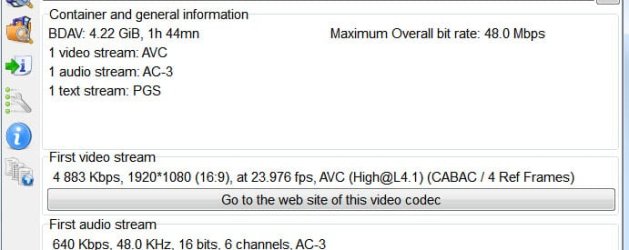
One may find that there is hardly any difference in video bitrate of the two, both hovering around 4870Kbps. From the Video quality point which is going to look better, the 1080P or 720P? 720P does not increase the video bitrate. I am now confused.

For comparison, the media info for the 1080P AVCHD created by BDtoAVCHD below: ( There is no option here to do a 720P)

3. BDtoAVCHD BD5 (DVD SL) 1080P

BD5 BD2AVCHD1080.jpg

DVDFab has one single advantage over BDtoAVCHD. It does the job in almost half the time. The disadvantage or cons is it does not give you any option other than 1080P or 720P - but I do not know which is better :) .

On the other hand, BDtoAVCHD allows one to select the target Audio bitrate and also various presets with no option to downconvert to 720p.
 

My Computer

OS
Windows 7 Home Premium 32 bit
Right, same bitrate but at 720P.

If you think about it, going from DVD -> 720PHD is just over double the amout of pixels.
And again going from 720P --> 1080P.

This is why I suggest going down to 720P when compressing to DVD or DVD-DL sizes.
You can fit more bits into the same space, for more detail and a overall better quality image.
With that same bitrate at 1080P, the encoder has to throw away more bits to compress the video. Which can result in even more quality loss.

In my experience, form what looks best to me..
If I can get 4500-6000 bitrate I go with 720P.
If I can get 8000 or more bitrate, 1080P.
99% of the time I just stick with higher bitrate 720P though.

Of course, this depends heavily on the film itself and how many complex scenes there are.
As well as how how close you want your copy to be to the original and how picky you are about it.


IMHO, if you can only get around 4500-6000bit rate to fit, go down to 720P. The quality of the copy should be nearly identical to the original.
I would suggest trying yourself. Do it both ways and see what looks better to you.

But keep in mind, downsizing 1080P -> 720P will take a bit longer.
If it allows you to change it, I would still use 4 Ref. Frames @ 720P as well.
 
Last edited:

My Computer

Computer Manufacturer/Model Number
Custom (Self Build)
OS
Windows 7 Home Premium 64bit
CPU
Intel Core i7 2700k
Motherboard
eVGA P67 SLI
Memory
8GB Mushkin Redline Ridgebacks @1866
Graphics Card(s)
EVGA GTX570 SC
Sound Card
XiFi Titanium HD
Monitor(s) Displays
LG W2453V
Screen Resolution
1920x1080
Hard Drives
Intel 320 80GB -- Intel X25-V 40GB --WD Black 1TB x2 -- WD Blue 640GB
PSU
Seasonic x750
Case
Corsair 600T SE White
Cooling
eVGA Superclocked CPU Cooler
Keyboard
Saitek Cyborg
Antivirus
Kaspersky
Browser
IE
Other Info
LG BD/DVD
Thanks for the inputs, Wishmaster. It was quite some food for thought.

Somehow the idea of downsizing the original 1080P to 720P and then viewing it on a 1080P resolution Full HD flat TV does not appeal to me. It is akin to blowing up Passport size photograph to 6" X 4" postcard size. Perhaps 720P video should be OK for those with screens of 720P.

After mulling over it for quite sometime _oops, I can't burn the same movie many times and view it patiently to decide which looks better. :) - I have decided to take the easy way out. To use DVD-DL as the media for the AVCHD. The video bitrate of the AVCHD created by BDtoAVCHD will then be around 9868Kbps for the 1080P.

Thanks again for taking your time out on this thread.
 

My Computer

OS
Windows 7 Home Premium 32 bit
At that bitrate, 1080P should look quite good.

Ther are a few movies you can fit on a standard DVD, but I too have found DL-DVD fits the bill much better :)

Glad you found something that your happy & comfortable with.
Happy ripping :)
 

My Computer

Computer Manufacturer/Model Number
Custom (Self Build)
OS
Windows 7 Home Premium 64bit
CPU
Intel Core i7 2700k
Motherboard
eVGA P67 SLI
Memory
8GB Mushkin Redline Ridgebacks @1866
Graphics Card(s)
EVGA GTX570 SC
Sound Card
XiFi Titanium HD
Monitor(s) Displays
LG W2453V
Screen Resolution
1920x1080
Hard Drives
Intel 320 80GB -- Intel X25-V 40GB --WD Black 1TB x2 -- WD Blue 640GB
PSU
Seasonic x750
Case
Corsair 600T SE White
Cooling
eVGA Superclocked CPU Cooler
Keyboard
Saitek Cyborg
Antivirus
Kaspersky
Browser
IE
Other Info
LG BD/DVD
Back
Top