which SSD size needed

thanks for the tips. i did the following:
- virtual memory manual se tot 400-1000MB (it yelled at me when I set the lower bound to <400)
- disabled the hiberfile in CMD (you really need to do that)
- limited restore points to 3.75 GB (I agree on the images as veldthui, but for some quick installation of a program I may want to revert I don't create an image...)

Including Office 2010 (and MSE, FF, Malwarebytes, fences, virtualclone etc.) and all updates I now use 15.5 GB. this really is slim compared to before.

Since the SSD is for speed, I'm not a friend of installing applications on a HDD to save expensive SSD space. First, some programs are really picky on the C-drive. Second, if it is a large installation (i.e. CAD) I really want them to be fast. If it is a small installation, it doesn't take much space anyway.

With this I'm sure I can get away with a 60 GB SSD. Thank you all for the help.
 

My Computer

Computer Manufacturer/Model Number
homemade
OS
W7 Pro 64
CPU
Intel i3 3220 @ 3.3 GHz
Motherboard
ASRock H77M
Memory
2x8GB DDR 3 1600 Kingston
Graphics Card(s)
onboard
Sound Card
onboard
Monitor(s) Displays
two 21" LCD
Hard Drives
128 GB Samsung 830
PSU
OCZ400MXSP
Cooling
Stock
Internet Speed
DSL
If you can afford, I would suggest that you get two 30gb SSD's. $105/unit

Put OS on one, put your games and apps on a second. Use your spinners for constantly changing files, movies, pics, downloads etc....

The OS drive in SATA port 0, the 2nd in port 1, cd rom port 6, Your spinner port 5.
When installing OS, only have the SSD for port 0 connected.
I have taken too immediatly installing all windows updates first thing, first the mandatory stuff, then I sift thru the optional stuff minus my hardware drivers. Once OS is finished I install my hardware drivers.
Next 1 by 1 add your other drives and apps, no need to hurry. I have found this to work great.
If you really can afford, buy 3, 30gb SSD's and RAID them, they scream.
Oh and buy an SSD with an onboard cache!
 

My Computer

Computer Manufacturer/Model Number
DIY #3, #2
OS
W7 Ulti/64, XP Pro/32
CPU
INTEL i7 920 DO, Core2 Duo 6400
Motherboard
GIGABYTE EX58 UD3R-SLI, EP45-UD3R
Memory
KINGSTON DDR3 1333MHz, CORSAIR DDR2 800MHz
Graphics Card(s)
EVGA GTX 260 x2, 8800 GTX
Sound Card
REALTEK HD onboard, ditto
Monitor(s) Displays
SONY 40" BRAVIA LCD
Screen Resolution
1360 X 768
Hard Drives
OCZ VERTEX/RAID0 -3, Vertex 30GB
PSU
COOLERMASTER 900W, ENERMAX 850W
Case
COOLERMASTER HAF 932 x2
Cooling
stock
Keyboard
MS
Mouse
MS
Internet Speed
ADSL 3MB/768KBs
Other Info
amateur enthusiast
If you can afford, I would suggest that you get two 30gb SSD's. $105/unit

Put OS on one, put your games and apps on a second. Use your spinners for constantly changing files, movies, pics, downloads etc....

The OS drive in SATA port 0, the 2nd in port 1, cd rom port 6, Your spinner port 5.
When installing OS, only have the SSD for port 0 connected.
I have taken too immediatly installing all windows updates first thing, first the mandatory stuff, then I sift thru the optional stuff minus my hardware drivers. Once OS is finished I install my hardware drivers.
Next 1 by 1 add your other drives and apps, no need to hurry. I have found this to work great.
If you really can afford, buy 3, 30gb SSD's and RAID them, they scream.
Oh and buy an SSD with an onboard cache!

I really don't see the benefit of your suggestion:
- 30 GB SSD are slower than the same type of 60 GB since the NAND has more parallel channels in larger SSD (you can see that well in tests between the 40 and 80 GB Intel)
- having 2 SSD wastes space. If The OS needs 20 GB and my applications need 25, I still have 15 for either OS or applications if I have one 60 GB SSD. If they are split up over 2 SSD, then the one might have space the other SSd needs.
- for the price of two 30 GB SSd I can get one 80 GB Intel, or for $ 60 less one 64 GB Crucial etc.
- putting 2 SSD in RAID 0 doesn't make them faster than the same type 60 GB SSD, but loses TRIM and makes it more complicated and less reliable.

Yes, data stay on HDD (that is some hundred GB, no way I could afford two SSD since i have RAID 1 for data).

I'm going to isntall all my heavy applications (CAD etc.) and see what I end up with. My original plan is to wait till fall when Intel brings its 3rd generation. and their sizes are 40 GB and 80 GB. 40 GB will always be too small for me, so I might get the 80 GB anyway and if it costs $ 100+ that is not much waste. Maybe the 64 GB SSD will get even cheaper, but at that price I can afford to be " wasteful" (Even if Intel is not always the fastest, it seem the most reliable and mature and you know what you get). Only if I get impatient I'll consider a 64 GB now... (this SSD is my graduation present to myself and I already graduated in May...)
 

My Computer

Computer Manufacturer/Model Number
homemade
OS
W7 Pro 64
CPU
Intel i3 3220 @ 3.3 GHz
Motherboard
ASRock H77M
Memory
2x8GB DDR 3 1600 Kingston
Graphics Card(s)
onboard
Sound Card
onboard
Monitor(s) Displays
two 21" LCD
Hard Drives
128 GB Samsung 830
PSU
OCZ400MXSP
Cooling
Stock
Internet Speed
DSL

My Computer

Computer type
PC/Desktop
Computer Manufacturer/Model Number
Ignatz Special; 4 speed manual gearbox; factory air conditioning; one of one
OS
Windows 7 Home Premium SP1, 64-bit
CPU
Intel Skylake i5-6600K, not overclocked
Motherboard
AsRock Z170M Extreme 4, micro ATX
Memory
8 GB HyperX DDR4-2666 (2 x 4 GB)
Graphics Card(s)
none; graphics are integrated on CPU
Sound Card
onboard: Realtek ALC1150; external: USB Behringer UF0-202
Monitor(s) Displays
Dell S2340M 23 inch IPS
Screen Resolution
1600 x 900
Hard Drives
System: Crucial MX100 series SSD, 128 GB;
Data: Samsung Spinpoint 103SJ, 1 TB;
Backup: WD Caviar Green WD30EZRX-00D8PB0, 3 TB
PSU
Rosewill SilentNight 500 watt fanless, semi-modular
Case
Antec Solo II
Cooling
Noctua NH-U12S; Noctua F12 intake, Noctua S12A exhaust
Keyboard
Microsoft 200 6JH-00001 USB
Mouse
Dell or Microsoft optical wired; USB
Antivirus
Microsoft Security Essentials and Malwarebytes Premium
Browser
Pale Moon
Other Info
All fans PWM; speeds at idle: CPU circa 500 rpm; intake circa 600 rpm; exhaust circa 600 rpm; CPU temps 27 idle and 47 C load in a warm room (27 C/81 F) when running Intel Extreme Tuning Utility stress test.
Last time I saw the price of the drives you speak of there were not cheaper. The Intel XM 80 was $500+.

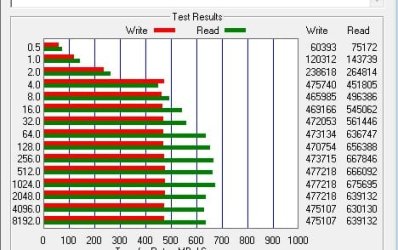
I do not know of any single SSD that has 475Mb/s writes and 626Mb/s reads, for $340. I have RAID'ed SSD's, its works great.

But its your dollar, you spend it how you like.

You seem to have SSD knowledge beyond the purpose of the thread, so why the thread?

ATTO results for a 3 member, SSD RAID 0 array. 90GB available, 80GB allocated.
 

Attachments

  • ATTO best yet.jpg
    ATTO best yet.jpg
    30.2 KB · Views: 15
Last edited:

My Computer

Computer Manufacturer/Model Number
DIY #3, #2
OS
W7 Ulti/64, XP Pro/32
CPU
INTEL i7 920 DO, Core2 Duo 6400
Motherboard
GIGABYTE EX58 UD3R-SLI, EP45-UD3R
Memory
KINGSTON DDR3 1333MHz, CORSAIR DDR2 800MHz
Graphics Card(s)
EVGA GTX 260 x2, 8800 GTX
Sound Card
REALTEK HD onboard, ditto
Monitor(s) Displays
SONY 40" BRAVIA LCD
Screen Resolution
1360 X 768
Hard Drives
OCZ VERTEX/RAID0 -3, Vertex 30GB
PSU
COOLERMASTER 900W, ENERMAX 850W
Case
COOLERMASTER HAF 932 x2
Cooling
stock
Keyboard
MS
Mouse
MS
Internet Speed
ADSL 3MB/768KBs
Other Info
amateur enthusiast
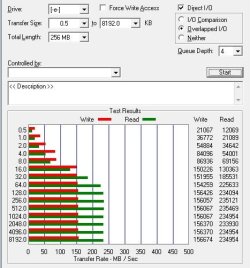
ATTO results for a single 30GB SSD.

Just an FYI.
 

Attachments

  • pagefile RST.jpg
    pagefile RST.jpg
    41.3 KB · Views: 0

My Computer

Computer Manufacturer/Model Number
DIY #3, #2
OS
W7 Ulti/64, XP Pro/32
CPU
INTEL i7 920 DO, Core2 Duo 6400
Motherboard
GIGABYTE EX58 UD3R-SLI, EP45-UD3R
Memory
KINGSTON DDR3 1333MHz, CORSAIR DDR2 800MHz
Graphics Card(s)
EVGA GTX 260 x2, 8800 GTX
Sound Card
REALTEK HD onboard, ditto
Monitor(s) Displays
SONY 40" BRAVIA LCD
Screen Resolution
1360 X 768
Hard Drives
OCZ VERTEX/RAID0 -3, Vertex 30GB
PSU
COOLERMASTER 900W, ENERMAX 850W
Case
COOLERMASTER HAF 932 x2
Cooling
stock
Keyboard
MS
Mouse
MS
Internet Speed
ADSL 3MB/768KBs
Other Info
amateur enthusiast
Last time I saw the price of the drives you speak of there were not cheaper. The Intel XM 80 was $500+.
You must not have looked in a really long time. The 80GB Intel X25M-G2 is $199 for a retail at NewEgg: Newegg.com - Intel X25-M Mainstream SSDSA2MH080G2R5 2.5" 80GB SATA II MLC Internal Solid State Drive (SSD)

I do not know of any single SSD that has 475Mb/s writes and 626Mb/s reads, for $340. I have RAID'ed SSD's, its works great.
The numbers are incredible. But for running your OS and launching apps, it far more about random access times then it is sequential reads and writes. So, unless you are using your SSD's for storage...I don't know why being able to write at 475MB a second is really a benefit. If you took 2 x 30GB and stripped them, you would essentially fill the 60GB completely in just over 2 minutes.
 

My Computer

Computer Manufacturer/Model Number
Self-Built in July 2009
OS
Windows 7 Ultimate x64
CPU
Intel Q9550 2.83Ghz OC'd to 3.40Ghz
Motherboard
Gigabyte GA-EP45-UD3R rev. 1.1, F12 BIOS
Memory
8GB G.Skill PI DDR2-800, 4-4-4-12 timings
Graphics Card(s)
EVGA 1280MB Nvidia GeForce GTX570
Sound Card
Realtek ALC899A 8 channel onboard audio
Monitor(s) Displays
23" Acer x233H
Screen Resolution
1920x1080
Hard Drives
Intel X25-M 80GB Gen 2 SSD
Western Digital 1TB Caviar Black, 32MB cache. WD1001FALS
PSU
Corsair 620HX modular
Case
Antec P182
Cooling
stock
Keyboard
ABS M1 Mechanical
Mouse
Logitech G9 Laser Mouse
Internet Speed
15/2 cable modem
Other Info
Windows and Linux enthusiast. Logitech G35 Headset.
All SSD's pretty much have a 1ms seek time. If you are doing alot of editing write speed would matter.

Your right I have not actually priced SSD's in about a 1.5 years, altho I just got another OCZ Vertex 30GB for $104.

I have had such good performance from this setup that I was just sharing. I have no desire to get into a debate about which is best. The thread was about drive size for an SSD, loaded with OS. I just stated what I did. 1.5 years ago 3, 30gb Vertex were cheaper than
1, X25M.
There is some evidence that filling an SSD to capacity is problematical. FYI

If not interested in performance, theres no need for SSD OS's. Modern spin drives are just fine.
 

My Computer

Computer Manufacturer/Model Number
DIY #3, #2
OS
W7 Ulti/64, XP Pro/32
CPU
INTEL i7 920 DO, Core2 Duo 6400
Motherboard
GIGABYTE EX58 UD3R-SLI, EP45-UD3R
Memory
KINGSTON DDR3 1333MHz, CORSAIR DDR2 800MHz
Graphics Card(s)
EVGA GTX 260 x2, 8800 GTX
Sound Card
REALTEK HD onboard, ditto
Monitor(s) Displays
SONY 40" BRAVIA LCD
Screen Resolution
1360 X 768
Hard Drives
OCZ VERTEX/RAID0 -3, Vertex 30GB
PSU
COOLERMASTER 900W, ENERMAX 850W
Case
COOLERMASTER HAF 932 x2
Cooling
stock
Keyboard
MS
Mouse
MS
Internet Speed
ADSL 3MB/768KBs
Other Info
amateur enthusiast
So, I installed all my applications (CAD etc.) and have about 30 GB used. This is a good change to the previous 45 GB :D
thanks for all the help.

I assume it is safe to say, that for a normal computer without heavy applications (CAD, Game etc.) a 40 GB SSD is more than sufficient. So, with $ 100 one could have a very speedy budget PC. I probably still wait till Q4 when Intel comes out with 25 nm SSD. I don't expect prices going into half (since they also want to make money), but expect all prices to come down a bit once Intel has the fastest SSD again (right now they are not the fastest anymore)
 

My Computer

Computer Manufacturer/Model Number
homemade
OS
W7 Pro 64
CPU
Intel i3 3220 @ 3.3 GHz
Motherboard
ASRock H77M
Memory
2x8GB DDR 3 1600 Kingston
Graphics Card(s)
onboard
Sound Card
onboard
Monitor(s) Displays
two 21" LCD
Hard Drives
128 GB Samsung 830
PSU
OCZ400MXSP
Cooling
Stock
Internet Speed
DSL
Back
Top