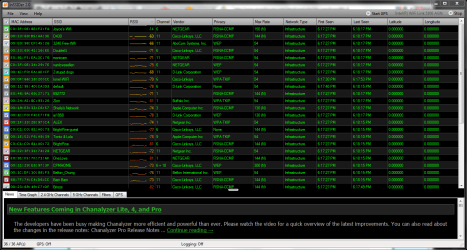
I reckon the first thing I can do is set the routers channel to something less congested. Please take a look at the inSSIDer readout and let me know what ya think. Basically, im trying to get my mother the best reception she can have in the other room. Any help is greatly appreciated by me and my momma
p.s. my network is at the top, joyces wifi
currently its set to channel 6, would something else be better?
Attachments
c.PNG
64.1 KB
· Views: 85
Last edited:
My Computer
At a glance
7 Ultimate 64 bit Service Pack 1Intel Core 2 Duo P9500 @ 2.53GHz (lower watta...4.0GB Dual-Channel DDR 2 @ 398MHz (5-5-5-18)512MB GeForce 9600M GT
Computer Manufacturer/Model Number
Sager NP2096
OS
7 Ultimate 64 bit Service Pack 1
CPU
Intel Core 2 Duo P9500 @ 2.53GHz (lower wattage chip)
Motherboard
JHL 90 (U2E1)
Memory
4.0GB Dual-Channel DDR 2 @ 398MHz (5-5-5-18)
Graphics Card(s)
512MB GeForce 9600M GT
Sound Card
Realtek High Definition Audio
Monitor(s) Displays
Generic PnP Monitor
Screen Resolution
1680x1050
Hard Drives
Hitachi 244GB @ 7200rpm (IDE)
Cooling
nature
Keyboard
generic
Mouse
Microsoft Wireless Mobile Mouse 3500
Internet Speed
30 megabits down, 5 megabits up
Other Info
1.)Staples 4-Port USB 2.0 Mobile Hub
2.)WNDR3700 - NETGEAR RangeMax Dual Band Wireless-N Gigabit Router
3.)Logitech Webcam C250
4.)Logitech M570
What you should look at is a graph of all the channels+Signal strength overlapping each other, then the best position (for now) would be instantly obvious...
Don't know the name of the graph but it looks like a bunch of little arches, showing each routers signal strength centered on it's selected channel and shows how it uses up two channels on either side. You;ll be able to see the best "hole" using that graph.
OR you can probably put the router into "automatic" mode and it may do well finding it;s own holes...
My Computer
At a glance
Windows 7 x64 Ultimatei7 96012 Gig Corsair DominatorNvidia 480
Computer Manufacturer/Model Number
Scratch built
OS
Windows 7 x64 Ultimate
CPU
i7 960
Motherboard
Asus P6X58D
Memory
12 Gig Corsair Dominator
Graphics Card(s)
Nvidia 480
Sound Card
Maudio Delta 44 + breakout box
Monitor(s) Displays
Dell UltraSharp U2410 24in and Samsung 21 dual monitors