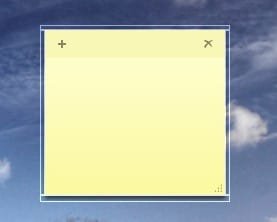
White borders around the sticky notes

virusquillo

New member
Local time
1:17 PM
Messages
6
what are those white borders appearing around the sticky notes?
it don't show while moving or resizing the note but after a few seconds appears again.
someone has the same issue? it's a normal behaviour?
 

Attachments

  • 2009-08-30_125213.jpg
    2009-08-30_125213.jpg
    4.6 KB · Views: 654

My Computer

OS
Windows 7 x64
CPU
Intel [email protected]
Motherboard
Gigabyte EP35-DS3
Memory
2x2GB@1066Mhz DDR2 Kingston Hyperx
Graphics Card(s)
Asus Nvidia 9400GT 512MB
Monitor(s) Displays
Benq 24" G2400WD
Screen Resolution
1920x1200
Hard Drives
250GB WDC WD2500AAJS SATA
250GB MAXTOR STM3250820AS SATA
Case
TACENS SAGITTA II LUX
Keyboard
Logitech Wave Pro
Mouse
Logitech MX 1100
Internet Speed
12mbs/1mbs @ R
Hello Virusquillo,

It may be a graphic glitch with your video drivers. Reinstalling or updating the drivers may help.

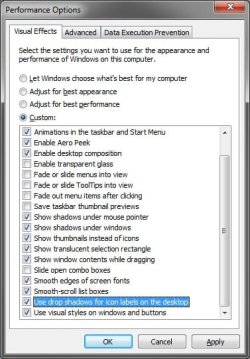
You might also see if unchecking this Visual Effects option highlighted below may help since it affects the borders.
Visual_Effects.jpg
Hope this helps,
Shawn
 

My Computer

Computer type
PC/Desktop
Computer Manufacturer/Model Number
Self built custom
OS
64-bit Windows 11 Pro for Workstations
CPU
Intel i7-8700K OC'd to 5 GHz
Motherboard
ASUS ROG Maximus XI Formula Z390
Memory
64 GB (4x16GB) G.SKILL TridentZ RGB DDR4 3600 MHz
Graphics Card(s)
ASUS ROG-STRIX-GTX1080TI-O11G-GAMING
Sound Card
Integrated
Monitor(s) Displays
2 x Samsung Odyssey G7 27"
Screen Resolution
2560x1440
Hard Drives
1TB Samsung 990 PRO M.2,
4TB Samsung 990 PRO PRO M.2,
TerraMaster F8 SSD Plus NAS
PSU
Seasonic Prime Titanium 850W
Case
Thermaltake Core P3
Cooling
Corsair Hydro H115i
Keyboard
Logitech wireless K800
Mouse
Logitech MX Master 4
Internet Speed
2 Gb/s Download and 100 Mb/s Upload
Antivirus
Malwarebyte Anti-Malware Premium
Browser
Google Chrome
Other Info
Logitech Z625 speaker system,
Logitech BRIO 4K Pro webcam,
HP Color LaserJet Pro MFP M477fdn,
APC SMART-UPS RT 1000 XL - SURT1000XLI,
Galaxy S23 Plus phone
I just noticed this problem today.
Only change i have done is that I installed the latest version of setpoint form logitech as I purchased a new mouse.

I right clicked setpoint in the task bar and clicked exit and the borders around sticky notes disapeared.

I am running Windows 7 x64.

Anyone know how to fix this?
 

My Computer

OS
7
I have the same config, win 7 x64 and setpoint installed, and the problem is there.

I just noticed this problem today.
Only change i have done is that I installed the latest version of setpoint form logitech as I purchased a new mouse.

I right clicked setpoint in the task bar and clicked exit and the borders around sticky notes disapeared.

I am running Windows 7 x64.

Anyone know how to fix this?
 

My Computer

OS
Windows 7 x64
CPU
Intel [email protected]
Motherboard
Gigabyte EP35-DS3
Memory
2x2GB@1066Mhz DDR2 Kingston Hyperx
Graphics Card(s)
Asus Nvidia 9400GT 512MB
Monitor(s) Displays
Benq 24" G2400WD
Screen Resolution
1920x1200
Hard Drives
250GB WDC WD2500AAJS SATA
250GB MAXTOR STM3250820AS SATA
Case
TACENS SAGITTA II LUX
Keyboard
Logitech Wave Pro
Mouse
Logitech MX 1100
Internet Speed
12mbs/1mbs @ R
change theme

I tried uninstall and reinstall of setpoint and that didnt work.
White setpoint is not running the border goes away.

I have just tried changing my desktop theme and the border went away, changed it back to what it was and it is still gone. Havnt done a restart yet though, but it normally came back when I flicked to a different window.
 

My Computer

OS
7
Setpoint is definitely at fault

Same configuration. Noticed the sticky notes border issue AFTER installing setpoint.

Any workarounds?
 

My Computer

OS
Win7 Home Premium x64
Back
Top