
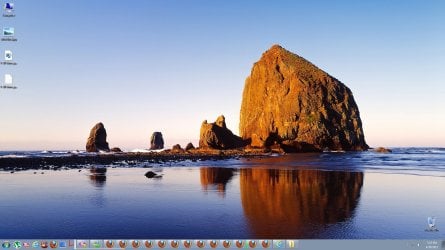
white line on taskbar ?

simonsez9

New member
Member
Local time
2:14 AM
Messages
72
i am getting this white annoying line on on the task bar it appears suddenly and gone and some time remain there how can i fix this
 

Attachments

  • whiteline.jpg
    whiteline.jpg
    249.9 KB · Views: 217

My Computer

Computer type
PC/Desktop
Computer Manufacturer/Model Number
Custom build
OS
Windows 7 Ultimate 64 Bit Sp1
CPU
Intel Quad Core Q9650
Motherboard
Asus P5G41T-MLX
Memory
Kingston DDR 3 8GB 1333 Mhz
Graphics Card(s)
Gigabyte 5450 1Gb DDR3
Sound Card
Mobo Built
Monitor(s) Displays
Dell 24 wm
Screen Resolution
1080 P
Hard Drives
2 Tb Sata Drive
PSU
Coolermatser GX750
Case
Cooler Master Casing
Cooling
Normal
Hi,

Do you have a System Restore point you could go back to before the point it started?
Also, right click the taskbar and then select toolbars. Uncheck anything selected there.

Stephen
 

My Computer

Computer Manufacturer/Model Number
Dell XPS 15 L502x
OS
Windows 7 Home Premium 64bit (O.E.M)
CPU
Intel Core i7 2630QM @2.00GHz
Memory
6GB DDR3
Graphics Card(s)
Intel Intergrated Graphics 3000, nVidia GT525M (1GB)
Screen Resolution
1366x768
Hard Drives
750GB Seagate 7200rpm
Keyboard
Backlit Dell XPS 15 L502x Keyboard
Mouse
Microsoft Wireless Mobile Mouse 4000
Internet Speed
2.5 Mb/s down, 0.36 up
thx for the reply only quick launch is selected there and nothing else
 

My Computer

Computer type
PC/Desktop
Computer Manufacturer/Model Number
Custom build
OS
Windows 7 Ultimate 64 Bit Sp1
CPU
Intel Quad Core Q9650
Motherboard
Asus P5G41T-MLX
Memory
Kingston DDR 3 8GB 1333 Mhz
Graphics Card(s)
Gigabyte 5450 1Gb DDR3
Sound Card
Mobo Built
Monitor(s) Displays
Dell 24 wm
Screen Resolution
1080 P
Hard Drives
2 Tb Sata Drive
PSU
Coolermatser GX750
Case
Cooler Master Casing
Cooling
Normal

My Computer

Computer Manufacturer/Model Number
Dell XPS 15 L502x
OS
Windows 7 Home Premium 64bit (O.E.M)
CPU
Intel Core i7 2630QM @2.00GHz
Memory
6GB DDR3
Graphics Card(s)
Intel Intergrated Graphics 3000, nVidia GT525M (1GB)
Screen Resolution
1366x768
Hard Drives
750GB Seagate 7200rpm
Keyboard
Backlit Dell XPS 15 L502x Keyboard
Mouse
Microsoft Wireless Mobile Mouse 4000
Internet Speed
2.5 Mb/s down, 0.36 up
i have run that as you told me but it wont fix it. The only way i am able to remove this white line either by unlocking & locking Task Bar, sometimes it work and some time not but still thought to mention it here if any idea how to resolve this issue and thx for the reply as well
 

My Computer

Computer type
PC/Desktop
Computer Manufacturer/Model Number
Custom build
OS
Windows 7 Ultimate 64 Bit Sp1
CPU
Intel Quad Core Q9650
Motherboard
Asus P5G41T-MLX
Memory
Kingston DDR 3 8GB 1333 Mhz
Graphics Card(s)
Gigabyte 5450 1Gb DDR3
Sound Card
Mobo Built
Monitor(s) Displays
Dell 24 wm
Screen Resolution
1080 P
Hard Drives
2 Tb Sata Drive
PSU
Coolermatser GX750
Case
Cooler Master Casing
Cooling
Normal
Would you mind sending me a PM or VM tomorrow to remind me to reply. I'm not in the mood to help people at the mo as I'm not feeling well. :(

Thanks
Stephen
 

My Computer

Computer Manufacturer/Model Number
Dell XPS 15 L502x
OS
Windows 7 Home Premium 64bit (O.E.M)
CPU
Intel Core i7 2630QM @2.00GHz
Memory
6GB DDR3
Graphics Card(s)
Intel Intergrated Graphics 3000, nVidia GT525M (1GB)
Screen Resolution
1366x768
Hard Drives
750GB Seagate 7200rpm
Keyboard
Backlit Dell XPS 15 L502x Keyboard
Mouse
Microsoft Wireless Mobile Mouse 4000
Internet Speed
2.5 Mb/s down, 0.36 up
Have you tried updating your graphics card drivers?
It looks like you are using Windows 7 Basic theme, if so try switching to the Windows Aero theme then back.
Jerry
 

My Computer

Computer type
Laptop
Computer Manufacturer/Model Number
Sager NP9170
OS
Win 7 Pro x64 / Win 10 Pro
CPU
Intel(R) Core(TM) i7-3630QM CPU @ 2.40GHz
Motherboard
CLEVO P170EM
Memory
12 GB
Graphics Card(s)
(1) Intel(R) HD Graphics 4000 (2) NVIDIA GeForce GTX 675M
Sound Card
(1) Realtek High Definition Audio (2) Intel(R) Display Aud
Monitor(s) Displays
17.3
Screen Resolution
1920x1080
Hard Drives
(1) Samsung 860 EVO 500GB(OS) (1) Samsung 860 EVO 500GB(Data)
Keyboard
Backlite
Antivirus
MSE, Malwarebytes Pro
Browser
Firefox
Other Info
DESKTOP: Custom-built.
OS: Win 10 Pro x64.
CASE: Rosewill R5.
CPU: Intel I5 4670K CPU @ 3.40GHz.
CPU COOLER: Cool Master Hyper 212 EVO.
MOTHERBOARD: Asus Z87-A.
MEMORY: Kingston HyperX 2x4 GB.
GPU: Nvidia Geforce 650 TI.
PSU: Corsair TX750.
DRIVES: (1) Samsung 840 120 GB SSD (2) Western Digital blue 500 GB 7200 RPM.
i would never use aero theme i love basic yes for drivers i thought of it but they r upto date i am using a mobo built graphics my graphic card is in warranty right now
 

My Computer

Computer type
PC/Desktop
Computer Manufacturer/Model Number
Custom build
OS
Windows 7 Ultimate 64 Bit Sp1
CPU
Intel Quad Core Q9650
Motherboard
Asus P5G41T-MLX
Memory
Kingston DDR 3 8GB 1333 Mhz
Graphics Card(s)
Gigabyte 5450 1Gb DDR3
Sound Card
Mobo Built
Monitor(s) Displays
Dell 24 wm
Screen Resolution
1080 P
Hard Drives
2 Tb Sata Drive
PSU
Coolermatser GX750
Case
Cooler Master Casing
Cooling
Normal
I said to switch back to Basic not to use Aero, thinking that it may reset it, just trying to help. Sorry
 

My Computer

Computer type
Laptop
Computer Manufacturer/Model Number
Sager NP9170
OS
Win 7 Pro x64 / Win 10 Pro
CPU
Intel(R) Core(TM) i7-3630QM CPU @ 2.40GHz
Motherboard
CLEVO P170EM
Memory
12 GB
Graphics Card(s)
(1) Intel(R) HD Graphics 4000 (2) NVIDIA GeForce GTX 675M
Sound Card
(1) Realtek High Definition Audio (2) Intel(R) Display Aud
Monitor(s) Displays
17.3
Screen Resolution
1920x1080
Hard Drives
(1) Samsung 860 EVO 500GB(OS) (1) Samsung 860 EVO 500GB(Data)
Keyboard
Backlite
Antivirus
MSE, Malwarebytes Pro
Browser
Firefox
Other Info
DESKTOP: Custom-built.
OS: Win 10 Pro x64.
CASE: Rosewill R5.
CPU: Intel I5 4670K CPU @ 3.40GHz.
CPU COOLER: Cool Master Hyper 212 EVO.
MOTHERBOARD: Asus Z87-A.
MEMORY: Kingston HyperX 2x4 GB.
GPU: Nvidia Geforce 650 TI.
PSU: Corsair TX750.
DRIVES: (1) Samsung 840 120 GB SSD (2) Western Digital blue 500 GB 7200 RPM.
Hi,

Just wondering, do you use any 3rd party theme patching software or have you used any in the past? That could explain it.

Stephen
 

My Computer

Computer Manufacturer/Model Number
Dell XPS 15 L502x
OS
Windows 7 Home Premium 64bit (O.E.M)
CPU
Intel Core i7 2630QM @2.00GHz
Memory
6GB DDR3
Graphics Card(s)
Intel Intergrated Graphics 3000, nVidia GT525M (1GB)
Screen Resolution
1366x768
Hard Drives
750GB Seagate 7200rpm
Keyboard
Backlit Dell XPS 15 L502x Keyboard
Mouse
Microsoft Wireless Mobile Mouse 4000
Internet Speed
2.5 Mb/s down, 0.36 up
Nope at all mate i simply using the basic theme for windows 7 and nothing else
 

My Computer

Computer type
PC/Desktop
Computer Manufacturer/Model Number
Custom build
OS
Windows 7 Ultimate 64 Bit Sp1
CPU
Intel Quad Core Q9650
Motherboard
Asus P5G41T-MLX
Memory
Kingston DDR 3 8GB 1333 Mhz
Graphics Card(s)
Gigabyte 5450 1Gb DDR3
Sound Card
Mobo Built
Monitor(s) Displays
Dell 24 wm
Screen Resolution
1080 P
Hard Drives
2 Tb Sata Drive
PSU
Coolermatser GX750
Case
Cooler Master Casing
Cooling
Normal
Back
Top