Why 2 different bootscreens?

Burgurne

Danish Viking
Member
VIP
Local time
11:48 PM
Messages
134
Location
Denmark
Now that RTM is out in the open, and I have got a copy of x64 with right HASH-numbers and all, I was hoping to see the bootscreen with the flag, as the rest of you have (except Sven and a few others).

But no. I'm still looking at the green squares when my PC boots. :cry:
What is wrong with my PC?
Can this be motherboard specific? I can see, that Sven and I have the same mobo, Gigabyte DS4 P35. Does anybody in here have such a mobo? If yes, do you have the right bootscreen?

Why did Microsoft left this "vista" rest in the RTM of Windows 7? :huh:
 

My Computer

Computer type
PC/Desktop
Computer Manufacturer/Model Number
homebrewed
OS
Windows 7 Ultimate x64 retail
CPU
Core i5 3570K @ 4,4Ghz
Motherboard
MSI Z77A GD65
Memory
16Gbyte Corsair C9 1866mhz
Graphics Card(s)
MSI Lightning GTX 770
Sound Card
Auzentech
Monitor(s) Displays
BenQ 24"
Screen Resolution
1920x1200
Hard Drives
Samsung 840 EVO SSD, Samsung SSD 830 256Gbyte, Seagate 3Tbyte HDD, WD 4 Tbyte HDD.
PSU
Zahlmann 850HP
Case
Corsair Carbide 500R
Keyboard
G15 logitech
Mouse
Logitech Laser MX1000
Internet Speed
60/60
Antivirus
Bitdefender
Browser
Chrome
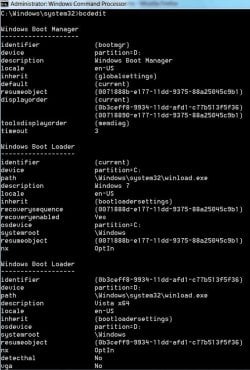
Did you check bcdedit and see if you have Locale set as en-US ?

The rolling green bars are default if locale is not set, or the graphics resolution is too low.

Just open an elevated cmd and type bcdedit {enter}

you will get something like this:

BCDEDIT2009-03-07_235226.jpg
 

My Computers

System One System Two

  • Computer type
    PC/Desktop
    OS
    7 X64
    CPU
    i5 8400
    Motherboard
    gigabyte b365m ds3h
    Memory
    2x8gb 3200mhz
    Hard Drives
    various
    PSU
    pure power 11 400w cm
    Case
    Coolermaster
    Cooling
    cryorig m9i
  • Computer type
    PC/Desktop
    OS
    7x64
    CPU
    g5400
    Motherboard
    ga b365m ds3h
    Memory
    8gb ddr4 2400
    PSU
    xfx pro 450w
Did you check bcdedit and see if you have Locale set as en-US ?

The rolling green bars are default if locale is not set, or the graphics resolution is too low.

Just open an elevated cmd and type bcdedit {enter}

you will get something like this:

View attachment 20197

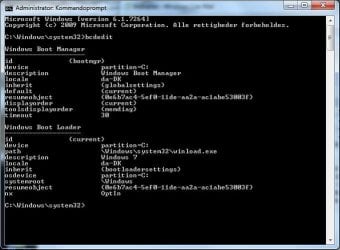
Well, like Burgurne I also have the green squares, and my bcdedit look like this:
Udklip.JPG

On my laptop it is also with da-DK as "locale", and this do show the boot-flag.

What do you mean by "the graphics resolution is too low". The boot screen is showing before any drivers are started? I don't see any way to change resolution on the bootscreen ??
 

My Computer

OS
Windows 7 Ultimate x64
CPU
Intel E6850 3,0 running 3,6 Ghz
Motherboard
Gigabyte DS4 P35
Memory
2x2 and Gb Corsair PC6400 CAS5 - 4GB total
Graphics Card(s)
Nvidia Geforce 260GTX
Sound Card
Creative X-Fi Fata1ty Gamer Extreme
Monitor(s) Displays
Samsung 2493hm
Screen Resolution
1920*1200
Hard Drives
Intel X25-M SSD for system
2x 1Tb Samsung F1 as seperate discs
PSU
Zahlman 850HP
Case
Shg
Cooling
Evo 120
Keyboard
Logitech G15 (blue backlight)
Mouse
Logitech G5 laser
Internet Speed
25/25 mbit
Other Info
1 Samsung SATA dvd-burner
1 LiteOn SATA dvd-burner
What do you mean by "the graphics resolution is too low". The boot screen is showing before any drivers are started? I don't see any way to change resolution on the bootscreen ??

MS wrote a couple months ago on the Engineering Windows blog that the "new" start orb only shows with native screen resolutions of 600 vertical pixels and greater.
Tom
 

My Computer

Computer type
PC/Desktop
Computer Manufacturer/Model Number
Dell: XPS 420 (2), XPS M1330 (several), XPS 14z, Mini 9, Mini 10v
OS
W8 Pro, W7 Ultimate, XP Pro x64, Vista x64, Ubuntu
CPU
Q6600, Q6700, T7500, T7500, N270, N270
Motherboard
Dell
Memory
8GB, 8GB, 4GB, 4GB, 2GB, 2GB
Graphics Card(s)
ATI, nVidia, nVidia, nVidia, Intel, Intel
Monitor(s) Displays
Dell 2408WFP
Hard Drives
A drawer full. OCZ Vertex's in RAID 0. Vertex 3's, Vertex 4, Samsung 830's, Samsung 840's, Intel 330. Don't use dino drives any more except for servers.
Keyboard
Logitech Wave
Internet Speed
29 Mbps DL / .95 Mbps UL
Other Info
New project(2013)...Another low power server. Zotac H67ITX, i3-2100T, Windows Server 2012 Essentials on Samsung SSD.
Previous project...Low power (38-40 watts using Kill-a-Watt) Windows Home Server. Zotac ION (Atom 330, GeForce9400), 4GB RAM, 2x2TB WD Green, IN WIM miniITX Case. Fits on a shelf in laundry closet, practically silent.
And how do you set this resolution? My native resolution is 1920x1200 on my monitor.
It is the very first screen windows is doing, so no driver or anything I can do will affect this?
 

My Computer

OS
Windows 7 Ultimate x64
CPU
Intel E6850 3,0 running 3,6 Ghz
Motherboard
Gigabyte DS4 P35
Memory
2x2 and Gb Corsair PC6400 CAS5 - 4GB total
Graphics Card(s)
Nvidia Geforce 260GTX
Sound Card
Creative X-Fi Fata1ty Gamer Extreme
Monitor(s) Displays
Samsung 2493hm
Screen Resolution
1920*1200
Hard Drives
Intel X25-M SSD for system
2x 1Tb Samsung F1 as seperate discs
PSU
Zahlman 850HP
Case
Shg
Cooling
Evo 120
Keyboard
Logitech G15 (blue backlight)
Mouse
Logitech G5 laser
Internet Speed
25/25 mbit
Other Info
1 Samsung SATA dvd-burner
1 LiteOn SATA dvd-burner
MS wrote a couple months ago on the Engineering Windows blog that the "new" start orb only shows with native screen resolutions of 600 vertical pixels and greater.
Tom

Ok, but how do I then change this resolution? Remember, this is before windows has started the Nvidia driver, so no help in Nvidias console.

Sven, when you install Windows 7 on your laptop, does it shows the flag or "orb" when restarting for the first time during installation of Windows 7?
 

My Computer

Computer type
PC/Desktop
Computer Manufacturer/Model Number
homebrewed
OS
Windows 7 Ultimate x64 retail
CPU
Core i5 3570K @ 4,4Ghz
Motherboard
MSI Z77A GD65
Memory
16Gbyte Corsair C9 1866mhz
Graphics Card(s)
MSI Lightning GTX 770
Sound Card
Auzentech
Monitor(s) Displays
BenQ 24"
Screen Resolution
1920x1200
Hard Drives
Samsung 840 EVO SSD, Samsung SSD 830 256Gbyte, Seagate 3Tbyte HDD, WD 4 Tbyte HDD.
PSU
Zahlmann 850HP
Case
Corsair Carbide 500R
Keyboard
G15 logitech
Mouse
Logitech Laser MX1000
Internet Speed
60/60
Antivirus
Bitdefender
Browser
Chrome

My Computer

Computer type
PC/Desktop
Computer Manufacturer/Model Number
Dell: XPS 420 (2), XPS M1330 (several), XPS 14z, Mini 9, Mini 10v
OS
W8 Pro, W7 Ultimate, XP Pro x64, Vista x64, Ubuntu
CPU
Q6600, Q6700, T7500, T7500, N270, N270
Motherboard
Dell
Memory
8GB, 8GB, 4GB, 4GB, 2GB, 2GB
Graphics Card(s)
ATI, nVidia, nVidia, nVidia, Intel, Intel
Monitor(s) Displays
Dell 2408WFP
Hard Drives
A drawer full. OCZ Vertex's in RAID 0. Vertex 3's, Vertex 4, Samsung 830's, Samsung 840's, Intel 330. Don't use dino drives any more except for servers.
Keyboard
Logitech Wave
Internet Speed
29 Mbps DL / .95 Mbps UL
Other Info
New project(2013)...Another low power server. Zotac H67ITX, i3-2100T, Windows Server 2012 Essentials on Samsung SSD.
Previous project...Low power (38-40 watts using Kill-a-Watt) Windows Home Server. Zotac ION (Atom 330, GeForce9400), 4GB RAM, 2x2TB WD Green, IN WIM miniITX Case. Fits on a shelf in laundry closet, practically silent.
The native resolution of the monitor isn't anything that can be changed. I'm thinking the problem is not the resolution but more like what SIW2 spoke about. Try this link for ideas on repairing the boot manager for this problem:
http://www.sevenforums.com/general-discussion/10037-boot-screen-changed.html#post96220

Tom

No, that did not help. But thanks for trying.

Problem is, that for me, I has never had the bootscreen with the "orb" on my desktop PC. Not once in the 5 different builds I have tried. All Clean Install.
 

My Computer

OS
Windows 7 Ultimate x64
CPU
Intel E6850 3,0 running 3,6 Ghz
Motherboard
Gigabyte DS4 P35
Memory
2x2 and Gb Corsair PC6400 CAS5 - 4GB total
Graphics Card(s)
Nvidia Geforce 260GTX
Sound Card
Creative X-Fi Fata1ty Gamer Extreme
Monitor(s) Displays
Samsung 2493hm
Screen Resolution
1920*1200
Hard Drives
Intel X25-M SSD for system
2x 1Tb Samsung F1 as seperate discs
PSU
Zahlman 850HP
Case
Shg
Cooling
Evo 120
Keyboard
Logitech G15 (blue backlight)
Mouse
Logitech G5 laser
Internet Speed
25/25 mbit
Other Info
1 Samsung SATA dvd-burner
1 LiteOn SATA dvd-burner
It is a really odd problem...I have encountered the squares on mine when I access repair mode by F8(I think...)...
 

My Computer

Computer Manufacturer/Model Number
Compal JFT02 (Custom Build Laptop)
OS
Windows 7 Home Premium x64 - Mac OS X 10.6.4 x64
CPU
Intel Core 2 Duo T9300 2.5 GHz
Motherboard
JFT02
Memory
4GB Kingston DDR2-800
Graphics Card(s)
NVIDIA Geforce 8600M GT (512MB Model)
Sound Card
Realtek HD Audio
Monitor(s) Displays
WUXGA Standard Laptop Display
Screen Resolution
1680*1050
Hard Drives
Toshiba 320GB 5400RPM Laptop HD
PSU
Standard Laptop Power Supply
Case
Standard Laptop Case
Cooling
Standard Laptop Cooling
Keyboard
Standard Laptop 105 Key-Keyboard
Mouse
Synaptics Touchpad
Internet Speed
Verizion Online DSL 3360/864 kbs (dl/up)
No, that did not help. But thanks for trying.

Problem is, that for me, I has never had the bootscreen with the "orb" on my desktop PC. Not once in the 5 different builds I have tried. All Clean Install.

Could be your onboard graphics is being used during boot, and then switched over to the graphics card. Check your bios for vga/graphics preferences.
 

My Computer

OS
7264x64/7260x86

My Computer

Computer Manufacturer/Model Number
Compal JFT02 (Custom Build Laptop)
OS
Windows 7 Home Premium x64 - Mac OS X 10.6.4 x64
CPU
Intel Core 2 Duo T9300 2.5 GHz
Motherboard
JFT02
Memory
4GB Kingston DDR2-800
Graphics Card(s)
NVIDIA Geforce 8600M GT (512MB Model)
Sound Card
Realtek HD Audio
Monitor(s) Displays
WUXGA Standard Laptop Display
Screen Resolution
1680*1050
Hard Drives
Toshiba 320GB 5400RPM Laptop HD
PSU
Standard Laptop Power Supply
Case
Standard Laptop Case
Cooling
Standard Laptop Cooling
Keyboard
Standard Laptop 105 Key-Keyboard
Mouse
Synaptics Touchpad
Internet Speed
Verizion Online DSL 3360/864 kbs (dl/up)
Could be your onboard graphics is being used during boot, and then switched over to the graphics card. Check your bios for vga/graphics preferences.
That is a thought too...Sven do you have a PCI-E GFX in your laptop? If so is there an option in the BIOS that lets you go to PCI-E GFX first and not onboard...
 

My Computer

Computer Manufacturer/Model Number
Compal JFT02 (Custom Build Laptop)
OS
Windows 7 Home Premium x64 - Mac OS X 10.6.4 x64
CPU
Intel Core 2 Duo T9300 2.5 GHz
Motherboard
JFT02
Memory
4GB Kingston DDR2-800
Graphics Card(s)
NVIDIA Geforce 8600M GT (512MB Model)
Sound Card
Realtek HD Audio
Monitor(s) Displays
WUXGA Standard Laptop Display
Screen Resolution
1680*1050
Hard Drives
Toshiba 320GB 5400RPM Laptop HD
PSU
Standard Laptop Power Supply
Case
Standard Laptop Case
Cooling
Standard Laptop Cooling
Keyboard
Standard Laptop 105 Key-Keyboard
Mouse
Synaptics Touchpad
Internet Speed
Verizion Online DSL 3360/864 kbs (dl/up)
That is a thought too...Sven do you have a PCI-E GFX in your laptop? If so is there an option in the BIOS that lets you go to PCI-E GFX first and not onboard...


He's using a desktop, just FYI.
 

My Computer

OS
Windows 7 RTM
CPU
Intel Core 2 Quad QX9770 @ 3.2GHZ
Motherboard
Dell XPS 730 H2C
Memory
Corsair 1600MHZ DDR2
Graphics Card(s)
Dual Nvidia GTX280 in SLI
Sound Card
Creative X-Fi
Monitor(s) Displays
Dell 30inch 3007WFP left - right Acer 19inch
Screen Resolution
2560x1600 - 1280x1024
Hard Drives
1 x OCZ Agility 64GB SSD (OS)
2 x 1TB in Raid Stripe = 2TB
1 x 1TB in External eSata = 1TB
PSU
1KW
Case
Dell XPS 730 H2C w/X-Panel
Cooling
Dell H2C Liquid Cooling Unit.
Keyboard
Saitek Eclipse II
Mouse
Logitech MX518
Internet Speed
20Mb Down/2Mb Up
Other Info
Homepage: http://www.digitalnowhere.com
IRC: irc.efnet.net #winsupport

My Computer

Computer Manufacturer/Model Number
Compal JFT02 (Custom Build Laptop)
OS
Windows 7 Home Premium x64 - Mac OS X 10.6.4 x64
CPU
Intel Core 2 Duo T9300 2.5 GHz
Motherboard
JFT02
Memory
4GB Kingston DDR2-800
Graphics Card(s)
NVIDIA Geforce 8600M GT (512MB Model)
Sound Card
Realtek HD Audio
Monitor(s) Displays
WUXGA Standard Laptop Display
Screen Resolution
1680*1050
Hard Drives
Toshiba 320GB 5400RPM Laptop HD
PSU
Standard Laptop Power Supply
Case
Standard Laptop Case
Cooling
Standard Laptop Cooling
Keyboard
Standard Laptop 105 Key-Keyboard
Mouse
Synaptics Touchpad
Internet Speed
Verizion Online DSL 3360/864 kbs (dl/up)
Well, here is where things stand at the moment.
Still has only seen the green squares on bootscren.
I have tried bcdedit %WinDir% /l en-US
I have tried bcdboot %WinDir% /l en-US
In BIOS I have tried these settinges:
Init Display First [PCI] [PEG] [PEG2] (all 3 settings tried)
Full Screen Logoshow [Enabled] [Disabled]
HPET Support [Enabled] [Disabled] - when enabled, I can select [32 bit mode] and [64 bit mode] I have absolutely no idea of what HPET is.

None of the above helps. Tried to boot from a Western Digital HD, and from my Intel SSD X25-M, tried an old Nvidia graphic card. No luck alt all.

In the folder "Boot" on C:\ there seems to be folders for a lot of languages, but only 2 files in each. Was there not sopposed to be 3 files in the folder that is used for boot? (f.i. C:\boot\en-US\*.*)


Answer to Burgurne. Yes, on my laptop the glowing Orb is showing up from very first boot during installation, but my desktop PC is as silly as yours. We have the same mobo, so it might be the issue?
Anybody else with a Gigabyte DS4 P35 mobo, that can comment that?
 

My Computer

OS
Windows 7 Ultimate x64
CPU
Intel E6850 3,0 running 3,6 Ghz
Motherboard
Gigabyte DS4 P35
Memory
2x2 and Gb Corsair PC6400 CAS5 - 4GB total
Graphics Card(s)
Nvidia Geforce 260GTX
Sound Card
Creative X-Fi Fata1ty Gamer Extreme
Monitor(s) Displays
Samsung 2493hm
Screen Resolution
1920*1200
Hard Drives
Intel X25-M SSD for system
2x 1Tb Samsung F1 as seperate discs
PSU
Zahlman 850HP
Case
Shg
Cooling
Evo 120
Keyboard
Logitech G15 (blue backlight)
Mouse
Logitech G5 laser
Internet Speed
25/25 mbit
Other Info
1 Samsung SATA dvd-burner
1 LiteOn SATA dvd-burner
which builds are you peeps using? after having a quick look into this apparently its a known bug for earlier builds..
 
It is on every build I have tried beta 2, RC, 7229, 7264 and 7600.
 

My Computer

OS
Windows 7 Ultimate x64
CPU
Intel E6850 3,0 running 3,6 Ghz
Motherboard
Gigabyte DS4 P35
Memory
2x2 and Gb Corsair PC6400 CAS5 - 4GB total
Graphics Card(s)
Nvidia Geforce 260GTX
Sound Card
Creative X-Fi Fata1ty Gamer Extreme
Monitor(s) Displays
Samsung 2493hm
Screen Resolution
1920*1200
Hard Drives
Intel X25-M SSD for system
2x 1Tb Samsung F1 as seperate discs
PSU
Zahlman 850HP
Case
Shg
Cooling
Evo 120
Keyboard
Logitech G15 (blue backlight)
Mouse
Logitech G5 laser
Internet Speed
25/25 mbit
Other Info
1 Samsung SATA dvd-burner
1 LiteOn SATA dvd-burner
Back
Top