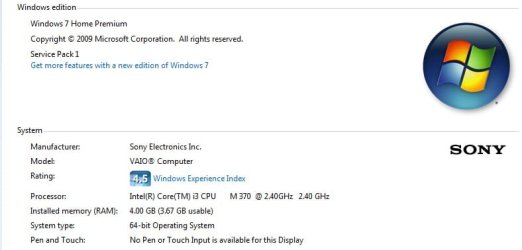
why all my installed games is not full screen?

mrsunico

New member
Local time
2:20 AM
Messages
10
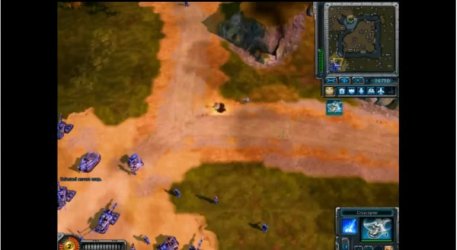
hello, can someone explain to me why all my games like, battlerealms, redalert3, warcraft3, rise of nation, plantsVSzombies, etc. is not full screen? theres two color black on both side of screen..
is it normal ? or can i make it full screen.. without affecting the video quality? :huh:
 

Attachments
  • Untitled.jpg
    Untitled.jpg
    34 KB · Views: 14
  • games.jpg
    games.jpg
    25.5 KB · Views: 20
Last edited:

My Computer My Computer

At a glance

Windows 7 Home Premium x64
OS
Windows 7 Home Premium x64
Only thing I can say is because the graphic resolution in the game is not the same as the native resolution of your Vaio?

In other words... check the Native Resolution of your Vaio and make sure that, once you are inside the game, go to Options/Video and adjust the resolution to the same one your laptop is.
 

My Computer My Computer

At a glance

Windows 7 x64 (Ultimate)Intel i5-4670K8GBs Ripjaws 2133MhzAsus GTX660 (2GBs)
Computer type
PC/Desktop
Computer Manufacturer/Model Number
Custom Built... Intel/Nvidia/ASRock
OS
Windows 7 x64 (Ultimate)
CPU
Intel i5-4670K
Motherboard
ASRock Z87 Extreme 6
Memory
8GBs Ripjaws 2133Mhz
Graphics Card(s)
Asus GTX660 (2GBs)
Sound Card
Onboard Realtek HD
Monitor(s) Displays
Acer AL2216W
Screen Resolution
1680 x 1050
Hard Drives
Samsung 840 SSD 120GBs
Samsung 750GB 32MB cache
1.5 TB
PSU
PC Cooling 750w Silencer
Case
Thermaltake Spedo Advance
Cooling
Std Cooler
Keyboard
Logitech G15
Mouse
Logitech G9
Internet Speed
Comcast 20Mbit
Antivirus
Avast
Browser
Firefox
:( didnt work me AstaLaVista. anyway thanks! i appreciate it!

is there another option? or i just consider it a normal thing? :eek:

or.. can you just make your suggestion more clear for me, jejejeje... im not computer literate. sorry if im stupid, so it will help a lot for me.. if i will follow a instruction like 1, 2, 3... and a specific one. thanks!
 
Last edited:

My Computer My Computer

At a glance

Windows 7 Home Premium x64
OS
Windows 7 Home Premium x64
:( didnt work me AstaLaVista. anyway thanks! i appreciate it!

is there another option? or i just consider it a normal thing? :eek:

or.. can you just make your suggestion more clear for me, jejejeje... im not computer literate. sorry if im stupid, so it will help a lot for me.. if i will follow a instruction like 1, 2, 3... and a specific one. thanks!

Hello;

Your games are probably running at 800x600, but rather than scaling the image to take up the full screen, your display is showing it at its native resolution.The native resolution of your display is 1366 X 768.
Usually older games does not support your native resolution.
Therefore,
Alt+Enter should get the job done. :)
-Works in 7, Vista, and XP.

Hope this helps :)
 

My Computer My Computer

At a glance

Windows 7 Ultimate x64Intel Core i7 930Gskill 2x3 GB RamSapphire ATI Radeon HD 5870
Computer Manufacturer/Model Number
Custom self assembled
OS
Windows 7 Ultimate x64
CPU
Intel Core i7 930
Motherboard
Gigabyte GA X58A UD7
Memory
Gskill 2x3 GB Ram
Graphics Card(s)
Sapphire ATI Radeon HD 5870
Monitor(s) Displays
LG 24MP88 24" LED Monitor
Screen Resolution
1920 X 1080
Hard Drives
Seagate barracuda 1 TB
PSU
Corsair GS 600W
Case
Cooler Master 690 II Plus
Cooling
Cooler Master Hyper 212X
Keyboard
Logitech G15 Gaming keyboard
Mouse
Logitech MX518 Gaming Mouse
Internet Speed
Broadband 50 Mbps speed [Hathway]
Other Info
Xbox 360 Wired Controller (x2)
AverMedia TV tuner Card [Internal]
Logitech HD C110 Web Camera
Netgear WGR614 Wireless-N 150 Router
Razer Goliathus Fragged Alpha Control Edition Mouse Pad
i see

oohh.. thanks alikhan now i understand a bit why oldies games is not full screen on my laptop.

by the way alt+enter doesn't work for me, nothing happens when i play games like battle realms or red alert3.
i also try to change the screen resolution of my laptop down to 800x600 to be same of games video resolution. but still it remain not full screen.
 

My Computer My Computer

At a glance

Windows 7 Home Premium x64
OS
Windows 7 Home Premium x64
oohh.. thanks alikhan now i understand a bit why oldies games is not full screen on my laptop.

by the way alt+enter doesn't work for me, nothing happens when i play games like battle realms or red alert3.
i also try to change the screen resolution of my laptop down to 800x600 to be same of games video resolution. but still it remain not full screen.

Hello ;

Try ctrl+alt+F11 .
Tell me whether it works .
It worked for me in Rise of Nations . :)
 

My Computer My Computer

At a glance

Windows 7 Ultimate x64Intel Core i7 930Gskill 2x3 GB RamSapphire ATI Radeon HD 5870
Computer Manufacturer/Model Number
Custom self assembled
OS
Windows 7 Ultimate x64
CPU
Intel Core i7 930
Motherboard
Gigabyte GA X58A UD7
Memory
Gskill 2x3 GB Ram
Graphics Card(s)
Sapphire ATI Radeon HD 5870
Monitor(s) Displays
LG 24MP88 24" LED Monitor
Screen Resolution
1920 X 1080
Hard Drives
Seagate barracuda 1 TB
PSU
Corsair GS 600W
Case
Cooler Master 690 II Plus
Cooling
Cooler Master Hyper 212X
Keyboard
Logitech G15 Gaming keyboard
Mouse
Logitech MX518 Gaming Mouse
Internet Speed
Broadband 50 Mbps speed [Hathway]
Other Info
Xbox 360 Wired Controller (x2)
AverMedia TV tuner Card [Internal]
Logitech HD C110 Web Camera
Netgear WGR614 Wireless-N 150 Router
Razer Goliathus Fragged Alpha Control Edition Mouse Pad
not work for me

hi alikhan but i try ctrl+alt+F11 in warcraft3 as well as rise of nation. and nothing happens. still not full screen. i dont know why. thanks again.
 

My Computer My Computer

At a glance

Windows 7 Home Premium x64
OS
Windows 7 Home Premium x64
Back
Top