Why are my graphics glitching EVEN IN THE BIOS?

Marty McFly

New member
Member
VIP
Local time
12:06 PM
Messages
120
Location
UK
After a recent security scare, I decided to do a clean install of Windows to a blank HDD.

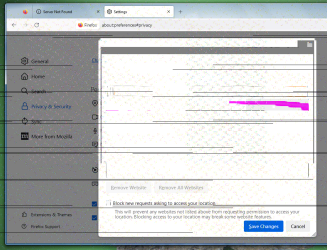
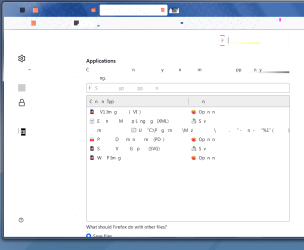
Everything was going fine, but then for no apparent reason, the graphics started glitching - not just in Windows, but even in the BIOS and motherboard boot splash screen, with blocks of noise everywhere. The glitching seems to come and go randomly. Sometimes I boot and it's there, sometimes it's not there. I'm also getting BSODs too.

I haven't yet installed all the Windows updates (just SP1 and a few essentials), but I doubt this could be to do with Updates as I've installed Windows to this exact computer several times before and never seen anything like this.

I got the feeling my machine was being attacked - could the GPU have be flashed by attackers?

Attaching a couple of images. And here's a couple of examples of BSOD reports:

Problem signature:
Problem Event Name: BlueScreen
OS Version: 6.1.7600.2.0.0.768.3
Locale ID: 2057

Additional information about the problem:
BCCode: 116
BCP1: FFFFFA800D14C010
BCP2: FFFFF88003C0CEFC
BCP3: 0000000000000000
BCP4: 0000000000000002
OS Version: 6_1_7600
Service Pack: 0_0
Product: 768_1


Problem signature:
Problem Event Name: BlueScreen
OS Version: 6.1.7601.2.1.0.768.3
Locale ID: 2057

Additional information about the problem:
BCCode: 50
BCP1: FFFFFA7FC6380AF4
BCP2: 0000000000000001
BCP3: FFFFF88001932008
BCP4: 0000000000000007
OS Version: 6_1_7601
Service Pack: 1_0
Product: 768_1
 

Attachments
  • Firefox 1a.png
    Firefox 1a.png
    29.5 KB · Views: 0
  • Firefox a2.png
    Firefox a2.png
    136.4 KB · Views: 0

My Computer My Computer

At a glance

Windows 7 Home Premium 64bit
OS
Windows 7 Home Premium 64bit
You could try a bios reset. If this is a physical card try making sure that it's seated correctly. Maybe take it out and put it back in. Otherwise it sounds like your graphics is dying to me if you have graphics issues on the bios menu.
 

My Computers My Computers

  • At a glance

    Windows 7 pro/Windows 10 ProIntel i7 860 Quad core 2.8 ghz8 gbATI Radeon HD 5770 1 gb ram
    Computer type
    PC/Desktop
    Computer Manufacturer/Model Number
    HP Pavillion Elite HPE-250f
    OS
    Windows 7 pro/Windows 10 Pro
    CPU
    Intel i7 860 Quad core 2.8 ghz
    Memory
    8 gb
    Graphics Card(s)
    ATI Radeon HD 5770 1 gb ram
    Monitor(s) Displays
    Alienware 25 AW2521HF & Viewsonic
    Screen Resolution
    1920 x1080 & 1680x1050
    Hard Drives
    WD blue 1 tb & 500 gb.
    Browser
    FF of course.
    Other Info
    https://www.bestbuy.com/site/hp-pavilion-elite-desktop-intel-core-i7-processor-8gb-memory-1tb-hard-drive/9921493.p?skuId=9921493
  • At a glance

    Windows 2012 R2 Data center/Linux Minti3 9100 3.6GHz, 8M cache, 4C/4T8GB 2666MT/s DDR4 ECC UDIMM
    Computer type
    PC/Desktop
    System Manufacturer/Model Number
    Dell Poweredge T140
    OS
    Windows 2012 R2 Data center/Linux Mint
    CPU
    i3 9100 3.6GHz, 8M cache, 4C/4T
    Memory
    8GB 2666MT/s DDR4 ECC UDIMM
    Monitor(s) Displays
    Viewsonic
    Screen Resolution
    1680x1050
    Hard Drives
    1 TB & 750 GB
    Other Info
    https://www.dell.com/en-us/work/shop/productdetailstxn/poweredge-t140?~ck=bt
Thanks so much! Yes I have a separate graphics card.

Otherwise it sounds like your graphics is dying to me if you have graphics issues on the bios menu.

Do you mean the graphics card is dying? Or is it possible for this to be caused by the motherboard alone?
 

My Computer My Computer

At a glance

Windows 7 Home Premium 64bit
OS
Windows 7 Home Premium 64bit
Probably the card. Did you try making sure that it's seated properly? Did you check the bios settings? If there is an integrated card is it disabled?
 

My Computers My Computers

  • At a glance

    Windows 7 pro/Windows 10 ProIntel i7 860 Quad core 2.8 ghz8 gbATI Radeon HD 5770 1 gb ram
    Computer type
    PC/Desktop
    Computer Manufacturer/Model Number
    HP Pavillion Elite HPE-250f
    OS
    Windows 7 pro/Windows 10 Pro
    CPU
    Intel i7 860 Quad core 2.8 ghz
    Memory
    8 gb
    Graphics Card(s)
    ATI Radeon HD 5770 1 gb ram
    Monitor(s) Displays
    Alienware 25 AW2521HF & Viewsonic
    Screen Resolution
    1920 x1080 & 1680x1050
    Hard Drives
    WD blue 1 tb & 500 gb.
    Browser
    FF of course.
    Other Info
    https://www.bestbuy.com/site/hp-pavilion-elite-desktop-intel-core-i7-processor-8gb-memory-1tb-hard-drive/9921493.p?skuId=9921493
  • At a glance

    Windows 2012 R2 Data center/Linux Minti3 9100 3.6GHz, 8M cache, 4C/4T8GB 2666MT/s DDR4 ECC UDIMM
    Computer type
    PC/Desktop
    System Manufacturer/Model Number
    Dell Poweredge T140
    OS
    Windows 2012 R2 Data center/Linux Mint
    CPU
    i3 9100 3.6GHz, 8M cache, 4C/4T
    Memory
    8GB 2666MT/s DDR4 ECC UDIMM
    Monitor(s) Displays
    Viewsonic
    Screen Resolution
    1680x1050
    Hard Drives
    1 TB & 750 GB
    Other Info
    https://www.dell.com/en-us/work/shop/productdetailstxn/poweredge-t140?~ck=bt
Thanks Townsbg. The GPU seems to be seated properly and very firmly in place. I don't think there is an integrated card in the motherboard as I've used the same hardware for years without any problems.

The strange thing is that all the graphics problems began when I launched a certain program and this is a program that in the past has interfered with Windows so could possibly be malicious. Is it possible for the GPU to be damaged (or flashed) just by running a program?
 

My Computer My Computer

At a glance

Windows 7 Home Premium 64bit
OS
Windows 7 Home Premium 64bit
I don't know. Sorry. You should google the program and see what you can find.
 

My Computers My Computers

  • At a glance

    Windows 7 pro/Windows 10 ProIntel i7 860 Quad core 2.8 ghz8 gbATI Radeon HD 5770 1 gb ram
    Computer type
    PC/Desktop
    Computer Manufacturer/Model Number
    HP Pavillion Elite HPE-250f
    OS
    Windows 7 pro/Windows 10 Pro
    CPU
    Intel i7 860 Quad core 2.8 ghz
    Memory
    8 gb
    Graphics Card(s)
    ATI Radeon HD 5770 1 gb ram
    Monitor(s) Displays
    Alienware 25 AW2521HF & Viewsonic
    Screen Resolution
    1920 x1080 & 1680x1050
    Hard Drives
    WD blue 1 tb & 500 gb.
    Browser
    FF of course.
    Other Info
    https://www.bestbuy.com/site/hp-pavilion-elite-desktop-intel-core-i7-processor-8gb-memory-1tb-hard-drive/9921493.p?skuId=9921493
  • At a glance

    Windows 2012 R2 Data center/Linux Minti3 9100 3.6GHz, 8M cache, 4C/4T8GB 2666MT/s DDR4 ECC UDIMM
    Computer type
    PC/Desktop
    System Manufacturer/Model Number
    Dell Poweredge T140
    OS
    Windows 2012 R2 Data center/Linux Mint
    CPU
    i3 9100 3.6GHz, 8M cache, 4C/4T
    Memory
    8GB 2666MT/s DDR4 ECC UDIMM
    Monitor(s) Displays
    Viewsonic
    Screen Resolution
    1680x1050
    Hard Drives
    1 TB & 750 GB
    Other Info
    https://www.dell.com/en-us/work/shop/productdetailstxn/poweredge-t140?~ck=bt
Back
Top