
Why are there 4 (!) RECYCLE BINs on my partition? Outer and Inner RBs

pstein

New member
Member
VIP
Local time
9:09 AM
Messages
244
After having disabled the option "protect my system folders) I had a look on my folders and found 4 (!) different RECYCLE BINs on my second, non-system partition D:

Have a look at the attached snapshot of my WinExplorer view and the corresponding listing with "dir /a".

Why are there so many RECYCLE BINs?

Whats the difference between the outer and the 4 inner RECYCLE BINs?

Why does one of the RECYCLE BINs has a short name while the others a longer like

S-1-5-21-1007407404-2758...........

Why do 2 of the tiny icons have a lock symbol and two not?

Can I delete them (e.g. from an externally booted ToolCD)?
Will the necessary (one and only ?) RECYCLE BIN then automatically re-created at next startup?

Peter
 

Attachments
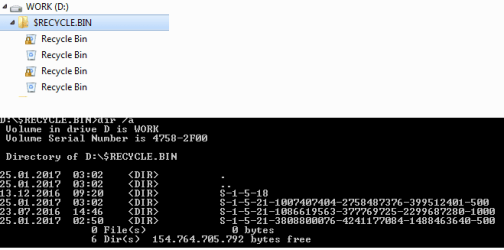
  • Multiple D-$RECYCLE.BIN folders.png
    Multiple D-$RECYCLE.BIN folders.png
    5.4 KB · Views: 34

My Computer My Computer

At a glance

win7pro 64bit
Computer type
PC/Desktop
OS
win7pro 64bit
First guess lookin at command prompt output
2 different users, 2 are locked 2 public

is folder view set to show hidden files/folders.

Roy
 

My Computer My Computer

At a glance

W7 home premium 32bit/W7HP 64bit/w10 tp insid...E5300 dual core3gbNvidia Geforce 7100 Nforce 630i
Computer type
PC/Desktop
Computer Manufacturer/Model Number
medionl/Aspire 6930G/acer x55a
OS
W7 home premium 32bit/W7HP 64bit/w10 tp insider ring
CPU
E5300 dual core
Motherboard
medion MS7366
Memory
3gb
Graphics Card(s)
Nvidia Geforce 7100 Nforce 630i
Monitor(s) Displays
avixc
Internet Speed
n (isp resticted to 72)
Antivirus
mse/pands
Browser
palemoon
Other Info
Belkin Fd7050 n USB using Railink RT2870 drivers, more upto date
This is by default in windows. Partitions and external drives will have a hidden recycle bin and will be linked. As you have unchecked Protect System Files these are now visible. If you delete a file on the main partition C:\ That deleted file will be see in the hidden recycle bins. When you empty the recycle bin on C:\ It will be emptied from the hidden recycle bins as well. Just recheck Protect System File and there hidden again.


Last edited:

My Computer My Computer

At a glance

Windows 10 Pro 64 bitAMD FX 9590 8 Core Black EditionCorsair Vengeance 16GB DDR3AMD Radeon (TM) R9 380 Gaming Series
Computer type
PC/Desktop
Computer Manufacturer/Model Number
Custom Built By Me.
OS
Windows 10 Pro 64 bit
CPU
AMD FX 9590 8 Core Black Edition
Motherboard
MSI 990FXA GAMING (MS-7893)
Memory
Corsair Vengeance 16GB DDR3
Graphics Card(s)
AMD Radeon (TM) R9 380 Gaming Series
Sound Card
AMD High Definition
Monitor(s) Displays
Samsung 32" 60Hz 4ms Curved PLS LED
Screen Resolution
1920 X 1080
Hard Drives
C: 223 GB SSD = E: 465 GB HDD = F: 931 GB HDD = G: 149 GB HDD = H: 931 GB HDD
PSU
EVGA Supernova NEX750B 750W ATX EPS12V 80PLUS Bronze
Case
Cool Master
Cooling
Noctua NH-D15 Premium Cooler with 2x NF-A15 PWM 140mm Fan
Internet Speed
Fiber Optic: Download 332.7 Mbps / Upload 331.5 Mbps
Antivirus
Windows Defender
Browser
Slimjet (64bit)
Lance, where is that setting - Protect System Files?
 

My Computer My Computer

At a glance

Windows 7 Professional 64-bitDesktop i5; Acers i5 & i7desktop 16GB; 1 Acer 8GB & 1 Acer 16GB
Computer type
PC/Desktop
Computer Manufacturer/Model Number
Antec desktop; Acer Aspire laptops
OS
Windows 7 Professional 64-bit
CPU
Desktop i5; Acers i5 & i7
Memory
desktop 16GB; 1 Acer 8GB & 1 Acer 16GB
Hard Drives
1TB split into 2 equal partitions [OS and data] usable by RJS
Internet Speed
AT&T DSL
Browser
FF, GChrome, msIE
Other Info
Windows 7 Firewall, Emsisoft AM/AV, MSE [scan-only], SpywareBlaster, Ruiware/BillP combine

My Computer My Computer

At a glance

Windows 10 Pro 64 bitAMD FX 9590 8 Core Black EditionCorsair Vengeance 16GB DDR3AMD Radeon (TM) R9 380 Gaming Series
Computer type
PC/Desktop
Computer Manufacturer/Model Number
Custom Built By Me.
OS
Windows 10 Pro 64 bit
CPU
AMD FX 9590 8 Core Black Edition
Motherboard
MSI 990FXA GAMING (MS-7893)
Memory
Corsair Vengeance 16GB DDR3
Graphics Card(s)
AMD Radeon (TM) R9 380 Gaming Series
Sound Card
AMD High Definition
Monitor(s) Displays
Samsung 32" 60Hz 4ms Curved PLS LED
Screen Resolution
1920 X 1080
Hard Drives
C: 223 GB SSD = E: 465 GB HDD = F: 931 GB HDD = G: 149 GB HDD = H: 931 GB HDD
PSU
EVGA Supernova NEX750B 750W ATX EPS12V 80PLUS Bronze
Case
Cool Master
Cooling
Noctua NH-D15 Premium Cooler with 2x NF-A15 PWM 140mm Fan
Internet Speed
Fiber Optic: Download 332.7 Mbps / Upload 331.5 Mbps
Antivirus
Windows Defender
Browser
Slimjet (64bit)
All those folders are the real storage of the recycle bin. When "deleting" a file to the bin, what it really does is to move it to those hidden folders, and emptying it really deletes the files from there. The icon typically on the desktop is just a shortcut to one of those folders. The "$RECYCLE.BIN" is just containing all others, a merely organizational separation, while the 4 inside it are the real recycle bin that you see in the desktop.

Why 4? The trick is that each user account gets his own recycle bin, totally independent of the other accounts. This folder separation achieves that. The names of those folders are the "SIDs" of each user account it belong to (the SID is the internal representation of user accounts of Windows). So, when a user deletes a file though Windows Explorer, the file ends up in the respective folder for that specific user. That's the only reason for finding 4 folders there.

Why the short name of one specific folder? Because that one belongs to a built-in account (in that case, the SYSTEM account), while all others are computer-specific, and to make the unique Windows adds a long random number at the end. Look here for some reference on this.

Also, Windows Explorer loves creating that structure for each logical drive it ever sees. You can safely delete any of this, the only side-effect being losing all files in the recycle bin. But Windows Explorer will eventually recreate them automatically (whether you like or use them or not).
 

My Computer My Computer

At a glance

Windows 7 Ultimate x64Intel Core i7-740QM8 GB DDR3NVIDIA GeForce 330GT
Computer type
Laptop
Computer Manufacturer/Model Number
Toshiba Sattelite A665-S6092
OS
Windows 7 Ultimate x64
CPU
Intel Core i7-740QM
Memory
8 GB DDR3
Graphics Card(s)
NVIDIA GeForce 330GT
Screen Resolution
1366x768
Hard Drives
Samsung 840 SSD 500GB
1TB USB3 external HD
Cooling
Coolermaster Notepal U3 notebook cooling pad
Internet Speed
3mbps ASDL
Antivirus
ClamWin 0.98.7
Browser
Opera 12.17 x86 (main), Firefox 38 (sec), IE11 (last resort)
Back
Top