
Occasionally my IntExp 11 under 64bit Win 7 is very, very slow or even blocked.
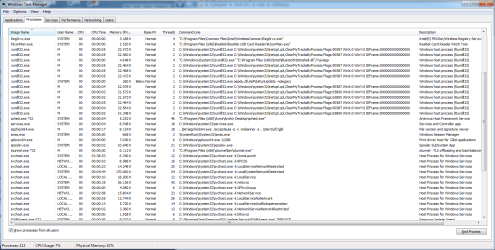
When I look into the TaskManager I find oftentimes lots of processes of type.
rundll32 for inetcpl ... ClearMyTracksProcess
See attached snapshot
I did not start these processes intentionally at least not manually.
They must be started automatically by IE itself or Windows or whatever.
Where do these process come from?
How do I force them to be faster executed?
Most of the time they run fast and close itself immediately.
Interestingly they seem not to run. The process load is 0
Thanks
Peter
When I look into the TaskManager I find oftentimes lots of processes of type.
rundll32 for inetcpl ... ClearMyTracksProcess
See attached snapshot
I did not start these processes intentionally at least not manually.
They must be started automatically by IE itself or Windows or whatever.
Where do these process come from?
How do I force them to be faster executed?
Most of the time they run fast and close itself immediately.
Interestingly they seem not to run. The process load is 0
Thanks
Peter
Attachments
My Computer
At a glance
win7pro 64bit
- Computer type
- PC/Desktop
- OS
- win7pro 64bit

