Solved Why aren't all picture folders showing up to select for uploading?

EndlessDark

New member
Local time
2:56 PM
Messages
7
When I try to upload pictures to ebay or to any other site, all of my folders aren't available. They are there when I go to the libraries through my desktop but when in the browse or upload pane not all the pictures folders are there. I was wondering what might cause this and if it can be corrected?

I am using Windows 7 64bit version.

Thanks
 

My Computer My Computer

At a glance

Windows 7 home premium 64 bit
Computer Manufacturer/Model Number
HP Slimline s5623w
OS
Windows 7 home premium 64 bit
Monitor(s) Displays
LG 42" Plasma TV
Keyboard
HP Slim Elite Wireless
Mouse
HP Slim Elite Wireless
Internet Speed
12MB
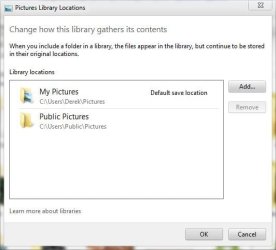
Libraries usually include more than one location, I'm sure you just need to select one of the other locations.

Libraries are just links to the original locations, so when you are uploading you just need to be more specific about which folder you want.

You may have check at the top of your pictures library for the exact locations, these are usually the default locations, with your user name of course.
 

Attachments

  • Capture.JPG
    Capture.JPG
    30.8 KB · Views: 15

My Computer My Computer

At a glance

Win 10 Pro x64Intel I5-2500K @3.3GHz16GB G.Skill Ripjaws X (4x4GB)EVGA GeForce 750 Ti SC 2GB
Computer type
PC/Desktop
Computer Manufacturer/Model Number
Self Built
OS
Win 10 Pro x64
CPU
Intel I5-2500K @3.3GHz
Motherboard
Asrock P67 Extreme4
Memory
16GB G.Skill Ripjaws X (4x4GB)
Graphics Card(s)
EVGA GeForce 750 Ti SC 2GB
Sound Card
ASUS Xonar DG 5.1 Channels 24-bit 96KHz PCI Interface Sound
Monitor(s) Displays
auria eq2367
Screen Resolution
1920 x 1080
Hard Drives
250GB Samsung 850 EVO SSD
1TB WD Blue
1TB Hitachi
PSU
SeaSonic X 650W 80 Plus Gold
Case
Corsair Obsidian 750D
Cooling
Corsair H60, Three 140mm case fans
Keyboard
Logitech Wireless Keyboard K520
Mouse
Logitech Wireless Mouse M310
Internet Speed
Wave Broadband ~ 100 dn 5 up
Antivirus
Windows Defender, Malwarebytes Premium
Browser
Edge, IE11, Chrome
Other Info
Laptop specs: HP g7-1365dx /
CPU: AMD A6-3420M APU with Radeon(tm) HD Graphics /
RAM: Crucial 8Gb (2x4Gb) /
SSD: Crucial M4-CT128M4SSD2 ATA Device/ FW 000F /
GFX: AMD Radeon HD 6520G /
OS: Windows 10 Pro x64
Actually I tried that..They are nowhere to be found when in the upload browser. I have looked in public pictures, my pictures and even went through the mycomputer option and the folders just aren't anywhere in there lol. They are readily visible and available when not in the upload browser just for some reason they are not showing up in there. There are 3 or 4 folders that I can't see when in the upload browser and one is my main folder where I keep most of my pics in different subfolders. The browser does pic up all pics that are not in any folders though but this doesn't help much. Any other ideas?

thanks
 

My Computer My Computer

At a glance

Windows 7 home premium 64 bit
Computer Manufacturer/Model Number
HP Slimline s5623w
OS
Windows 7 home premium 64 bit
Monitor(s) Displays
LG 42" Plasma TV
Keyboard
HP Slim Elite Wireless
Mouse
HP Slim Elite Wireless
Internet Speed
12MB
Ok Derikimo I solved my own problem lol. while I was in the upload browser instead of using the libraries link to get to mypictures I went directly to my userfolder and mypictures. While in there I clicked on properties and in General under Attributes I noticed that "hidden" was checked. This box was not checked when I wasn't in the upload browser so I unchecked it. Now all my folders are present even when I go through the libraries shortcut while in the upload pane. Before I unchecked the "hidden" box they were available nowhere while in the upload pane. Now they are all there. So thanks.
 

My Computer My Computer

At a glance

Windows 7 home premium 64 bit
Computer Manufacturer/Model Number
HP Slimline s5623w
OS
Windows 7 home premium 64 bit
Monitor(s) Displays
LG 42" Plasma TV
Keyboard
HP Slim Elite Wireless
Mouse
HP Slim Elite Wireless
Internet Speed
12MB
Glad you figured it out. :)
 

My Computer My Computer

At a glance

Win 10 Pro x64Intel I5-2500K @3.3GHz16GB G.Skill Ripjaws X (4x4GB)EVGA GeForce 750 Ti SC 2GB
Computer type
PC/Desktop
Computer Manufacturer/Model Number
Self Built
OS
Win 10 Pro x64
CPU
Intel I5-2500K @3.3GHz
Motherboard
Asrock P67 Extreme4
Memory
16GB G.Skill Ripjaws X (4x4GB)
Graphics Card(s)
EVGA GeForce 750 Ti SC 2GB
Sound Card
ASUS Xonar DG 5.1 Channels 24-bit 96KHz PCI Interface Sound
Monitor(s) Displays
auria eq2367
Screen Resolution
1920 x 1080
Hard Drives
250GB Samsung 850 EVO SSD
1TB WD Blue
1TB Hitachi
PSU
SeaSonic X 650W 80 Plus Gold
Case
Corsair Obsidian 750D
Cooling
Corsair H60, Three 140mm case fans
Keyboard
Logitech Wireless Keyboard K520
Mouse
Logitech Wireless Mouse M310
Internet Speed
Wave Broadband ~ 100 dn 5 up
Antivirus
Windows Defender, Malwarebytes Premium
Browser
Edge, IE11, Chrome
Other Info
Laptop specs: HP g7-1365dx /
CPU: AMD A6-3420M APU with Radeon(tm) HD Graphics /
RAM: Crucial 8Gb (2x4Gb) /
SSD: Crucial M4-CT128M4SSD2 ATA Device/ FW 000F /
GFX: AMD Radeon HD 6520G /
OS: Windows 10 Pro x64
Microsoft needs to address this problem. You are far from the first to have it. When you manually open folders and go to the Documents or Pictures folders, you can see that all of them are there but when you need to browse to them to upload one or add it to something, many of the photos or folders aren't there, although you are in the same folder that you can see them in when you manually open the folder to find them. For some reason, they are hidden only when browsing with a browse window open. Yes, changing the properties from hidden fixes it but why? Why are they only hidden when you look at them from a browse window and why are some hidden in the first place?
 

My Computer My Computer

At a glance

Windows 7 Professional 64 bit
Computer type
PC/Desktop
Computer Manufacturer/Model Number
Systemax
OS
Windows 7 Professional 64 bit
Usually this would point to some type of malware setting either the Library or folders inside the library as hidden in the attributes,
You can use these free tools to see if they find anything,
Manually Update them before running full scans,
Try not to use your computer while the scans are running, (one at a time of course).
Uncheck the box to Active the Free trial from the final install options,
http://www.malwarebytes.org/products/malwarebytes_free
http://www.superantispyware.com/?tag=SUPERANTISPYWARE
This one is the longest up to 4 hours, the others are only about 45 minutes,
http://www.microsoft.com/security/scanner/en-us/default.aspx
There have been many posted workarounds as Showing Hidden folders, files and drives in folder options,
http://www.sevenforums.com/tutorials/56005-file-folder-hide-unhide.html
Also you could just Rename the effected folder and test/ add anything in front of the folders name.

Please add what Security suite you have installed and any prior security you've uninstalled,
Also please use this tutorial to fill in your system spec's,
http://www.sevenforums.com/tutorials/180324-system-info-see-your-system-specs.html
 

My Computer My Computer

At a glance

Win-7-Pro64bit 7-H-Prem-64biti7-5930K 2nd i9-9940x both water blocked VRM'...Trident-z 3200C14 2nd Trident-z 3600C16EVGA 1080ti ftw3 2nd Titan Xp both water blocked
Computer type
PC/Desktop
Computer Manufacturer/Model Number
Custom assembled by me :}
OS
Win-7-Pro64bit 7-H-Prem-64bit
CPU
i7-5930K 2nd i9-9940x both water blocked VRM's too
Motherboard
ASUS SABERTOOTH X99 2nd ASUS x299 Apex
Memory
Trident-z 3200C14 2nd Trident-z 3600C16
Graphics Card(s)
EVGA 1080ti ftw3 2nd Titan Xp both water blocked
Sound Card
Built-in Realtek
Monitor(s) Displays
1-AOC G2460PG 24"G-Sync 144Hz/ 2nd 1-ASUS VG248QE 24" 144Hz
Screen Resolution
1920 x 1080 144Hz
Hard Drives
2-Samsung M.2 Evo & Evo Plus
2-Samsung 850 EVO 500GB SSD's/ 3-2.5 W.D. Black 1tb-&3-1tb/3-3.5 WD Black 1tb hdd's
PSU
EVGA SuperNOVA 1000-P2 2nd 1200-P2
Case
2-Corsair Obsidian Series 450D Black ATX Mid Tower
Cooling
Custom water loops
Keyboard
Logitech G710+/ 2nd Logitech G910
Mouse
2-RedDragon M901 Perdition 16400 dpi Gaming mouse = wired
Internet Speed
Comcast Ping 19ms 89.31mbps download speed 6.12mbps upload
Antivirus
Malwarebytes Pro/ Superantispyware Pro
Browser
FireFox & Pale moon
Other Info
2nd ASUS X299 Apex/Intel i9-9940x with Custom water loop/7H-Prem-x64/Corsair 450D case/Ram Trident-z 3600C16 4x8gb / Samsung970Evo plus 500gb SSD/Dual ssd EZ swap evo/PSU EVGA SuperNova 1200w-P2 80+Platinum/GPU Titan Xp /8-ML-140 on push-pull on 2-280GTX rads
I am having the same issue, only my "hidden" box isn't checked. When I try to upload on any site online only two of my six picture folders show up in "My Pictures". How do I get all of them to appear? Thanks
 

My Computer My Computer

At a glance

windows 7
Computer type
PC/Desktop
Computer Manufacturer/Model Number
hp
OS
windows 7
I learned since my last post that it has to do with which folders have been added to the Libraries in Windows Vista and 7. I've disabled Libraries on my own computer so I don't have the problem here. I think Libraries was a stupid idea for Microsoft to add to Windows. It just causes problems like yours.

Check here. Post again if this doesn't fix it.
Include folders in a library
 
Last edited:

My Computer My Computer

At a glance

Windows 7 Professional 64 bit
Computer type
PC/Desktop
Computer Manufacturer/Model Number
Systemax
OS
Windows 7 Professional 64 bit
Keep in mind that libraries are virtual, not real. Folders from an external or additional drive can be added to libraries so they appear alongside folders that are on your internal C drive.
 

My Computer My Computer

At a glance

Windows 7 Professional 64 bit
Computer type
PC/Desktop
Computer Manufacturer/Model Number
Systemax
OS
Windows 7 Professional 64 bit
Could you please explain how I can disable libraries?
 

My Computer My Computer

At a glance

windows 7
Computer type
PC/Desktop
Computer Manufacturer/Model Number
hp
OS
windows 7

My Computer My Computer

At a glance

Windows 7 Professional 64 bit
Computer type
PC/Desktop
Computer Manufacturer/Model Number
Systemax
OS
Windows 7 Professional 64 bit

My Computer My Computer

At a glance

Win-7-Pro64bit 7-H-Prem-64biti7-5930K 2nd i9-9940x both water blocked VRM'...Trident-z 3200C14 2nd Trident-z 3600C16EVGA 1080ti ftw3 2nd Titan Xp both water blocked
Computer type
PC/Desktop
Computer Manufacturer/Model Number
Custom assembled by me :}
OS
Win-7-Pro64bit 7-H-Prem-64bit
CPU
i7-5930K 2nd i9-9940x both water blocked VRM's too
Motherboard
ASUS SABERTOOTH X99 2nd ASUS x299 Apex
Memory
Trident-z 3200C14 2nd Trident-z 3600C16
Graphics Card(s)
EVGA 1080ti ftw3 2nd Titan Xp both water blocked
Sound Card
Built-in Realtek
Monitor(s) Displays
1-AOC G2460PG 24"G-Sync 144Hz/ 2nd 1-ASUS VG248QE 24" 144Hz
Screen Resolution
1920 x 1080 144Hz
Hard Drives
2-Samsung M.2 Evo & Evo Plus
2-Samsung 850 EVO 500GB SSD's/ 3-2.5 W.D. Black 1tb-&3-1tb/3-3.5 WD Black 1tb hdd's
PSU
EVGA SuperNOVA 1000-P2 2nd 1200-P2
Case
2-Corsair Obsidian Series 450D Black ATX Mid Tower
Cooling
Custom water loops
Keyboard
Logitech G710+/ 2nd Logitech G910
Mouse
2-RedDragon M901 Perdition 16400 dpi Gaming mouse = wired
Internet Speed
Comcast Ping 19ms 89.31mbps download speed 6.12mbps upload
Antivirus
Malwarebytes Pro/ Superantispyware Pro
Browser
FireFox & Pale moon
Other Info
2nd ASUS X299 Apex/Intel i9-9940x with Custom water loop/7H-Prem-x64/Corsair 450D case/Ram Trident-z 3600C16 4x8gb / Samsung970Evo plus 500gb SSD/Dual ssd EZ swap evo/PSU EVGA SuperNova 1200w-P2 80+Platinum/GPU Titan Xp /8-ML-140 on push-pull on 2-280GTX rads
Back
Top