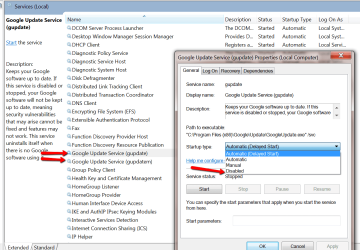
why can not disable these 2 google services?

drugo

New member
Member
VIP
Local time
10:20 AM
Messages
476
Hi

hi

i installed nik bundle plugins from nik

I used autoruns and there are 2 service under
HKLM\System\CurrentControlSet\Services

but if i run like an administrator services.msc i can't find them and stop them

they are 2 services
"C:\Program Files (x86)\Google\Update\GoogleUpdate.exe" /svc

thanks
 

My Computer My Computer

Computer type
PC/Desktop
OS
windows 7 ultimate 64bit
This might help. Take a look.

Start Orb and type msconfig.
Look in Start Up for the services and then while there go to Services. Put a check mark in the box (Lower left corner) Hide all Microsoft's Services and see if you can find them there.
 

My Computer My Computer

Computer type
PC/Desktop
Computer Manufacturer/Model Number
Home made Desktop
OS
Windows 10 Pro. 64/ version 1709 Windows 7 Pro/64
CPU
Intel i7-6800K @ 4.3
Motherboard
ASUS X-99 Deluxe II
Memory
Corsair Platinum 16 gig @2400
Graphics Card(s)
EVGA GTX 1070 OC
Monitor(s) Displays
Asus 27" LED LCD/VE278Q
Screen Resolution
1920-1080 or 1280-720 HDMI
Hard Drives
INTEL SSD 730-240 Gb Sata 3.0/
PSU
EVGA Platium 1200W
Case
Phanteks Luxe Tempered Glass 8 fans/ one radiator
Cooling
XSPC/ Water Cooled CPU
Keyboard
Das 4 Professional
Mouse
Logitech M705/MX Anywhere 2-S
Internet Speed
100 mbits
Antivirus
Microsoft Security Essentials/ Malwarebytes Premium 3.0/ SAS
Browser
I.E. 11 default/Firefox/ ISP Time Warner Cable/Spectrum
Other Info
LG BluRay Burner/
Sound system-KLipsch-THX/
Icy Dock ssd Hot Swap bays.
Also look at the scheduled task by going to Start menu -> All Programs -> Accesories -> System Tools -> Task Scheduler.

On the task scheduler navigation pane, select "Task Scheduler Library." Delete any Google Update stuff if there is one on the list.
 

My Computer My Computer

Computer type
Laptop
Computer Manufacturer/Model Number
Dell Optiplex SX270, Lenovo Z470
OS
Windows 7 Professional x64 SP1
CPU
Intel® Pentium® 4 @ 2.26 GHz, Intel Core i7-2670QM @ 2.20 GH
Motherboard
Dell, Lenovo
Memory
512MB Dual channel DDR SDRAM @ 400MHz 2.5-3-3-7, 8 GB DDR3
Graphics Card(s)
Intel 82865G, Nvidia GeForce 520M Graphics
Sound Card
SoundMax Integrated Audio, Integrated HD Audio
Monitor(s) Displays
LG W1952
Screen Resolution
1440x900, 1366 x 768
Hard Drives
40 GB 2.5" IDE 4200 RPM HDD, 500 GB 5400 RPM Sata 1.5 + 32 GB SSD
PSU
Dell 145 Watt, Lenovo 120 Watt Power Adapter
Case
Optiplex SX270 Small Form Factor, Laptop
Cooling
Dell Proprietary Air Cooling, Stock laptop cooling
Keyboard
Dell SK-8125 USB Keyboard
Mouse
Dell PS/2 2 button ball mouse with wheel scroll
Internet Speed
300 Mbit down / 20 Mbps up Time Warner Cable
Antivirus
MSE, Malwarebytes Scanner
Browser
Internet (Aizawa) Explorer 11
Other Info
Running Windows Server 2012 Datacenter on a virtual machine to run Metro Apps.
Go to Services. In the Properites of those services you can disable them.
 

Attachments

  • 2013-07-04_1847.png
    2013-07-04_1847.png
    66.6 KB · Views: 12

My Computer My Computer

Computer Manufacturer/Model Number
HP, Dell, Gateway, Toshiba - 4 laptops and 2 desktops
OS
Vista, Windows7, Mint Mate, Zorin, Windows 8
CPU
from 1.6GHz Duo to i7
Monitor(s) Displays
2x HP w2207
Hard Drives
5x HDD, 7x SSD, 12x Externals
Keyboard
with trackball - no mices
Mouse
Trackball mice
Internet Speed
DSL 6000
Also look at the scheduled task by going to Start menu -> All Programs -> Accesories -> System Tools -> Task Scheduler.

On the task scheduler navigation pane, select "Task Scheduler Library." Delete any Google Update stuff if there is one on the list.
Yes there are there!
can disable them?
thanks

Go to Services. In the Properites of those services you can disable them.
in the service they are not in the list !
 

My Computer My Computer

Computer type
PC/Desktop
OS
windows 7 ultimate 64bit
Yeah you can either disable or delete them. I'd try disabling them and see if they still load when Windows boots.
 

My Computer My Computer

Computer type
Laptop
Computer Manufacturer/Model Number
Dell Optiplex SX270, Lenovo Z470
OS
Windows 7 Professional x64 SP1
CPU
Intel® Pentium® 4 @ 2.26 GHz, Intel Core i7-2670QM @ 2.20 GH
Motherboard
Dell, Lenovo
Memory
512MB Dual channel DDR SDRAM @ 400MHz 2.5-3-3-7, 8 GB DDR3
Graphics Card(s)
Intel 82865G, Nvidia GeForce 520M Graphics
Sound Card
SoundMax Integrated Audio, Integrated HD Audio
Monitor(s) Displays
LG W1952
Screen Resolution
1440x900, 1366 x 768
Hard Drives
40 GB 2.5" IDE 4200 RPM HDD, 500 GB 5400 RPM Sata 1.5 + 32 GB SSD
PSU
Dell 145 Watt, Lenovo 120 Watt Power Adapter
Case
Optiplex SX270 Small Form Factor, Laptop
Cooling
Dell Proprietary Air Cooling, Stock laptop cooling
Keyboard
Dell SK-8125 USB Keyboard
Mouse
Dell PS/2 2 button ball mouse with wheel scroll
Internet Speed
300 Mbit down / 20 Mbps up Time Warner Cable
Antivirus
MSE, Malwarebytes Scanner
Browser
Internet (Aizawa) Explorer 11
Other Info
Running Windows Server 2012 Datacenter on a virtual machine to run Metro Apps.
They update Chrome, why would you want them disabled?
 

My Computer My Computer

Computer type
Laptop
OS
Win 7 Ultimate 32-bit
They update Chrome, why would you want them disabled?
i don't have chrome installed

they came with nik silver bundle are photoshop plugins
 

My Computer My Computer

Computer type
PC/Desktop
OS
windows 7 ultimate 64bit
Back
Top