Solved Why can't I add a copyright tag for my own music files?

LowStrung

New member
Local time
9:20 PM
Messages
24
I'm running Windows 7 Starter edition. In the properties dialogs for MP3 files, some of the fields can be changed or filled in, but never the copyright field, even though the MP3 files were created by me, and contain my own original music compositions. Does anyone know why?

I'd like my MP3s to show copyright info, especially because I upload some of them to my personal website. I have tried a couple of tag manager programs (can't remember their names offhand), but still could not make any copyright entries.
 

My Computer My Computer

At a glance

Windows 7 Starter 32bit
Computer type
Laptop
OS
Windows 7 Starter 32bit
Winamp

I use Winamp to play music.

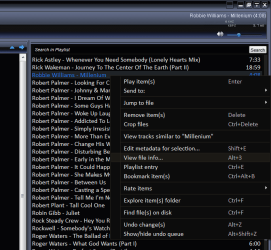
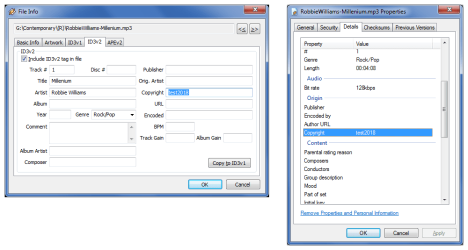
I just tried adding some info to the Copyright field in the ID3v2 tab of the "File Info" window.
It appears in the file Properties window in Windows Explorer.
Winamp Copyright 01.png

(Click to see larger image)
Winamp Copyright 02.png
 

My Computer My Computer

At a glance

W7 Ultimate SP1, LM19.2 MATE, W10 Home 1703, ...AMD Phenom II x6 1100T, 3.3 GHz12GB DDR3 1333 G-Skill (4GB x 2), G-Skill (2G...NVIDIA GeForce GTX 660
Computer type
PC/Desktop
Computer Manufacturer/Model Number
n/a
OS
W7 Ultimate SP1, LM19.2 MATE, W10 Home 1703, W10 Pro 1703 VM, #All 64 bit
CPU
AMD Phenom II x6 1100T, 3.3 GHz
Motherboard
ASUS M4A88T-M/USB3 (AM3)
Memory
12GB DDR3 1333 G-Skill (4GB x 2), G-Skill (2GB x 2)
Graphics Card(s)
NVIDIA GeForce GTX 660
Sound Card
Realtek?
Monitor(s) Displays
Samsung S23B350
Screen Resolution
1920x1080
Hard Drives
WD Green 2TB (SATA), WD Green 3TB (SATA), WD Blue 4TB (SATA), WD Blue 6TB (SATA)
PSU
Cooler Master
Case
Antec GX300 Tower
Cooling
3x Antec TRICOOL 120mm Fans
Mouse
Wired Optical
Internet Speed
DSL
Antivirus
Avast
Browser
Pale Moon (64 bit)
Other Info
2018-12-27 Upgraded HDDs
2015-12-10 Upgraded case, graphics card, storage
2015-08-15 Upgraded motherboard & RAM
2015-07-15 Upgraded LM17.1 to LM17.2
I use Winamp to play music.

I just tried adding some info to the Copyright field in the ID3v2 tab of the "File Info" window.
It appears in the file Properties window in Windows Explorer.

Thanks, lehnerus2000. I use SMPlayer (front end for MPlayer), which doesn't have that feature, but I still don't understand why the field can't be edited in Windows Explorer's properties dialog, while the other fields can. It would be understandable if the file had been created by someone else who held the copyright and had already entered the info in the field. At any rate, I'd rather not change my media player or add a second one.

On the other hand, the properties dialog lets me edit the copyright info of JPEGs, even those by third parties.
 

My Computer My Computer

At a glance

Windows 7 Starter 32bit
Computer type
Laptop
OS
Windows 7 Starter 32bit
I think that the reason for the inability to add/edit the copyright field has to do with the power of the Music industry and their stance on digital music.

A lot of sound cards used to come with a "What you hear" or Stereo Mix" option which allowed the user to easily digitally copy MP3 and other Music formats.

Following a campaign by the music industry, (and to a certain extent the Film/Video industry), a lot of, mostly first world manufacturers, removed the option from their hardware. The lack of Add/Edit for the copyright of Music (and I think Video files), is Microsoft's contribution to the File "protection" situation.

This does not apply to Image files probably due to the fact that Photographers, and Artists, act as individuals rather than through a well organised Industry body, so have less say on the matter. Digital images do have the ability to be Digitally Marked with copyright, via the Digimarc process available as a Plug-in for Photoshop and other editors, this is not suitable for Music or Video as the mark actually adds data that would "show" in the formats used.

I use MediaMonkey to handle my Audio & Video libraries and this like Winamp also allows editing of the copyright field
 

My Computers My Computers

  • At a glance

    Windows 11 Pro x64 [Latest Release and Releas...Ryzen 9 5950X, 3.8 - 5.2 MHz64GB [2 x 32GB] DDR4 3200MHz4GB NVIDIA GEFORCE GTX 1650 Ti
    Computer type
    PC/Desktop
    Computer Manufacturer/Model Number
    ChillBlast - Custom to my design
    OS
    Windows 11 Pro x64 [Latest Release and Release Preview]
    CPU
    Ryzen 9 5950X, 3.8 - 5.2 MHz
    Motherboard
    Asus Prime X570-Pro
    Memory
    64GB [2 x 32GB] DDR4 3200MHz
    Graphics Card(s)
    4GB NVIDIA GEFORCE GTX 1650 Ti
    Sound Card
    On-board SPDIF to 5.1 System + HDMI [5.1 system]
    Monitor(s) Displays
    32" UHD 32 Bit HDR Monitor + 43" UHD 4K 32Bit HDR TV
    Screen Resolution
    2 x 3840 x 2160 @60Hz
    Hard Drives
    1TB M2 SSD OS, 500GB Fast Access SSD, 2 x 8TB Data + Various Externals from 1TB to 4TB, 10TB NAS
    PSU
    NZXT C750 80 PLUS Gold 750W Modular PSU
    Case
    Workstation Case [Matt Black]
    Cooling
    NZXT Kraken X63 280mm CPU Cooler +2x Quiet Case fans
    Keyboard
    Logitech Wireless MX Keys & K400 + others
    Mouse
    Logitech Wireless MX Master 3S
    Internet Speed
    920 MB Down 50 MB Up
    Antivirus
    BitDefender Total Security Pro
    Browser
    Chrome (always run latest Non-Beta)
    Other Info
    Also run ...
    Laptop - Quad 8GB - Windows 10 Pro x64
    Nexus 7 Android tablet x2
    Samsung 10.2" tablet
    Blackview TAB 8 4G Android Tablet c/w Keyboard
    Wacom Intuos Pro Medium Pen Pad
    Wacom Intuos Pro Small Pen Pad
    Wacom Expresskeys Remote
    Loopdeck+ Graphics Controller
    Shuttle Pro v2 Control
  • At a glance

    Windows 11 Pro x64 Latest RPIntel I7 10750H 5.0GHz32GB [2x16GB] DDR4 2933 MHznVidia GTX1650Ti 4 GB GDDR6
    Computer type
    Laptop
    System Manufacturer/Model Number
    Dell XPS 17 10750H
    OS
    Windows 11 Pro x64 Latest RP
    CPU
    Intel I7 10750H 5.0GHz
    Motherboard
    Dell XPS
    Memory
    32GB [2x16GB] DDR4 2933 MHz
    Graphics Card(s)
    nVidia GTX1650Ti 4 GB GDDR6
    Sound Card
    Stock [Realtek] 4 Speaker
    Monitor(s) Displays
    17" IPS UHD+ Infinity Edge Touchscreen
    Screen Resolution
    3840 x 2400
    Hard Drives
    2TB M2 NVMe, 4TB External + various 500GB & 1TB External NVMe (also have access to spinner HDD from
    PSU
    Stock
    Case
    Stock XPS Aluminium & Carbon Fibre
    Cooling
    Stock - Active Fan Control
    Keyboard
    Backlit + Various Logitech
    Mouse
    Stock Track Pad + Logitech MX Trackball
    Internet Speed
    72 MB Down 18MB Up
    Browser
    Chrome
    Other Info
    Also run ...
    Laptop - Quad 8GB - Windows 10 Pro x64
    Nexus 7 Android tablet x2
    10.2" tablet
    Sony Z3 Android Smartphone
    Wacom Intuos Pro Medium Pen Pad
    Wacom Intuos Pro Small Pen Pad
    Wacom Expresskeys Remote
    Loopdeck+ Graphics Controller
    Shuttle Pro v2 Control Pad
    10TB NAS
Do you actually have them "copyrighted"? I have a recording studio and have done a lot of song demos for a "retired" Nashville Songwriter. His are protected as he is a BMI registered songwriter and he says BMI takes care of it. When I burn a CD of the songs I add "ISRC" codes to further protect him.
 

My Computer My Computer

At a glance

Windows 10 64 bitIntel i7 6700K16GB Corsair DominatorIntel CPU Graphics
Computer type
PC/Desktop
Computer Manufacturer/Model Number
My Own Build
OS
Windows 10 64 bit
CPU
Intel i7 6700K
Motherboard
ASUS ROG Maximus VIII Hero
Memory
16GB Corsair Dominator
Graphics Card(s)
Intel CPU Graphics
Sound Card
RealTek
Monitor(s) Displays
27" Dell S2719dgf
Screen Resolution
2560X1440
Hard Drives
1 TB Samsung 850 EVO SSD for Win 10 Pro
500GB Samsung 850 EVO SSD for Win 10 Insider
2 TB drive for backup
PSU
EVGA Supernova 750G2
Case
BeQuiet Silent Base 600
Cooling
Deepcool Captain 120EX
Keyboard
Microsoft Wireless 2000
Mouse
Microsoft wireless
Internet Speed
100 MB/sec (Cable)
Antivirus
Microsoft Defender and Malwarebytes
Browser
Edge/Firefox
Other Info
Cakewalk (Sonar) by BandLab and Studio One 4.1 Pro recording studio software. MOTU 896Mk3 Hybrid recording interface, Frontier Tranzport wireless control unit, Behringer X-Touch Control Surface.
Five USB connected optical drives for CD Audio production using Nero BurningROM
Barman58: Yes, I can see MS doing that in sympathy with the music industry. In my case, I'm not actually in that industry or even a professional musician, though I've taught guitar for a living in the past. Now that I'm retired, my composing is done as a hobby; I don't earn a dime for it. Nevertheless, I try to discourage people from reposting my work as their own. The scores are also on my site as PDFs, but there's a copyright notice in the footer on each page.

firebird said:
Do you actually have them "copyrighted"? I have a recording studio and have done a lot of song demos for a "retired" Nashville Songwriter. His are protected as he is a BMI registered songwriter and he says BMI takes care of it. When I burn a CD of the songs I add "ISRC" codes to further protect him.
As I mentioned above, I'm not a professional musician, which is why I haven't registered with an organization like BMI. My compositions are not for sale; I've written them for my own amusement, though I do like to share them with others via the web. Some of the scores have already wound up on other sites without my permission (along with inappropriate advertising), though at least the titles and copyright info in the footers provide some attribution. Naturally I understand the risks involved; my copyright notices are merely intended as a deterrent. As they say, door locks keep only the honest people out. :D
 

My Computer My Computer

At a glance

Windows 7 Starter 32bit
Computer type
Laptop
OS
Windows 7 Starter 32bit
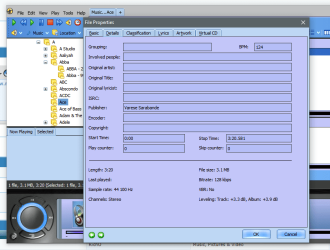
If you do want to add extra tags to MP3 files Mediamonkey has a free version that allows all types of data to be embedded in the file, including Images which might make it more difficult to use your work

MMTags.PNG
 

My Computers My Computers

  • At a glance

    Windows 11 Pro x64 [Latest Release and Releas...Ryzen 9 5950X, 3.8 - 5.2 MHz64GB [2 x 32GB] DDR4 3200MHz4GB NVIDIA GEFORCE GTX 1650 Ti
    Computer type
    PC/Desktop
    Computer Manufacturer/Model Number
    ChillBlast - Custom to my design
    OS
    Windows 11 Pro x64 [Latest Release and Release Preview]
    CPU
    Ryzen 9 5950X, 3.8 - 5.2 MHz
    Motherboard
    Asus Prime X570-Pro
    Memory
    64GB [2 x 32GB] DDR4 3200MHz
    Graphics Card(s)
    4GB NVIDIA GEFORCE GTX 1650 Ti
    Sound Card
    On-board SPDIF to 5.1 System + HDMI [5.1 system]
    Monitor(s) Displays
    32" UHD 32 Bit HDR Monitor + 43" UHD 4K 32Bit HDR TV
    Screen Resolution
    2 x 3840 x 2160 @60Hz
    Hard Drives
    1TB M2 SSD OS, 500GB Fast Access SSD, 2 x 8TB Data + Various Externals from 1TB to 4TB, 10TB NAS
    PSU
    NZXT C750 80 PLUS Gold 750W Modular PSU
    Case
    Workstation Case [Matt Black]
    Cooling
    NZXT Kraken X63 280mm CPU Cooler +2x Quiet Case fans
    Keyboard
    Logitech Wireless MX Keys & K400 + others
    Mouse
    Logitech Wireless MX Master 3S
    Internet Speed
    920 MB Down 50 MB Up
    Antivirus
    BitDefender Total Security Pro
    Browser
    Chrome (always run latest Non-Beta)
    Other Info
    Also run ...
    Laptop - Quad 8GB - Windows 10 Pro x64
    Nexus 7 Android tablet x2
    Samsung 10.2" tablet
    Blackview TAB 8 4G Android Tablet c/w Keyboard
    Wacom Intuos Pro Medium Pen Pad
    Wacom Intuos Pro Small Pen Pad
    Wacom Expresskeys Remote
    Loopdeck+ Graphics Controller
    Shuttle Pro v2 Control
  • At a glance

    Windows 11 Pro x64 Latest RPIntel I7 10750H 5.0GHz32GB [2x16GB] DDR4 2933 MHznVidia GTX1650Ti 4 GB GDDR6
    Computer type
    Laptop
    System Manufacturer/Model Number
    Dell XPS 17 10750H
    OS
    Windows 11 Pro x64 Latest RP
    CPU
    Intel I7 10750H 5.0GHz
    Motherboard
    Dell XPS
    Memory
    32GB [2x16GB] DDR4 2933 MHz
    Graphics Card(s)
    nVidia GTX1650Ti 4 GB GDDR6
    Sound Card
    Stock [Realtek] 4 Speaker
    Monitor(s) Displays
    17" IPS UHD+ Infinity Edge Touchscreen
    Screen Resolution
    3840 x 2400
    Hard Drives
    2TB M2 NVMe, 4TB External + various 500GB & 1TB External NVMe (also have access to spinner HDD from
    PSU
    Stock
    Case
    Stock XPS Aluminium & Carbon Fibre
    Cooling
    Stock - Active Fan Control
    Keyboard
    Backlit + Various Logitech
    Mouse
    Stock Track Pad + Logitech MX Trackball
    Internet Speed
    72 MB Down 18MB Up
    Browser
    Chrome
    Other Info
    Also run ...
    Laptop - Quad 8GB - Windows 10 Pro x64
    Nexus 7 Android tablet x2
    10.2" tablet
    Sony Z3 Android Smartphone
    Wacom Intuos Pro Medium Pen Pad
    Wacom Intuos Pro Small Pen Pad
    Wacom Expresskeys Remote
    Loopdeck+ Graphics Controller
    Shuttle Pro v2 Control Pad
    10TB NAS
If you do want to add extra tags to MP3 files Mediamonkey has a free version that allows all types of data to be embedded in the file, including Images which might make it more difficult to use your work

Thanks. I just tried MediaMonkey, installing it with the "portable" option. I was able to enter copyright info, however, the program is pretty complicated and way more than I need (built-in player, library management tools, etc.), sort of like using a pile driver to hammer in a finishing nail. Also, despite the "portable" installation, it loaded the registry down with all kinds of extra keys, so many, in fact that I had to do a system restore to get rid of them all, since MediaMonkey naturally didn't show up in Programs & Features (I had removed it manually).

Then I found a couple of other utilities for editing MP3 tags. Both were still a convoluted way to do a simple task. One of them used a tiny, barely readable UI font that could not be changed.

In the meantime, after having successfully added copyright info to one of my MP3s, I suddenly realized that one really has to look for it in the properties; it doesn't grab one's attention at all. So I finally hit on a simple alternative: Since the title field is accessible in properties, I appended a short copyright notice to the title, which shows up in the player's titlebar. Good enough! "Live and learn," as my mother was fond of saying. :)

Anyway, thanks for all the helpful responses, folks!
 

My Computer My Computer

At a glance

Windows 7 Starter 32bit
Computer type
Laptop
OS
Windows 7 Starter 32bit

My Computer My Computer

At a glance

Windows 10 Pro. 64/ version 1709 Windows 7 Pr...Intel i7-6800K @ 4.3Corsair Platinum 16 gig @2400EVGA GTX 1070 OC
Computer type
PC/Desktop
Computer Manufacturer/Model Number
Home made Desktop
OS
Windows 10 Pro. 64/ version 1709 Windows 7 Pro/64
CPU
Intel i7-6800K @ 4.3
Motherboard
ASUS X-99 Deluxe II
Memory
Corsair Platinum 16 gig @2400
Graphics Card(s)
EVGA GTX 1070 OC
Monitor(s) Displays
Asus 27" LED LCD/VE278Q
Screen Resolution
1920-1080 or 1280-720 HDMI
Hard Drives
INTEL SSD 730-240 Gb Sata 3.0/
PSU
EVGA Platium 1200W
Case
Phanteks Luxe Tempered Glass 8 fans/ one radiator
Cooling
XSPC/ Water Cooled CPU
Keyboard
Das 4 Professional
Mouse
Logitech M705/MX Anywhere 2-S
Internet Speed
100 mbits
Antivirus
Microsoft Security Essentials/ Malwarebytes Premium 3.0/ SAS
Browser
I.E. 11 default/Firefox/ ISP Time Warner Cable/Spectrum
Other Info
LG BluRay Burner/
Sound system-KLipsch-THX/
Icy Dock ssd Hot Swap bays.
The thing with copyright, (and I can only talk about here in the UK, but it should be universal), is that copyright is something that is assumed for the creator of the media, and you should not have to claim it. If I create a photographic image I automatically have the Intellectual Property rights to that work, and this is enshrined in law.

The issues arrive when you need to record this so that usage fees and like charges can be recovered, and the lawyers then get involved. The internet has always been considered outside the normal scope of law, as it was in its early days when people would use it to share work freely with others and for free. Now the net has become commercialized, but some of the people who want to earn money from the net are willing to treat the net as it used to be - free for all - but expect others to pay them for "providing" media.

Sorting this out can be difficult and once lawyers get involved, expensive

With the image side of things which is what I am most involved in you can use electronic watermarks (which is not a free service), use tags which may be removed or you can use an image watermark, (and not one at the edge that can be cropped out), or only upload a low resolution Sampler, both of which which ruins the image, for those that want an image for personal use.

All my images that are published online, I retain full rights to but allow their use for non commercial purposes, (including fundraising for Non Profit organisations), I just ask for an attribution).

I always shoot my Images in Raw format, and fully annotate them in the internal metadata - these images are kept as "Digital negatives" and are never directly published, the Geo location and time of creation is also added to the metadata by the camera and my Google timeline will also place me at that location at that time.

I'm not sure what digital tagging is possible for Music files, but maybe a copyright Image inserted into a tag in the MP3 file could dissuade many, as the player would display the image on playback, Also recording the original in a non compressed format and using this to generate the MP3 for upload could be another option, providing a dated master recording . I can remember radio stations , when playing a new released single, would insert a few Station Ident Jingles to spoil any recordings from the radio to tape. with the digital age it's simple to record bit by bit for lossless copying and then edit the file to remove unwanted content so this is not a viable option

 

My Computers My Computers

  • At a glance

    Windows 11 Pro x64 [Latest Release and Releas...Ryzen 9 5950X, 3.8 - 5.2 MHz64GB [2 x 32GB] DDR4 3200MHz4GB NVIDIA GEFORCE GTX 1650 Ti
    Computer type
    PC/Desktop
    Computer Manufacturer/Model Number
    ChillBlast - Custom to my design
    OS
    Windows 11 Pro x64 [Latest Release and Release Preview]
    CPU
    Ryzen 9 5950X, 3.8 - 5.2 MHz
    Motherboard
    Asus Prime X570-Pro
    Memory
    64GB [2 x 32GB] DDR4 3200MHz
    Graphics Card(s)
    4GB NVIDIA GEFORCE GTX 1650 Ti
    Sound Card
    On-board SPDIF to 5.1 System + HDMI [5.1 system]
    Monitor(s) Displays
    32" UHD 32 Bit HDR Monitor + 43" UHD 4K 32Bit HDR TV
    Screen Resolution
    2 x 3840 x 2160 @60Hz
    Hard Drives
    1TB M2 SSD OS, 500GB Fast Access SSD, 2 x 8TB Data + Various Externals from 1TB to 4TB, 10TB NAS
    PSU
    NZXT C750 80 PLUS Gold 750W Modular PSU
    Case
    Workstation Case [Matt Black]
    Cooling
    NZXT Kraken X63 280mm CPU Cooler +2x Quiet Case fans
    Keyboard
    Logitech Wireless MX Keys & K400 + others
    Mouse
    Logitech Wireless MX Master 3S
    Internet Speed
    920 MB Down 50 MB Up
    Antivirus
    BitDefender Total Security Pro
    Browser
    Chrome (always run latest Non-Beta)
    Other Info
    Also run ...
    Laptop - Quad 8GB - Windows 10 Pro x64
    Nexus 7 Android tablet x2
    Samsung 10.2" tablet
    Blackview TAB 8 4G Android Tablet c/w Keyboard
    Wacom Intuos Pro Medium Pen Pad
    Wacom Intuos Pro Small Pen Pad
    Wacom Expresskeys Remote
    Loopdeck+ Graphics Controller
    Shuttle Pro v2 Control
  • At a glance

    Windows 11 Pro x64 Latest RPIntel I7 10750H 5.0GHz32GB [2x16GB] DDR4 2933 MHznVidia GTX1650Ti 4 GB GDDR6
    Computer type
    Laptop
    System Manufacturer/Model Number
    Dell XPS 17 10750H
    OS
    Windows 11 Pro x64 Latest RP
    CPU
    Intel I7 10750H 5.0GHz
    Motherboard
    Dell XPS
    Memory
    32GB [2x16GB] DDR4 2933 MHz
    Graphics Card(s)
    nVidia GTX1650Ti 4 GB GDDR6
    Sound Card
    Stock [Realtek] 4 Speaker
    Monitor(s) Displays
    17" IPS UHD+ Infinity Edge Touchscreen
    Screen Resolution
    3840 x 2400
    Hard Drives
    2TB M2 NVMe, 4TB External + various 500GB & 1TB External NVMe (also have access to spinner HDD from
    PSU
    Stock
    Case
    Stock XPS Aluminium & Carbon Fibre
    Cooling
    Stock - Active Fan Control
    Keyboard
    Backlit + Various Logitech
    Mouse
    Stock Track Pad + Logitech MX Trackball
    Internet Speed
    72 MB Down 18MB Up
    Browser
    Chrome
    Other Info
    Also run ...
    Laptop - Quad 8GB - Windows 10 Pro x64
    Nexus 7 Android tablet x2
    10.2" tablet
    Sony Z3 Android Smartphone
    Wacom Intuos Pro Medium Pen Pad
    Wacom Intuos Pro Small Pen Pad
    Wacom Expresskeys Remote
    Loopdeck+ Graphics Controller
    Shuttle Pro v2 Control Pad
    10TB NAS
Copyright is not the same in the US as it is in the UK. Unless you have it (legally) copyrighted anyone can use it or even claim it and copyright it for themselves. Just to say "copyright" means nothing legally.
 

My Computer My Computer

At a glance

Windows 10 64 bitIntel i7 6700K16GB Corsair DominatorIntel CPU Graphics
Computer type
PC/Desktop
Computer Manufacturer/Model Number
My Own Build
OS
Windows 10 64 bit
CPU
Intel i7 6700K
Motherboard
ASUS ROG Maximus VIII Hero
Memory
16GB Corsair Dominator
Graphics Card(s)
Intel CPU Graphics
Sound Card
RealTek
Monitor(s) Displays
27" Dell S2719dgf
Screen Resolution
2560X1440
Hard Drives
1 TB Samsung 850 EVO SSD for Win 10 Pro
500GB Samsung 850 EVO SSD for Win 10 Insider
2 TB drive for backup
PSU
EVGA Supernova 750G2
Case
BeQuiet Silent Base 600
Cooling
Deepcool Captain 120EX
Keyboard
Microsoft Wireless 2000
Mouse
Microsoft wireless
Internet Speed
100 MB/sec (Cable)
Antivirus
Microsoft Defender and Malwarebytes
Browser
Edge/Firefox
Other Info
Cakewalk (Sonar) by BandLab and Studio One 4.1 Pro recording studio software. MOTU 896Mk3 Hybrid recording interface, Frontier Tranzport wireless control unit, Behringer X-Touch Control Surface.
Five USB connected optical drives for CD Audio production using Nero BurningROM
As I've already mentioned, my copyright notices are simply a deterrent, and some honest people will respect them. In one instance I approached the webmaster of a site on which one of their members had posted a score of mine without permission. I was asked to fill out a removal request form based on U.S. copyright law, even though I'm a Canadian citizen and my compositions were written here in Canada. I filled out the form anyway, and the content was removed, but after seeing another of my scores on the same site, I just shrugged my shoulders and let it pass.

I have no intention of seeking legal recourse to protect my works, nor do I want to register the copyright for all 325 of them (of which only 32 are on my site). Life's too short for all that.

Thanks again, folks! :)
 

My Computer My Computer

At a glance

Windows 7 Starter 32bit
Computer type
Laptop
OS
Windows 7 Starter 32bit
Copyright is not the same in the US as it is in the UK. Unless you have it (legally) copyrighted anyone can use it or even claim it and copyright it for themselves. Just to say "copyright" means nothing legally.

Actually, U.S. copyright law is similar to U.K. copyright law in that the creator is legally protected from the time of creation. In real life, though, it's difficult to impossible to prove who created and owns intellectual property unless it has been registered with the copyright office (and if someone else registers the property first, good luck proving it). Then, all that does is prove you own the rights to the property (unless you sell it or give it away). A registered copyright will not prevent theft of intellectual property, though. It only gives the owner of the rights the tool needed to sue in cases of infringement.
 

My Computer My Computer

At a glance

Win 7 Ultimate 64 bitIntel i7-3930KKingston HyperX Genesis 32GB Kit (8x4GB Modul...MSI R7850 Twin Frozr 2GD5/OC Radeon HD 7850 2...
Computer type
PC/Desktop
Computer Manufacturer/Model Number
Custom Build
OS
Win 7 Ultimate 64 bit
CPU
Intel i7-3930K
Motherboard
ASUS P9X79 WS
Memory
Kingston HyperX Genesis 32GB Kit (8x4GB Modules) 1600MHz DDR
Graphics Card(s)
MSI R7850 Twin Frozr 2GD5/OC Radeon HD 7850 2GB 256-bit GDDR
Sound Card
Asus Xonar Essence STX
Monitor(s) Displays
3x Asus VG248QE 24", Vizio 32" TV
Screen Resolution
1920 x 1080, ?
Hard Drives
Samsung 128GB 840 Pro SSD (1),
Samsung 4TB 850 EVO SSDs (4)
Samsung 4TB 850 EVO SSDs (16) external backup drives used in 2.5" hot swap bays in the computer.
PSU
Corsair HX750w
Case
Antec Two Hundred v2 (modified)
Cooling
Cooler Master GeminII S524 120mm (fan replaced with a 140mm)
Keyboard
Logitech G510s
Mouse
Logitech M525 (two in use)
Internet Speed
=< 32Mbps down, 8Mbps up
Antivirus
AVAST!, MBAM, SAS, Spybot S&D (all but MBAM free) Glary Util
Browser
IE11
Other Info
LSI 9211-8i HBA card (8 SATA III ports), 2.5" & 3.5" Hot Swap Bays, HooToo HT-CR001 PCI-E to USB 3.0 Internal Hub + 6 Slot Card Reader, and LG Model CH12LS28 BD-ROM Optical Drive. Also, ScanSnap S1500 ADF duplexing scanner, Canon 9000F flat bed scanner, Corsair SP2500 2.1 speakers, Samsung CLP 415nw laser color printer, Cyberpower PP2200SW UPS
I use only Winamp to play music. Its very comfortable
 

My Computer My Computer

At a glance

64 version Windows 10
Computer type
PC/Desktop
Computer Manufacturer/Model Number
Lenovo
OS
64 version Windows 10
Back
Top