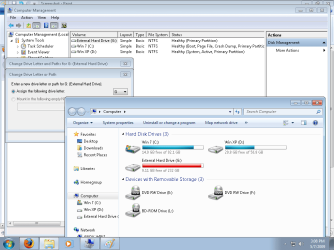
Why can't I change my External HD to Drive Letter K?

andythecurefan

New member
Power User
VIP
Local time
6:36 PM
Messages
221
Location
Los Angeles, CA
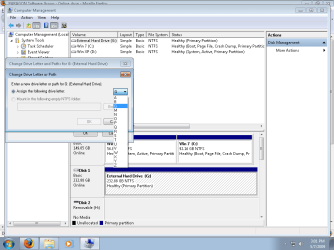
Alright so i wanted to set my External Hard Drive letter to K because my iTunes XML library file recognizes all my music being on path K:\ and so on.

Can anyone figure out what's up? Please.

I have an idea it might because of my 5-in-1 card reader but in my XP OS it showed them by default under the "My Computer" option regardless of there being a card or not. Do you think that in 7 a card actually has to be present for it to have shown up?
 

Attachments
  • Screenshot.png
    Screenshot.png
    27.4 KB · Views: 108
  • Screenshot2.png
    Screenshot2.png
    42.7 KB · Views: 91

My Computer My Computer

At a glance

7 Pro Build 7600.16385x64 [2.0 WEI]Intel(R) Celeron(R) D CPU 3.33GHz2.00 GB RAM (1.87 GB usable)ATI Radeon™ X300 based integrated graphics
Computer Manufacturer/Model Number
eMachines W3503
OS
7 Pro Build 7600.16385x64 [2.0 WEI]
CPU
Intel(R) Celeron(R) D CPU 3.33GHz
Memory
2.00 GB RAM (1.87 GB usable)
Graphics Card(s)
ATI Radeon™ X300 based integrated graphics
Sound Card
6-channel (5.1) ATI High Definition Audio
Monitor(s) Displays
eMachines® 17" LCD Flat Panel Monitor (17F3)
Screen Resolution
1024 x 768 @ 85Hz
Hard Drives
160GB HDD (7200rpm, 2MB cache)
I you go to folder options in the control panel got o the "view" tab and check the box to show hidden folders, files and drives....you may find that a card reader or something else already has that letter in use.
 

My Computer My Computer

At a glance

Windows 7 Professional x64Intel Core i7 8604GB DDR3 Mushkin 1600Mhz @ 7-8-7-20MSI GTS250 1GB DDR3 Twin Frozr
Computer Manufacturer/Model Number
Keeps changing - (Custom)
OS
Windows 7 Professional x64
CPU
Intel Core i7 860
Motherboard
Gigabyte GA-P55-UD4P
Memory
4GB DDR3 Mushkin 1600Mhz @ 7-8-7-20
Graphics Card(s)
MSI GTS250 1GB DDR3 Twin Frozr
Sound Card
Onboard realtek
Monitor(s) Displays
Samsung SyncMaster 24" P2450 + Samsung 20" 2033
Screen Resolution
1920 X 1080 and 1600 X 900 (#2 system 1440 X 900)
Hard Drives
Patriot Inferno 120GB SSD + 3 WD Blue 640GB drives
PSU
Corsair 750 HX Modular
Case
Lancool PC-K62
Cooling
Cooler Master TX3 CPU cooler and 4-140mm and 1-120mm case
Keyboard
Gigabyte USB keyboard
Mouse
Microsoft wireless laser mouse 5000
Internet Speed
7 Mb down 1.5 up
Other Info
System #2: AMD Phenom II X6 1055T (Freezer 7 Pro cooler) - Gigabyte 880GMA-UD2H - WD 500GB Black - 9500GT (1GB) 500W OCZ modular PSU - Antec 200 case. System #3 (LapTop) Core 2 Duo T6670 - 320GB 7200RPM HD - 4GB DDR3 RAM.
I you go to folder options in the control panel got o the "view" tab and check the box to show hidden folders, files and drives....you may find that a card reader or something else already has that letter in use.
that was it. thanks. i thought it might be it but didn't know how or why they were not visible. thank you. rep to you will be added.

by the way, does anyone know how to change the thread to "solved"? i never figured that one out.
 

My Computer My Computer

At a glance

7 Pro Build 7600.16385x64 [2.0 WEI]Intel(R) Celeron(R) D CPU 3.33GHz2.00 GB RAM (1.87 GB usable)ATI Radeon™ X300 based integrated graphics
Computer Manufacturer/Model Number
eMachines W3503
OS
7 Pro Build 7600.16385x64 [2.0 WEI]
CPU
Intel(R) Celeron(R) D CPU 3.33GHz
Memory
2.00 GB RAM (1.87 GB usable)
Graphics Card(s)
ATI Radeon™ X300 based integrated graphics
Sound Card
6-channel (5.1) ATI High Definition Audio
Monitor(s) Displays
eMachines® 17" LCD Flat Panel Monitor (17F3)
Screen Resolution
1024 x 768 @ 85Hz
Hard Drives
160GB HDD (7200rpm, 2MB cache)
that was it. thanks. i thought it might be it but didn't know how or why they were not visible. thank you. rep to you will be added.

by the way, does anyone know how to change the thread to "solved"? i never figured that one out.

Click the read, white and black caution sign icon in the upper right hand corner of the post to report it to the moderators. They will mark it solved for you.
 

My Computer My Computer

At a glance

El Capitan / Windows 10i7-4980HQ16GBIris 5200
Computer type
Laptop
Computer Manufacturer/Model Number
Apple
OS
El Capitan / Windows 10
CPU
i7-4980HQ
Memory
16GB
Graphics Card(s)
Iris 5200
that was it. thanks. i thought it might be it but didn't know how or why they were not visible. thank you. rep to you will be added.

by the way, does anyone know how to change the thread to "solved"? i never figured that one out.

I am glad that helped you out. Have a great day!
 

My Computer My Computer

At a glance

Windows 7 Professional x64Intel Core i7 8604GB DDR3 Mushkin 1600Mhz @ 7-8-7-20MSI GTS250 1GB DDR3 Twin Frozr
Computer Manufacturer/Model Number
Keeps changing - (Custom)
OS
Windows 7 Professional x64
CPU
Intel Core i7 860
Motherboard
Gigabyte GA-P55-UD4P
Memory
4GB DDR3 Mushkin 1600Mhz @ 7-8-7-20
Graphics Card(s)
MSI GTS250 1GB DDR3 Twin Frozr
Sound Card
Onboard realtek
Monitor(s) Displays
Samsung SyncMaster 24" P2450 + Samsung 20" 2033
Screen Resolution
1920 X 1080 and 1600 X 900 (#2 system 1440 X 900)
Hard Drives
Patriot Inferno 120GB SSD + 3 WD Blue 640GB drives
PSU
Corsair 750 HX Modular
Case
Lancool PC-K62
Cooling
Cooler Master TX3 CPU cooler and 4-140mm and 1-120mm case
Keyboard
Gigabyte USB keyboard
Mouse
Microsoft wireless laser mouse 5000
Internet Speed
7 Mb down 1.5 up
Other Info
System #2: AMD Phenom II X6 1055T (Freezer 7 Pro cooler) - Gigabyte 880GMA-UD2H - WD 500GB Black - 9500GT (1GB) 500W OCZ modular PSU - Antec 200 case. System #3 (LapTop) Core 2 Duo T6670 - 320GB 7200RPM HD - 4GB DDR3 RAM.
Back
Top