why can't I create any file where I want it?

madhatter

New member
Local time
3:48 AM
Messages
23
in xp whereever i right click i get to create a large number of new document types (depending on my software suite ofc)
in 7 this only works in certain (very few) folders, in most i can only create a new folder (in which creating whatever seems to work)
i read that on system partitions this is normal, but i have a total of 9 partitions (and a few with other OS, but without letters) on 4 drives and in most i can only make folders
WHY?!
even this file (.txt draft) i created in xp just because creating files where i want feels too good
 
Last edited by a moderator:

My Computer My Computer

At a glance

WinXPPro32SP3, WinXPPro64SP2, Win7Ult32SP1, W...Athlon II X2 240 2.8GHz4GBRadeon HD 5670 1024MB
Computer Manufacturer/Model Number
home brewed
OS
WinXPPro32SP3, WinXPPro64SP2, Win7Ult32SP1, Win7Ult64SP1
CPU
Athlon II X2 240 2.8GHz
Motherboard
ASRock ALiveNF7G-GLAN
Memory
4GB
Graphics Card(s)
Radeon HD 5670 1024MB
Sound Card
integrated Realtek
Monitor(s) Displays
BENQ
Screen Resolution
1280x1024
Hard Drives
Barracuda 500GB,
Barracuda 2TB,
Maxtor 500GB,
Barracuda 1,5TB
PSU
Gigabyte Superb 550P
Internet Speed
30Mbit/3Mbit
Hi,

I cannot replicate your problem. I can right-click in any folder on my PC, then navigate to New, and then I have the following list of items I can create:

Folder
Shortcut
Bitmap image
Contact
Micorsoft Word Document
Journal document
Microsoft PowerPoint Presentation
Text document
Microsoft Excel Worksheet
Compressed (zip) folder
Briefcase

Every single one of them works.

Please describe in detail the steps you are using to try and create a file.

Regards,
Golden
 

My Computer My Computer

At a glance

Windows 10 Pro x64 ; Xubuntu x64Intel i7 860 @ 2.80 GHz O/C'ed to 4.0GHz16GB Corsair Vengance DDR3 @ 661 MHz Dual Cha...EVGA NVidia GTX 560 1024MB
Computer type
PC/Desktop
Computer Manufacturer/Model Number
Golden Mk. I.4
OS
Windows 10 Pro x64 ; Xubuntu x64
CPU
Intel i7 860 @ 2.80 GHz O/C'ed to 4.0GHz
Motherboard
Gigabyte P55A-UD3R Rev.1. Award BIOS F13
Memory
16GB Corsair Vengance DDR3 @ 661 MHz Dual Channel (9-9-9-24)
Graphics Card(s)
EVGA NVidia GTX 560 1024MB
Sound Card
Realtek Integrated
Monitor(s) Displays
Dual Samsung SyncMaster 2494HS
Screen Resolution
1920*1080 and 1920*1080
Hard Drives
1*Samsung 840 EVO 120GB SSD;
1*OCZ Vertex 2 60GB SSD;
2*Samsung F3 SpinPoint 1TB in RAID0;
1*Samsung F1 SpinPoint 1TB;
2*Western Digital 1TB External USB 3.0
1*Western Digital 500GB External USB 3.0
1*Seagate 500GB External USB 2.0
PSU
Thermaltake ToughPower QFan 750W
Case
Thermaltake Element S VK60001W2Z
Cooling
Corsair H60 Water Cooling, 2*230mm and 2*80mm case fans
Keyboard
Logitech G110
Mouse
Logitech MX518
hi, thanks for taking interest

just booted up w7 to make sure
well, right now when i open stock win explorer and right click inside one of my lucky folders i can go to new (actually this is the SK version so its called Nový) and choose from 16 items from new folder to excel sheet etc.
the distribution is like this:
hdd1
1-GAMES (K) - folder
hdd2
2-W7-64 (C) - folder
2-WXP-32 (D) - folder
2-GAMES (E) - anything
hdd3
3-BACKUP-G (F) - anything
3-STUFF (J) - anything
hdd4
4-BACKUP-S (G) - folder
4-DLs (H) - folder
4-GAMESTUFF (I) - folder
external
OneTouch (S) - anything

i just noticed that this seems to go for entire partitions
either its folder everywhere or its anything everywhere
however, when i create a new folder i can create anything inside of it

i am becoming more and more convinced that my misery comes from the wicked rights system which i absolutely dont understand
 
Last edited:

My Computer My Computer

At a glance

WinXPPro32SP3, WinXPPro64SP2, Win7Ult32SP1, W...Athlon II X2 240 2.8GHz4GBRadeon HD 5670 1024MB
Computer Manufacturer/Model Number
home brewed
OS
WinXPPro32SP3, WinXPPro64SP2, Win7Ult32SP1, Win7Ult64SP1
CPU
Athlon II X2 240 2.8GHz
Motherboard
ASRock ALiveNF7G-GLAN
Memory
4GB
Graphics Card(s)
Radeon HD 5670 1024MB
Sound Card
integrated Realtek
Monitor(s) Displays
BENQ
Screen Resolution
1280x1024
Hard Drives
Barracuda 500GB,
Barracuda 2TB,
Maxtor 500GB,
Barracuda 1,5TB
PSU
Gigabyte Superb 550P
Internet Speed
30Mbit/3Mbit
Nine partitions on one system? That would drive me insane. Anyway, on to the matter at hand, it still isn't clear what the problem is. If you are missing entries, it is likely that the apps aren't installed that added entries to your XP menus. If you are unable to see certain extries in system folders, that is by design for the users protection...and should be respected.
 

My Computer My Computer

At a glance

Windows 7 Ultimate x64 SP1Intel Core i7-260012 GB Patriot Extreme DDR3-1333Nvidia GTX 470
OS
Windows 7 Ultimate x64 SP1
CPU
Intel Core i7-2600
Motherboard
Gigabyte GA-P67A-UD3P-B3
Memory
12 GB Patriot Extreme DDR3-1333
Graphics Card(s)
Nvidia GTX 470
Monitor(s) Displays
Dell UltraSharp 2209WA
Hard Drives
OCZ Agility3 240 GB, WD5001AALS, WD7501AALS
PSU
OCZ ModStream 700W
Case
CoolerMaster HAF 912 Advanced
Cooling
CoolerMaster Hyper 212 Plus
i dont see why i shouldnt be able to make files in system partitions since for some people thats all they have, but thats not bothering me right now
apparently my entire 1.5TB drive (labelled 4) is a no-no and i dont understand why since theres no OS on it
as a matter of fact, its the only hdd without an OS (i removed letters from the other OS partitions)

i have tried taking ownership of one of the insubordinate folders and it changed nothing
ever since win95 when i started using computers i havent been so frustrated by an OS...

and btw, i have no idea what obliges this forum to correct everything to Windows 7, but right there one partition label was changed to nonsense...
 
Last edited:

My Computer My Computer

At a glance

WinXPPro32SP3, WinXPPro64SP2, Win7Ult32SP1, W...Athlon II X2 240 2.8GHz4GBRadeon HD 5670 1024MB
Computer Manufacturer/Model Number
home brewed
OS
WinXPPro32SP3, WinXPPro64SP2, Win7Ult32SP1, Win7Ult64SP1
CPU
Athlon II X2 240 2.8GHz
Motherboard
ASRock ALiveNF7G-GLAN
Memory
4GB
Graphics Card(s)
Radeon HD 5670 1024MB
Sound Card
integrated Realtek
Monitor(s) Displays
BENQ
Screen Resolution
1280x1024
Hard Drives
Barracuda 500GB,
Barracuda 2TB,
Maxtor 500GB,
Barracuda 1,5TB
PSU
Gigabyte Superb 550P
Internet Speed
30Mbit/3Mbit
Can I assume that the 1.5TB Drive (4) has data on it that was written in XP and formatted as NTFS?

If so then this could be a simple permissions issue - NTFS stores it's file permissions on the drive and it uses UID's to do this. A user Fred created on XP and also in win7 are not the same user as far as windows is concerned, but two different users.

As win7 has better designed security than XP the dual token system in use for administrators will mean that you have to add the actual username, (the Standard user token), to the permissions on the drive.

This can be done by applying the required user/permissions to the root of the drive and allowing them to cascade down the tree. You may need to re-apply permissions at lower levels in particularly confused scenarios.

You may also need to take ownership of the drive, log in as the hidden administrator or run Explorer.exe as administrator to apply the permissions changes

This is not a new issue but was present from NT with NTFS file systems, the new security measures in win7 mmeerly bring it to light more often
 

My Computers My Computers

  • At a glance

    Windows 11 Pro x64 [Latest Release and Releas...Ryzen 9 5950X, 3.8 - 5.2 MHz64GB [2 x 32GB] DDR4 3200MHz4GB NVIDIA GEFORCE GTX 1650 Ti
    Computer type
    PC/Desktop
    Computer Manufacturer/Model Number
    ChillBlast - Custom to my design
    OS
    Windows 11 Pro x64 [Latest Release and Release Preview]
    CPU
    Ryzen 9 5950X, 3.8 - 5.2 MHz
    Motherboard
    Asus Prime X570-Pro
    Memory
    64GB [2 x 32GB] DDR4 3200MHz
    Graphics Card(s)
    4GB NVIDIA GEFORCE GTX 1650 Ti
    Sound Card
    On-board SPDIF to 5.1 System + HDMI [5.1 system]
    Monitor(s) Displays
    32" UHD 32 Bit HDR Monitor + 43" UHD 4K 32Bit HDR TV
    Screen Resolution
    2 x 3840 x 2160 @60Hz
    Hard Drives
    1TB M2 SSD OS, 500GB Fast Access SSD, 2 x 8TB Data + Various Externals from 1TB to 4TB, 10TB NAS
    PSU
    NZXT C750 80 PLUS Gold 750W Modular PSU
    Case
    Workstation Case [Matt Black]
    Cooling
    NZXT Kraken X63 280mm CPU Cooler +2x Quiet Case fans
    Keyboard
    Logitech Wireless MX Keys & K400 + others
    Mouse
    Logitech Wireless MX Master 3S
    Internet Speed
    920 MB Down 50 MB Up
    Antivirus
    BitDefender Total Security Pro
    Browser
    Chrome (always run latest Non-Beta)
    Other Info
    Also run ...
    Laptop - Quad 8GB - Windows 10 Pro x64
    Nexus 7 Android tablet x2
    Samsung 10.2" tablet
    Blackview TAB 8 4G Android Tablet c/w Keyboard
    Wacom Intuos Pro Medium Pen Pad
    Wacom Intuos Pro Small Pen Pad
    Wacom Expresskeys Remote
    Loopdeck+ Graphics Controller
    Shuttle Pro v2 Control
  • At a glance

    Windows 11 Pro x64 Latest RPIntel I7 10750H 5.0GHz32GB [2x16GB] DDR4 2933 MHznVidia GTX1650Ti 4 GB GDDR6
    Computer type
    Laptop
    System Manufacturer/Model Number
    Dell XPS 17 10750H
    OS
    Windows 11 Pro x64 Latest RP
    CPU
    Intel I7 10750H 5.0GHz
    Motherboard
    Dell XPS
    Memory
    32GB [2x16GB] DDR4 2933 MHz
    Graphics Card(s)
    nVidia GTX1650Ti 4 GB GDDR6
    Sound Card
    Stock [Realtek] 4 Speaker
    Monitor(s) Displays
    17" IPS UHD+ Infinity Edge Touchscreen
    Screen Resolution
    3840 x 2400
    Hard Drives
    2TB M2 NVMe, 4TB External + various 500GB & 1TB External NVMe (also have access to spinner HDD from
    PSU
    Stock
    Case
    Stock XPS Aluminium & Carbon Fibre
    Cooling
    Stock - Active Fan Control
    Keyboard
    Backlit + Various Logitech
    Mouse
    Stock Track Pad + Logitech MX Trackball
    Internet Speed
    72 MB Down 18MB Up
    Browser
    Chrome
    Other Info
    Also run ...
    Laptop - Quad 8GB - Windows 10 Pro x64
    Nexus 7 Android tablet x2
    10.2" tablet
    Sony Z3 Android Smartphone
    Wacom Intuos Pro Medium Pen Pad
    Wacom Intuos Pro Small Pen Pad
    Wacom Expresskeys Remote
    Loopdeck+ Graphics Controller
    Shuttle Pro v2 Control Pad
    10TB NAS
As Barman says, at the root of each drive and add you user and give yourself (your user account) full control of the root folder and let it cascade to all subfolders, that'll fix it.

BUT!!! Do NOT do that to your C drive where Windows is installed! Only to the non-root partitions, that includes possibly skipping your WXP-32 drive as well if you ever want to be able to boot that OS again...
 

My Computer My Computer

At a glance

Windows 7 x64 Ultimatei7 96012 Gig Corsair DominatorNvidia 480
Computer Manufacturer/Model Number
Scratch built
OS
Windows 7 x64 Ultimate
CPU
i7 960
Motherboard
Asus P6X58D
Memory
12 Gig Corsair Dominator
Graphics Card(s)
Nvidia 480
Sound Card
Maudio Delta 44 + breakout box
Monitor(s) Displays
Dell UltraSharp U2410 24in and Samsung 21 dual monitors
Screen Resolution
1920x1200 and 1280x1024
Hard Drives
Primary: Intel X-25M G2 160G SSD
Secondary: Segate baracuda 1.0 TB
HDs in AHCI mode.
PSU
Corasair TX850
Case
Cooler Master HAF
Cooling
Corsair H50
Keyboard
Logitech G15 + N52 game pad
Mouse
Logitech MX518
Internet Speed
15kbs down 4.5kbps up
Other Info
WEI 7.6
CPU & RAM 7.6
Graphics 7.9
Hard disk 7.7
yes, used Partition Wizard Home Edition to partition the hdd under XP64SP2
everything is NTFS

could you please tell how to change those permissions in more depth?
i claimed ownership of the entire 4-BACKUP-S (G) partition to no avail
looking ak permissions i saw that CREATOR OWNER has no rights and when i try to change this i am told access is denied for each folder individually
 

My Computer My Computer

At a glance

WinXPPro32SP3, WinXPPro64SP2, Win7Ult32SP1, W...Athlon II X2 240 2.8GHz4GBRadeon HD 5670 1024MB
Computer Manufacturer/Model Number
home brewed
OS
WinXPPro32SP3, WinXPPro64SP2, Win7Ult32SP1, Win7Ult64SP1
CPU
Athlon II X2 240 2.8GHz
Motherboard
ASRock ALiveNF7G-GLAN
Memory
4GB
Graphics Card(s)
Radeon HD 5670 1024MB
Sound Card
integrated Realtek
Monitor(s) Displays
BENQ
Screen Resolution
1280x1024
Hard Drives
Barracuda 500GB,
Barracuda 2TB,
Maxtor 500GB,
Barracuda 1,5TB
PSU
Gigabyte Superb 550P
Internet Speed
30Mbit/3Mbit
Right click the Drive for a partition and select Properties then the Security tab, then Edit.

There should be an entry that looks like "Administrators (<comptuer name>\Administrators)"

Click on it and then down below make sure that your local machine adinistrators have allowed full control (click the Full control check box under Allow if not).

I believe that should be enough, You can click OK and apply the settings to all sub folders.

But if that still doesn;t work, go back to the permissions dialog and you can add your own account by clicking Add, then entering your user name, then "Check names" and selecting your local user name, then back on the permissions page, give that account full control as well.

PS. Is the backup folder just a place you copy files to y hand? Or is it used by a real backup program? If so then there may be other permission shinanigans on those folders due to the backup software...
 

My Computer My Computer

At a glance

Windows 7 x64 Ultimatei7 96012 Gig Corsair DominatorNvidia 480
Computer Manufacturer/Model Number
Scratch built
OS
Windows 7 x64 Ultimate
CPU
i7 960
Motherboard
Asus P6X58D
Memory
12 Gig Corsair Dominator
Graphics Card(s)
Nvidia 480
Sound Card
Maudio Delta 44 + breakout box
Monitor(s) Displays
Dell UltraSharp U2410 24in and Samsung 21 dual monitors
Screen Resolution
1920x1200 and 1280x1024
Hard Drives
Primary: Intel X-25M G2 160G SSD
Secondary: Segate baracuda 1.0 TB
HDs in AHCI mode.
PSU
Corasair TX850
Case
Cooler Master HAF
Cooling
Corsair H50
Keyboard
Logitech G15 + N52 game pad
Mouse
Logitech MX518
Internet Speed
15kbs down 4.5kbps up
Other Info
WEI 7.6
CPU & RAM 7.6
Graphics 7.9
Hard disk 7.7
admins have all rights, system has all rights, users have rights for viewing
no rights for me or CREATOR OWNER
whenever i change these i am told its not possible for each folder in the root of the partition individually, including $RECYCLE.BIN

perhaps the file system is damaged?
 

My Computer My Computer

At a glance

WinXPPro32SP3, WinXPPro64SP2, Win7Ult32SP1, W...Athlon II X2 240 2.8GHz4GBRadeon HD 5670 1024MB
Computer Manufacturer/Model Number
home brewed
OS
WinXPPro32SP3, WinXPPro64SP2, Win7Ult32SP1, Win7Ult64SP1
CPU
Athlon II X2 240 2.8GHz
Motherboard
ASRock ALiveNF7G-GLAN
Memory
4GB
Graphics Card(s)
Radeon HD 5670 1024MB
Sound Card
integrated Realtek
Monitor(s) Displays
BENQ
Screen Resolution
1280x1024
Hard Drives
Barracuda 500GB,
Barracuda 2TB,
Maxtor 500GB,
Barracuda 1,5TB
PSU
Gigabyte Superb 550P
Internet Speed
30Mbit/3Mbit
Well... probably not.

But I may not be able to help too much furhter without actually seeing the problem first hand.

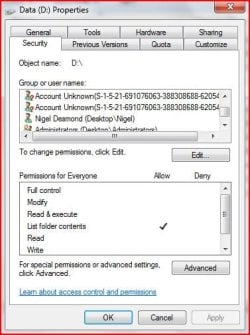
But you COULD maybe post a screenshot of the list of users on the edit permissions dlg (The one with the check boxes under allow and deny). One with your user highlighted and maybe a second, see if there is a user with a name that has "SID" in it and a LONG number. That would be the old user that actually created all the files and folders. If there is one, click on that and post a screen shot of that.

But once things go off the expected, they become much harder to try to fix over a forum :D
 

My Computer My Computer

At a glance

Windows 7 x64 Ultimatei7 96012 Gig Corsair DominatorNvidia 480
Computer Manufacturer/Model Number
Scratch built
OS
Windows 7 x64 Ultimate
CPU
i7 960
Motherboard
Asus P6X58D
Memory
12 Gig Corsair Dominator
Graphics Card(s)
Nvidia 480
Sound Card
Maudio Delta 44 + breakout box
Monitor(s) Displays
Dell UltraSharp U2410 24in and Samsung 21 dual monitors
Screen Resolution
1920x1200 and 1280x1024
Hard Drives
Primary: Intel X-25M G2 160G SSD
Secondary: Segate baracuda 1.0 TB
HDs in AHCI mode.
PSU
Corasair TX850
Case
Cooler Master HAF
Cooling
Corsair H50
Keyboard
Logitech G15 + N52 game pad
Mouse
Logitech MX518
Internet Speed
15kbs down 4.5kbps up
Other Info
WEI 7.6
CPU & RAM 7.6
Graphics 7.9
Hard disk 7.7
One major problem with a multi-boot with windows accessing NTFS data drives is that of permissions, especially on things such as System Volume Information & Recycle Bins.

Each system, (be it NT, Win2000, XP Vista, or Windows 7), will create it's own version of these system areas, Windows will combine them into a single tree for each type of system Data, I would advise that the permissions on these areas are skipped when allowing the permissions cascade.

Also as it is normally required that you take ownership on each OS in turn in order to apply permissions, you choose an OS that is likely to be your most used and set the permissions for this OS Last, Thus leaving the Ownership with this OS.

I have operated many systems with multiple Windows OS's and It is possible to get this to work but a fair amount of work is required to sort out the data partition/Drive permissions.

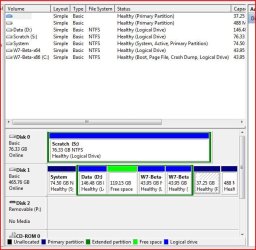
Example Multiple Partition system
partitions.JPG

Example of UID from other OS
permissions_D.JPG
 

My Computers My Computers

  • At a glance

    Windows 11 Pro x64 [Latest Release and Releas...Ryzen 9 5950X, 3.8 - 5.2 MHz64GB [2 x 32GB] DDR4 3200MHz4GB NVIDIA GEFORCE GTX 1650 Ti
    Computer type
    PC/Desktop
    Computer Manufacturer/Model Number
    ChillBlast - Custom to my design
    OS
    Windows 11 Pro x64 [Latest Release and Release Preview]
    CPU
    Ryzen 9 5950X, 3.8 - 5.2 MHz
    Motherboard
    Asus Prime X570-Pro
    Memory
    64GB [2 x 32GB] DDR4 3200MHz
    Graphics Card(s)
    4GB NVIDIA GEFORCE GTX 1650 Ti
    Sound Card
    On-board SPDIF to 5.1 System + HDMI [5.1 system]
    Monitor(s) Displays
    32" UHD 32 Bit HDR Monitor + 43" UHD 4K 32Bit HDR TV
    Screen Resolution
    2 x 3840 x 2160 @60Hz
    Hard Drives
    1TB M2 SSD OS, 500GB Fast Access SSD, 2 x 8TB Data + Various Externals from 1TB to 4TB, 10TB NAS
    PSU
    NZXT C750 80 PLUS Gold 750W Modular PSU
    Case
    Workstation Case [Matt Black]
    Cooling
    NZXT Kraken X63 280mm CPU Cooler +2x Quiet Case fans
    Keyboard
    Logitech Wireless MX Keys & K400 + others
    Mouse
    Logitech Wireless MX Master 3S
    Internet Speed
    920 MB Down 50 MB Up
    Antivirus
    BitDefender Total Security Pro
    Browser
    Chrome (always run latest Non-Beta)
    Other Info
    Also run ...
    Laptop - Quad 8GB - Windows 10 Pro x64
    Nexus 7 Android tablet x2
    Samsung 10.2" tablet
    Blackview TAB 8 4G Android Tablet c/w Keyboard
    Wacom Intuos Pro Medium Pen Pad
    Wacom Intuos Pro Small Pen Pad
    Wacom Expresskeys Remote
    Loopdeck+ Graphics Controller
    Shuttle Pro v2 Control
  • At a glance

    Windows 11 Pro x64 Latest RPIntel I7 10750H 5.0GHz32GB [2x16GB] DDR4 2933 MHznVidia GTX1650Ti 4 GB GDDR6
    Computer type
    Laptop
    System Manufacturer/Model Number
    Dell XPS 17 10750H
    OS
    Windows 11 Pro x64 Latest RP
    CPU
    Intel I7 10750H 5.0GHz
    Motherboard
    Dell XPS
    Memory
    32GB [2x16GB] DDR4 2933 MHz
    Graphics Card(s)
    nVidia GTX1650Ti 4 GB GDDR6
    Sound Card
    Stock [Realtek] 4 Speaker
    Monitor(s) Displays
    17" IPS UHD+ Infinity Edge Touchscreen
    Screen Resolution
    3840 x 2400
    Hard Drives
    2TB M2 NVMe, 4TB External + various 500GB & 1TB External NVMe (also have access to spinner HDD from
    PSU
    Stock
    Case
    Stock XPS Aluminium & Carbon Fibre
    Cooling
    Stock - Active Fan Control
    Keyboard
    Backlit + Various Logitech
    Mouse
    Stock Track Pad + Logitech MX Trackball
    Internet Speed
    72 MB Down 18MB Up
    Browser
    Chrome
    Other Info
    Also run ...
    Laptop - Quad 8GB - Windows 10 Pro x64
    Nexus 7 Android tablet x2
    10.2" tablet
    Sony Z3 Android Smartphone
    Wacom Intuos Pro Medium Pen Pad
    Wacom Intuos Pro Small Pen Pad
    Wacom Expresskeys Remote
    Loopdeck+ Graphics Controller
    Shuttle Pro v2 Control Pad
    10TB NAS
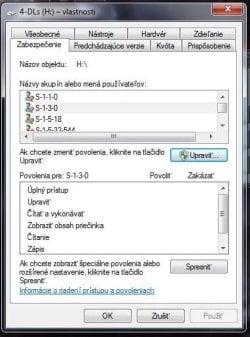
View attachment 172252dammit Barman58, youre making my lone synapse overheat
im not quite sure what you mean by "Also as it is normally required that you take ownership on each OS"
i have built this pc and installed every bit on it, but still i dont know how to take ownership of an OS
funny thing is that despite all the denial 4-BACKUP-S (G) seems to finally acknowledge my rights
4-DLs (H) on the other hand allowed permission changes without nagging, however the properties window has been showing the progress circle whenever moused over for ages now and looks weird too...
those numbers werent there before
i fear touching it
 

Attachments

  • 4-DLs.jpg
    4-DLs.jpg
    33.9 KB · Views: 3

My Computer My Computer

At a glance

WinXPPro32SP3, WinXPPro64SP2, Win7Ult32SP1, W...Athlon II X2 240 2.8GHz4GBRadeon HD 5670 1024MB
Computer Manufacturer/Model Number
home brewed
OS
WinXPPro32SP3, WinXPPro64SP2, Win7Ult32SP1, Win7Ult64SP1
CPU
Athlon II X2 240 2.8GHz
Motherboard
ASRock ALiveNF7G-GLAN
Memory
4GB
Graphics Card(s)
Radeon HD 5670 1024MB
Sound Card
integrated Realtek
Monitor(s) Displays
BENQ
Screen Resolution
1280x1024
Hard Drives
Barracuda 500GB,
Barracuda 2TB,
Maxtor 500GB,
Barracuda 1,5TB
PSU
Gigabyte Superb 550P
Internet Speed
30Mbit/3Mbit
Basically in order to assign permissions on an NTFS file system, you need to be the owner of the file concerned, this ownership flag is the same as all permissions in that it is OS independent, and is stored on the actual data partition as part of the file header.

In a case like yours where you have four separate OS's you will need to boot into each OS, Take ownership of the data partition, as a user from that OS, and then assign the permissions you require.

for example
In OS1 you take ownership and assign permissions, when you log into OS2 you will find that the Owner of the data drive will show as an S......... UID, this is the unique windows User ID for the username that took ownership in OS1, and is not recognised by the OS2. you will need to change the owner to a user from OS2 in order to apply permissions. You will also need to do this for OS3 & OS4.

The ownership will end up as that of the last OS user ID set, which is why I suggested that you leave your primary OS until last as you are more likely to adjust permissions in future in this OS.

Sorry if this is confusing but permissions in multi-OS or Multi-user systems are complicated, I have seen some systems where the one data location was accessed by multiple users from multiple OS's all on one physical system, which is not a pretty sight.
 

My Computers My Computers

  • At a glance

    Windows 11 Pro x64 [Latest Release and Releas...Ryzen 9 5950X, 3.8 - 5.2 MHz64GB [2 x 32GB] DDR4 3200MHz4GB NVIDIA GEFORCE GTX 1650 Ti
    Computer type
    PC/Desktop
    Computer Manufacturer/Model Number
    ChillBlast - Custom to my design
    OS
    Windows 11 Pro x64 [Latest Release and Release Preview]
    CPU
    Ryzen 9 5950X, 3.8 - 5.2 MHz
    Motherboard
    Asus Prime X570-Pro
    Memory
    64GB [2 x 32GB] DDR4 3200MHz
    Graphics Card(s)
    4GB NVIDIA GEFORCE GTX 1650 Ti
    Sound Card
    On-board SPDIF to 5.1 System + HDMI [5.1 system]
    Monitor(s) Displays
    32" UHD 32 Bit HDR Monitor + 43" UHD 4K 32Bit HDR TV
    Screen Resolution
    2 x 3840 x 2160 @60Hz
    Hard Drives
    1TB M2 SSD OS, 500GB Fast Access SSD, 2 x 8TB Data + Various Externals from 1TB to 4TB, 10TB NAS
    PSU
    NZXT C750 80 PLUS Gold 750W Modular PSU
    Case
    Workstation Case [Matt Black]
    Cooling
    NZXT Kraken X63 280mm CPU Cooler +2x Quiet Case fans
    Keyboard
    Logitech Wireless MX Keys & K400 + others
    Mouse
    Logitech Wireless MX Master 3S
    Internet Speed
    920 MB Down 50 MB Up
    Antivirus
    BitDefender Total Security Pro
    Browser
    Chrome (always run latest Non-Beta)
    Other Info
    Also run ...
    Laptop - Quad 8GB - Windows 10 Pro x64
    Nexus 7 Android tablet x2
    Samsung 10.2" tablet
    Blackview TAB 8 4G Android Tablet c/w Keyboard
    Wacom Intuos Pro Medium Pen Pad
    Wacom Intuos Pro Small Pen Pad
    Wacom Expresskeys Remote
    Loopdeck+ Graphics Controller
    Shuttle Pro v2 Control
  • At a glance

    Windows 11 Pro x64 Latest RPIntel I7 10750H 5.0GHz32GB [2x16GB] DDR4 2933 MHznVidia GTX1650Ti 4 GB GDDR6
    Computer type
    Laptop
    System Manufacturer/Model Number
    Dell XPS 17 10750H
    OS
    Windows 11 Pro x64 Latest RP
    CPU
    Intel I7 10750H 5.0GHz
    Motherboard
    Dell XPS
    Memory
    32GB [2x16GB] DDR4 2933 MHz
    Graphics Card(s)
    nVidia GTX1650Ti 4 GB GDDR6
    Sound Card
    Stock [Realtek] 4 Speaker
    Monitor(s) Displays
    17" IPS UHD+ Infinity Edge Touchscreen
    Screen Resolution
    3840 x 2400
    Hard Drives
    2TB M2 NVMe, 4TB External + various 500GB & 1TB External NVMe (also have access to spinner HDD from
    PSU
    Stock
    Case
    Stock XPS Aluminium & Carbon Fibre
    Cooling
    Stock - Active Fan Control
    Keyboard
    Backlit + Various Logitech
    Mouse
    Stock Track Pad + Logitech MX Trackball
    Internet Speed
    72 MB Down 18MB Up
    Browser
    Chrome
    Other Info
    Also run ...
    Laptop - Quad 8GB - Windows 10 Pro x64
    Nexus 7 Android tablet x2
    10.2" tablet
    Sony Z3 Android Smartphone
    Wacom Intuos Pro Medium Pen Pad
    Wacom Intuos Pro Small Pen Pad
    Wacom Expresskeys Remote
    Loopdeck+ Graphics Controller
    Shuttle Pro v2 Control Pad
    10TB NAS
yea, i suppose that makes sense...
i would in fact very much like to move over to this OS
however this permission stuff refuses to do my bidding
even partitions which dont flat out refuse to have their permissions changed take a while showing how they are skimming through the entire file tree and once done they do the stunt i described above at which point i rather cancel
but most of all, why does that one partition flat out refuse to let me change permissions and claim denied access?
how is that even possible?
is the only way to avoid mayhem formatting all drives anew for every OS?!
 

My Computer My Computer

At a glance

WinXPPro32SP3, WinXPPro64SP2, Win7Ult32SP1, W...Athlon II X2 240 2.8GHz4GBRadeon HD 5670 1024MB
Computer Manufacturer/Model Number
home brewed
OS
WinXPPro32SP3, WinXPPro64SP2, Win7Ult32SP1, Win7Ult64SP1
CPU
Athlon II X2 240 2.8GHz
Motherboard
ASRock ALiveNF7G-GLAN
Memory
4GB
Graphics Card(s)
Radeon HD 5670 1024MB
Sound Card
integrated Realtek
Monitor(s) Displays
BENQ
Screen Resolution
1280x1024
Hard Drives
Barracuda 500GB,
Barracuda 2TB,
Maxtor 500GB,
Barracuda 1,5TB
PSU
Gigabyte Superb 550P
Internet Speed
30Mbit/3Mbit
anyway, i might have found the key to undoing most of my plight
authenticated users
the obedient directories know them and the insubordinate ones dont
adding them seems to solve the right click menu problem
just why w7 decided to leave those out on certain partitions will probably remain a mystery forever...
so i suppose that narrows the problem down to 1 thing:
why in the name of all that is holy does 4-BACKUP-S (G) remain the sole partition that always shouts access denied upon permission editing?!
 

My Computer My Computer

At a glance

WinXPPro32SP3, WinXPPro64SP2, Win7Ult32SP1, W...Athlon II X2 240 2.8GHz4GBRadeon HD 5670 1024MB
Computer Manufacturer/Model Number
home brewed
OS
WinXPPro32SP3, WinXPPro64SP2, Win7Ult32SP1, Win7Ult64SP1
CPU
Athlon II X2 240 2.8GHz
Motherboard
ASRock ALiveNF7G-GLAN
Memory
4GB
Graphics Card(s)
Radeon HD 5670 1024MB
Sound Card
integrated Realtek
Monitor(s) Displays
BENQ
Screen Resolution
1280x1024
Hard Drives
Barracuda 500GB,
Barracuda 2TB,
Maxtor 500GB,
Barracuda 1,5TB
PSU
Gigabyte Superb 550P
Internet Speed
30Mbit/3Mbit
alright guys, a little more help here, please
i know ive been asking for a lot of attention lately, but after finding out that permissions are the the likely cause of all my trouble with w7 ive been looking around and saw others sharing my problem, but no solutions would lead me to ultimate success

adding authenticated users made a lot of the pain go away, but a lot of folders are still being difficult
you see, authenticated users always solve the issue, however sometimes the rule is not applied to all items inside the designated folder and i have to wonder why
to add insult to injury, yesterday i got flat out access denied for each item in the defiant directory, but today i am being ignored
in certain folders permission changes simply dont reach into the subdirectories
what makes it even more curious is that i can enter and change the values in a folder after folder fashion (and then the changes are applied even to the subdirectories), however for folders containing ~1000+ items this is not a feasible option
even tried to use the hidden admin account to do it
i have taken ownership of the folder and checked to include subfolders, still the permission changes are being ignored while ownership is changed properly

why oh why do permission changes not penetrate into subfolders in certain folders?!

this appears to be a duplicate of my problem (or what it used to be back when i got access denied instead of being silently ignored): http://www.sevenforums.com/software/110975-access-denied-ownership-permission.html (just that i am not tinkering with C:\)
 
Last edited:

My Computer My Computer

At a glance

WinXPPro32SP3, WinXPPro64SP2, Win7Ult32SP1, W...Athlon II X2 240 2.8GHz4GBRadeon HD 5670 1024MB
Computer Manufacturer/Model Number
home brewed
OS
WinXPPro32SP3, WinXPPro64SP2, Win7Ult32SP1, Win7Ult64SP1
CPU
Athlon II X2 240 2.8GHz
Motherboard
ASRock ALiveNF7G-GLAN
Memory
4GB
Graphics Card(s)
Radeon HD 5670 1024MB
Sound Card
integrated Realtek
Monitor(s) Displays
BENQ
Screen Resolution
1280x1024
Hard Drives
Barracuda 500GB,
Barracuda 2TB,
Maxtor 500GB,
Barracuda 1,5TB
PSU
Gigabyte Superb 550P
Internet Speed
30Mbit/3Mbit
Back
Top