why cant i do ctrl alt del when system hangs

windew420

New member
Member
Local time
12:56 AM
Messages
68
my lockups are rare now but it still locks up i redid all wireing in my case and turned all case fans to high and got my idle real temp @ 46c :D. i just wounder if its just me or can others not access the task manager:confused: when a apps locks up cause iam sick of having to do cold boots. any way thanks for any help or a fix:D
 

My Computer

Computer Manufacturer/Model Number
stupid i7
OS
WINDOWS 7 7600 64BIT RTM
CPU
i7 940 stock freq
Motherboard
p6t deluxe
Memory
corsair xms3 ddr3 6 gig 9-9-9-24
Graphics Card(s)
xfx geforce gtx 280
Sound Card
on board hd audio
Monitor(s) Displays
samsung syncmaster 2253bw
Hard Drives
1.5 tb seagate sata
500 gb seagate
PSU
850 watt
Case
antec 900
Cooling
lots of fans
Ctrl+Alt+Del often doesn't work when something like a kernel driver crashes or if you have overclocked your computer too high and it locks up.
 

My Computer

Computer Manufacturer/Model Number
Too many to list.
OS
XP, Seven, 2008R2
CPU
AMD, Intel, VIA
Motherboard
Various
Memory
Corsair, Kingston, etc.
Graphics Card(s)
ATI, NVIDIA
Monitor(s) Displays
Samsung
Hard Drives
Maxtor, Western Digital
Keyboard
qwerty
Internet Speed
22 Mb/s @ home, 1 Gb/s @ server
Other Info
All of my systems still run fastest on XP 32-bit for the most part. Win7 is fun to play with, but I still prefer XP for raw speed, security, and functionality.
no overclocking

other than cpu is at 1.25volts memory is at 1.35volts ram bus is at 1.66volts 9-9-9-24 thats the most stable so far. i tried auto on my ai tweak and it crashes way more then. it has been locking up in my browsers ie and firefox. also it has froze on other apps in the past just seems like browsers now.

also what is tj max and its distance.


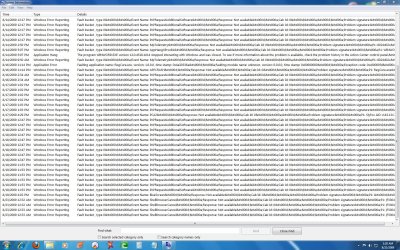
here is my error scn shot

thank you for any help:D
 

Attachments

  • winerrorreport.jpg
    winerrorreport.jpg
    533.3 KB · Views: 234
  • tempnvolts.jpg
    tempnvolts.jpg
    112.6 KB · Views: 327

My Computer

Computer Manufacturer/Model Number
stupid i7
OS
WINDOWS 7 7600 64BIT RTM
CPU
i7 940 stock freq
Motherboard
p6t deluxe
Memory
corsair xms3 ddr3 6 gig 9-9-9-24
Graphics Card(s)
xfx geforce gtx 280
Sound Card
on board hd audio
Monitor(s) Displays
samsung syncmaster 2253bw
Hard Drives
1.5 tb seagate sata
500 gb seagate
PSU
850 watt
Case
antec 900
Cooling
lots of fans
TJMax is a retail store chain in the USA
Stop using RegCure, it'll cause more problems than you need.

To test crashes/freezes the first thing to do is to check the system without overclocking. If it still crashes/freezes, then troubleshoot it without the overclock. Once the system is stable, then apply the overclock to see if it remains stable.
 

My Computer

Computer Manufacturer/Model Number
Home built (x64), Lenovo x61s Tablet, Samsung Netbook
OS
Win7 x64 + x86
CPU
Intel i7 920, other Intel chips, and the Atom in the netbook
Motherboard
Asus P6T Deluxe
Memory
12 gB; 4 gB Lenovo; 1 gB Samsung netbook
Graphics Card(s)
ATI 4870
Sound Card
Yes, I have one of these
Monitor(s) Displays
32" Sharp Aquos TV
Screen Resolution
800x600 - I have vision issues
Hard Drives
4 - 150 gB Velociraptors in RAID 5
Promise controller
PSU
1000 watt (can't recall the brand)
Case
Antec 300
Cooling
Big honking cooler that was rated highly at Toms Hardware
Keyboard
Microsoft Natural
Mouse
Logitech Trackman
Internet Speed
Cable
Other Info
GeekSquad UPS
CyberPower UPS
DLink DNS-323 NAS (2 tB)
Netgear wireless router as an access point
Netgear wired router FSV-318
Home network consists of
4 desktop computers (2 Vista, 2 Win7)
1 netbook (Win7)
4 laptop computers (XP, 2-Vista, Win7)
Wii and XBox 360
Ctrl+Shift+Esc will bring up task manager
 

My Computer

OS
win 7 64 , Vista
CPU
Amd 64 X2 5600
Motherboard
Msi K9n MS-7250
Memory
4G Corsair PC2-6400
Graphics Card(s)
MSI Gefores 8800 GT
Monitor(s) Displays
Acer P221w
Screen Resolution
1680 x 1080
the answer lies in the question.
 

My Computer

Computer Manufacturer/Model Number
Samsung NP530U4B-S02IN
OS
Windows® 8 Pro (64-bit)
CPU
Intel® Core™ i5 Processor 2467M (1.60GHz, 3MB L3 Cache)
Motherboard
Samsung Electronics
Memory
6GB DDR3 System Memory at 1,333MHz (on BD 4GB + 2GB x 1)
Graphics Card(s)
AMD Radeon™ HD7550M 1GB DDR3 (Ext. Graphic)
Sound Card
Realtek High Definition Audio
Monitor(s) Displays
35.56cm (14.0) SuperBright 300nit HD LED Display
Screen Resolution
1366x768
Hard Drives
1TB S-ATA II Hard Drive (5400RPM) with ExpressCache 16GB SSD
Internet Speed
sucks
Antivirus
Microsoft Security Essentials
Browser
Google Chrome (Sync enabled)
If a the computer is locked up an interrupt by pressing CTRL+ALT+DELETE cannot get any CPU time to issue and interrupt...
 

My Computer

Computer type
PC/Desktop
Computer Manufacturer/Model Number
Alienware Aurora ALX R4
OS
Windows 10 Pro (x64)
CPU
Intel Core i7-3930K (3.2GHz - 4.5GHz)
Motherboard
Alienware Aurora-R4 x79
Memory
4x Samsung 4GB PC3-12800 DDR3 (16GB 1600MHz)
Graphics Card(s)
Nvidia Geforce GTX 690
Sound Card
SteelSeries Siberia Elite
Monitor(s) Displays
Dell UltraSharp U3011
Screen Resolution
2560x1600
Hard Drives
Samsung 850 Pro 256 GB, Seagate 1TB Desktop Hybrid HDD, 2x Western Digital 4TB Green HDD
PSU
875W Some Dell PSU <.<
Case
Alienware Aurora ALX
Cooling
Custom Liquid Cooling (EK CPU & GPU blocks) dual EK 480RAD
Keyboard
Logitech G710+ Mechanical
Mouse
Logitech G700s
Internet Speed
Verizon Fios (50 mbps average)
Other Info
Server: Intel NUC D54250WYK: i5-4250U, 16GB, 256 GB mSATA, Windows Server 2012 R2
If a the computer is locked up an interrupt by pressing CTRL+ALT+DELETE cannot get any CPU time to issue and interrupt...

Ctrl+Shift+Esc will bring up task manager

guy ctrl+alt+del is the hotkey assignment to log off. no wonder it wont work. because it's trying to logoff windows in the middle of an app crash.
as stated by jmanjeff, ctrl+shift+esc is the NEW hotkey assignment for the task manager.
 

My Computer

Computer Manufacturer/Model Number
eMachines W3502
OS
Windows 7 Ultimate x32
CPU
Intel Celeron D 3.2 Ghz 533 fsb (LGA 775)
Motherboard
Intel D101GGC
Memory
1 GB (2x512MB) PC-3200 DDR @ 200Mhz
Graphics Card(s)
Nvidia GeForce 9400GT- 1GB
Sound Card
Sound Blaster X-Fi Xtreame Gamer
Monitor(s) Displays
19" LCD HDtv
Screen Resolution
1360x768 @ 60Htz
Hard Drives
SeaGate Barracuda 750GB
SeaGate Barracuda 100GB
Toshiba CD/DVDW/ TS-H552D [DVD+R, DL]
PSU
stock (idk)
Case
The busted remains of the stock case
Cooling
Dust cooled, waitwut?
Keyboard
Stock. Missing a few keys.
Mouse
Logitech LX8 5-btn mouse (wireless)
Internet Speed
TWC 10Mb
Other Info
Keeps going, and going, and going.......
guy ctrl+alt+del is the hotkey assignment to log off. no wonder it wont work. because it's trying to logoff windows in the middle of an app crash.
as stated by jmanjeff, ctrl+shift+esc is the NEW hotkey assignment for the task manager.

Umm no, CTRL+ALT+DELETE is a system interrupt which tells Windows to stop the current process and open the Windows Security dialog. The Windows Security dialog puts Windows into a secure desktop like UAC. CTRL+ALT+ESC is not an interrupt, just a standard hotkey.

However, again if the CPU is locked up it cannot receive the interrupt and inform Windows.
 

My Computer

Computer type
PC/Desktop
Computer Manufacturer/Model Number
Alienware Aurora ALX R4
OS
Windows 10 Pro (x64)
CPU
Intel Core i7-3930K (3.2GHz - 4.5GHz)
Motherboard
Alienware Aurora-R4 x79
Memory
4x Samsung 4GB PC3-12800 DDR3 (16GB 1600MHz)
Graphics Card(s)
Nvidia Geforce GTX 690
Sound Card
SteelSeries Siberia Elite
Monitor(s) Displays
Dell UltraSharp U3011
Screen Resolution
2560x1600
Hard Drives
Samsung 850 Pro 256 GB, Seagate 1TB Desktop Hybrid HDD, 2x Western Digital 4TB Green HDD
PSU
875W Some Dell PSU <.<
Case
Alienware Aurora ALX
Cooling
Custom Liquid Cooling (EK CPU & GPU blocks) dual EK 480RAD
Keyboard
Logitech G710+ Mechanical
Mouse
Logitech G700s
Internet Speed
Verizon Fios (50 mbps average)
Other Info
Server: Intel NUC D54250WYK: i5-4250U, 16GB, 256 GB mSATA, Windows Server 2012 R2
Windew420 - I hear what you are asking. Your original problem has been mitigated but not solved.

Other SF members, this is a continuing probelm- originally attributed to severe overheating @100C.
 
thanks for all the help ctrl shift esc

man i need a win7 ebook lol:D
 

My Computer

Computer Manufacturer/Model Number
stupid i7
OS
WINDOWS 7 7600 64BIT RTM
CPU
i7 940 stock freq
Motherboard
p6t deluxe
Memory
corsair xms3 ddr3 6 gig 9-9-9-24
Graphics Card(s)
xfx geforce gtx 280
Sound Card
on board hd audio
Monitor(s) Displays
samsung syncmaster 2253bw
Hard Drives
1.5 tb seagate sata
500 gb seagate
PSU
850 watt
Case
antec 900
Cooling
lots of fans
:confused::sarc::(:oi cant wait to find the distance on yahoo maps to tjmax cause i wana shop for cooler cpu.:mad::geek::sick::shock:;):sarc::D:cry:


TJMax is a retail store chain in the USA
Stop using RegCure, it'll cause more problems than you need.

To test crashes/freezes the first thing to do is to check the system without overclocking. If it still crashes/freezes, then troubleshoot it without the overclock. Once the system is stable, then apply the overclock to see if it remains stable.
 

My Computer

Computer Manufacturer/Model Number
stupid i7
OS
WINDOWS 7 7600 64BIT RTM
CPU
i7 940 stock freq
Motherboard
p6t deluxe
Memory
corsair xms3 ddr3 6 gig 9-9-9-24
Graphics Card(s)
xfx geforce gtx 280
Sound Card
on board hd audio
Monitor(s) Displays
samsung syncmaster 2253bw
Hard Drives
1.5 tb seagate sata
500 gb seagate
PSU
850 watt
Case
antec 900
Cooling
lots of fans
still locked up

i just had lock up and tried ctrl shift esc and it brought up task manager and i tried to end process and it still locked up:mad:
 

My Computer

Computer Manufacturer/Model Number
stupid i7
OS
WINDOWS 7 7600 64BIT RTM
CPU
i7 940 stock freq
Motherboard
p6t deluxe
Memory
corsair xms3 ddr3 6 gig 9-9-9-24
Graphics Card(s)
xfx geforce gtx 280
Sound Card
on board hd audio
Monitor(s) Displays
samsung syncmaster 2253bw
Hard Drives
1.5 tb seagate sata
500 gb seagate
PSU
850 watt
Case
antec 900
Cooling
lots of fans
my lockups are rare now but it still locks up i redid all wireing in my case and turned all case fans to high and got my idle real temp @ 46c :D. i just wounder if its just me or can others not access the task manager:confused: when a apps locks up cause iam sick of having to do cold boots. any way thanks for any help or a fix:D

You might have lost some files from your previous overheating lock ups. I have no problems accessing the task manager. Although I suspect something else is causing this overheating problem besides just poor case flow.

You might try to use the command prompt and run sfc/scannow to get those files back.
 

My Computer

Computer type
PC/Desktop
Computer Manufacturer/Model Number
Home built
OS
Windows 7 Ult, Windows 8.1 Pro,
CPU
Q9650-4.275GHz, E8600 4.5GHz, E6750-3.8GHz
Motherboard
Evga 780i FTW
Memory
G.Skill PC2 9600 1200Mhz 5 5 5 15 2T
Graphics Card(s)
GTX480
Sound Card
Asus Xonar D2
Monitor(s) Displays
HannsG
Screen Resolution
1680X1050
Hard Drives
GSkill Phoenix Pro 120GB SSD
PSU
ThermalTake Toughpower 1000Watt modular
Case
ThermalTake XaserV
Cooling
Xigmatek S1283
Keyboard
Logitech G15
Mouse
Logitech G9
Internet Speed
T1
Back
Top