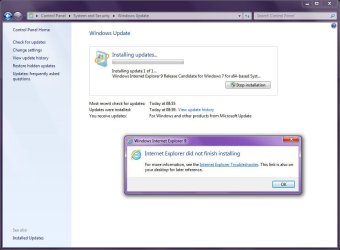
Why can't I uninstall IE9 Beta?

TopHatProfessor

New member
Local time
8:32 AM
Messages
19
I don't like Internet Explorer 9 Beta. It's takes forever to start and load my homepage, and so many other problems. So I read that to get IE8 back, I just need to go to Show Updates in Add or Remove Programs, click unistall, then IE8 is back after reboot. Easy as pie right? Wrong. Whenever I go to uninstall Internet Explorer 9 (Beta), I can't. I do ehe whole uninstall thing, then I reboot, then it goes to this windows update screen. It says #% or something like that. Once it's almost done, it says Windows Update failed; Reverting changes. Then I'm still stuck with IE9. I miss IE8. And I am running Windows 7, 32-Bit edition. How can I fix this problem?
 

My Computer My Computer

At a glance

Windows 7
OS
Windows 7

My Computer My Computer

At a glance

Windows 10, Home Clean InstallIntel Core2 processsor Q8200(2.33Ghz 1333FSB)...6 gbATI Radeon 256MB HD3650
Computer type
PC/Desktop
Computer Manufacturer/Model Number
Dell XPS 420
OS
Windows 10, Home Clean Install
CPU
Intel Core2 processsor Q8200(2.33Ghz 1333FSB) Quad Core Tech
Motherboard
Dell
Memory
6 gb
Graphics Card(s)
ATI Radeon 256MB HD3650
Sound Card
Intergrated 7.1 Channel Audio
Monitor(s) Displays
Dell SP2009W 20"
Hard Drives
640 GB Serial ATA Hard drive
Cooling
Fan
Keyboard
Dell USB Keyboard
Mouse
Dell Premium Optical USB
Internet Speed
DSL 2.85
Did you follow these instructions precisely?
http://www.sevenforums.com/tutorials/112121-internet-explorer-9-uninstall.html

as it appears that you did from your post, can you use a system restore to go back to a short time prior to installation

If not you can try an alternative such as Chrome or Firefox.
I attempted this new way to uninstall, but whenever I attemp to uninstall IE9 as an update, it says this :
"An error has occurred. Not all of the updates were successfully uninstalled.".
Grr.
 

My Computer My Computer

At a glance

Windows 7
OS
Windows 7
Uninstall as many as you can with System Restore
Try in safe mode
or it it does not work
Just use an alternative. Many prefer Firefox or Chrome over IE.
 

My Computer My Computer

At a glance

Windows 10, Home Clean InstallIntel Core2 processsor Q8200(2.33Ghz 1333FSB)...6 gbATI Radeon 256MB HD3650
Computer type
PC/Desktop
Computer Manufacturer/Model Number
Dell XPS 420
OS
Windows 10, Home Clean Install
CPU
Intel Core2 processsor Q8200(2.33Ghz 1333FSB) Quad Core Tech
Motherboard
Dell
Memory
6 gb
Graphics Card(s)
ATI Radeon 256MB HD3650
Sound Card
Intergrated 7.1 Channel Audio
Monitor(s) Displays
Dell SP2009W 20"
Hard Drives
640 GB Serial ATA Hard drive
Cooling
Fan
Keyboard
Dell USB Keyboard
Mouse
Dell Premium Optical USB
Internet Speed
DSL 2.85
Can only go back to a couple of days...
The biggest problem is on IE9 is compatibility and the lack of the ability to not say "Internet Explorer has stopped working."
 

My Computer My Computer

At a glance

Windows 7
OS
Windows 7
You did realize that 9 is a beta release. The very term beta implies not ready for release. Volunteers, like yourself, are used to determine the problems so that they can be rectified before the public release. That is why I do not use betas. I wait for the official release date.

Try to reset 9. In 8 you go to tools, internet options, advanced, reset
If that doew not work try in clean boot to try and diagnose and maybe solve the problem
How to troubleshoot a problem by performing a clean boot in Windows Vista or in Windows 7
 

My Computer My Computer

At a glance

Windows 10, Home Clean InstallIntel Core2 processsor Q8200(2.33Ghz 1333FSB)...6 gbATI Radeon 256MB HD3650
Computer type
PC/Desktop
Computer Manufacturer/Model Number
Dell XPS 420
OS
Windows 10, Home Clean Install
CPU
Intel Core2 processsor Q8200(2.33Ghz 1333FSB) Quad Core Tech
Motherboard
Dell
Memory
6 gb
Graphics Card(s)
ATI Radeon 256MB HD3650
Sound Card
Intergrated 7.1 Channel Audio
Monitor(s) Displays
Dell SP2009W 20"
Hard Drives
640 GB Serial ATA Hard drive
Cooling
Fan
Keyboard
Dell USB Keyboard
Mouse
Dell Premium Optical USB
Internet Speed
DSL 2.85
You did realize that 9 is a beta release. The very term beta implies not ready for release. Volunteers, like yourself, are used to determine the problems so that they can be rectified before the public release. That is why I do not use betas. I wait for the official release date.

Try to reset 9. In 8 you go to tools, internet options, advanced, reset
If that doew not work try in clean boot to try and diagnose and maybe solve the problem
How to troubleshoot a problem by performing a clean boot in Windows Vista or in Windows 7
Oooh I see your point. Well can I tell Microsoft my problem? I did notice the Feedback Tool.
I did restart 9, and it got all weird. Now the pages won't load. :/
I followed the steps, but when I got to step 2 it says that there are no updates. Am I supposed to go through ALL the steps? Or just until I fix the problem?
 

My Computer My Computer

At a glance

Windows 7
OS
Windows 7
This is my suggestion. For now use another browser; Firefox, Chrome, or anyone that you may like. When IE9 is finally released, you may be able to update with the final release. If not, lets try to see what can be done then.
There is a good possibility that the Beta will have to be uninstalled first, but we have to wait to see what happens.
Use the feedback tool, that is what it is for.
 

My Computer My Computer

At a glance

Windows 10, Home Clean InstallIntel Core2 processsor Q8200(2.33Ghz 1333FSB)...6 gbATI Radeon 256MB HD3650
Computer type
PC/Desktop
Computer Manufacturer/Model Number
Dell XPS 420
OS
Windows 10, Home Clean Install
CPU
Intel Core2 processsor Q8200(2.33Ghz 1333FSB) Quad Core Tech
Motherboard
Dell
Memory
6 gb
Graphics Card(s)
ATI Radeon 256MB HD3650
Sound Card
Intergrated 7.1 Channel Audio
Monitor(s) Displays
Dell SP2009W 20"
Hard Drives
640 GB Serial ATA Hard drive
Cooling
Fan
Keyboard
Dell USB Keyboard
Mouse
Dell Premium Optical USB
Internet Speed
DSL 2.85
This is my suggestion. For now use another browser; Firefox, Chrome, or anyone that you may like. When IE9 is finally released, you may be able to update with the final release. If not, lets try to see what can be done then.
There is a good possibility that the Beta will have to be uninstalled first, but we have to wait to see what happens.
Use the feedback tool, that is what it is for.

Okay, I stopped using IE9, and went to Chrome. Chrome rocks btw... Now I can uninstall IE9 from the updates list in Programs and Features. But when I reboot and it says "Configuring Windows", right when the countdown's about to end, it says "Failure configuring updates. Reverting changes." all the time. I uninstalled the Feedback tool too, so I don't see why it would do this. I have my updates set to automatic, and I've also tried to do the command line that uninstalls but to no avail. :/ Oh, and fyi, IE9 isn't in the updates list any longer, but I still have IE9 instead of IE8.
 

My Computer My Computer

At a glance

Windows 7
OS
Windows 7

My Computer My Computer

At a glance

Windows 10, Home Clean InstallIntel Core2 processsor Q8200(2.33Ghz 1333FSB)...6 gbATI Radeon 256MB HD3650
Computer type
PC/Desktop
Computer Manufacturer/Model Number
Dell XPS 420
OS
Windows 10, Home Clean Install
CPU
Intel Core2 processsor Q8200(2.33Ghz 1333FSB) Quad Core Tech
Motherboard
Dell
Memory
6 gb
Graphics Card(s)
ATI Radeon 256MB HD3650
Sound Card
Intergrated 7.1 Channel Audio
Monitor(s) Displays
Dell SP2009W 20"
Hard Drives
640 GB Serial ATA Hard drive
Cooling
Fan
Keyboard
Dell USB Keyboard
Mouse
Dell Premium Optical USB
Internet Speed
DSL 2.85
Try and reset, the update.
http://www.sevenforums.com/tutorials/91738-windows-update-reset.html

If that works, set update to notify and not on automatic. When you get updates, install very few at a time, maybe or or two.

Did what you said, but still same problem. Every time I do this it still reverts the changes; it even went into a loop for a few times where it said "Failed to configure updates; reverting changes" three or four times in a row before going to the log in screen.
 

My Computer My Computer

At a glance

Windows 7
OS
Windows 7
There are only two ways to uninstall the beta from Windows 7, as far as I know. With a sytem restore or with the updates. Dont know why it does not work in your case.
 

My Computer My Computer

At a glance

Windows 10, Home Clean InstallIntel Core2 processsor Q8200(2.33Ghz 1333FSB)...6 gbATI Radeon 256MB HD3650
Computer type
PC/Desktop
Computer Manufacturer/Model Number
Dell XPS 420
OS
Windows 10, Home Clean Install
CPU
Intel Core2 processsor Q8200(2.33Ghz 1333FSB) Quad Core Tech
Motherboard
Dell
Memory
6 gb
Graphics Card(s)
ATI Radeon 256MB HD3650
Sound Card
Intergrated 7.1 Channel Audio
Monitor(s) Displays
Dell SP2009W 20"
Hard Drives
640 GB Serial ATA Hard drive
Cooling
Fan
Keyboard
Dell USB Keyboard
Mouse
Dell Premium Optical USB
Internet Speed
DSL 2.85
Try re-installing IE 9 on top of the version you already have then when installed reboot and then try un-installing it you might have a few corrupt entries in your system.

Steve
 

My Computer My Computer

At a glance

Windows 7 Ultimate 64 - OEM Service Pack 1Intel Core i7 930 2.80Ghz Bloomfield Socket L...Patriot Viper 6GB 3x2GB DDR3 PC3-1200C9 1600M...Asus ATI Radeon HD 5770 CuCore 1024MB GDDR5 P...
Computer Manufacturer/Model Number
Over Clockers Ultima Viper 2.80Ghz
OS
Windows 7 Ultimate 64 - OEM Service Pack 1
CPU
Intel Core i7 930 2.80Ghz Bloomfield Socket LGA 1366
Motherboard
Gigabyte GA-X58A-UD3R Intel X58 Socket 1366 DDR3
Memory
Patriot Viper 6GB 3x2GB DDR3 PC3-1200C9 1600Mhz Tri Channel
Graphics Card(s)
Asus ATI Radeon HD 5770 CuCore 1024MB GDDR5 PCI Express
Sound Card
Realtek ALC889 @ Intel 82801JB ICH10 - High Definition Audio
Monitor(s) Displays
Samsung SyncMaster 920N 19"
Screen Resolution
1280*1024
Hard Drives
1 x OCZ Vertex2 Series 120GB 2.5" SATA-II SSD
1 x Seagate Barracuda 7200.12 1TB SATA-II 32MB Cache
1 x Western Digital Caviar Green 2TB SATA-II 64 MB Cache
PSU
Corsair TX 650W ATX SLi
Case
Antec 902 Ultimate Gaming Case Black
Cooling
Prolimatech Megahalems Rev B CPU Cooler Socket 775/1156/1366
Keyboard
Microsoft Comfort Curve Keyboard
Mouse
Microsoft Optical USB
Internet Speed
ADSL24 FTTC 34.2 Mbps Down 7.1Mbps Up
Other Info
OcUK 22x DVDSATA ReWriter Black
Akasa AK-FN058 Apache Black Super Silent 120mm Fan
Printer Epson Stylus Photo R300
Scanner Canon Canoscan 8000F
I ended up to reinstall wds .....never try Beta again ....
 

My Computer My Computer

At a glance

WDS 7 Home Pre.x64Intel Core i5 2450M @ 2.50GHz8GB Kingston[2x4] Dual-Channel DDR3 @ 1333MHzAMD Radeon(TM) HD 6470M + Intel(R) HD Graph 3000
Computer type
Laptop
Computer Manufacturer/Model Number
Sony Vaio VPC-SE23FXS
OS
WDS 7 Home Pre.x64
CPU
Intel Core i5 2450M @ 2.50GHz
Memory
8GB Kingston[2x4] Dual-Channel DDR3 @ 1333MHz
Graphics Card(s)
AMD Radeon(TM) HD 6470M + Intel(R) HD Graph 3000
Hard Drives
TOSHIBA MK6459GSXP 600GB x 5400RPM (SATA)
Try re-installing IE 9 on top of the version you already have then when installed reboot and then try un-installing it you might have a few corrupt entries in your system.

Steve

Tried that. Whenever I do it says "There's a more current version of Internet Explorer on your system," or something like that. I can't reinstall Windows 7 because a family friend did the installation, not us.
 

My Computer My Computer

At a glance

Windows 7
OS
Windows 7
I too would like to know how to uninstall IE9BETA, because I want to install the RC.

Here is the problem I'm having. Whether or not I use the individual downloads or windows update, the installation for Internet Explorer 9 RC fails.

Here are screenshots of trying to do this via Windows Update:
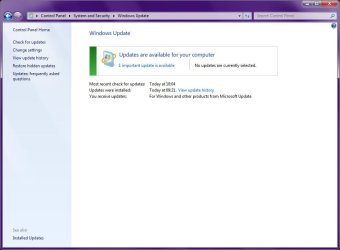
Image0.jpg
Shows only 1 Update available

Image1.jpg
Shows Internet Explorer 9 installation failure
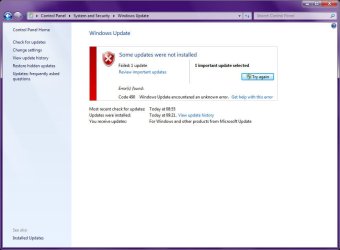
Image2.jpg
Some update were not installed

Clicking on "Try Again" as shown in the above screenshot does not work. The installation perpetually fails, and each time it does so, it adds (or updates) a shorcut on my desktop, Internet Explorer Troubleshooting. I've followed all 5 methods given in the article, all to no avail.

Internet Explorer 9 RC just flatout refuses to install.

Now I know jujst about every "Uninstall IE9BETA resource says to go to View Installed Updates, including the SevenForums tutorial Internet Explorer 9 Uninstall, except that Windows Internet Explorer 9 does not show up in the list of installed updates.

So I figured that this is perhaps because of KB2482017 (Cumulative Security Update for Internet Explorer 9 Beta for Windows 7 for x64-based Systems)

Image3.jpg
KB2482017

So perhaps uninstalling KB2482017 first might help? But that particular update also does not show in the list of installed updates.

I've tested my IE9RC downloads in a Virtual PC installation of Windows 7, and it works flawlessly. I just cannot install into my production machine, Prometheus.

So what I'm looking for is another way of uninstalling Internet Explorer 9 BETA, perhaps something from an elevated command line, that will revert my system back to Internet Explorer 8.

 

My Computer My Computer

At a glance

Windows 7 Professional 32-bit SP1AMD A4/A63.00GB EDOVMware SVGA 3D
Computer type
PC/Desktop
Computer Manufacturer/Model Number
Virtual Machine
OS
Windows 7 Professional 32-bit SP1
CPU
AMD A4/A6
Motherboard
Intel Corporation 440BX Desktop Reference Platform
Memory
3.00GB EDO
Graphics Card(s)
VMware SVGA 3D
Sound Card
High Definition Audio Device
Monitor(s) Displays
Generic Non-PnP Monitor on VMware SVGA 3D
Screen Resolution
1440x900
Hard Drives
1 x 60GB VMware Virtual SATA Hard Drive ATA Device
Antivirus
Kaspersky Total Security
Back
Top