Why can't Win 7 see a GPT HDD that's being picked up in BIOS ?

Muffin Top

New member
Member
Local time
10:37 PM
Messages
77
The HDD appears in BIOS. I checked the cable anyway, no difference in BIOS. Win 7's diskpart can't see this HDD, even though it appears in BIOS.


This history of this HDD is I cleaned it from Disk Management in Win 10. After cleaning it, I initialized it as GPT.


Could it be that Win 7's installer is not reading because of these actions in Win 10?


Sometimes, [FONT=&quot]Windows setup can chuck a fit when it discovers a drive with an invalid MBR/boot sector and won't install to it?[/FONT]
 

My Computers My Computers

  • At a glance

    10 trying for 7x64i7 6th gen32G
    Computer type
    PC/Desktop
    Computer Manufacturer/Model Number
    Dell Opti 7050
    OS
    10 trying for 7x64
    CPU
    i7 6th gen
    Memory
    32G
    Hard Drives
    1T SSD; 2T HDD
  • Computer type
    PC/Desktop
Installing to a GPT disk requires
  • Windows 7 (64-bit)
  • UEFI based system
That means if your computer doesn't support UEFI then you must install Windows 7 on a 2TB or smaller disk that is partitioned with MBR. That does apply to data disks which can be MBR or GPT.

Windows 7 can utilize GPT (GUID Partition Table) disks for storing data, but it cannot boot from them unless the computer is using UEFI and the Windows 7 installation is the 64-bit version. To use a GPT disk for data storage with Windows 7, you can initialize the disk as GPT in Disk Management. However, if you are trying to install Windows 7 on a GPT disk, you'll need to ensure your computer supports UEFI and is configured to boot in UEFI mode, according to Microsoft.
 

My Computers My Computers

  • At a glance

    Windows 7 Professional 64bit / Windows 10 Hom...AMD FX-8350GSKILL Ripjaw-X PC3 12800 12GB (2x4GB, 2x2GB)ASUS ENGTX560 DCII OC/2DI/1GD5 1GB
    Computer type
    PC/Desktop
    Computer Manufacturer/Model Number
    Custom build
    OS
    Windows 7 Professional 64bit / Windows 10 Home 64bit
    CPU
    AMD FX-8350
    Motherboard
    Gigabyte GA-990FXA-UD3 (AM3+) Rev. 4.0
    Memory
    GSKILL Ripjaw-X PC3 12800 12GB (2x4GB, 2x2GB)
    Graphics Card(s)
    ASUS ENGTX560 DCII OC/2DI/1GD5 1GB
    Sound Card
    Integrated
    Monitor(s) Displays
    Asus VE228H (21.5-in)
    Screen Resolution
    1920x1080 60Hz
    Hard Drives
    SAMSUNG 870 EVO 1TB (2.5" SATA SSD)
    SAMSUNG 870 EVO 500GB (2.5" SATA SSD)
    PSU
    Antec TruePower (new) TP-650 (650 watts)
    Case
    Antec Three Hundred
    Cooling
    AMD stock (plan to upgrade to Cooler Master Hyper 212 EVO)
    Keyboard
    Logitech K540 (wireless)
    Mouse
    Logitech M310 (wireless)
    Internet Speed
    Comcast Gigabit X2 Internet (2100Mbps down / 300Mbps up)
    Browser
    Firefox, Edge, Chrome
    Other Info
    Optical drive: ASUS DRW-24B3ST/BLK/G (Black) (24X)
    External hard drives: 2TB & 6TB
    Internet Gateway: Comcast XB8
  • Computer type
    PC/Desktop
Thanks, my computer supports both.


The Win 10 system is on the PCIe NVMe UEFI drive. In Win 10, I can see my 2T HDD. However, I can't see this HDD in Win 7's installer. The internet has noted that Win 7's installer can be finicky about working with a disk that doesn't have a good boot record.


That's why I'm thinking about converting the HDD to MBR. Then I'll dual-boot via BIOS instead of EasyBCD. When I want to switch between the UEFI NVMe and the MBR HDD I'll have to go into BIOS. That's not bad, because it saves me from figuring out EasyBCD while I'm still in the troubleshooting stages.


If I convert the HDD to MBR and format it as one single NTFS partition, then I'm hoping the Win 7 installer will be able to see it. Maybe I need to add a system partion first, so the Win 7 installer can put a boot record on it?
 

My Computers My Computers

  • At a glance

    10 trying for 7x64i7 6th gen32G
    Computer type
    PC/Desktop
    Computer Manufacturer/Model Number
    Dell Opti 7050
    OS
    10 trying for 7x64
    CPU
    i7 6th gen
    Memory
    32G
    Hard Drives
    1T SSD; 2T HDD
  • Computer type
    PC/Desktop
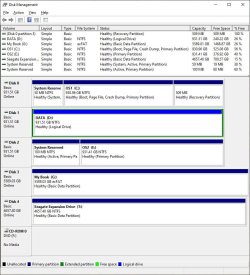
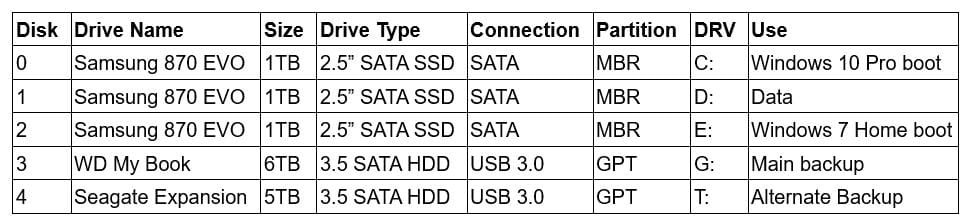
I have a dual-boot of Windows 10 and Windows 7. The original motherboard didn't support UEFI so the drives were MBR. I replaced the motherboard with one that does support UEFI. However, I don't see any reason to convert the drives to UEFI and GPT now. Note the external HDDs have always been GPT since they are larger than 2TB.

Disk Management.jpg

Drives.jpg

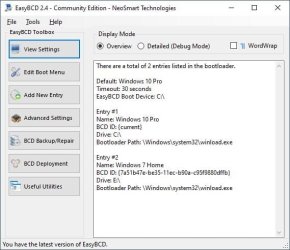
EasyBCD.jpg
 

My Computers My Computers

  • At a glance

    Windows 7 Professional 64bit / Windows 10 Hom...AMD FX-8350GSKILL Ripjaw-X PC3 12800 12GB (2x4GB, 2x2GB)ASUS ENGTX560 DCII OC/2DI/1GD5 1GB
    Computer type
    PC/Desktop
    Computer Manufacturer/Model Number
    Custom build
    OS
    Windows 7 Professional 64bit / Windows 10 Home 64bit
    CPU
    AMD FX-8350
    Motherboard
    Gigabyte GA-990FXA-UD3 (AM3+) Rev. 4.0
    Memory
    GSKILL Ripjaw-X PC3 12800 12GB (2x4GB, 2x2GB)
    Graphics Card(s)
    ASUS ENGTX560 DCII OC/2DI/1GD5 1GB
    Sound Card
    Integrated
    Monitor(s) Displays
    Asus VE228H (21.5-in)
    Screen Resolution
    1920x1080 60Hz
    Hard Drives
    SAMSUNG 870 EVO 1TB (2.5" SATA SSD)
    SAMSUNG 870 EVO 500GB (2.5" SATA SSD)
    PSU
    Antec TruePower (new) TP-650 (650 watts)
    Case
    Antec Three Hundred
    Cooling
    AMD stock (plan to upgrade to Cooler Master Hyper 212 EVO)
    Keyboard
    Logitech K540 (wireless)
    Mouse
    Logitech M310 (wireless)
    Internet Speed
    Comcast Gigabit X2 Internet (2100Mbps down / 300Mbps up)
    Browser
    Firefox, Edge, Chrome
    Other Info
    Optical drive: ASUS DRW-24B3ST/BLK/G (Black) (24X)
    External hard drives: 2TB & 6TB
    Internet Gateway: Comcast XB8
  • Computer type
    PC/Desktop
Thanks, it looks like the MBR path will work better for my Win 7 install as well.


Are your disks 0 & 2 separate hardware devices? Do you use the Windows blue dual-boot screen? Or do you use a utility like EasyBCD?
 

My Computers My Computers

  • At a glance

    10 trying for 7x64i7 6th gen32G
    Computer type
    PC/Desktop
    Computer Manufacturer/Model Number
    Dell Opti 7050
    OS
    10 trying for 7x64
    CPU
    i7 6th gen
    Memory
    32G
    Hard Drives
    1T SSD; 2T HDD
  • Computer type
    PC/Desktop
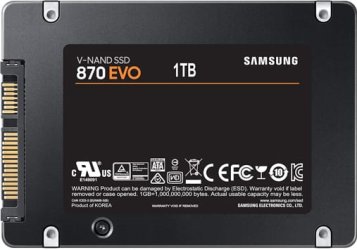
Drives 0, 1 and 2 are all 1TB Samsung 870 EVOs 2.5" SATA SSDs.

Samsung870EVO.jpg

Like I said the original motherboard did not support UEFI so I had no choice but to set up the drives as MBR. If I ever reinstall Windows I will switch to UEFI and GPT since the the replacement motherboard supports it.

Normally if you install Windows 7 on one drive and then Windows 10 on another drive the dual-boot menu will automatically be created for you. After that I might use EasyBCD to edit the boot menu. For example, with EasyBCD I can change which version of Windows is the default. The default is what boots if you do nothing. If you want to boot to the other then you have to manually select it in the boot menu.

If for some reason either Windows 7 or 10 can't boot then I might use the Windows setup flash drive to correct it. After that I might lose the boot menu. That is, the computer might boot directly into Windows 7 or 10 without having a choice to boot into the other one. To get the boot menu back I can use EasyBCD.

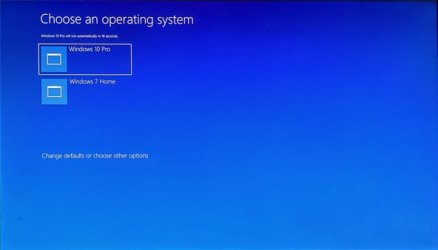
In the boot menu the default is Windows 10. If I hit enter then Windows 10 boots. I have to manually select Windows 7 to boot to it. Also, after the default time of 30 seconds whichever one is selected will automatically boot.

20250505_154518 #3.jpg
 

My Computers My Computers

  • At a glance

    Windows 7 Professional 64bit / Windows 10 Hom...AMD FX-8350GSKILL Ripjaw-X PC3 12800 12GB (2x4GB, 2x2GB)ASUS ENGTX560 DCII OC/2DI/1GD5 1GB
    Computer type
    PC/Desktop
    Computer Manufacturer/Model Number
    Custom build
    OS
    Windows 7 Professional 64bit / Windows 10 Home 64bit
    CPU
    AMD FX-8350
    Motherboard
    Gigabyte GA-990FXA-UD3 (AM3+) Rev. 4.0
    Memory
    GSKILL Ripjaw-X PC3 12800 12GB (2x4GB, 2x2GB)
    Graphics Card(s)
    ASUS ENGTX560 DCII OC/2DI/1GD5 1GB
    Sound Card
    Integrated
    Monitor(s) Displays
    Asus VE228H (21.5-in)
    Screen Resolution
    1920x1080 60Hz
    Hard Drives
    SAMSUNG 870 EVO 1TB (2.5" SATA SSD)
    SAMSUNG 870 EVO 500GB (2.5" SATA SSD)
    PSU
    Antec TruePower (new) TP-650 (650 watts)
    Case
    Antec Three Hundred
    Cooling
    AMD stock (plan to upgrade to Cooler Master Hyper 212 EVO)
    Keyboard
    Logitech K540 (wireless)
    Mouse
    Logitech M310 (wireless)
    Internet Speed
    Comcast Gigabit X2 Internet (2100Mbps down / 300Mbps up)
    Browser
    Firefox, Edge, Chrome
    Other Info
    Optical drive: ASUS DRW-24B3ST/BLK/G (Black) (24X)
    External hard drives: 2TB & 6TB
    Internet Gateway: Comcast XB8
  • Computer type
    PC/Desktop
Thanks so much, I'll give it a try.


I only gained the ability to see my HDD in the Win 7 installer's diskpart after setting up a new volume (which was after converting it to MBR). In my case, the ability of the Win 7 installer to see the drives had nothing to do with drivers (i.e., I was able to see a drive for which I don't have a driver, but was not able to see a drive for which drivers were embedded in my boot USB).


Maybe if I convert this HDD back to GPT and set up a new volume, maybe then I'll still be able to see it in the Win 7 installer's diskpart.
 

My Computers My Computers

  • At a glance

    10 trying for 7x64i7 6th gen32G
    Computer type
    PC/Desktop
    Computer Manufacturer/Model Number
    Dell Opti 7050
    OS
    10 trying for 7x64
    CPU
    i7 6th gen
    Memory
    32G
    Hard Drives
    1T SSD; 2T HDD
  • Computer type
    PC/Desktop
If you want to install as UEFI - GPT you MUST boot the Win 7 USB installation drive as UEFI.

Are you booting from a DVD or a USB drive?

To make a Win 7 USB boot able drive:

Open a CMD window as administrator and type:

diskpart
list disk (it will list all drives. Identify the USB drive number)
select disk n (replace n by the USB drive number obtained with list disk)
clean
convert mbr
create part primary
select part 1
format fs=fat32 quick
assign
active
exit (to exit diskpart)

If you have a Win 7 installation iso file
On Win 7 use 7Zip to extract all files and folders from the Win 7 iso file to the USB drive.
On Win 10, mount the iso file and copy all files and folders to the USB drive.

If you have a Win 7 installation DVD
On another computer that has ODD, copy all files and folders from the DVD to the USB drive

To make it UEFI boot able you must add the \efi\boot folder
419872-windows-7-laptop-users-why-my-laptop-slow-efi-boot.jpg


To make it universal (all Win 7 versions), go to \sources on the USB drive and delete \sources\ei.cfg
 

My Computers My Computers

  • At a glance

    Windows 7 HP 64i5 6600K - 800MHz to 4200MHz4+4G GSkill DDR4 3000IG - Intel 530
    Computer type
    PC/Desktop
    Computer Manufacturer/Model Number
    custom build
    OS
    Windows 7 HP 64
    CPU
    i5 6600K - 800MHz to 4200MHz
    Motherboard
    GA-Z170-HD3P
    Memory
    4+4G GSkill DDR4 3000
    Graphics Card(s)
    IG - Intel 530
    Monitor(s) Displays
    Samsung 226BW
    Screen Resolution
    1680x1050
    Hard Drives
    (1) -1 SM951 – 128GB M.2 AHCI PCIe SSD drive for Windows 7 and Lubuntu
    (2) -1 WD SATA 3 - 1T for Data
    (3) -1 WD SATA 3 - 1T for backup
    PSU
    Thermaltake 450W TR2 gold
    Keyboard
    Old and good Chicony mechanical keyboard
    Mouse
    Logitech mX performance - 9 buttons (had to disable some)
    Internet Speed
    500Mb/s
    Browser
    Firefox 64
    Other Info
    TinyWall firewall
  • At a glance

    Windows 7 Proi7-4500U 800MHz to 3.0GHz(4+4)G DDR3 1600IG intel 4400 + NVIDIA GeForce GT 745M
    Computer type
    Laptop
    System Manufacturer/Model Number
    Asus Q550LF
    OS
    Windows 7 Pro
    CPU
    i7-4500U 800MHz to 3.0GHz
    Motherboard
    Asus Q550LF
    Memory
    (4+4)G DDR3 1600
    Graphics Card(s)
    IG intel 4400 + NVIDIA GeForce GT 745M
    Sound Card
    Realtek
    Monitor(s) Displays
    LG Display LP156WF4-SPH1
    Screen Resolution
    1920 x 1080
    Hard Drives
    BX500 120G SSD for Windows and programs +
    1T HDD for data
    Internet Speed
    500 Mb/s
    Browser
    Firefox
    Other Info
    TinyWall firewall
Thanks so much! I agree with all your points, and I attempted those steps. Just a couple caveats:

I attempted both DVD and USB, booting UEFI via the correct BIOS adjustments. The USB's ISO was able to progress further in the Win 7 set-up, so I wonder if there's something wrong with my DVD.

Maybe I did better with the USB because it has a more updated ISO, and with more drivers.

Since Win 7 installer's diskpart is finicky about how the HDD has been handled in Win 10, I may attempt a GPT set-up again, instead of just settling for MBR. When I was fiddling with the HDD in Win 10, I noticed the HDD's first partition was the GPT reserve (attributable to some non-standard fiddling I did), not a system partition.

That might have been an issue because the Win 7 installer is finicky about working with disks that lack a proper boot record. When I formatted the HDD in MBR, via the new volume function, then the Win 7 installer was able to see the new volume HDD.
 

My Computers My Computers

  • At a glance

    10 trying for 7x64i7 6th gen32G
    Computer type
    PC/Desktop
    Computer Manufacturer/Model Number
    Dell Opti 7050
    OS
    10 trying for 7x64
    CPU
    i7 6th gen
    Memory
    32G
    Hard Drives
    1T SSD; 2T HDD
  • Computer type
    PC/Desktop
Windows must be pointed to install on an unallocated space not a partition.
If you boot the Win 7 USB installation drive as UEFI and delete all partitions, even if the drive is MBR, it will convert to GPT and install Win 7 as UEFI-GPT, creating the three partitions (EFI, MSR, C: )

Reset BIOS or load defaults.
Set Disk mode to AHCI, not RAID
Select OS mode = CSM or Select OS mode = other + UEFI (depends on BIOS).
Disable fast boot and secure boot

Windows can be installed in two ways: Legacy-MBR or UEFI-GPT
To install as Legacy-MBR you must boot the installation drive as Legacy

To install as UEFI-GPT you must boot the installation drive as UEFI.

As you have a UEFI BIOS, you should install as UEFI-GPT
Detach any other drives (SATA or Power cable) from the MB.

During POST, press F12(?) to launch the boot menu. You will see two options for the USB drive. USB UEFI (Name) and USB (Name). Select USB UEFI (Name) to install as UEFI-GPT.
Go to install and delete ALL partitions on the main drive till you have one and only one unallocated space and then proceed.
If you don't want to use MS account, don't enable updates or connect to the internet during installation.

Once you have Win 7 installed, use Simplix to do the updates
 

My Computers My Computers

  • At a glance

    Windows 7 HP 64i5 6600K - 800MHz to 4200MHz4+4G GSkill DDR4 3000IG - Intel 530
    Computer type
    PC/Desktop
    Computer Manufacturer/Model Number
    custom build
    OS
    Windows 7 HP 64
    CPU
    i5 6600K - 800MHz to 4200MHz
    Motherboard
    GA-Z170-HD3P
    Memory
    4+4G GSkill DDR4 3000
    Graphics Card(s)
    IG - Intel 530
    Monitor(s) Displays
    Samsung 226BW
    Screen Resolution
    1680x1050
    Hard Drives
    (1) -1 SM951 – 128GB M.2 AHCI PCIe SSD drive for Windows 7 and Lubuntu
    (2) -1 WD SATA 3 - 1T for Data
    (3) -1 WD SATA 3 - 1T for backup
    PSU
    Thermaltake 450W TR2 gold
    Keyboard
    Old and good Chicony mechanical keyboard
    Mouse
    Logitech mX performance - 9 buttons (had to disable some)
    Internet Speed
    500Mb/s
    Browser
    Firefox 64
    Other Info
    TinyWall firewall
  • At a glance

    Windows 7 Proi7-4500U 800MHz to 3.0GHz(4+4)G DDR3 1600IG intel 4400 + NVIDIA GeForce GT 745M
    Computer type
    Laptop
    System Manufacturer/Model Number
    Asus Q550LF
    OS
    Windows 7 Pro
    CPU
    i7-4500U 800MHz to 3.0GHz
    Motherboard
    Asus Q550LF
    Memory
    (4+4)G DDR3 1600
    Graphics Card(s)
    IG intel 4400 + NVIDIA GeForce GT 745M
    Sound Card
    Realtek
    Monitor(s) Displays
    LG Display LP156WF4-SPH1
    Screen Resolution
    1920 x 1080
    Hard Drives
    BX500 120G SSD for Windows and programs +
    1T HDD for data
    Internet Speed
    500 Mb/s
    Browser
    Firefox
    Other Info
    TinyWall firewall
Windows must be pointed to install on an unallocated space not a partition.

It can be installed to an existing partition
 

My Computers My Computers

  • At a glance

    7 X64i5 84002x8gb 3200mhz
    Computer type
    PC/Desktop
    OS
    7 X64
    CPU
    i5 8400
    Motherboard
    gigabyte b365m ds3h
    Memory
    2x8gb 3200mhz
    Hard Drives
    various
    PSU
    pure power 11 400w cm
    Case
    Coolermaster
    Cooling
    cryorig m9i
  • At a glance

    7x64g54008gb ddr4 2400
    Computer type
    PC/Desktop
    OS
    7x64
    CPU
    g5400
    Motherboard
    ga b365m ds3h
    Memory
    8gb ddr4 2400
    PSU
    xfx pro 450w
Thanks so much both, I'll give these steps a try !
 

My Computers My Computers

  • At a glance

    10 trying for 7x64i7 6th gen32G
    Computer type
    PC/Desktop
    Computer Manufacturer/Model Number
    Dell Opti 7050
    OS
    10 trying for 7x64
    CPU
    i7 6th gen
    Memory
    32G
    Hard Drives
    1T SSD; 2T HDD
  • Computer type
    PC/Desktop
Normally if you install Windows 7 on one drive and then Windows 10 on another drive the dual-boot menu will automatically be created for you. After that I might use EasyBCD to edit the boot menu. For example, with EasyBCD I can change which version of Windows is the default. The default is what boots if you do nothing. If you want to boot to the other then you have to manually select it in the boot menu.
In the boot menu the default is Windows 10. If I hit enter then Windows 10 boots. I have to manually select Windows 7 to boot to it. Also, after the default time of 30 seconds whichever one is selected will automatically boot.

Thanks again everyone! I'm beginning to wonder if dual-booting via BIOS supports my defense-in-depth against malware?

My original rationale for favoring Win 7 is for web browsing, since 7's system restore is the only one that works reliably. When MicroSoft decided to de-emphasize consumer products, they stopped ensuring that system restore would work in 10 & 11.

For defense-in-depth: I'm web browsing via 7, and I run system restore after every internet session. My MBR SATA 7 system purposefully excludes a driver for the NVMe drive that contains my Win 10 system. So my 7 system can't see my 10 system, and Dell's NVMe driver requires a restart, which won't happen since I restore my 7 system after every internet session.

So it's unlikely that a virus will target a dual-booter. But if one does, it won't see my 10 system (because my 7 system doesn't have a driver for the 10 drive), and it won't be able to boot my 10 system, which is GPT.
 

My Computers My Computers

  • At a glance

    10 trying for 7x64i7 6th gen32G
    Computer type
    PC/Desktop
    Computer Manufacturer/Model Number
    Dell Opti 7050
    OS
    10 trying for 7x64
    CPU
    i7 6th gen
    Memory
    32G
    Hard Drives
    1T SSD; 2T HDD
  • Computer type
    PC/Desktop
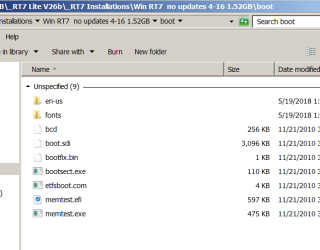
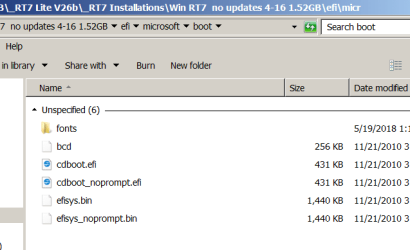
I get the bootx64.efi file in this Boot folder (in that link), but there are two 'Boot' folders. One in the root of the install iso folder and the other buried in the efi folder.
Some of my installs, either original or ones that were customized in RT7 Lite or NT Lite, the entries are different as to the specific files in each folder.
My question is, replacing the existing Boot folder with this one, how about all those files that were in the original? Won't that mess up the install?.

RT7 Lite Boot 1 files.png RT7 Lite Boot 2 files.png
 

My Computers My Computers

  • At a glance

    Win7 x64AMD
    Computer type
    Laptop
    Computer Manufacturer/Model Number
    Toshiba
    OS
    Win7 x64
    CPU
    AMD
  • At a glance

    Win 7 Pro x64AMD FX-835016GBnVidia GeForce 1060
    Computer type
    PC/Desktop
    System Manufacturer/Model Number
    AMD based MB
    OS
    Win 7 Pro x64
    CPU
    AMD FX-8350
    Motherboard
    Gigabyte GA-970A-D3P
    Memory
    16GB
    Graphics Card(s)
    nVidia GeForce 1060
    Monitor(s) Displays
    25"
    Screen Resolution
    1920x1200
    Hard Drives
    two SSD;
    two 4TB HDD
    PSU
    700watt Seasonic
    Internet Speed
    300MB up & down
    Browser
    Firefox
    Other Info
    BD Recorder
My question is, replacing the existing Boot folder with this one, how about all those files that were in the original? Won't that mess up the install?

Thanks, good question. There's a Win 7 install guide on GitHub that claims an updated ISO can reliably install Win 7 in UEFI. While I didn't quite complete that installation, I got far enough along in the process to believe it will work.


The issue I had with that install is I had messed up my destination disk. Then, when I discovered my error, and re-formatted my disk, I was tired enough to take the easy way out via MBR installation. I'll see if I can convert it to GPT using the Win 10 recovery USB.


Before taking that step, I'm trying to figure out if there's an archived 2022 Win 7 update? I've been going through the rites of passage with updates. I just discovered that Microsoft won't let me download the 2022 update that permits secure boot to Win 7.


So I have to find another way to get the secure boot update, KB5017361. Without secure boot, I don't need to run Win 7 in UEFI.


I would buy the secure boot update if it were still available, but that's Microsoft.

- - - Updated - - -

To clarify, I downloaded KB5017361, but Microsoft won't let me install it.

I need the post-2020 service stack update(s), which I'm guessing Microsoft won't let me have?

Maybe I'm wrong, I hope there's a way to get the post-2020 updates installed, so I'll be able to secure boot Win 7.
 

My Computers My Computers

  • At a glance

    10 trying for 7x64i7 6th gen32G
    Computer type
    PC/Desktop
    Computer Manufacturer/Model Number
    Dell Opti 7050
    OS
    10 trying for 7x64
    CPU
    i7 6th gen
    Memory
    32G
    Hard Drives
    1T SSD; 2T HDD
  • Computer type
    PC/Desktop
Frankly, I wouldn't loose any sleep over it.
Why is the 'Secure Boot' that important?
 

My Computers My Computers

  • At a glance

    Win7 x64AMD
    Computer type
    Laptop
    Computer Manufacturer/Model Number
    Toshiba
    OS
    Win7 x64
    CPU
    AMD
  • At a glance

    Win 7 Pro x64AMD FX-835016GBnVidia GeForce 1060
    Computer type
    PC/Desktop
    System Manufacturer/Model Number
    AMD based MB
    OS
    Win 7 Pro x64
    CPU
    AMD FX-8350
    Motherboard
    Gigabyte GA-970A-D3P
    Memory
    16GB
    Graphics Card(s)
    nVidia GeForce 1060
    Monitor(s) Displays
    25"
    Screen Resolution
    1920x1200
    Hard Drives
    two SSD;
    two 4TB HDD
    PSU
    700watt Seasonic
    Internet Speed
    300MB up & down
    Browser
    Firefox
    Other Info
    BD Recorder
Secure boot minimizes the risk of picking up a BIOS bug.

I use 7 for web browsing, because its system restore is more reliable than 10 & 11. Over the past 16 years of web browsing in 7, I've never picked up a bug from malicious sites because I run system restore after every internet session.

However, observations are that BIOS attacks have been increasing lately, and I would expect AI will continue to proliferate BIOS attacks exponentially.
 

My Computers My Computers

  • At a glance

    10 trying for 7x64i7 6th gen32G
    Computer type
    PC/Desktop
    Computer Manufacturer/Model Number
    Dell Opti 7050
    OS
    10 trying for 7x64
    CPU
    i7 6th gen
    Memory
    32G
    Hard Drives
    1T SSD; 2T HDD
  • Computer type
    PC/Desktop
Back
Top