why do i have to change default format (sound hz )

chrislv

New member
Local time
4:49 PM
Messages
6
everytime i play music or movie sound is crapy i have to open sound properties and switch default formats ie 24bit 44100 hz to 48000 hz or visa versa then sound is great and if i close app then open again same thing sounds like crap until i toggle
 

My Computer My Computer

At a glance

7 32 bitatom3 gbnvidia
Computer Manufacturer/Model Number
acer revo
OS
7 32 bit
CPU
atom
Memory
3 gb
Graphics Card(s)
nvidia
Is your sound output via the headphone jack or are you connected via HDMI?

It could be a conflict between the Realtek Sound Manager and the Windows settings.
 

My Computer My Computer

At a glance

8 Pro x64i7 3770K 4.6GHz16GB G.Skill Trident X 2666mhzx2 EVGA 780 Ti Superclocked SLI
Computer type
PC/Desktop
Computer Manufacturer/Model Number
Systems by SmartEyeball
OS
8 Pro x64
CPU
i7 3770K 4.6GHz
Motherboard
ASUS P8Z77 WS
Memory
16GB G.Skill Trident X 2666mhz
Graphics Card(s)
x2 EVGA 780 Ti Superclocked SLI
Sound Card
SB X-FI Surround 5.1 PRO USB / ATH-AD900 Headphones
Monitor(s) Displays
x3 Dell U2410 / 58" Samsung
Screen Resolution
5760*1200/ 1920*1200
Hard Drives
2x Intel 520 240GB (RAID 0) * 2x WD Caviar Blacks 2TB (RAID 0) * 2TB WD Caviar Black * Sony Optirac DVD
PSU
Silverstone Strider Evolution 1200W
Case
Thermaltake Level 10 GT Snow Edition
Cooling
Noctua NH-D14
Keyboard
Topre Realforce // Ducky Shine MX Black // Filco Ninja TKL
Mouse
Thermaltake Theron (Highly Recommended) + Razer Imperator
Antivirus
MSE
Browser
IE, FF, WaterFox
Other Info
GT Extreme V2 Sim Racing Cockpit + 40" LCD and K/B Mouse stand ▼
Fanatec CSR Elite Wheel + Clubsport V1 Pedals + CSR shifter/7G-H ▼Saitek X52 Pro ▼ TrackIR 5 Pro
Buttkicker v2 Seat Rumbler with Dedicated 5.1 and Sub Woofer attached to frame ▼
=
Bloody Big Grin
sound

its hdmi if it is a conflict what cant i do ie disable realtek as it is not in use??
 

My Computer My Computer

At a glance

7 32 bitatom3 gbnvidia
Computer Manufacturer/Model Number
acer revo
OS
7 32 bit
CPU
atom
Memory
3 gb
Graphics Card(s)
nvidia
You have two different sound devices, your regular PC audio and in this case apparently RealTek and you have the HDMI audio which can be a function of your Video device. 16 bit, 44.1Khz is standard "CD quality" audio. Anything else is above the "default". I have a home recording studio and use 24 bit for recording but when I mix down to the final product it is 16 bit 44.1Khz "standard". All the higher bit rates on playback won't make the standard audio any better.

You list an Intel Atom CPU, which are used on the "netbooks". Is this what you have?
 

My Computer My Computer

At a glance

Windows 10 64 bitIntel i7 6700K16GB Corsair DominatorIntel CPU Graphics
Computer type
PC/Desktop
Computer Manufacturer/Model Number
My Own Build
OS
Windows 10 64 bit
CPU
Intel i7 6700K
Motherboard
ASUS ROG Maximus VIII Hero
Memory
16GB Corsair Dominator
Graphics Card(s)
Intel CPU Graphics
Sound Card
RealTek
Monitor(s) Displays
27" Dell S2719dgf
Screen Resolution
2560X1440
Hard Drives
1 TB Samsung 850 EVO SSD for Win 10 Pro
500GB Samsung 850 EVO SSD for Win 10 Insider
2 TB drive for backup
PSU
EVGA Supernova 750G2
Case
BeQuiet Silent Base 600
Cooling
Deepcool Captain 120EX
Keyboard
Microsoft Wireless 2000
Mouse
Microsoft wireless
Internet Speed
100 MB/sec (Cable)
Antivirus
Microsoft Defender and Malwarebytes
Browser
Edge/Firefox
Other Info
Cakewalk (Sonar) by BandLab and Studio One 4.1 Pro recording studio software. MOTU 896Mk3 Hybrid recording interface, Frontier Tranzport wireless control unit, Behringer X-Touch Control Surface.
Five USB connected optical drives for CD Audio production using Nero BurningROM
You could also try re-installing you sound device driver(s), it's possible their might have been some corruption or your just using windows default sound driver(s)
Fabe
 

My Computer My Computer

At a glance

Windows 7 ultimate 64 bit / XP Home sp3intel Core 2 Duo E8400 3.0ghz8 gigs 1066 OCZ Fata1tyEVGA GTX 580 Call of Duty Black Ops Edition
Computer Manufacturer/Model Number
Self Built
OS
Windows 7 ultimate 64 bit / XP Home sp3
CPU
intel Core 2 Duo E8400 3.0ghz
Motherboard
Asus P5ND bios 1401
Memory
8 gigs 1066 OCZ Fata1ty
Graphics Card(s)
EVGA GTX 580 Call of Duty Black Ops Edition
Sound Card
Creative Soundblaster Audigy 2zs
Monitor(s) Displays
Asus 24in LCD's 2MS X2
Screen Resolution
1920x1080p @60Hz
Hard Drives
WD Caviar 500 Black/ WD Caviar 200 Blue
PSU
OCZ 700W GameXtreme
Case
NZXT Apollo
Cooling
Corsair H50 CPU/120mm x3 /60mm x2 /Corsair Dominator Ram
Keyboard
Logitech Bluetooth Wireless MX5000
Mouse
Logitech Bluetooth Wireless MX1000
Internet Speed
Download 19.83 Upload 0.97
Other Info
Logitech Z2300 Speakers/ Bose Noise Cancelling Headphones/Avermedia PCI-e Hybrid TV Bravo/Epson NX415 all in one/ 4 Port Powered USB Hub/ LG 10x Bluray Burner /TSST Corp DVDRW External
ok so i plead ignorance on this did not know 16bit 44.1khz is standard default. so at this level i will still have dd and dts for movies
 

My Computer My Computer

At a glance

7 32 bitatom3 gbnvidia
Computer Manufacturer/Model Number
acer revo
OS
7 32 bit
CPU
atom
Memory
3 gb
Graphics Card(s)
nvidia
and its a nettop mini pc was going to paste it in here but too much info just google acer revo mine has atom 220 if u would like to see specs great little machine
 

My Computer My Computer

At a glance

7 32 bitatom3 gbnvidia
Computer Manufacturer/Model Number
acer revo
OS
7 32 bit
CPU
atom
Memory
3 gb
Graphics Card(s)
nvidia
tried lower bit rate and no matter what i have hz set to it sounds bad until i change it to any other hz, then the sound is crystal clear.

thanx in advance for any and all help on this subject
 

My Computer My Computer

At a glance

7 32 bitatom3 gbnvidia
Computer Manufacturer/Model Number
acer revo
OS
7 32 bit
CPU
atom
Memory
3 gb
Graphics Card(s)
nvidia
You could either set all the control panels to use the same settings ie Realtek Sound Manager and the Windows properties (I'm not sure if the nvidia Control panel also has the settings to set the HDMI)

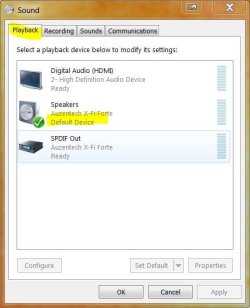
Make sure the HDMI is set as the 'Default Device' (big green tick) via Playback Devices / Sounds ie:

sound P.JPG

Or

Disable the Realtek device via Device Manager > Sound, Video and game controllers

Sound device.JPG


And stop the Realtek Sound Manager running at startup by disabling via Msconfig

Type msconfig in the search bar > Startup tab and untick the entry for the Sound Manager
 

My Computer My Computer

At a glance

8 Pro x64i7 3770K 4.6GHz16GB G.Skill Trident X 2666mhzx2 EVGA 780 Ti Superclocked SLI
Computer type
PC/Desktop
Computer Manufacturer/Model Number
Systems by SmartEyeball
OS
8 Pro x64
CPU
i7 3770K 4.6GHz
Motherboard
ASUS P8Z77 WS
Memory
16GB G.Skill Trident X 2666mhz
Graphics Card(s)
x2 EVGA 780 Ti Superclocked SLI
Sound Card
SB X-FI Surround 5.1 PRO USB / ATH-AD900 Headphones
Monitor(s) Displays
x3 Dell U2410 / 58" Samsung
Screen Resolution
5760*1200/ 1920*1200
Hard Drives
2x Intel 520 240GB (RAID 0) * 2x WD Caviar Blacks 2TB (RAID 0) * 2TB WD Caviar Black * Sony Optirac DVD
PSU
Silverstone Strider Evolution 1200W
Case
Thermaltake Level 10 GT Snow Edition
Cooling
Noctua NH-D14
Keyboard
Topre Realforce // Ducky Shine MX Black // Filco Ninja TKL
Mouse
Thermaltake Theron (Highly Recommended) + Razer Imperator
Antivirus
MSE
Browser
IE, FF, WaterFox
Other Info
GT Extreme V2 Sim Racing Cockpit + 40" LCD and K/B Mouse stand ▼
Fanatec CSR Elite Wheel + Clubsport V1 Pedals + CSR shifter/7G-H ▼Saitek X52 Pro ▼ TrackIR 5 Pro
Buttkicker v2 Seat Rumbler with Dedicated 5.1 and Sub Woofer attached to frame ▼
=
Bloody Big Grin
smartyball Thank You! that work perfect I had tried disabling realtek but did not uncheck in msconfig that is key to ending the conflict I was having thank you and all others for help and input. :)
 

My Computer My Computer

At a glance

7 32 bitatom3 gbnvidia
Computer Manufacturer/Model Number
acer revo
OS
7 32 bit
CPU
atom
Memory
3 gb
Graphics Card(s)
nvidia
Back
Top