Why do you use a virtual machine?

Hi there

Yes -- but paying 250 USD for a piece of hardware in order to do this is really going against the spirit of the question - which was essentially to see given an OS-X install disk could you create a working Guest OS-X VM.

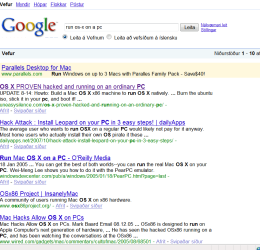
However Google is your friend here -- try some of these links - It doesn't seem as difficult as I originally thought -- of course you'll need a valid OS-X install disc.

I might have a go with this myself just for fun. :D

Cheers
jimbo
 

Attachments

  • maconpc.png
    maconpc.png
    39.9 KB · Views: 45

My Computer

Computer type
PC/Desktop
Computer Manufacturer/Model Number
Custom built, several laptops HP/ASUS
OS
Linux CENTOS 7 / various Windows OS'es and servers
CPU
Intel i7 Intel i5
Memory
8GB, 16GB
Graphics Card(s)
On Motherboard
Sound Card
Realtek HD audio
Monitor(s) Displays
Apple Cinema display, Samsung LCD
Screen Resolution
1920 X 1080
Hard Drives
4 X 1TB SATA
Mouse
Toshiba wireless laser
Internet Speed
> 20MB up
So, So, So

My beautiful wife watches Filipino TV streamed out of Manila. These streams will only play in WiMP. The cost is 90% below the cost of the cable/satellite config necessary to watch the broadcast equivelant. The streams will not all run properly in Win7. Some will, some will not. Tech support blames lack of codec compatibility. To me that must mean that TFC (Filipino TV) is compressing different shows with various codecs, rather than all shows with the same codecs. Tech support says that nothing they stream will work in Win7. Whatever.

The DRM can only be registered on a single machine. My only current XP class machine at home is a P3 866 MHz w/256 RAM. I pulled it out of a dumpster. It works OK, as I have it configured much like a TV - it just goes to one website and only runs two non-TSR apps, IE7 and WiMP10. It is just so freaking slow.

So, I run VirtualXP. But guess what? The video playback absolutely sucks. Very choppy and AV sync issues. I will spend the next week learning all about this technological challenge.

So, I boot into XP. I'm there right now. She's watching the news on the 24 inch and I am preparing some legal documents and typing this on the 46 inch.

So, I just want to play on the PC while my beautiful wife watches her TFC. That's why.
 
I have a few uses for XP Mode. (Haven't tested yet though.)

We have a website we use that loads the IBM Host on Demand service. This page works fine if you use a single core processor machine. If you use a multi-core one, it locks up. Period. Our service provider has coded a new page with 1/2 of the functions we need that works in multi-core support though. So I'm sure the original page is just badly written. We've tried for months to get them to update it. No luck.
I'll use XP Mode (or VPC) to create a virtual machine using just 1 core. Hopefully this will make the machine appear as a single core unit and the main page will work again.

Also we have a few users who connect via Cisco VPN to another network. The admin of this site has decided when connected, the user's LAN capabilities go away. Since we use Roaming Profiles (w/Redirected Folders), this means our users can connect to the VPN, but when they do, they don't have access to any of their files anymore. :/ Using XP mode, I hope to have them use the virtual machine to connect to the VPN, leaving Win7 functional on the LAN. This way the XP machine will lose LAN services while maintaining the VPN in a window for the user. I know the RPC over HTTP won't work with this setup though, so it'll be full blown virtual window for them.
 

My Computer

Computer Manufacturer/Model Number
Custom
OS
Windows 7
CPU
Pentium D 2.66
Motherboard
Asus P5ND2-SLi
Memory
4 gigs DDR2
Graphics Card(s)
BFG nVidia 8600 GT OC
Sound Card
nForce 4 (realtek)
Monitor(s) Displays
Samsung 204B
Screen Resolution
1600x1200
Hard Drives
Western Digital Raptor 150
Western Digital 320 (both SATA)
PSU
BFG 600 watt
Cooling
fan
Keyboard
MS Natural
Mouse
MS Sidewinder
Internet Speed
10 mb
I use virtualization with VirtualBox, for testing purpose.

Having a direct acces to an old XP, a linux ubuntu/Debian.
Testing new OS (I always test in VM before hard installation)

I use it for offline configuration for my server.
The server run Debian R4, on the server run a VM with Windows Home Server.
I can test some config of Debian on a VM before managing the "real one", same for WHS.

Sometimes the VM with XP help me for desk support, when I need to remember how to do some tweak under XP as I din't use it since Vista.

But I never have to use it for compatibility issues at this time.

VM stuff is very helpfull for lot of thing.
 

My Computer

OS
Vista H.P. SP1 x32 Seven RC x64
CPU
Q6600 @ 3.4Ghz
Motherboard
GA-EP45-DS3L
Memory
4Go PC2-6400
Graphics Card(s)
8500GT @ 700/500
Sound Card
Audigy Platinium
Monitor(s) Displays
Mitsubishi Diamond Pro 920 + Mitsubishi Diamond Pro 720
Screen Resolution
1600x1200 twice
Hard Drives
Hitachi 160Go
Maxtor 160Go (system drive)
Maxtor 200Go in Antec MX-1 EC external box (eSATA-USB2.0)
PSU
Corsair VX550W
Case
Thermaltake Xaser III
Cooling
Watercooling (CPU, GPU, HDD, NB)
Keyboard
MS Wireless Multimedia 6000 V2.0
Mouse
IntellEye Explorer 3.0
Internet Speed
ADSL 18Mbit/s/1Mbit/s
I use Secure client from Checkpoint version 60, no go in win7
 

My Computer

OS
Windows 7 Ultimate x64
Sorry to bump an old thread, but I use VMs a lot (one of my favorite topics)

I use VMs to:

1) test software, I install stuff, try it out, then uninstall it. That way I can see how good the software is, and if it uninstalls cleanly without screwing stuff up, then I decide whether to put it on my real machine
2) keep some non-essential apps on a vm instead of having 200 apps installed on my main machine, which can slow crap down (too many apps put things in your startup or task manager) I have different vms for different things (media editor vm, ...)
3) do development work, instead of crapping up my main machine with a apache/php and coldfusion dev envirnoments, I can have them seperate vms and run the servers and programs when I need to only
4) testing browsers, MS has some free xp vms for testing in ie6, 7 and 8, they expire after a few months of course

Some people use them for
1) to try different OSes out (linux, etc...)
2) old games

Take a look at the VMs on vmware's site and you'll get some more ideas on how to use them. VMs are much easier to deal with than another computer and KVM, plus you aren't wasting electricity having by another computer turned on.
 

My Computer

Computer Manufacturer/Model Number
custom built
OS
Windows 7 RC 64bit
CPU
amd
Motherboard
msi
Memory
2gb
Graphics Card(s)
nvidia
Sound Card
audigy 2 zs
Monitor(s) Displays
21" lcd widescreen
Hard Drives
300gb in 3 partitions (1 for winxp, 1 for win7-64, and 1 for data)
Keyboard
old HP
Mouse
5 button
Internet Speed
cable
Other Info
xpmode installed and working :)
dualbooting with xp pro on same hdd
I use virtualization for practically anything

1). Learning how to install and configure software
2). Write documentation for work purposes for future installs and configs
3). Learning about things that typically require lots of hardware. For example, doing software RAID arrays and learning how to fail, replace and rebuild an array. This can easily be done, documented and used for training purposes
4). Setting up things like Microsoft Clustering services...which typically require shared storage, etc. With VM's, you can setup shared files and so forth and do the same thing which are great for learning purposes.
5). If I want to surf a website which might have questionable content than I can fire up a VM, and use the browser then instead and keep my primary machine safe.
6). Testing is so much faster in a VM. Reboots happen almost immediately...and if you have ever used true server class hardware...sometimes the POST process itself can take up to 2 minutes before the OS even starts to load.
 

My Computer

Computer Manufacturer/Model Number
Self-Built in July 2009
OS
Windows 7 Ultimate x64
CPU
Intel Q9550 2.83Ghz OC'd to 3.40Ghz
Motherboard
Gigabyte GA-EP45-UD3R rev. 1.1, F12 BIOS
Memory
8GB G.Skill PI DDR2-800, 4-4-4-12 timings
Graphics Card(s)
EVGA 1280MB Nvidia GeForce GTX570
Sound Card
Realtek ALC899A 8 channel onboard audio
Monitor(s) Displays
23" Acer x233H
Screen Resolution
1920x1080
Hard Drives
Intel X25-M 80GB Gen 2 SSD
Western Digital 1TB Caviar Black, 32MB cache. WD1001FALS
PSU
Corsair 620HX modular
Case
Antec P182
Cooling
stock
Keyboard
ABS M1 Mechanical
Mouse
Logitech G9 Laser Mouse
Internet Speed
15/2 cable modem
Other Info
Windows and Linux enthusiast. Logitech G35 Headset.
Running different os dependent appliactions, such as OpenVpn. And my MySql server so its not on my main os.
 

My Computer

Computer Manufacturer/Model Number
SMN-Productions
OS
Windows 7 x86/x64, Server 2008r2, Web Server 2008
CPU
i7 v2 3930K Steping stone 2
Motherboard
ASUS Rampage IV Extreme
Memory
G.SKILL Ripjaws Z Series 32GB
Graphics Card(s)
AMD HD 5770
Monitor(s) Displays
Acer 21" and Samsung 20"
Hard Drives
Patriot Pyro 80GB
PSU
1000 Watt
Case
HAF-X
Cooling
4 Fans
Keyboard
Black Widow Ultimate
I just thought of another reason. You can use old hardware devices instead of having to upgrade to a new OS if the old hardware doesnt have drivers for newer OSes.

I have an old HP scanner from 99 that only has OCR software for XP or lower. So I'll probably have to setup a VM if I ever need OCR support (rarely used it, but could come in handy sometime). Beats buying a new scanner. I'm sure this could save some people from having to buy a new printer or something also.
 

My Computer

Computer Manufacturer/Model Number
custom built
OS
Windows 7 RC 64bit
CPU
amd
Motherboard
msi
Memory
2gb
Graphics Card(s)
nvidia
Sound Card
audigy 2 zs
Monitor(s) Displays
21" lcd widescreen
Hard Drives
300gb in 3 partitions (1 for winxp, 1 for win7-64, and 1 for data)
Keyboard
old HP
Mouse
5 button
Internet Speed
cable
Other Info
xpmode installed and working :)
dualbooting with xp pro on same hdd
@s0me0ne
In regards to your post.
Respectfully It makes little sense.
You can use old hardware devices instead of having to upgrade to a new OS if the old hardware doesnt have drivers for newer OSes.
( Did you mean "having to upgrade to a new device if the old hardware"?)

Are you saying run the old OS nativity and use the newer OS as a guest? Or the other way around?(New os native and the older OS as a guest.)
Most of the older hardware has generic drivers for them. Mainly its just newer devices made within the past 2-3 years that has issues(At least from my older hardware). If im not mistaken XP had OCR built in, cause I used to have an old 95 printer plugged it into the LPT port rebooted. Scanned something and it output a text document instead of an image. If that was the case im sure vista and 7 have it built in to, if not there should be a freeware out there some place.
 

My Computer

Computer Manufacturer/Model Number
SMN-Productions
OS
Windows 7 x86/x64, Server 2008r2, Web Server 2008
CPU
i7 v2 3930K Steping stone 2
Motherboard
ASUS Rampage IV Extreme
Memory
G.SKILL Ripjaws Z Series 32GB
Graphics Card(s)
AMD HD 5770
Monitor(s) Displays
Acer 21" and Samsung 20"
Hard Drives
Patriot Pyro 80GB
PSU
1000 Watt
Case
HAF-X
Cooling
4 Fans
Keyboard
Black Widow Ultimate
I mean using a new os native and the older os as a guest. I'll admit I haven't tested for OCR support in XP, but I just realized the software for my HP scanner used a third party plugin for OCR support.

I may have jumped the gun, but I also read something on slashdot recently about a person that had an old printer and he couldn't get new drivers for it to run on newer OSes (windows), so I thought this might be another good reason for a VM.
 

My Computer

Computer Manufacturer/Model Number
custom built
OS
Windows 7 RC 64bit
CPU
amd
Motherboard
msi
Memory
2gb
Graphics Card(s)
nvidia
Sound Card
audigy 2 zs
Monitor(s) Displays
21" lcd widescreen
Hard Drives
300gb in 3 partitions (1 for winxp, 1 for win7-64, and 1 for data)
Keyboard
old HP
Mouse
5 button
Internet Speed
cable
Other Info
xpmode installed and working :)
dualbooting with xp pro on same hdd
Back
Top