Why do you use a virtual machine?

RST101

Xtreme PC Gamer
Guru
VIP
Local time
8:23 PM
Messages
1,086
Location
Ellesmere Port, UK.
As the title suggests I would like to know for what purposes do you use a virtual machine. Is it for performance issues or compatibility or do you do it because you can? I have never used it myself as I have never had the need to so don't really know what it's all about, but I cant get my head around why you would not want to just run things off the operating system you have. I'm fortunate in that all the games and software I use have no problems running on x64 windows 7 so xp mode wont be installed on my machine.
 

My Computer

Computer Manufacturer/Model Number
Custom Build.
OS
Windows 7 Ultimate x64.
CPU
i5 760 @ 4.2Ghz. 1.18v
Motherboard
Gigabyte - H55M-USB3
Memory
4g Corsair xms3 ddr3, 1600Mhz.
Graphics Card(s)
Gigabyte GTX-560Ti soc edition
Sound Card
Asus Xonar Dx - Logitech Z5500.
Monitor(s) Displays
Acer 22" LCD Wide screen 1680-1050 -Samsung 42" Plasma....
Screen Resolution
1680/1050 -----1920/1080p.
Hard Drives
2x 2TB Seagate Go Flex,
1x 1TB Seagate,
1x 640WD Black,
x16 Gig sandisc flash drive,
1x8Gig sandisc flash drive.
PSU
XigmaTek 80plus NRP-PC702 - 700w dual 30a.
Case
Venus Gamers Midi Tower Case with LED Display
Cooling
Arctic Freezer 7 Pro Rev 2... x2 Arctic F8 case fans........
Keyboard
Logitech G15-v2 Gaming.
Mouse
Microsoft Sidewinder X8.
Internet Speed
Virgin Media - 50mb down- 8mb up.
Other Info
x2 Xbox 360 wireless controllers...

Dual layer optical disc drive...

Chrome 79million

A.V = MSE
Personally, I use it for 2 reasons:

1. Applications that require XP

For example, at the moment I have an XP VM for testing an SSL VPN connection, that does not work on 7, so I can still connect to a corporate network.

2. Server testing

I run a few 2003 servers, for testing server stuff. This works well on Windows Virtual PC (better than VPC2007 did on the the Beta).
 

My Computer

OS
Windows 7 RC
Mitchell on Demand 2005 does not work on Win7 correctly... it works, but not 100%..

I have not tried MasterCam X2 yet on Win7, but I hear it does not work, so I am perpared with my XP VM to use it.
 

My Computer

Computer Manufacturer/Model Number
Dell XPS 420
OS
WIN 7 Ultimate 7127 RC
CPU
Intel duo
Motherboard
Dell XPS 420
Memory
Dell 4 Gig
Graphics Card(s)
Nvidia 9800GT
Sound Card
Sigma on board
Monitor(s) Displays
Dell 24"
Screen Resolution
1920
Hard Drives
SATA
Other Info
Apple iMac 2.8 Intel Duo
OSX 10.5.6
4 GIG
1TB
well i wanted to try it out but apparantly Sony doesnt want its Vaio customers doing so...
 

My Computer

Computer Manufacturer/Model Number
Sony
OS
Main OS: Windows 7 64 bit, Secondary: Vista 32 bit
CPU
Intel Core 2 Duo P8400 @ 2.26 Ghz
Motherboard
Intel PM45
Memory
4GB DDR2
Graphics Card(s)
ATI Radeon Mobility HD3470
Sound Card
Integrated Realtek
Monitor(s) Displays
Integrated (Laptop) 16.4 inch
Screen Resolution
1600x900
Hard Drives
320 GB
Mouse
Logitech
Internet Speed
1 Mb/s
To play around with server 2008 and also comes in handy if I'm over at Vista forums as I can have Vista running in a VM and not lose use of W7 for other things.

Gary
 

My Computer

Computer Manufacturer/Model Number
Dell XPS420
OS
Vista Ult 64 bit Seven Ult RTM x64
CPU
Intel Core2 Quad Q6600 2.40 gigahertz
Memory
Crucial Ballistix 4x2GB PC2 6400
Graphics Card(s)
NVIDIA GeForce 8600 GTS 256 MB
Sound Card
Creative SB X-Fi audio
Monitor(s) Displays
HP w2207 + HPvs15
Screen Resolution
1680x1050 + 1024x768
Hard Drives
2-WD5000AAKS-500 GB
WD5000AAV-500 GB external
Keyboard
Microsoft Comfort Curve
Mouse
MX Revolution
Other Info
Wacom Intuos 2 Graphics Tablet
Experience Index=5.5
So far, I've used mine for Exchange 2007 Management Tools and the 2003 Server Admin Tools Pack.
 

My Computer

OS
Windows 7 Pro x64
CPU
Intel Core i7-860 @ 2.98GHz
Motherboard
EVGA P55 LE
Memory
G.Skill Trident DDR3 2000 (4x2GB)
Graphics Card(s)
EVGA nVidia GeForce 260GTX Core 216
Sound Card
On-Board
Monitor(s) Displays
ASUS VW246H 24" 1080p
Screen Resolution
1920x1080
Hard Drives
2 x 74GB Western Digital 10,000 RPM Raptors [Raid-0]
Western Digital Caviar Black 1TB
Western Digital Caviar 750GB - SATA
Maxtor OneTouch 250GB Firewire/USB
PSU
Corsair TX750W
Case
Chenming 602 [Black]
Keyboard
Microsoft Digital Media Pro
Mouse
Logitech MX510 [Blue]
Internet Speed
Cable - 10MB/s
For me i'm running windows XP with windows 7 in a virtual machine. Its because I didn't know if I would like windows 7 or not so I didn't want to commit my PC to it. This way if something goes wrong it goes wrong inside the virtual PC, it doesn't leave. And if I want to delete 7 I can easily enough. Now that I've used it for a while I'm seriously thinking about going and buying a new machine, likely a cheap laptop to use seven on. Until 7 comes out and is available in a more permanent solution I wont be committing my current machine to 7.
 

My Computer

Computer Manufacturer/Model Number
Seanix Desktop PC
OS
Windows 7 Ultimate 32 bit
CPU
Intel Core 2 Duo CPU E4500 2.20 GHz
Memory
1.99 GB
Graphics Card(s)
Intel G33/G31 Express Chipset Family (256 MB)
Sound Card
Realtek ALC888/1200
Monitor(s) Displays
DELL
Screen Resolution
1280 X 1024
Hard Drives
320GB Internal
200GB External
Case
Seanix
Keyboard
Seanix USB Keyboard
Mouse
Seanix USB Keyboard
Internet Speed
Broadband
Other Info
Getting close to 3 years old.
for honeypoting!...:)
that and testing different OS's on it.. (VPC still has a longs ways to go in the matter of features)
 

My Computer

Computer Manufacturer/Model Number
Tx2500z Tablet Pc/Homemade Server
OS
Windows 7 Ult x64(x2), HomePrem x32(x4), Server 08 (+VM), 08 R2 (VM) , SuSe 11.2 (VM), XP 32 (VM)
CPU
Turion X2 ultra (oh well came with laptop)/P4 @3.2 (yes P4)
Motherboard
IDK HP Motherboard / Intel DG965SS
Memory
OCZ Dual Channel 4GB kit/ 1gb Dual Channel
Graphics Card(s)
HD 3200 graphics /GMA x3100 (yay for intergrated!!)
Sound Card
Realtek HD Audio(mic working, well sort of)/Siig IC-70012
Monitor(s) Displays
built-in Hp 12" laptop screen/ Acer 19"
Screen Resolution
1280x800 /1440x900
Cooling
All Air Cooled
Mouse
Logi MX Rev. /MS Wheel Optical 1.1A /Logitech Optical Mouse
Internet Speed
College baby but its still routed through vpn to 1536k...
Other Info
love my wacom pen and pressure sensitivity...
wished it worked in 7, SUSE for that matter though
I use the VM for some very old apps written in 98 but run in XP for specail equipment the writers of the software are no where to be found today so porting them to Vista or 7 is on the impossible side. I also have a Win2k Server in VM due to work and testing settings before I change the real one. We are now looking at moving to Server 2008 but with everyone tighting the money belt that might not happen so Im looking at ways to run the old Servers as long as I can.
Plus I the added reason is I can and makes it very nice in meetings to show people what the server or app looks like on a laptop running server and the app by its self letting the customer toy around with it not having to worry about the real database cause I can wipe the demo copy and reset a new one from the orginail. Full network right in your hands on a laptop makes life easier.
 

My Computer

Computer Manufacturer/Model Number
Custom Build
OS
Windows 7 Ultimate x64 SP1
CPU
AMD Phenom II 1090 3.2 six core
Motherboard
MSI 890FXA-GD65
Memory
16 gig DDR3
Graphics Card(s)
MSI R6950 2gig
Sound Card
on board
Monitor(s) Displays
Acer 23inch led
Screen Resolution
1900x1080 widescreen
Hard Drives
Seagate 1tb SATA6
2x 1tb HITACHI Deskstar
PSU
CORSAIR Enthusiast Series TX750 V2 750W
Case
CoolMaster HAF 922
Cooling
Box AMD Heatsink/Fan
Internet Speed
Cable 12Mbps/3Mbps
Hi all
There's no way I can run THIS on W7 or even any 64 Bit OS currently.

If you need to access this type of Software (SAP) you have to wait until this has been upgraded.

As there are literally thousands of companies running this world wide doing an upgrade on this scale is going to take years.

It's one thing to upgrade a base OS running a few stand alon Office type applications but running a fully blown ERP system containing HR, Finanace, Materials Management, Logistsics etc etc is a totally different ball game.

It will still be a while yet before this stuff will run on W7 - and larger companies might take YEARS before they upgrade. Virtualisation is the only answer.

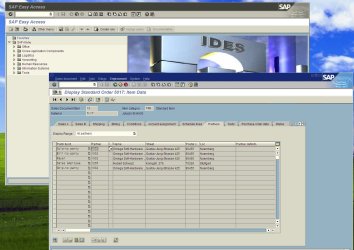
Here's a typical shot of a SAP application screen -- this is running on an XP VM front end (note the database and application servers are usually on Linux servers whilst the front end is a Windows server).


Cheers
jimbo
 

Attachments

  • ides.jpg
    ides.jpg
    475.6 KB · Views: 305

My Computer

Computer type
PC/Desktop
Computer Manufacturer/Model Number
Custom built, several laptops HP/ASUS
OS
Linux CENTOS 7 / various Windows OS'es and servers
CPU
Intel i7 Intel i5
Memory
8GB, 16GB
Graphics Card(s)
On Motherboard
Sound Card
Realtek HD audio
Monitor(s) Displays
Apple Cinema display, Samsung LCD
Screen Resolution
1920 X 1080
Hard Drives
4 X 1TB SATA
Mouse
Toshiba wireless laser
Internet Speed
> 20MB up
me, I just like messing about with virtualisation, seeing what ancient OS I can install. Managed to get Windows 1.1 installed in the past lol.
 

My Computer

Computer Manufacturer/Model Number
self built
OS
Windows 7 Professional 64-bit
CPU
Intel E8400 3GHz
Motherboard
Intel DX48BT2
Memory
Kingston PC3-10700H 4Gb
Graphics Card(s)
XFX Radeon HD 5850 BlackEd.
Sound Card
Asus Xonar DG
Monitor(s) Displays
2x Samsung SM-T220HD 22"
Screen Resolution
1680x1050 on two monitors
Hard Drives
OCZ Vertex 2 120gb 3.5" (OS)
Seagate Momentus XT 500gb
Samsung F3 1Tb (games)
2x Samsung F1 1Tb
PSU
Thermaltake ToughPower 850w
Case
Thermaltake Armor
Cooling
Scythe Mugen II
Keyboard
Microsoft Comfort Curve USB
Mouse
Razer Diamondback 3G
Internet Speed
8128/443
I use VirtualBox to run Windows XP. I had to do this because I have some VPN applications that don't work in Windows 7. This, however, has let me see some hidden benefits.

First, I keep all of my work stuff separate. If I format my computer, my virtual machine image is intact, meaning I don't have to reinstall anything for work related tasks.

Second being all my network traffic doesn't go through the VPN anymore, only what the VM does. So my Windows 7 (the host OS) uses my connection regularly, and my XP (guest VM OS)'s traffic goes through the VPN

It works pretty well, so I'm keeping it this way even when the apps get Win7 support
 

My Computer

OS
Win
1. To try out something more serious, like mess with system files, without fLucking up my real OS

2. For fun, when the best of the best (Win7) starts to get boring, it's always fun to go to the basement, find those old original CD's of NT and check what it was like back then. Still, no harm done to your real OS.

3. Last for compatibility issues, sure I haven't seen many of those since I've started using 7, but it's wise to keep the classic XP in handy whenever you need it...
 

My Computer

Computer type
PC/Desktop
Computer Manufacturer/Model Number
Multirama PC Expert [Bulgaria]
OS
Windows 7 Home Premium [64-Bit]
CPU
Intel Core 2 Quad CPU Q8200 @ 2.33 GHz
Motherboard
GIGABYTE GA-G31M-S2C
Memory
4094 MB DDR2
Graphics Card(s)
SAPPHIRE Radeon HD 6970 (2 GB VRAM)
Sound Card
Realtek ALC883 @ Intel 82801GB ICH7 - High Definition Audio
Monitor(s) Displays
Samsung SyncMaster BX2235 [21.5" LCD with LED Backlight]
Screen Resolution
1920x1080
Hard Drives
Hitachi HDT721075SLA360 - 750 GB
PSU
Cooler Master GX750 - 750W
Case
Multirama (Black / 2010 Revision)
Cooling
Stock + Cooler Master
Keyboard
Logitech G510 (Gaming Keyboard)
Mouse
Razer Lachesis (4000 DPI, Blue Version)
Internet Speed
Vivacom Optical [100 Mbps]
Browser
Chrome [Windows]
As somebody already mentioned, some vpn clients (like Cisco or Nortel) works intermittently with Windows7/Vista at best, so I need to run WinXP for vpn. I also run some server stuff, like IIS for some scripting job...and of course to play around with different flavors of Linux. I wonder a user mentioned that he wanted to run vm but he can't since he has a Vaio...I have a Vaio and I run VMWARE x64...
 

My Computer

Computer Manufacturer/Model Number
Sony Vaio VGN-CR123E/B
OS
Windows 7 RTM (x64)
CPU
Intel T7300
Memory
Samsung 4GB DDR2 667
Graphics Card(s)
Intel x3100 GMA
Monitor(s) Displays
eMachines E211H (21" 1080p)
Screen Resolution
1280x800
Hard Drives
WD SCORPIO WD3200BEKT (320GB 7200)
Mouse
Logitech Wireless Notebook Mouse
Other Info
VMWare Workstation 6
VMs: Windows2008 R2, Windows XP Pro, Chrome OS (Pre-Beta), Jolicloud.
Also running Windows VirtualPC/XP Mode since MS removed the VT restriction
So I have one question, can I run OSX in this ???
 

My Computer

Computer Manufacturer/Model Number
HP G60-230US
OS
Windows 7 Ultimate X64
CPU
Intel Pentium Dual-Core T4200 @ 2.0 GHz
Memory
4GB's
Graphics Card(s)
Mobile Intel 45 Express
Sound Card
Conexant High Definition SmartAudio 221
Monitor(s) Displays
16"
Screen Resolution
1366X768
Hard Drives
320GB
Mouse
Logitech M305
Internet Speed
Cable
So I have one question, can I run OSX in this ???

Provided you have the Intel version of the macbook you *could* in theory run this on a PC (you need an OS install disk to install the Virtual OS whatever OS you want as a guest)

However there's a caveat here apart from the legal B/S stuff about running APPLE OS'es on non APPLE gear. There are some closed proprietary drivers that might not be supported in the Virtual hardware when you try and install the OS.

So i haven't heard of anybody actually running OSX on a non Apple machine -- however since OSX is only a Unix derivative why not run one of the many Linux distros out there -- these are very OSX like and you've got a lot more choice.

Note of course there isn't any problem in running WINDOWS on a Macbook in a virtual machine -- try BOOTCAMP or PARALLELS for the Virtual machine software. (You will need an XP install disk as well of course).

Cheers
jimbo
 

My Computer

Computer type
PC/Desktop
Computer Manufacturer/Model Number
Custom built, several laptops HP/ASUS
OS
Linux CENTOS 7 / various Windows OS'es and servers
CPU
Intel i7 Intel i5
Memory
8GB, 16GB
Graphics Card(s)
On Motherboard
Sound Card
Realtek HD audio
Monitor(s) Displays
Apple Cinema display, Samsung LCD
Screen Resolution
1920 X 1080
Hard Drives
4 X 1TB SATA
Mouse
Toshiba wireless laser
Internet Speed
> 20MB up

My Computer

Computer Manufacturer/Model Number
Sony Vaio VGN-CR123E/B
OS
Windows 7 RTM (x64)
CPU
Intel T7300
Memory
Samsung 4GB DDR2 667
Graphics Card(s)
Intel x3100 GMA
Monitor(s) Displays
eMachines E211H (21" 1080p)
Screen Resolution
1280x800
Hard Drives
WD SCORPIO WD3200BEKT (320GB 7200)
Mouse
Logitech Wireless Notebook Mouse
Other Info
VMWare Workstation 6
VMs: Windows2008 R2, Windows XP Pro, Chrome OS (Pre-Beta), Jolicloud.
Also running Windows VirtualPC/XP Mode since MS removed the VT restriction
Back
Top