
Why does blue circle spin for 30 seconds before menu window appears? Only happens when working with the 'Save picture as' function.
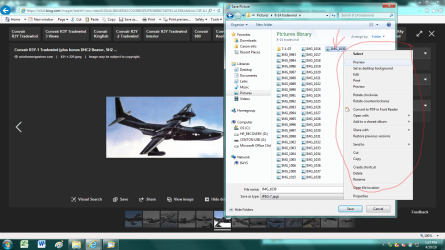
Right clicking on a picture in IE 11 to 'save picture as' to a folder or any location, there are other pictures in the folder and I right click on one to see what it is. The 'blue circle of death' spins for 20 to 30 seconds before the menu window opens. This just started about 4 to 5 months ago. Prior to this time period the window would appear instantaneously. This is extremely annoying when trying to get things done quickly. Wouldn't mind if I had all day to wait around for things to happen.
Anyone have a clue as to what is going on (?) and how to fix or repair what ever function controls this ? Hope I'm not in the wrong category to post this and if I am please direct me to the correct one.
Have included a screen shot as an example.
Thanks in advance for any and all help.
Right clicking on a picture in IE 11 to 'save picture as' to a folder or any location, there are other pictures in the folder and I right click on one to see what it is. The 'blue circle of death' spins for 20 to 30 seconds before the menu window opens. This just started about 4 to 5 months ago. Prior to this time period the window would appear instantaneously. This is extremely annoying when trying to get things done quickly. Wouldn't mind if I had all day to wait around for things to happen.
Anyone have a clue as to what is going on (?) and how to fix or repair what ever function controls this ? Hope I'm not in the wrong category to post this and if I am please direct me to the correct one.
Have included a screen shot as an example.
Thanks in advance for any and all help.
Attachments
My Computer
- Computer type
- PC/Desktop
- Computer Manufacturer/Model Number
- HP s5610y
- OS
- Windows 7 Home Premium 64 bit SP1
- CPU
- AMD Athlon II x2 250 3.0 GHz
- Motherboard
- H-Apricot RS780L uATX
- Memory
- 8GB 2x Patriot Signature 4GB 240-Pin DDR3 SDRAM DDR3 1333 (P
- Graphics Card(s)
- ATI Radeon 3000
- Hard Drives
- WDC WD6400AAKS 6527B
- Antivirus
- Norton Internet Security With Backup
- Browser
- Internet Explorer 11

