

Why does it take so long to open a folder the first time after a boot? For instance, D:\Temp which is my generic work area only has 25 items in it yet after booting, it takes 10 to 15 seconds to open in Windows Explorer. 2nd and all subsequent times it opens almost instantly.
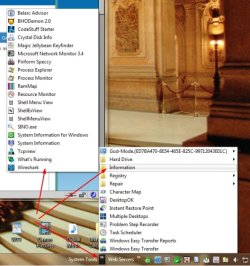
The same is true of Toolbars I've added to the Taskbar. I have System Tools there and the first time I hover over any of the sub folders, it takes the same 10 to 15 seconds before I see what is in those folders.
I've tried deleting Iconcache.db in various places but that did not make any difference. This is where I've found them:

The same is true of Toolbars I've added to the Taskbar. I have System Tools there and the first time I hover over any of the sub folders, it takes the same 10 to 15 seconds before I see what is in those folders.
I've tried deleting Iconcache.db in various places but that did not make any difference. This is where I've found them:
My Computer
- Computer type
- PC/Desktop
- Computer Manufacturer/Model Number
- Lenovo IdeaCenter 450
- OS
- Windows 10 Pro X64
- CPU
- Intel Quad Core i7-4770 @ 3.4Ghz
- Memory
- 16.0GB PC3-12800 DDR3 SDRAM 1600 MHz
- Graphics Card(s)
- Intel Integrated HD Graphics
- Sound Card
- Realtek HD Audio
- Monitor(s) Displays
- HP 22" LCD
- Screen Resolution
- 1680 x 1050
- Hard Drives
- 250GB Samsung EVO SATA-3 SSD
2TB Seagate ST2000DM001 SATA-2
1.5TB Seagate ST3150041AS SATA
- Keyboard
- Dell USB
- Mouse
- Lenovo USB
- Internet Speed
- Cable via Road Runner 3MB Upload, 30MB Download
- Antivirus
- Windows Defender, MBAM Pro, MBAE
- Browser
- Seamonkey
- Other Info
- UEFI/GPT
PLDS DVD-RW DH16AERSH


