
Solved Why does Memory Diagnostic Tool turn off my laptop on its own at 6%?

beck2ham

New member
Local time
6:43 PM
Messages
8
Hello,

I am running Windows-7 (64-bit) on Acer 5738.

Off late, my laptop has started misbehaving. It randomly turns off on its own...without any BSOD or anything. It simply Turn Off in the blink of an eye...without allowing me to save my work etc.

At first, I thought it might be due to erratic/unstable power supply. So I did the following tests:
  1. I confirmed that the Main Power Supply was stable. So it was ruled out as a possible culprit.
  2. The next likely suspicious character appeared to be my laptop's battery. I thought that maybe the battery wasn't able to provide a stable power supply. So I removed the battery and started using the laptop on direct A.C. power.
  3. However, even on direct A.C. power, it did the same...it would turn off randomly. There's no pattern to it...like a fixed time of day it would turn off. So I knew that it's not related to any scheduled activity and was likely a hardware issue.

While I started investigating the Event Viewer logs for these random turn offs. However, for each one of these random turn-offs, all the Event Viewer had to say was that "The previous system shutdown at <<time>> on ‎<<date>> was unexpected."
e.g.: The previous system shutdown at 7:55:19 AM on ‎10/‎22/‎2017 was unexpected.

I then came across this article:
https://blogs.technet.microsoft.com/mrsnrub/2008/12/30/the-previous-shutdown-was-unexpected/

As suggested in this blog post, I unchecked the "Automatically Restart" option. So my Startup and Recovery options are as shown in the attached image (titled "Startup and Recovery options.jpg").

However, even now, the system randomly turns off...without creating any dump files or giving me a BSOD.

So I thought maybe I should check my memory. And I ran the "Windows Memory Diagnostic" tool.
I ran it twice with the following settings: Extended, Cache ON, Pass=1.

In both runs, the system turned off at 6%. And no Memory Diagnostic logs are created in the Even Viewer.

Any ideas what my next step should be?

I tried running the Basic version of the Windows Memory Diagnostic Tool, instead of the Extended version. And the Basic tests completed successfully without turning off the laptop. Could this help me narrow down the problem to any specific hardware component/cause?
Also, even though the Basic version of tests completed successfully, I didn't find any test results in Event Viewer -> Windows Logs -> System. I right-clicked and clicked Find to find "MemoryDiagnostic". The only entries I see are those informing me that "The Windows Memory Diagnostic scheduled the testing of the computer's memory to run immediately". Are there not supposed to be any logs for successful tests?

Edit:
1. [24th October 2017 7:20 PM] I completely forgot to mention that although no logs were being created, and no BSOD is being shown, I created a Dump by following the procedure mentioned in this link: Blue Screen of Death (BSOD) Posting Instructions - Windows 7 Help Forums
The tool created the dump which is attached as a ZIP file titled "XOLO-Sat_10_21_2017_110502_23.zip".
2. [24th October 2017 7:48 PM] Before running Memtest, I just ran Windows' Memory Diagnostic Tool again. I can confirm that no errors are detected in Basic and Standard tests. But when I tried Extended Tests, it again crashed...not restart...but turn off.
 

Attachments
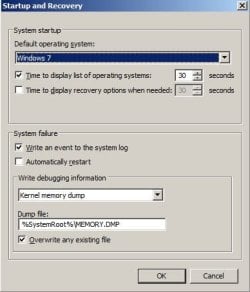
Last edited:

My Computer My Computer

At a glance

Windows 7 SP1 64-bitIntel(R) Core(TM)2 Duo CPU T6400 @ 2.00GHz6GB DDR3 (2GB + 4GB)Intel GMA 4500MD
Computer type
Laptop
Computer Manufacturer/Model Number
Acer 5738 laptop
OS
Windows 7 SP1 64-bit
CPU
Intel(R) Core(TM)2 Duo CPU T6400 @ 2.00GHz
Motherboard
Acer JV50_MV (Intel GM45/GM47 Chipset)
Memory
6GB DDR3 (2GB + 4GB)
Graphics Card(s)
Intel GMA 4500MD
Hard Drives
298GB Hitachi HTS545032B9A300 ATA Device (SATA)
Antivirus
Microsoft Security Essentials
Browser
Google Chrome

My Computer My Computer

At a glance

W7 home premium 32bit/W7HP 64bit/w10 tp insid...E5300 dual core3gbNvidia Geforce 7100 Nforce 630i
Computer type
PC/Desktop
Computer Manufacturer/Model Number
medionl/Aspire 6930G/acer x55a
OS
W7 home premium 32bit/W7HP 64bit/w10 tp insider ring
CPU
E5300 dual core
Motherboard
medion MS7366
Memory
3gb
Graphics Card(s)
Nvidia Geforce 7100 Nforce 630i
Monitor(s) Displays
avixc
Internet Speed
n (isp resticted to 72)
Antivirus
mse/pands
Browser
palemoon
Other Info
Belkin Fd7050 n USB using Railink RT2870 drivers, more upto date

My Computer My Computer

At a glance

Windows 7 SP1 64-bitIntel(R) Core(TM)2 Duo CPU T6400 @ 2.00GHz6GB DDR3 (2GB + 4GB)Intel GMA 4500MD
Computer type
Laptop
Computer Manufacturer/Model Number
Acer 5738 laptop
OS
Windows 7 SP1 64-bit
CPU
Intel(R) Core(TM)2 Duo CPU T6400 @ 2.00GHz
Motherboard
Acer JV50_MV (Intel GM45/GM47 Chipset)
Memory
6GB DDR3 (2GB + 4GB)
Graphics Card(s)
Intel GMA 4500MD
Hard Drives
298GB Hitachi HTS545032B9A300 ATA Device (SATA)
Antivirus
Microsoft Security Essentials
Browser
Google Chrome

Hello, Roy sir!

I used the USB option to run Memtest86+. Here are the results:
  1. Memtest offered me to select "Fail-Safe" or "Multi-threading". I selected neither. After a few seconds, it started the tests on its own. After 15% or so, the laptop turned off on its own again. Memtest didn't show list error(s) by then.
  2. I again let Memtest run on its own. This time, the laptop turned off on its own by the time 5-6% tests were completed.
  3. In the 3rd run, I selected "Fail-Safe" option. This time too, it turned off on its own after completing 7-8% tests.
  4. In the 4th run, I again selected "Fail-Safe" option. Again, it turned off on its own...this time, as soon as the tests started!
  5. In the 5th run, I selected the "Multi-threading" option. The laptop turned off on its own again...after about 6-7%.

So basically, in none of the runs did I find any errors. But none of the runs were successful because the laptop turned off on its own.

What should I try next?

Also, out of whim, before trying Memtest86, I tried to run Windows' Memory Diagnostic Tool in "Standard" mode. Then too, the computer turned off on its own.

So basically, with Memtest, my laptop turned itself off on every run.
But with Windows' Diagnostic Tool, my laptop turned itself off only when I ran the "Extended" tests, not when I "Basic" tests, or the "Standard" tests.

Would this be of any help in zeroing down the problem?
 

My Computer My Computer

At a glance

Windows 7 SP1 64-bitIntel(R) Core(TM)2 Duo CPU T6400 @ 2.00GHz6GB DDR3 (2GB + 4GB)Intel GMA 4500MD
Computer type
Laptop
Computer Manufacturer/Model Number
Acer 5738 laptop
OS
Windows 7 SP1 64-bit
CPU
Intel(R) Core(TM)2 Duo CPU T6400 @ 2.00GHz
Motherboard
Acer JV50_MV (Intel GM45/GM47 Chipset)
Memory
6GB DDR3 (2GB + 4GB)
Graphics Card(s)
Intel GMA 4500MD
Hard Drives
298GB Hitachi HTS545032B9A300 ATA Device (SATA)
Antivirus
Microsoft Security Essentials
Browser
Google Chrome
I would say that your laptop is turning off due to high CPU temperature.
How old it is? Have you ever cleaned the CPU heat sink?
Enter BIOS. Does it has a hardware temperature monitor?
 

My Computers My Computers

  • At a glance

    Windows 7 HP 64i5 6600K - 800MHz to 4200MHz4+4G GSkill DDR4 3000IG - Intel 530
    Computer type
    PC/Desktop
    Computer Manufacturer/Model Number
    custom build
    OS
    Windows 7 HP 64
    CPU
    i5 6600K - 800MHz to 4200MHz
    Motherboard
    GA-Z170-HD3P
    Memory
    4+4G GSkill DDR4 3000
    Graphics Card(s)
    IG - Intel 530
    Monitor(s) Displays
    Samsung 226BW
    Screen Resolution
    1680x1050
    Hard Drives
    (1) -1 SM951 – 128GB M.2 AHCI PCIe SSD drive for Windows 7 and Lubuntu
    (2) -1 WD SATA 3 - 1T for Data
    (3) -1 WD SATA 3 - 1T for backup
    PSU
    Thermaltake 450W TR2 gold
    Keyboard
    Old and good Chicony mechanical keyboard
    Mouse
    Logitech mX performance - 9 buttons (had to disable some)
    Internet Speed
    500Mb/s
    Browser
    Firefox 64
    Other Info
    TinyWall firewall
  • At a glance

    Windows 7 Proi7-4500U 800MHz to 3.0GHz(4+4)G DDR3 1600IG intel 4400 + NVIDIA GeForce GT 745M
    Computer type
    Laptop
    System Manufacturer/Model Number
    Asus Q550LF
    OS
    Windows 7 Pro
    CPU
    i7-4500U 800MHz to 3.0GHz
    Motherboard
    Asus Q550LF
    Memory
    (4+4)G DDR3 1600
    Graphics Card(s)
    IG intel 4400 + NVIDIA GeForce GT 745M
    Sound Card
    Realtek
    Monitor(s) Displays
    LG Display LP156WF4-SPH1
    Screen Resolution
    1920 x 1080
    Hard Drives
    BX500 120G SSD for Windows and programs +
    1T HDD for data
    Internet Speed
    500 Mb/s
    Browser
    Firefox
    Other Info
    TinyWall firewall
I would say that your laptop is turning off due to high CPU temperature.
How old it is? Have you ever cleaned the CPU heat sink?
Enter BIOS. Does it has a hardware temperature monitor?

The laptop is 9 years old.
No, I haven't cleaned the CPU heat sink.
The BIOS doesn't show temperature anywhere. I'm guessing its doesn't have such a feature.

So are suggesting is that I need to clean the fan in the laptop?

I've heard rumours about it being a cause of turning off/restart of computers. But after reading this article on Technet, I had ruled out that possibility. In the comments section, the writer says that, "...systems shutting down due to heat often refuse to power back on for a period of time, or until the temperature has dropped back to a safe level..."

But I, on the other hand, have never had any difficulties powering the laptop back on as soon as it it turns off.

But I'd try cleaning the heat sink.

But I have never really taken my laptop apart before. So I want to ask this: Heat sink refers to the fan unit in the laptop, right? Do I have to open it and clean it?

Also, I've seen online (such as this video, and this page) that they also replace the Thermal Paste. Is it mandatory to replace the Thermal Paste? Are their any guidelines how to buy the right thermal paste? Is it like simply putting on the Thermal Paste and spreading it along? How much Thermal Paste to apply?
 

My Computer My Computer

At a glance

Windows 7 SP1 64-bitIntel(R) Core(TM)2 Duo CPU T6400 @ 2.00GHz6GB DDR3 (2GB + 4GB)Intel GMA 4500MD
Computer type
Laptop
Computer Manufacturer/Model Number
Acer 5738 laptop
OS
Windows 7 SP1 64-bit
CPU
Intel(R) Core(TM)2 Duo CPU T6400 @ 2.00GHz
Motherboard
Acer JV50_MV (Intel GM45/GM47 Chipset)
Memory
6GB DDR3 (2GB + 4GB)
Graphics Card(s)
Intel GMA 4500MD
Hard Drives
298GB Hitachi HTS545032B9A300 ATA Device (SATA)
Antivirus
Microsoft Security Essentials
Browser
Google Chrome
Try to find a service manual for your laptop. It gives you step by step on how to get to the heat sink and fan.
Replace the thermal paste only if you take the heat sink from the CPU. Normally you can take the fan out and clean the heat sink.
Use a paint brush and a vacuum cleaner. Don't let the fan spin. Don't get the vacuum tube too close to computer parts (static discharge).

Just to be sure it's temperature, install a hardware monitor Open Hardware Monitor - Core temp, fan speed and voltages in a free software gadget
expand it to C:\Program Files (x86)\HardwareMonitor and execute the OpenHardwareMonitor.exe. Go to options tab
- Start minimized
- Minimize to tray
- Minimize on close
- Run on windows startup
 
Last edited:

My Computers My Computers

  • At a glance

    Windows 7 HP 64i5 6600K - 800MHz to 4200MHz4+4G GSkill DDR4 3000IG - Intel 530
    Computer type
    PC/Desktop
    Computer Manufacturer/Model Number
    custom build
    OS
    Windows 7 HP 64
    CPU
    i5 6600K - 800MHz to 4200MHz
    Motherboard
    GA-Z170-HD3P
    Memory
    4+4G GSkill DDR4 3000
    Graphics Card(s)
    IG - Intel 530
    Monitor(s) Displays
    Samsung 226BW
    Screen Resolution
    1680x1050
    Hard Drives
    (1) -1 SM951 – 128GB M.2 AHCI PCIe SSD drive for Windows 7 and Lubuntu
    (2) -1 WD SATA 3 - 1T for Data
    (3) -1 WD SATA 3 - 1T for backup
    PSU
    Thermaltake 450W TR2 gold
    Keyboard
    Old and good Chicony mechanical keyboard
    Mouse
    Logitech mX performance - 9 buttons (had to disable some)
    Internet Speed
    500Mb/s
    Browser
    Firefox 64
    Other Info
    TinyWall firewall
  • At a glance

    Windows 7 Proi7-4500U 800MHz to 3.0GHz(4+4)G DDR3 1600IG intel 4400 + NVIDIA GeForce GT 745M
    Computer type
    Laptop
    System Manufacturer/Model Number
    Asus Q550LF
    OS
    Windows 7 Pro
    CPU
    i7-4500U 800MHz to 3.0GHz
    Motherboard
    Asus Q550LF
    Memory
    (4+4)G DDR3 1600
    Graphics Card(s)
    IG intel 4400 + NVIDIA GeForce GT 745M
    Sound Card
    Realtek
    Monitor(s) Displays
    LG Display LP156WF4-SPH1
    Screen Resolution
    1920 x 1080
    Hard Drives
    BX500 120G SSD for Windows and programs +
    1T HDD for data
    Internet Speed
    500 Mb/s
    Browser
    Firefox
    Other Info
    TinyWall firewall
Spontaneous shutdowns are usually due to power problems or overheating. I would think a memory test would give the CPU a pretty good workout so if the problem was overheating this would bring it on quickly. Overheating wouldn't normally produce a BSOD. Overheating would cause the hardware to shutdown without the OS being aware there was a problem.
 

My Computer My Computer

At a glance

Windows 7 Pro 64 bitXeon W35208 GBNvidia Geforce 210
Computer type
PC/Desktop
Computer Manufacturer/Model Number
HP
OS
Windows 7 Pro 64 bit
CPU
Xeon W3520
Memory
8 GB
Graphics Card(s)
Nvidia Geforce 210
Thank you, Megahertz07 sir/ma'am and LMiller7 sir/ma'am!

I took my laptop apart following this service guide and this video. I cleaned the heatsink.

Thereafter, I ran Memtest86+ as suggested by torchwood sir/ma'am. I completed one complete pass of the tests run by that software!

Then, just to be certain, I ran the stress test using Prime95 as suggested in this article. It's been 2 hours since the stress test has been running and even though readings in HWMonitor suggest that my CPU has been running over 90 degree celcius since the stress test started, even hitting 95 degrees once, but it's been 2 hours since the test has been running and the laptop hasn't turned off on its own yet!

I'm so happy! It seems that the issue has been resolved!

Just to be clear, before cleaning the Heatsink (fan) module, my laptop never went past the 15% mark in Memtest86+'s tests...it would turn itself off before that. Also, running the stress test using Prime95, my laptop won't even last 15 minutes! It would turn itself off before that!

So I'm so happy with the results after cleaning the heatsink!

If the laptop continues to run fine even after 8 hours of Prime95's stress test, I shall mark this thread as resolved tomorrow.

Or should I be worried that the laptop is running beyond 90 degrees since the start of this stress test? Should it not touch the 90 degree mark?
 

My Computer My Computer

At a glance

Windows 7 SP1 64-bitIntel(R) Core(TM)2 Duo CPU T6400 @ 2.00GHz6GB DDR3 (2GB + 4GB)Intel GMA 4500MD
Computer type
Laptop
Computer Manufacturer/Model Number
Acer 5738 laptop
OS
Windows 7 SP1 64-bit
CPU
Intel(R) Core(TM)2 Duo CPU T6400 @ 2.00GHz
Motherboard
Acer JV50_MV (Intel GM45/GM47 Chipset)
Memory
6GB DDR3 (2GB + 4GB)
Graphics Card(s)
Intel GMA 4500MD
Hard Drives
298GB Hitachi HTS545032B9A300 ATA Device (SATA)
Antivirus
Microsoft Security Essentials
Browser
Google Chrome
Hello,

The problem seems to have not been cured completely. The system shutdown unexpectedly again. Event Viewer log says that the unexpected shutdown happened about 15 minutes after I wrote the previous comment. So, it shutdown only after 2 hours 15 minutes of stress testing.

I was actually worried at the temperatures hovering around 90-93 degrees Celsius during the stress test. My fears have come true..

What should be my next step? I've already cleaned the heat sink.
 

My Computer My Computer

At a glance

Windows 7 SP1 64-bitIntel(R) Core(TM)2 Duo CPU T6400 @ 2.00GHz6GB DDR3 (2GB + 4GB)Intel GMA 4500MD
Computer type
Laptop
Computer Manufacturer/Model Number
Acer 5738 laptop
OS
Windows 7 SP1 64-bit
CPU
Intel(R) Core(TM)2 Duo CPU T6400 @ 2.00GHz
Motherboard
Acer JV50_MV (Intel GM45/GM47 Chipset)
Memory
6GB DDR3 (2GB + 4GB)
Graphics Card(s)
Intel GMA 4500MD
Hard Drives
298GB Hitachi HTS545032B9A300 ATA Device (SATA)
Antivirus
Microsoft Security Essentials
Browser
Google Chrome
Just a suggestion.
Do not run prime 95 that long on any laptop. The odds are even a proper working laptop will not be able to dissipate the heat.

Check your temps while using your laptop in a normal fashion.

90C is way to hot. I would never stress any computer into the 90's C.

Jack
 

My Computer My Computer

At a glance

Windows 10 Pro. 64/ version 1709 Windows 7 Pr...Intel i7-6800K @ 4.3Corsair Platinum 16 gig @2400EVGA GTX 1070 OC
Computer type
PC/Desktop
Computer Manufacturer/Model Number
Home made Desktop
OS
Windows 10 Pro. 64/ version 1709 Windows 7 Pro/64
CPU
Intel i7-6800K @ 4.3
Motherboard
ASUS X-99 Deluxe II
Memory
Corsair Platinum 16 gig @2400
Graphics Card(s)
EVGA GTX 1070 OC
Monitor(s) Displays
Asus 27" LED LCD/VE278Q
Screen Resolution
1920-1080 or 1280-720 HDMI
Hard Drives
INTEL SSD 730-240 Gb Sata 3.0/
PSU
EVGA Platium 1200W
Case
Phanteks Luxe Tempered Glass 8 fans/ one radiator
Cooling
XSPC/ Water Cooled CPU
Keyboard
Das 4 Professional
Mouse
Logitech M705/MX Anywhere 2-S
Internet Speed
100 mbits
Antivirus
Microsoft Security Essentials/ Malwarebytes Premium 3.0/ SAS
Browser
I.E. 11 default/Firefox/ ISP Time Warner Cable/Spectrum
Other Info
LG BluRay Burner/
Sound system-KLipsch-THX/
Icy Dock ssd Hot Swap bays.
Just a suggestion.
Do not run prime 95 that long on any laptop. The odds are even a proper working laptop will not be able to dissipate the heat.

Check your temps while using your laptop in a normal fashion.

90C is way to hot. I would never stress any computer into the 90's C.

Jack


Sir/Ma'am,

Does that mean that my laptop is fine now? I've been using the laptop for my normal usage since morning (it's been 10 hours since the laptop is under use), and the CPU temperatures are in the range of 57-62.

Is this acceptable performance?
 

My Computer My Computer

At a glance

Windows 7 SP1 64-bitIntel(R) Core(TM)2 Duo CPU T6400 @ 2.00GHz6GB DDR3 (2GB + 4GB)Intel GMA 4500MD
Computer type
Laptop
Computer Manufacturer/Model Number
Acer 5738 laptop
OS
Windows 7 SP1 64-bit
CPU
Intel(R) Core(TM)2 Duo CPU T6400 @ 2.00GHz
Motherboard
Acer JV50_MV (Intel GM45/GM47 Chipset)
Memory
6GB DDR3 (2GB + 4GB)
Graphics Card(s)
Intel GMA 4500MD
Hard Drives
298GB Hitachi HTS545032B9A300 ATA Device (SATA)
Antivirus
Microsoft Security Essentials
Browser
Google Chrome
Did you installed Open hardware monitor as I suggested on #7?
Did you checked the temp before cleaning the heat sink?

Temperatures up to 80ºC aren't ideal but are acceptable for a laptop.
 

My Computers My Computers

  • At a glance

    Windows 7 HP 64i5 6600K - 800MHz to 4200MHz4+4G GSkill DDR4 3000IG - Intel 530
    Computer type
    PC/Desktop
    Computer Manufacturer/Model Number
    custom build
    OS
    Windows 7 HP 64
    CPU
    i5 6600K - 800MHz to 4200MHz
    Motherboard
    GA-Z170-HD3P
    Memory
    4+4G GSkill DDR4 3000
    Graphics Card(s)
    IG - Intel 530
    Monitor(s) Displays
    Samsung 226BW
    Screen Resolution
    1680x1050
    Hard Drives
    (1) -1 SM951 – 128GB M.2 AHCI PCIe SSD drive for Windows 7 and Lubuntu
    (2) -1 WD SATA 3 - 1T for Data
    (3) -1 WD SATA 3 - 1T for backup
    PSU
    Thermaltake 450W TR2 gold
    Keyboard
    Old and good Chicony mechanical keyboard
    Mouse
    Logitech mX performance - 9 buttons (had to disable some)
    Internet Speed
    500Mb/s
    Browser
    Firefox 64
    Other Info
    TinyWall firewall
  • At a glance

    Windows 7 Proi7-4500U 800MHz to 3.0GHz(4+4)G DDR3 1600IG intel 4400 + NVIDIA GeForce GT 745M
    Computer type
    Laptop
    System Manufacturer/Model Number
    Asus Q550LF
    OS
    Windows 7 Pro
    CPU
    i7-4500U 800MHz to 3.0GHz
    Motherboard
    Asus Q550LF
    Memory
    (4+4)G DDR3 1600
    Graphics Card(s)
    IG intel 4400 + NVIDIA GeForce GT 745M
    Sound Card
    Realtek
    Monitor(s) Displays
    LG Display LP156WF4-SPH1
    Screen Resolution
    1920 x 1080
    Hard Drives
    BX500 120G SSD for Windows and programs +
    1T HDD for data
    Internet Speed
    500 Mb/s
    Browser
    Firefox
    Other Info
    TinyWall firewall
Did you installed Open hardware monitor as I suggested on #7?
Did you checked the temp before cleaning the heat sink?

Temperatures up to 80ºC aren't ideal but are acceptable for a laptop.

Megahertz07 sir/ma'am, yes, I installed Hardware Monitor as you suggested. That's how I'm able to monitor the temperatures.

Also, now that you mention it, I had run the prime95 test even before cleaning the stress test. Even then, as soon as I started the tests, the temperature soared from 55-60 degrees celsius to 90 degree celsiu and above within a few moments. They continued to hover beyond 90 degrees for 12-15 minutes, before the laptop turned itself off.

The only saving grace, I suppose is that instead of turning itself off within 12-15 minutes, it's now turning off after 2 hours 15 minutes of prime95 stress test.

In normal functioning (implying use of Opera and IE, instead of Chrome; office programs; etc.), the laptop hovers in the range of 50-60 degrees celsius. That is, after being used for the entire day.

But I'm worried that if I ever need to go higher, I might face the problem again.

As a precaution, I've bought this laptop stand to prevent the vents below the laptop from being blocked. And despite this, the temperatures soar over 90 degrees in prime 95 stress test.

[Update:] I did some OCR in Adobe Acrobat this morning which pushed the CPU usage above 70%. This also pushed the temperatures above 68 degrees celsius. Temperatures hovering in the range of 68-75 degrees.
 
Last edited:

My Computer My Computer

At a glance

Windows 7 SP1 64-bitIntel(R) Core(TM)2 Duo CPU T6400 @ 2.00GHz6GB DDR3 (2GB + 4GB)Intel GMA 4500MD
Computer type
Laptop
Computer Manufacturer/Model Number
Acer 5738 laptop
OS
Windows 7 SP1 64-bit
CPU
Intel(R) Core(TM)2 Duo CPU T6400 @ 2.00GHz
Motherboard
Acer JV50_MV (Intel GM45/GM47 Chipset)
Memory
6GB DDR3 (2GB + 4GB)
Graphics Card(s)
Intel GMA 4500MD
Hard Drives
298GB Hitachi HTS545032B9A300 ATA Device (SATA)
Antivirus
Microsoft Security Essentials
Browser
Google Chrome
Back
Top