
why does windows 7 require elevation to administrator?

LMHmedchem

New member
Local time
4:13 PM
Messages
39
Hello,

I have an application that is run from the command line. I cannot get the application to run without error unless I run as administrator. I have two newer versions of the same application that run just fine and do not require administrator. The differences in the code between the versions are not extensive and I can't figure out why the old version needs elevation to administrator to run. These applications were built with gnu cpp and don't have a manifest. The application is actually two binaries that communicate through shared memory. There is a parent process that launches a child process, passes data to the child, and receives data back. I don't know what this would have to do with anything because the versions that work do the same thing as the versions that don't.

Can anyone here shed any light on reasons why windows 7 would require administrator and possible work-arounds?

LMHmedchem
 

My Computer

OS
Windows 7 64-bit enterprise
CPU
i5 2500K
Motherboard
Gigabyte GA-Z68X-UD3H-B3
Memory
G.Skill Ripjaws X 2x2GB DDR3 1600MHz, 9-9-9-24-2n, 1.5v
Hard Drives
Western Digital Caviar Blue 500GB (Boot drive)
Western Digital Caviar Blue 500GB (Backup drive)
PSU
Corsair 650TX 650W
Case
Diablotek EVO
Cooling
CM Hyper 212+, Delta 113CFM PWM fan, MX-4
For security reasons Windows requires admin privileges to access many system resources. This has been a feature of the NT platform since the beginning. Each new version of Windows has tightened up security to meet the demands of the world of today. That creates some issues for applications designed for older operating systems, particularly when running with a non admin account. Needed resources that were accessible on older systems can no longer be accessed without an admin level account. Newer applications were designed for the more modern tightened security and they run as expected. They may not with a future OS.

Workarounds, if any, will depend on the details of the situation.
 

My Computer

Computer type
PC/Desktop
Computer Manufacturer/Model Number
HP
OS
Windows 7 Pro 64 bit
CPU
Xeon W3520
Memory
8 GB
Graphics Card(s)
Nvidia Geforce 210
Thanks for the reply,

What I don't get is the fact that I have three versions of this application. On some systems, two versions work without administrator and one does not. The failure seems to be in the communication between the parent and child processes. With the oldest version, the parent is not allowed to communicate with the child without administrator. The parent/child communication part of the code has not been changed in the newer versions. The modified code is all in the child process. The child just does more processing now than in the older versions. The parent code and the shared memory code has not changed at all, nor has the compile, link, and build code in the make file. The gcc version is the same, as is the version of msvcrt.dll on all computers this has been tested on.

All three versions run properly on some systems, but the oldest version requires admin on some systems.

I'm not even sure where to start looking for the issue. What details can I add here that will be useful in narrowing down the possible issues? Please let me know if you have suggestions.

LMHmedchem
 

My Computer

OS
Windows 7 64-bit enterprise
CPU
i5 2500K
Motherboard
Gigabyte GA-Z68X-UD3H-B3
Memory
G.Skill Ripjaws X 2x2GB DDR3 1600MHz, 9-9-9-24-2n, 1.5v
Hard Drives
Western Digital Caviar Blue 500GB (Boot drive)
Western Digital Caviar Blue 500GB (Backup drive)
PSU
Corsair 650TX 650W
Case
Diablotek EVO
Cooling
CM Hyper 212+, Delta 113CFM PWM fan, MX-4
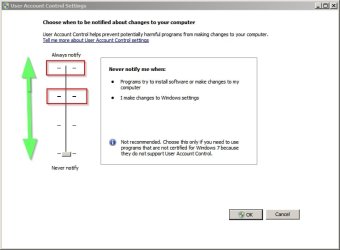
Compare UAC settings

Maybe check UAC settings on each machine. Maybe they're not set up in the same way on each.

User Account Control Settings.jpg

I never see those prompts but I'm using something that replaces UAC. Not recommended for most users.
 

My Computer

Computer type
Laptop
Computer Manufacturer/Model Number
ASUS
OS
Microsoft Windows 7 Home Premium 64-bit 7601 Multiprocessor Free Service Pack 1
CPU
AMD C-60 APU with Radeon(tm) HD Graphics
Motherboard
ASUSTeK COMPUTER INC. X501U
Memory
4.00 GB
Graphics Card(s)
AMD Radeon HD 6290 Graphics
Sound Card
(1) AMD High Definition Audio Device (2) Realtek High Defi
Screen Resolution
1366 x 768 x 32 bits (4294967296 colors) @ 60 Hz
Hard Drives
Hitachi HTS545050A7E380 SATA Disk Device
Antivirus
Comodo CIS & FW, SecureAplus App Whitelisting, Threatfire
Browser
Cyberfox 64bit, Opera 64bit, Airfox
Other Info
Spy-The-Spy, HitmanPro.Alert, Norton Connect Safe, MJRegWatcher, BitDefender TrafficLight, Voodoo Shield, Zemana AntiMalware

My Computer

Computer type
PC/Desktop
Computer Manufacturer/Model Number
Home made Desktop
OS
Windows 10 Pro. 64/ version 1709 Windows 7 Pro/64
CPU
Intel i7-6800K @ 4.3
Motherboard
ASUS X-99 Deluxe II
Memory
Corsair Platinum 16 gig @2400
Graphics Card(s)
EVGA GTX 1070 OC
Monitor(s) Displays
Asus 27" LED LCD/VE278Q
Screen Resolution
1920-1080 or 1280-720 HDMI
Hard Drives
INTEL SSD 730-240 Gb Sata 3.0/
PSU
EVGA Platium 1200W
Case
Phanteks Luxe Tempered Glass 8 fans/ one radiator
Cooling
XSPC/ Water Cooled CPU
Keyboard
Das 4 Professional
Mouse
Logitech M705/MX Anywhere 2-S
Internet Speed
100 mbits
Antivirus
Microsoft Security Essentials/ Malwarebytes Premium 3.0/ SAS
Browser
I.E. 11 default/Firefox/ ISP Time Warner Cable/Spectrum
Other Info
LG BluRay Burner/
Sound system-KLipsch-THX/
Icy Dock ssd Hot Swap bays.
Is this computer still under the watchful eye of your I.T. Department
No, this is running fine on my computers, but those all now have UAC turned off and run under admin accounts anyway. They always have administrator if they need it. Most of my windows 7 computers are not connected to the internet and are just used for number crunching applications that I can't get on linux. To me, security is largely about making sure important stuff isn't on a computer with a wide area network connection.

The problem showed up when a colleague tried to use an older version of one of these apps on their computers and I have had to duplicate the issue on a w7 computer to try and get to the bottom of it. It seems as if the problem is either when the parent process tries to fork off a child process, or when the parent tries to IPC with the child process through shared memory. It's hard to understand why some versions work on non-admin accounts with UAC turned on and some don't. I have been looking for actions that w7 might considered protected and want elevation. I have ruled out basic permission and AV issues, which I always look at first. I have been trying to figure out if the older version has a different manifest, but manifest view says that there is no manifest, which I don't think is right.

At the moment, I am diffing though the code of the different versions to see if there are any differences in the src or makefile that might explain what is different in the newer versions that would account for them working. I don't know enough about UAC to know what to look for, so I thought I should post and see if anyone else has run into something similar. I am surprised that there is anything about a number crunching widget that would make w7 want administrator.

LMHmedchem
 

My Computer

OS
Windows 7 64-bit enterprise
CPU
i5 2500K
Motherboard
Gigabyte GA-Z68X-UD3H-B3
Memory
G.Skill Ripjaws X 2x2GB DDR3 1600MHz, 9-9-9-24-2n, 1.5v
Hard Drives
Western Digital Caviar Blue 500GB (Boot drive)
Western Digital Caviar Blue 500GB (Backup drive)
PSU
Corsair 650TX 650W
Case
Diablotek EVO
Cooling
CM Hyper 212+, Delta 113CFM PWM fan, MX-4
For all those of you who are following this thread and waiting for the outcome...

I was able to get the application to run without administrator privileges by setting both executables to run in windows 7 compatibility mode. The app was run from the command line as a non-elevated user. The program was run with pwd as the install directory on the C: drive. When run this way, there is no prompt for administrator and the program runs without error. This allows UAC to be left at the recommended level.

The program was compiled and built on windows 7, so it's odd that it has to run in windows 7 compatibility mode, especially when it runs on many w7 systems as is. I still have no idea why other versions of this app run with no modification, yet this versions requires different settings. I would expect w7 to require admin if protected resources or locations were needed. If a protected resource was needed, that is not something you should be able to shut off by changing the compatibility mode. If it is not needed, then why admin in the first place?

LMHmedchem
 

My Computer

OS
Windows 7 64-bit enterprise
CPU
i5 2500K
Motherboard
Gigabyte GA-Z68X-UD3H-B3
Memory
G.Skill Ripjaws X 2x2GB DDR3 1600MHz, 9-9-9-24-2n, 1.5v
Hard Drives
Western Digital Caviar Blue 500GB (Boot drive)
Western Digital Caviar Blue 500GB (Backup drive)
PSU
Corsair 650TX 650W
Case
Diablotek EVO
Cooling
CM Hyper 212+, Delta 113CFM PWM fan, MX-4
The lack of manifest is most likely the problem. Without manifest: "at times UAC may not be able to accurately detect if the application needs to be elevated or not and you may end up with an elevation or credential prompt that is unwanted." source

What is the compatibility mode "Windows 7" I wonder. Maybe it's Windows 7 without SP1. Anyway it's a weird issue considering you've compiled it on a Win 7 machine. Maybe something changed in SP1 that doesn't work correctly in the version of your app you're having problems with. Or it's just the lack of manifest. Even if we can't exactly understand why, you should be lucky it worked with simply setting a compatibility mode :p

I checked the manifest of one of my apps (non-admin):
HTML:
    <security>
      <requestedPrivileges xmlns="urn:schemas-microsoft-com:asm.v3">
        <!-- UAC Manifest Options
            If you want to change the Windows User Account Control level replace the 
            requestedExecutionLevel node with one of the following.

        <requestedExecutionLevel  level="asInvoker" uiAccess="false" />
        <requestedExecutionLevel  level="requireAdministrator" uiAccess="false" />
        <requestedExecutionLevel  level="highestAvailable" uiAccess="false" />

            Specifying requestedExecutionLevel node will disable file and registry virtualization.
            If you want to utilize File and Registry Virtualization for backward 
            compatibility then delete the requestedExecutionLevel node.
        -->
        <requestedExecutionLevel level="asInvoker" uiAccess="false" />
      </requestedPrivileges>
    </security>
 

My Computer

Computer type
Laptop
Computer Manufacturer/Model Number
HP Elitebook 8540p
OS
Windows 7 Pro 32
CPU
Intel(R) Core(TM) i5 CPU M 540 @ 2.53GHz
Motherboard
Hewlett-Packard 1521
Memory
4,00 GB (Usable 2,98)
Graphics Card(s)
NVIDIA NVS 5100M
Sound Card
NVIDIA High Definition Audio
Screen Resolution
1600x900
Hard Drives
INTEL SSDSA2CW120G3
Antivirus
F-Secure Internet Security
Browser
IE, Firefox, Opera
Other Info
Sandboxie,
SRP (Software Restriction Policy),
EMET (Enhanced Mitigation Experience Toolkit),
WFC (Windows Firewall Control by BiniSoft),
Malwarebytes Premium
What is the compatibility mode "Windows 7" I wonder.
I had exactly the same thought. I guess it could be for running apps that were built for windows 8.

I'm 100% not sure that my app is actually missing a manifest. I tried to use ManifestView to check it, and ManifestView says it can't find a manifest. I posted a bit on GNU about that and the message I got is that it would have been compiled with the "default manifest" unless I specified my own. I don't know why ManifestView can't find the manifest if there is one there. I guess I need to confirm this one way or another, but I'm not sure how. I haven't yet seen what the default manifest looks like.

LMHmedchem
 
Last edited:

My Computer

OS
Windows 7 64-bit enterprise
CPU
i5 2500K
Motherboard
Gigabyte GA-Z68X-UD3H-B3
Memory
G.Skill Ripjaws X 2x2GB DDR3 1600MHz, 9-9-9-24-2n, 1.5v
Hard Drives
Western Digital Caviar Blue 500GB (Boot drive)
Western Digital Caviar Blue 500GB (Backup drive)
PSU
Corsair 650TX 650W
Case
Diablotek EVO
Cooling
CM Hyper 212+, Delta 113CFM PWM fan, MX-4
Try to open the app in Notepad and look for a HTML block. I tried and it was readable at the end of the file. Or search for the word manifest.
 

My Computer

Computer type
Laptop
Computer Manufacturer/Model Number
HP Elitebook 8540p
OS
Windows 7 Pro 32
CPU
Intel(R) Core(TM) i5 CPU M 540 @ 2.53GHz
Motherboard
Hewlett-Packard 1521
Memory
4,00 GB (Usable 2,98)
Graphics Card(s)
NVIDIA NVS 5100M
Sound Card
NVIDIA High Definition Audio
Screen Resolution
1600x900
Hard Drives
INTEL SSDSA2CW120G3
Antivirus
F-Secure Internet Security
Browser
IE, Firefox, Opera
Other Info
Sandboxie,
SRP (Software Restriction Policy),
EMET (Enhanced Mitigation Experience Toolkit),
WFC (Windows Firewall Control by BiniSoft),
Malwarebytes Premium
I don't find any html code or the word "manifest" in either of my applications. There is readable text here and there in the binary, but nothing that looks like a manifest file.

I can't find anything like that in any of the newer versions of this app that work properly, so I'm still confused.

LMHmedchem
 

My Computer

OS
Windows 7 64-bit enterprise
CPU
i5 2500K
Motherboard
Gigabyte GA-Z68X-UD3H-B3
Memory
G.Skill Ripjaws X 2x2GB DDR3 1600MHz, 9-9-9-24-2n, 1.5v
Hard Drives
Western Digital Caviar Blue 500GB (Boot drive)
Western Digital Caviar Blue 500GB (Backup drive)
PSU
Corsair 650TX 650W
Case
Diablotek EVO
Cooling
CM Hyper 212+, Delta 113CFM PWM fan, MX-4
Well either they don't have a manifest or the manifests are external resources. I searched some more and it shouldn't be a problem for an app to be without a manifest as long as the program doesn't do things that require elevated rights.

Is the app installed in the same location as the other versions that works without compatibility mode? Maybe it's something with the location of where the programs run from. Or permissions on those folders. Or that you perhaps ran it as admin or with UAC turned off at some time.

Here's an article that explains UAC Virtualization. Hopefully it explains something so maybe you can figure out what's wrong:
UAC Virtualization â
 

My Computer

Computer type
Laptop
Computer Manufacturer/Model Number
HP Elitebook 8540p
OS
Windows 7 Pro 32
CPU
Intel(R) Core(TM) i5 CPU M 540 @ 2.53GHz
Motherboard
Hewlett-Packard 1521
Memory
4,00 GB (Usable 2,98)
Graphics Card(s)
NVIDIA NVS 5100M
Sound Card
NVIDIA High Definition Audio
Screen Resolution
1600x900
Hard Drives
INTEL SSDSA2CW120G3
Antivirus
F-Secure Internet Security
Browser
IE, Firefox, Opera
Other Info
Sandboxie,
SRP (Software Restriction Policy),
EMET (Enhanced Mitigation Experience Toolkit),
WFC (Windows Firewall Control by BiniSoft),
Malwarebytes Premium
Back
Top