Why does Windows seem to lag when MULTITASKING?

apple3

New member
Local time
10:59 PM
Messages
50
I am d/l some files have plenty of RAM and HD space but when I go to do something it is very sluggish. Is there a way that I can improve this? If I stop d/l then it is fine. THX
 

My Computer

Computer Manufacturer/Model Number
Intel
OS
Windows 7
CPU
D940 Intel Duo Core
Motherboard
Intel D945GTP
Memory
OCZ Platinum
Graphics Card(s)
Nvidia 7600 256 GT
Sound Card
On Board but use external Firewire
Monitor(s) Displays
Dual Samsung
Screen Resolution
1200x1078
Hard Drives
Several internal Sata
PSU
Generiz 550
Case
Can't remember but looks like a G4
Cooling
Intel Fan
Keyboard
Apple Keyboard
Mouse
Logitech
Internet Speed
1.5 Mega Bytes per second (cable) 15000 mbits
Hello apple,

Welcome to the Seven Forums.

Could you click on the 'update sys. specs' link under the 'My sys specs' button on the bottom left of one of your posts. That info will help us answer your questions. Fill in as much info as you can.

Gary
 

My Computer

Computer Manufacturer/Model Number
Dell XPS420
OS
Vista Ult 64 bit Seven Ult RTM x64
CPU
Intel Core2 Quad Q6600 2.40 gigahertz
Memory
Crucial Ballistix 4x2GB PC2 6400
Graphics Card(s)
NVIDIA GeForce 8600 GTS 256 MB
Sound Card
Creative SB X-Fi audio
Monitor(s) Displays
HP w2207 + HPvs15
Screen Resolution
1680x1050 + 1024x768
Hard Drives
2-WD5000AAKS-500 GB
WD5000AAV-500 GB external
Keyboard
Microsoft Comfort Curve
Mouse
MX Revolution
Other Info
Wacom Intuos 2 Graphics Tablet
Experience Index=5.5
I have noticed that too in some cases, when I download or especially when I copy files from network locations (lan and wireless) Windows gets laggy until the transfer finishes...

I think it has something to do with the disk writes....

Please confirm anyone...
 

My Computer

Computer Manufacturer/Model Number
ENIAC
OS
Windows 7 RC 7100 32bit/64bit
CPU
Intel Core2Duo E4500 2.20 GHz
Motherboard
ASUS P5LD2-X/1333
Memory
2x1GB Kinsgston DDR2 800MHz
Graphics Card(s)
Nvidia 8500GT
Sound Card
Onboard High Definition Audio Device
Monitor(s) Displays
Sony Bravia 42"
Case
LINKW 2222
Cooling
Standard Intel
Keyboard
Some cheap one
Mouse
Microsoft Intellimouse something
Internet Speed
24MBps ADSL
I do agree that with downloads and transfers certain applications get laggy, especially IE 32-Bit.
 

My Computer

Computer Manufacturer/Model Number
HP G60-230US Notebook
OS
Seven 7000 64-Bit
CPU
Intel Mobile Core 2 Duo P7350
Motherboard
Winstron 3612
Memory
3GB DDR2
Graphics Card(s)
Intel Mobile 45 Express
Sound Card
Conexant High Definition
Monitor(s) Displays
HP 16" Widescreen
Screen Resolution
1366x768
Hard Drives
Western Digital 320 GB
PSU
Microsoft AC Adapter*
Case
HP Notebook Imprint Finish Case
Keyboard
Standard PS/2 Keyboard*
Mouse
Synaptics Touch Pad
Internet Speed
Verizon DSL
Other Info
* Indicates actual brand unknown
Hmm, only d/ls I have done have been from the net, but I haven't noticed any big hit in performance. Well in IE, but I figured it was cause the bandwidth was being used by the d/l.

Gary
 

My Computer

Computer Manufacturer/Model Number
Dell XPS420
OS
Vista Ult 64 bit Seven Ult RTM x64
CPU
Intel Core2 Quad Q6600 2.40 gigahertz
Memory
Crucial Ballistix 4x2GB PC2 6400
Graphics Card(s)
NVIDIA GeForce 8600 GTS 256 MB
Sound Card
Creative SB X-Fi audio
Monitor(s) Displays
HP w2207 + HPvs15
Screen Resolution
1680x1050 + 1024x768
Hard Drives
2-WD5000AAKS-500 GB
WD5000AAV-500 GB external
Keyboard
Microsoft Comfort Curve
Mouse
MX Revolution
Other Info
Wacom Intuos 2 Graphics Tablet
Experience Index=5.5
I am d/l some files have plenty of RAM and HD space but when I go to do something it is very sluggish. Is there a way that I can improve this? If I stop d/l then it is fine. THX


Well, we wouldn't even be able to tell if you even had true multitasking capabilities if you don't fill out your specifications.
 

My Computer

Computer type
PC/Desktop
Computer Manufacturer/Model Number
Airbot 2.0
OS
Windows 7 Ultimate x64 SP1
CPU
Core i7 920 (D0) @ 4Ghz, *26c idle *65c full load on air
Motherboard
Asus P6X58D Premium - Sata 6Gb/s - USB 3.0
Memory
12GB DDR3 Corsair Dominator -CMD12GX3M6A1600C8 at 1600MHz
Graphics Card(s)
Zotac Geforce GTX 770
Sound Card
ASUS Xonar D2X
Monitor(s) Displays
1 LG 24" Flatron W2453V-PF 1 Samsung 24" P2450H both 2ms RT
Screen Resolution
1920x1080@60hz
Hard Drives
1 Samsung 250GB 840 Evo SSD
1 OCZ Vertex2 180GB SSD
1 TB Samsung Spinpoint F1 7200RPM 32MB cache
2 500GB WD Caviar Blacks 7200RPM 32MB cache (WD5001AALS)

Pioneer DVD Burner DVR-S18M
PSU
Corsair HX1000W
Case
Cooler Master HAF 932
Cooling
Case Fans *3 230mm, *1 140mm/CPU - *Tuniq Tower 120 Extreme
Keyboard
Logitech Wireless MK700
Mouse
Logitech Wireless MK700
Internet Speed
DL 15 Mbps UL 0.98 Mbps
Antivirus
None
Browser
Firefox Nightly
Other Info
Processor-7.7 *RAM- 7.9 *Graphics-7.9 *Gaming Graphics- 7.9 *SSD- 7.8 W.E.I final score= 7.7
*Phone- LG Nexus 5
Well, we wouldn't even be able to tell if you even had true multitasking capabilities if you don't fill out your specifications.

Okay I did it in it. (sig).

If I download and then go to move a window, the screen lags in re-draw. Also if I unzip, it does the same thing. I would have thought that this wouldn't be possible in a modern system. Otherwise it feels fast. Another operating system doesn't feel like this but I am liking windows 7 a bunch.:D

Is there a setting I could change that would help.
Updated the system found the place to set it for this board
 

My Computer

Computer Manufacturer/Model Number
Intel
OS
Windows 7
CPU
D940 Intel Duo Core
Motherboard
Intel D945GTP
Memory
OCZ Platinum
Graphics Card(s)
Nvidia 7600 256 GT
Sound Card
On Board but use external Firewire
Monitor(s) Displays
Dual Samsung
Screen Resolution
1200x1078
Hard Drives
Several internal Sata
PSU
Generiz 550
Case
Can't remember but looks like a G4
Cooling
Intel Fan
Keyboard
Apple Keyboard
Mouse
Logitech
Internet Speed
1.5 Mega Bytes per second (cable) 15000 mbits
You have to remember that when your downloading or uploading your discs are in use. So if a sata 2 dics has a true throughput or 50-60Mps then this will be greatly impacted on other applications trying to access the disc, wether it be for read or write. Is the disc/discs in use both used for download directory and access for the app or function that you are using?
 

My Computer

Computer Manufacturer/Model Number
Home Brew
OS
Vista X64 ultimate/ 7 X64 Ultimate (7264)
CPU
Q6600 @3.4GHz
Motherboard
Asus P5Q-Pro
Memory
Crucial Ballastix 4GB DDR2 PC2-6400C4 @ 1033MHz
Graphics Card(s)
Nvidia 7600gt (Got better things to do than game!)
Sound Card
Onboard
Monitor(s) Displays
19" Widescreen
Screen Resolution
1440 x 900
Hard Drives
WD800HLFS OS Drive
1.5TB Total Storage
PSU
Hiper Type-M 880W
Case
Tai-Chi
Cooling
Custom water
Keyboard
Generic
Mouse
Logitech MX1100 Laser Cordless
Internet Speed
20Meg
Sounds like a disk time issue. I wonder if 7 talks to the HDD more than the other OSs have. Also important to remember that this is still a beta and betas are supposed to be buggy :) I would try (if you have another HDD) moving your page file to another HDD to see if that helps. I know that in order to make it boot faster, it doesn't load as much stuff up front as before. Also, if you are downloading via IE8, it could very well be that because the download window is a plugin of IE. I know that for me, IE8 isn't playing too nice and it gets really slow, like when typing, but the rest of the system remains perky.
 

My Computer

Computer Manufacturer/Model Number
Toshiba Satellite P200
OS
Windows 7 Ultimate 32-bit build 7000
CPU
Intel Core Duo 2 GHz
Memory
2 Gb
Graphics Card(s)
nVidia 7600 GeForce Go
Sounds like a disk time issue. I wonder if 7 talks to the HDD more than the other OSs have. Also important to remember that this is still a beta and betas are supposed to be buggy :) I would try (if you have another HDD) moving your page file to another HDD to see if that helps. I know that in order to make it boot faster, it doesn't load as much stuff up front as before. Also, if you are downloading via IE8, it could very well be that because the download window is a plugin of IE. I know that for me, IE8 isn't playing too nice and it gets really slow, like when typing, but the rest of the system remains perky.

I don't understand what you want me to try. I can put in another hard drive if you want but not sure what you want me to do. I am using chrome as my browser but it is not just the internet, just moving a window, any window when doing something like unzipping causes the window to lag and redraw like an old win95 machine. Otherwise it runs fast EXCEPT when I do anything hard drive intensive and this seems a little unusual.

Please tell me what you want me to do.
Thx
Edited:
A plane crashed into the Hudson river and I think we should send vibes and thoughts and prayers as its 20 degree's outside. On the news now. Terrible, terrible. Hope its okay to post this.
 
Last edited:

My Computer

Computer Manufacturer/Model Number
Intel
OS
Windows 7
CPU
D940 Intel Duo Core
Motherboard
Intel D945GTP
Memory
OCZ Platinum
Graphics Card(s)
Nvidia 7600 256 GT
Sound Card
On Board but use external Firewire
Monitor(s) Displays
Dual Samsung
Screen Resolution
1200x1078
Hard Drives
Several internal Sata
PSU
Generiz 550
Case
Can't remember but looks like a G4
Cooling
Intel Fan
Keyboard
Apple Keyboard
Mouse
Logitech
Internet Speed
1.5 Mega Bytes per second (cable) 15000 mbits
I just thought moving your page file to a different hard drive might help with your disk performance. I'm downloading chrome right now to see if it has any affects on performance for me.
 

My Computer

Computer Manufacturer/Model Number
Toshiba Satellite P200
OS
Windows 7 Ultimate 32-bit build 7000
CPU
Intel Core Duo 2 GHz
Memory
2 Gb
Graphics Card(s)
nVidia 7600 GeForce Go

My Computer

Computer Manufacturer/Model Number
ME!
OS
Windows 7 SP1 Ultimate 64bit
CPU
AMD Phenom II X4 940
Motherboard
ASUS M4A79 Deluxe (BIOS 3603)
Memory
OCZ PC8500 Platinum 4GB
Graphics Card(s)
Sapphire HD4870 1GB 256-bit GDDR5
Sound Card
HT Omega Claro
Monitor(s) Displays
ViewSonic G220fb still rocks
Screen Resolution
1600x1200@85hz
Hard Drives
160GB Seagate 7200.10 Sata
150GB WD Raptor 10,000rpm Sata
PSU
Corsair TX950W
Cooling
Zalman 9700NT
Keyboard
Logitech Standard
Mouse
Microsoft SideWinder
Internet Speed
5.26MB down 0.86MB up
Other Info
APC BackUps 900VA

Attachments

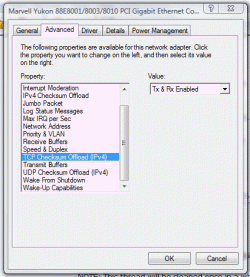
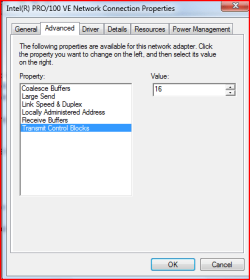
  • network card.PNG
    network card.PNG
    10.7 KB · Views: 12

My Computer

Computer Manufacturer/Model Number
Intel
OS
Windows 7
CPU
D940 Intel Duo Core
Motherboard
Intel D945GTP
Memory
OCZ Platinum
Graphics Card(s)
Nvidia 7600 256 GT
Sound Card
On Board but use external Firewire
Monitor(s) Displays
Dual Samsung
Screen Resolution
1200x1078
Hard Drives
Several internal Sata
PSU
Generiz 550
Case
Can't remember but looks like a G4
Cooling
Intel Fan
Keyboard
Apple Keyboard
Mouse
Logitech
Internet Speed
1.5 Mega Bytes per second (cable) 15000 mbits
[HKEY_LOCAL_MACHINE\SYSTEM\CurrentControlSet\Services\Tcpip\Parameters]
"DisableTaskOffload"=0

You need that in your registry
 

My Computer

Computer Manufacturer/Model Number
ME!
OS
Windows 7 SP1 Ultimate 64bit
CPU
AMD Phenom II X4 940
Motherboard
ASUS M4A79 Deluxe (BIOS 3603)
Memory
OCZ PC8500 Platinum 4GB
Graphics Card(s)
Sapphire HD4870 1GB 256-bit GDDR5
Sound Card
HT Omega Claro
Monitor(s) Displays
ViewSonic G220fb still rocks
Screen Resolution
1600x1200@85hz
Hard Drives
160GB Seagate 7200.10 Sata
150GB WD Raptor 10,000rpm Sata
PSU
Corsair TX950W
Cooling
Zalman 9700NT
Keyboard
Logitech Standard
Mouse
Microsoft SideWinder
Internet Speed
5.26MB down 0.86MB up
Other Info
APC BackUps 900VA
Might want to do some more reading before you just go an enable a registry tweak / HD tweak without some reference. Cartel supplied the MSFN link, be *sure* to read that first - carefully.

Also, a lot of folks (most notably those using Seagate Barracudas) have been experiencing poor HD performance in their WEI scores *and* in HD speed tests built into W7. I have a small workaround for those using nForce boards and 'Cudas, see http://www.sevenforums.com/general-discussion/342-show-us-your-wei-16.html#post10171 - but this problem exists (without the ability to fix it)for others also using 'Cudas *and* Maxtor drives and *not* using nForce boards.

Finally, you should research your hardware a lot more - why type of HDs do you have, what are the settings, are they installed and jumpered correctly, is your BIOS allowing full bandwidth for your drives, etc.

Finally, remember this: W7 *is* a beta OS - and throughput is one of the problems that W7 hasn't quite fixed yet - early reports show that Vista is still faster in throughput than W7.

editsmily.gif

Added the following:

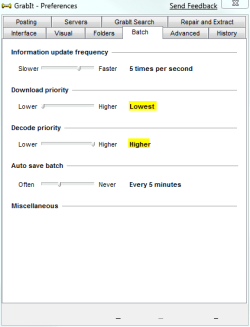
Also, do realize that 1) I have no issues when DL/ing and multitasking, and 2) I at times do seriously high powered downloading - GrabIt News Group Binary grabber, at sustained speeds to 2500 KB/s and / or Various *.ISO downloads from M$ and Linux ISO sites - sustained speeds of 2500 - 3100 KB/s.

I have no issues at all except when I let Fx use DTA to DL a file - then I get a minor lag when it first starts, which last typically a couple of seconds.

 

My Computers

System One System Two

  • Computer type
    PC/Desktop
    Computer Manufacturer/Model Number
    The Beast Model A (homebrew)
    OS
    Windows 11 21H2 Current build
    CPU
    AMD Ryzen 9 3950X
    Motherboard
    MSI MEG X570 GODLIKE
    Memory
    4 * 32 GB - Corsair Vengeance 3600 MHz
    Graphics Card(s)
    EVGA GeForce RTX 3080 Ti XC3 ULTRA GAMING (12G-P5-3955-KR)
    Sound Card
    Realtek® ALC1220 Codec
    Monitor(s) Displays
    2x Eve Spectrum ES07D03 4K Gaming Monitor (Matte) | Eve Spec
    Screen Resolution
    3x 3840 x 2160
    Hard Drives
    3x Samsung 980 Pro NVMe PCIe 4 M.2 2 TB SSD (MZ-V8P2T0B/AM) } 3x Sabrent Rocket NVMe 4.0 1 TB SSD
    PSU
    PC Power & Cooling’s Silencer Series 1050 Watt, 80 Plus Plat
    Case
    Fractal Design Define 7 XL Dark ATX Full Tower Case
    Cooling
    SteelSeries Apex Pro Wired Gaming Keyboard
    Keyboard
    SteelSeries Apex Pro
    Mouse
    Logitech MX Master 3S | MX Master 3 for business
    Internet Speed
    AT&T LightSpeed Gigabit Duplex Ftth
    Antivirus
    Windows Defender + MB 3
    Browser
    Nightly (default) + Firefox (stable),Chrome, Edge
  • Computer type
    PC/Desktop
    System Manufacturer/Model Number
    Dell Latitude E5470
    OS
    ChromeOS Flex Dev Channel (current)
    CPU
    Intel(R) Core(TM) i5-6300U CPU @ 2.40GHz, 2501 Mhz, 2 Core(s), 4 Logical Processor(s)
    Motherboard
    Dell
    Memory
    16 GB
    Graphics Card(s)
    Intel(R) HD Graphics 520
    Sound Card
    Intel(R) HD Graphics 520 + RealTek Audio
    Monitor(s) Displays
    Dell laptop display 15"
    Screen Resolution
    1920 * 1080
    Hard Drives
    Toshiba 128GB M.2 22300 drive
    INTEL Cherryville 520 Series SSDSC2CW180A 180 GB SATA III SSD
    PSU
    Dell
    Case
    Dell
    Cooling
    Dell
    Keyboard
    Dell
    Mouse
    Logitech MX Master 3S (shared w. Sys 1) | Dell TouchPad
    Internet Speed
    AT&T LightSpeed Gigabit Duplex Ftth
Might want to do some more reading before you just go an enable a registry tweak / HD tweak without some reference. Cartel supplied the MSFN link, be *sure* to read that first - carefully.

Also, a lot of folks (most notably those using Seagate Barracudas) have been experiencing poor HD performance in their WEI scores *and* in HD speed tests built into W7. I have a small workaround for those using nForce boards and 'Cudas, see http://www.sevenforums.com/general-discussion/342-show-us-your-wei-16.html#post10171 - but this problem exists (without the ability to fix it)for others also using 'Cudas *and* Maxtor drives and *not* using nForce boards.

Finally, you should research your hardware a lot more - why type of HDs do you have, what are the settings, are they installed and jumpered correctly, is your BIOS allowing full bandwidth for your drives, etc.

Finally, remember this: W7 *is* a beta OS - and throughput is one of the problems that W7 hasn't quite fixed yet - early reports show that Vista is still faster in throughput than W7.

editsmily.gif

Added the following:

Also, do realize that 1) I have no issues when DL/ing and multitasking, and 2) I at times do seriously high powered downloading - GrabIt News Group Binary grabber, at sustained speeds to 2500 KB/s and / or Various *.ISO downloads from M$ and Linux ISO sites - sustained speeds of 2500 - 3100 KB/s.

I have no issues at all except when I let Fx use DTA to DL a file - then I get a minor lag when it first starts, which last typically a couple of seconds.


Wow, how ironic, it was Grabit that I first realized this problem so if you can fix it maybe I can? I then noticed the same thing if downloading from browser, you know, felt like 256MB of ram instead of 2GB in in it.

Here are my specs.

Its a Western Digital Hard Drive and its the thin wire, serial right.
It is configured as cable select.
I don't know if there is a setting in the bios and have no idea what to look for.
There are a few BIOS updates from Intel.
The motherboard is Intel

Ummmmmmmm not sure what else to ask for. Didn't do the register update yet.
 

My Computer

Computer Manufacturer/Model Number
Intel
OS
Windows 7
CPU
D940 Intel Duo Core
Motherboard
Intel D945GTP
Memory
OCZ Platinum
Graphics Card(s)
Nvidia 7600 256 GT
Sound Card
On Board but use external Firewire
Monitor(s) Displays
Dual Samsung
Screen Resolution
1200x1078
Hard Drives
Several internal Sata
PSU
Generiz 550
Case
Can't remember but looks like a G4
Cooling
Intel Fan
Keyboard
Apple Keyboard
Mouse
Logitech
Internet Speed
1.5 Mega Bytes per second (cable) 15000 mbits
Sure - I moderate at those forums too, every once in a blue moon....

Windows 7 Build 7000 GrabIt settings.PNG
 

My Computers

System One System Two

  • Computer type
    PC/Desktop
    Computer Manufacturer/Model Number
    The Beast Model A (homebrew)
    OS
    Windows 11 21H2 Current build
    CPU
    AMD Ryzen 9 3950X
    Motherboard
    MSI MEG X570 GODLIKE
    Memory
    4 * 32 GB - Corsair Vengeance 3600 MHz
    Graphics Card(s)
    EVGA GeForce RTX 3080 Ti XC3 ULTRA GAMING (12G-P5-3955-KR)
    Sound Card
    Realtek® ALC1220 Codec
    Monitor(s) Displays
    2x Eve Spectrum ES07D03 4K Gaming Monitor (Matte) | Eve Spec
    Screen Resolution
    3x 3840 x 2160
    Hard Drives
    3x Samsung 980 Pro NVMe PCIe 4 M.2 2 TB SSD (MZ-V8P2T0B/AM) } 3x Sabrent Rocket NVMe 4.0 1 TB SSD
    PSU
    PC Power & Cooling’s Silencer Series 1050 Watt, 80 Plus Plat
    Case
    Fractal Design Define 7 XL Dark ATX Full Tower Case
    Cooling
    SteelSeries Apex Pro Wired Gaming Keyboard
    Keyboard
    SteelSeries Apex Pro
    Mouse
    Logitech MX Master 3S | MX Master 3 for business
    Internet Speed
    AT&T LightSpeed Gigabit Duplex Ftth
    Antivirus
    Windows Defender + MB 3
    Browser
    Nightly (default) + Firefox (stable),Chrome, Edge
  • Computer type
    PC/Desktop
    System Manufacturer/Model Number
    Dell Latitude E5470
    OS
    ChromeOS Flex Dev Channel (current)
    CPU
    Intel(R) Core(TM) i5-6300U CPU @ 2.40GHz, 2501 Mhz, 2 Core(s), 4 Logical Processor(s)
    Motherboard
    Dell
    Memory
    16 GB
    Graphics Card(s)
    Intel(R) HD Graphics 520
    Sound Card
    Intel(R) HD Graphics 520 + RealTek Audio
    Monitor(s) Displays
    Dell laptop display 15"
    Screen Resolution
    1920 * 1080
    Hard Drives
    Toshiba 128GB M.2 22300 drive
    INTEL Cherryville 520 Series SSDSC2CW180A 180 GB SATA III SSD
    PSU
    Dell
    Case
    Dell
    Cooling
    Dell
    Keyboard
    Dell
    Mouse
    Logitech MX Master 3S (shared w. Sys 1) | Dell TouchPad
    Internet Speed
    AT&T LightSpeed Gigabit Duplex Ftth
Gig-E?

You have to remember that when your downloading or uploading your discs are in use. So if a sata 2 dics has a true throughput or 50-60Mps then this will be greatly impacted on other applications trying to access the disc, wether it be for read or write. Is the disc/discs in use both used for download directory and access for the app or function that you are using?

You must be kidding. How come do you expect to saturate a SATA disk that can deliver 40MB/s when downloading something from the Internet? Or do you have a Gig-E internet connection at home?
 

My Computer

OS
Windows 7
I had this problem very badly.... the system IO would lock up and the cpu was always maxed at 100%, with kernel cpu times sitting at 70-80% on all tasks...

I fixed it by flashing my board BIOS to a later version. Was on a GA P35-S3 board.

It is also possible it was fixed by the bios flash setting the drive settings back to IDE Legacy from AHCI, which was a side effect of the flashing.

Before I fixed the problem, Win 7 was a horrid laggy piece of crud.....

Afterwards, Win 7 is the best OS release from MS so far. Guess they will finally get me to ditch XP :)
 

My Computer

OS
Windows 7
CPU
E6750
Motherboard
GA-P35-S3
Memory
8GB
Graphics Card(s)
Nvidia 8800 Ultra
Sound Card
onboard
Monitor(s) Displays
1920x1200 + 1280x1024
Hard Drives
too many... 4
Well I did a flashing of the bios then copied some files 800MB from the desktop to the desktop and it was faster, ~45MB or so.

I then copied some files from the PUBLIC user folder and sure enough it slowed to .500K or so. Therefore I am conviniced that its a bug. Has to be.

Can someone else confirm? Love this place.
Sorry about the last post (firewire=crash when changed sample rate), didn't know there was a audio forum and probably would have posted here as this was a BSOD but if audio means any audio device regardless of peripheral, then I will post from now on in Audio forums. Again, love this place. Cool stuff.
 

My Computer

Computer Manufacturer/Model Number
Intel
OS
Windows 7
CPU
D940 Intel Duo Core
Motherboard
Intel D945GTP
Memory
OCZ Platinum
Graphics Card(s)
Nvidia 7600 256 GT
Sound Card
On Board but use external Firewire
Monitor(s) Displays
Dual Samsung
Screen Resolution
1200x1078
Hard Drives
Several internal Sata
PSU
Generiz 550
Case
Can't remember but looks like a G4
Cooling
Intel Fan
Keyboard
Apple Keyboard
Mouse
Logitech
Internet Speed
1.5 Mega Bytes per second (cable) 15000 mbits
Back
Top