Why doesn't the Format Menu show up?

taulant01

New member
Local time
3:42 AM
Messages
4
Hello.
I am a new member and i wanted to ask you something. 2 months ago i have installed Windows 7 Ultimate, and now i wanted to format the hard drive, but when i booted from the Dvd, it shows up only an the Wallpaper and the Mouse pointer. But the Format Menu (if we can call it so), does not show up. What can be the problem?

I apologize for my bad english.
 

My Computer

OS
Windows 7 Ultimate
Make sure that you have the dvd set as the first boot device in your BIOS options....
 

My Computer

Computer type
PC/Desktop
Computer Manufacturer/Model Number
LENOVO K450 @3.0GHZ
OS
64-bit Windows 8.1 Pro
CPU
Core(TM) i5 CPU 4330 Haswell @ 3.20GHz
Motherboard
LENOVO
Memory
12.00 GB
Graphics Card(s)
Intel(R) HD Graphics
Sound Card
Intel HD integtrated
Monitor(s) Displays
HP 25' ISP Monitor
Screen Resolution
1900/1020
Hard Drives
(1) ST1000DM003-1CH162 (2) Generic STORAGE DEVICE USB Device (3) Generic STORAGE DEVICE USB Device
Internet Speed
100mb down/10mb up
yes it is set as the first boot device in my BIOS. The problem is that i BOOT from the DVD but after I Boot it doesn't show up the Format Menu, to format my hard drive. Only the mouse sign shows up and nothing else.
I hope you're understanding me what i am saying.

if i use this program maybe i can format my Pc? I need really to format it, thats the problem why i am asking
 
Last edited by a moderator:

My Computer

OS
Windows 7 Ultimate
What do you mean by "format" - reinstall the operating system or reformat the disk into e.g. NTFS?
 

My Computer

Computer Manufacturer/Model Number
HP, Dell, Gateway, Toshiba - 4 laptops and 2 desktops
OS
Vista, Windows7, Mint Mate, Zorin, Windows 8
CPU
from 1.6GHz Duo to i7
Monitor(s) Displays
2x HP w2207
Hard Drives
5x HDD, 7x SSD, 12x Externals
Keyboard
with trackball - no mices
Mouse
Trackball mice
Internet Speed
DSL 6000
man i don't completly understand you. As i said that i have an bad english. We call it here in my country Format, when we delete all the data on the hard drive that has windows installed on it and install the windows in that drive.
 

My Computer

OS
Windows 7 Ultimate
Welcome to SevenForums.
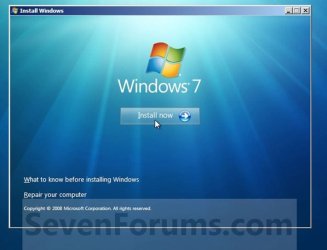
So your install dvd is not showing you the first screen of the installer? Where did you get your dvd? :Dinstall now.JPG
 

My Computer

Computer Manufacturer/Model Number
Gateway GT5692
OS
Windows 7 Ulti. x64
CPU
AMD Phenom 8450 triple-core 2.10 ghz
Memory
4GB
Graphics Card(s)
ATI Radion HD 3200
Monitor(s) Displays
Gateway FPD1775W
Screen Resolution
1280x720
Hard Drives
465.6613 Gibibytes
If this is the firs thing that shows up after i boot from the dvd than yes, this doesn't show up. Whith that dvd that i possess, i have formated my Pc months ago.
 

My Computer

OS
Windows 7 Ultimate
When you have the dvd in your dvd drive and you are booted up in windows can you start set up exe? Does your drive see the installer or is there a problem with this?
 

My Computer

Computer Manufacturer/Model Number
Gateway GT5692
OS
Windows 7 Ulti. x64
CPU
AMD Phenom 8450 triple-core 2.10 ghz
Memory
4GB
Graphics Card(s)
ATI Radion HD 3200
Monitor(s) Displays
Gateway FPD1775W
Screen Resolution
1280x720
Hard Drives
465.6613 Gibibytes
Hello taulant01, welcome to Seven Forums!


Maybe this will help.

After you have made backups of everything you care to save and you want to do a real wipe "clean all" to the Hard Disk Drive (HDD) have a look at this tutorial at the link below, it over-writes everything, all the old Windows code including all the old Windows drivers, giving you the best possible space to install Windows 7 to; it goes hand-in-hand with a clean install.


Click these links below to view these tutorials.

How to Do a Clean Installation with Windows 7

SSD / HDD : Optimize for Windows Reinstallation
 

My Computer

Computer Manufacturer/Model Number
* BFK Customs *
OS
W 7 64-bit Ultimate
CPU
Intel Q9550 Yorkfield
Motherboard
ASUS P5Q Pro
Memory
8GB Dominator 8500C5D
Graphics Card(s)
ATI : XFX 5870
Sound Card
Realtek HD Audio 7-1
Monitor(s) Displays
1x 47" LCD HDMI & 3x 26" LCD HDMI
Screen Resolution
1920x1080P & 1920x1200
Hard Drives
1x 80GB Intel X25-M G2 SSD : 1x 500GB & 1x 640GB WD Caviar Black(s)
PSU
Corsair 620HX
Case
Cooler Master RC-690
Cooling
Tuniq Tower 120, 2x 140mm and 3x 120mm case fans
Keyboard
Microsoft 500
Mouse
Razer Diamondback 3G
Internet Speed
14 Mb/s
Other Info
1x Koutech 3Gb/s SATA HDD Hot Swap Rack
Back
Top